1. Introducere
Thank you for choosing the SEMIER Portable AM FM SW Radio with Bluetooth Speaker. This versatile device offers multiple listening options, including AM, FM, and Shortwave radio bands, along with Bluetooth connectivity, MP3 playback via USB/TF card, and a built-in microphone for recording. It also features an LCD display, alarm clock, and multiple power supply options for convenience at home or on the go.
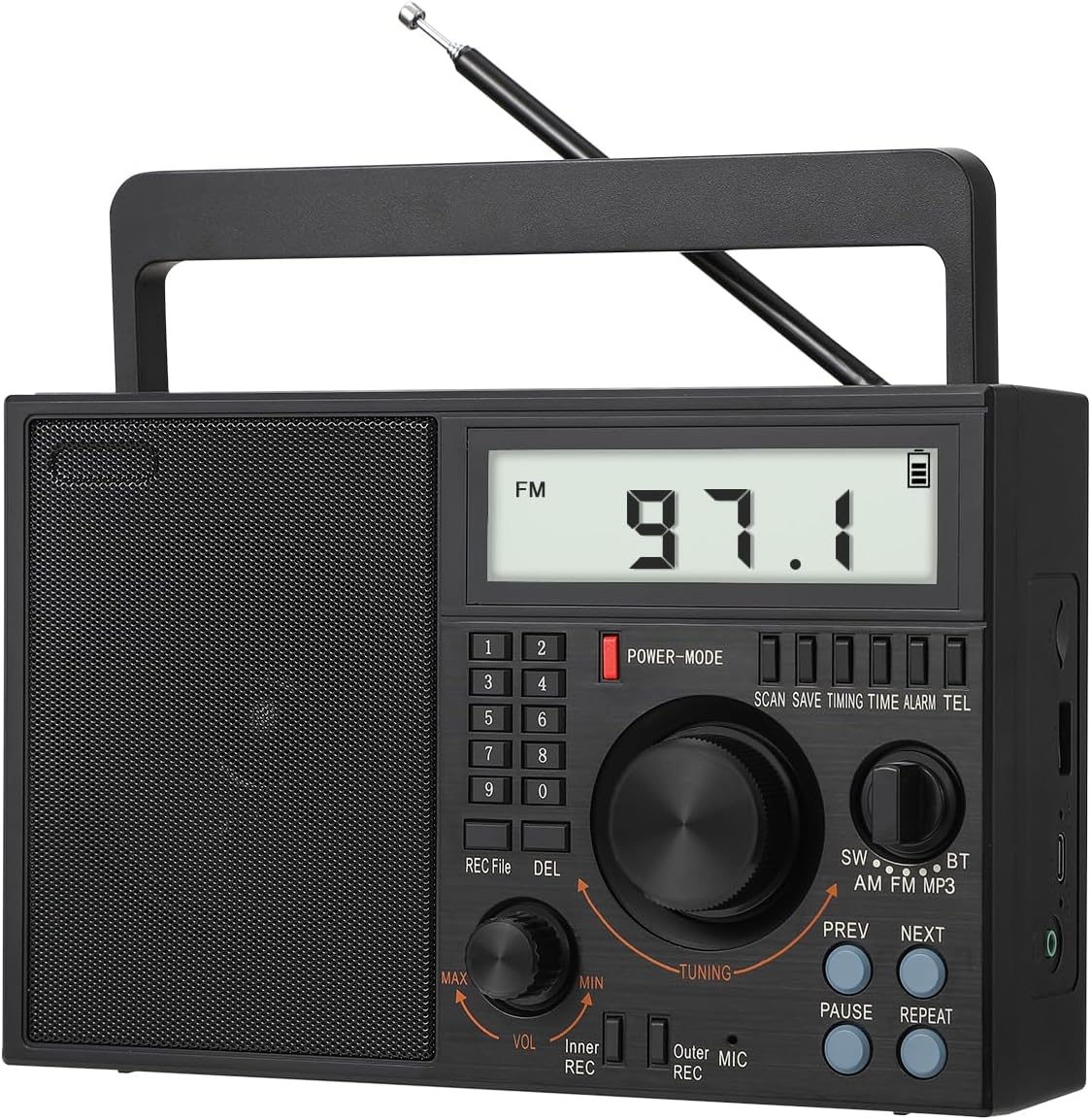
Figure 1: SEMIER Portable AM FM SW Radio (Model SM-828)
2. Caracteristici cheie
- Radio multibandă: Listen to AM (520–1710 KHz), FM (87–108 MHz), and SW (2.3–21.95 MHz) stations with enhanced reception via a 22.8-inch telescopic antenna and DSP chip.
- Conectivitate Bluetooth 5.0: Redați audio fără fir de pe smartphone sau de pe alte dispozitive compatibile Bluetooth.
- Mp3 player: Play music directly from USB drives or TF (Micro SD) cards.
- MIC Recording Function: Înregistrați sunetul folosind microfonul încorporat.
- Display LCD: Large, clear LCD screen for easy viewing of frequency, time, and other information.
- Opțiuni multiple de alimentare: Operates via AC 110V plug-in, a replaceable 1200 mAh 18650 rechargeable battery (included), or 3 D batteries (not included).
- Audio de înaltă calitate: Features a premium built-in 6W speaker for clear sound and a 3.5mm earphone jack for private listening.
- Design portabil: Compact and lightweight (8.6 x 3.8 x 5.5 inches, 2.0 pounds) with an attached swivel handle for easy transport.
3. Conținutul pachetului
Vă rugăm să vă asigurați că toate articolele sunt prezente în colet:
- SEMIER Portable AM FM SW Radio (SM-828)
- 1200 mAh 18650 Rechargeable Battery
- Cablu de alimentare AC
- Cablu de încărcare USB
- Manualul de utilizare (acest document)
4. Produs terminatview
Familiarize yourself with the radio's controls and components:
Figura 2: Aspectul panoului frontal
- Display LCD: Shows frequency, time, battery status, and mode.
- Tastatură numerică (0-9): For direct frequency input and setting time/alarm.
- Buton de alimentare / mod: Turns the radio on/off and cycles through modes (Radio, Bluetooth, MP3).
- Buton de acordare: Reglează frecvența radio sau navighează prin meniuri.
- Buton de volum (VOL): Ajustează nivelul de ieșire audio.
- REC /File/DEL Buttons: For recording functions and file management.
- SW/AM/FM/BT/MP3 Switch: Selectează modul de operare dorit.
- PREV/NEXT Buttons: For navigating tracks in MP3 mode or presets in radio mode.
- PAUSE/REPEAT Buttons: Pentru controlul redării media.
- Antena telescopica: Extends for improved radio reception.
- Port USB: Pentru redarea de pe unitatea USB.
- Slot pentru carduri TF: Pentru redarea de pe cardul TF (Micro SD).
- Mufă pentru căști de 3.5 mm: Pentru conectarea căștilor.
- MIC (Microfon): Microfon încorporat pentru înregistrare.
5. Configurare
5.1 Sursa de alimentare
The radio offers three power options:
- Alimentare CA (110V): Connect the included AC power cord to the radio's AC input and plug it into a standard wall outlet. This powers the radio and charges the internal rechargeable battery.
- D Batteries: For portable use without a power outlet, insert three (3) D-size batteries (not included) into the battery compartment on the back of the radio. Ensure correct polarity (+/-).
- Baterie reîncărcabilă: The radio comes with a pre-installed 1200 mAh 18650 rechargeable battery. This battery can be charged via the AC power cord or the included USB charging cable connected to a USB power source (e.g., computer, USB wall adapter).

Figura 3: Opțiuni de alimentare
5.2 Configurarea antenei
For optimal radio reception, especially for FM and SW bands, extend the telescopic antenna fully. For AM reception, the radio has a built-in AM antenna, but adjusting the radio's orientation may improve reception.

Figure 4: Extending the Telescopic Antenna
6. Instrucțiuni de utilizare
6.1 Pornire/Oprire
Apăsați tasta POWER-MODE button to turn the radio on or off. The LCD display will illuminate when powered on.
6.2 Radio Tuning (AM/FM/SW)
Slide the band switch to select SW, AM, sau FM modul. Folosește TUNING knob to manually scan for stations. The frequency will be displayed on the LCD. For direct frequency input, use the numeric keypad.

Figure 5: Radio Reception and Display
6.3 Modul Bluetooth (BT)
Slide the band switch to BT mode. The radio will enter pairing mode. On your smartphone or Bluetooth device, search for available devices and select "BT-07" (or similar name) to connect. Once paired, you can stream audio to the radio.

Figura 6: Conectivitate Bluetooth
Redare de pe card USB/TF 6.4
Introduceți o unitate USB sau un card TF (Micro SD) care conține fișiere audio MP3 files into the respective slot. Slide the band switch to MP3 mode. The radio will automatically detect and begin playing the audio files. Folosește PREV, URMĂTORUL, PAUZĂ, și REPETA butoane pentru a controla redarea.

Figure 7: USB and TF Card Playback
6.5 MIC Recording
To record audio using the built-in microphone, ensure a USB drive or TF card is inserted. Press the REC pentru a începe înregistrarea. Apăsați din nou butonul pentru a opri. Înregistrat files can be accessed and played back in MP3 mode.
6.6 Funcția ceas cu alarmă
The radio features an alarm clock. To set the alarm, refer to the detailed instructions in the full owner's manual. The LCD display will show the current time and can be used to set the alarm time.

Figure 8: Alarm Clock Display
6.7 Mufă pentru căști
For private listening, plug any standard 3.5mm headphones into the earphone jack located on the side of the radio. The internal speaker will automatically mute when headphones are connected.
Figure 9: Earphone Jack Usage
6.8 Demonstrație video a produsului
For a visual guide on setup and operation, please watch the official product video below:
Video 1: Official Product Demonstration of SEMIER SM-828 Radio. This video demonstrates various features including power options, antenna extension, radio tuning (AM/FM/SW), Bluetooth pairing, USB/TF card playback, voice recording, and alarm clock setup.
7. Întreținere
To ensure the longevity and optimal performance of your radio:
- Clean the radio with a soft, dry cloth. Do not use liquid cleaners or abrasive chemicals.
- Keep the radio away from extreme temperatures, direct sunlight, and high humidity.
- If not using D batteries for an extended period, remove them to prevent leakage.
- Depozitați radioul într-un loc răcoros și uscat atunci când nu îl utilizați.
8. Depanare
| Problemă | Cauza posibila | Soluţie |
|---|---|---|
| Radioul nu pornește. | No power source; batteries drained or incorrectly inserted; AC cord not connected. | Check AC connection. Ensure rechargeable battery is charged. Insert fresh D batteries with correct polarity. |
| Recepție radio slabă. | Antenă neextinsă; zonă cu semnal slab; interferențe. | Extindeți complet antena telescopică. Repoziționați radioul pentru un semnal mai bun. Depărtați-vă de dispozitivele electronice care cauzează interferențe. |
| LCD display goes blank during radio playback. | This is normal operation to conserve power. The display backlight and frequency information will turn off after a few seconds of inactivity. | Press any button or turn a knob to temporarily reactivate the display. |
| Radio does not remember last station. | This model may not retain the last tuned station upon power cycle or band switch. | Manually tune to your desired station or use preset functions if available (refer to full manual for preset instructions). |
| Probleme de conexiune Bluetooth. | Radio not in BT mode; device too far; interference; device not discoverable. | Ensure radio is in BT mode. Keep devices within 10 meters. Turn off and on Bluetooth on both devices. |
| Cardul USB/TF nu se redă. | Card/drive not inserted correctly; unsupported file format; corupt files. | Ensure card/drive is fully inserted. Verify files are in MP3 format. Try a different USB/TF card. |
9. Specificații
| Caracteristică | Detaliu |
|---|---|
| Dimensiunile produsului | 8.6 x 3.8 x 5.5 inches (approx. 7"L x 9"W x 4"H) |
| Greutatea articolului | 2.0 lire (aproximativ 1.9 lire) |
| Marca | SEMIER |
| Culoare | Negru |
| Tehnologia de conectivitate | Bluetooth, auxiliar, USB |
| Tehnologie Tuner | AM/FM/SW |
| Sursa de alimentare | Battery Powered (Rechargeable 18650, 3x D batteries), AC Plug-in |
| Benzile radio acceptate | 3-Band (AM 520-1710 KHz, FM 87-108 MHz, SW 2.3-21.95 MHz) |
| Caracteristici speciale | Lightweight, Built-In AM Antenna, Built-In Clock, Rechargeable, LCD Display, Bluetooth Speaker, TF Card/USB Playing, MIC Recording |
| Componente incluse | AC Power Cord, Rechargeable Battery, USB Charging Cable, Owner's Manual |

Figura 10: Dimensiunile produsului
10. Garanție și asistență
SEMIER offers a 90-day money-back guarantee for this product. For any questions, technical assistance, or customer service inquiries, please contact SEMIER customer support. They provide 24/7 customer service to ensure a satisfactory experience.


