Introducere
This manual provides detailed instructions for the safe and efficient operation of your boAt Partypal 390 Bluetooth Speaker. Please read this manual thoroughly before using the product and retain it for future reference. The Partypal 390 is a powerful portable speaker designed for various audio needs, featuring 160W boAt Signature Sound, multiple connectivity options, and integrated LED lighting.
Informații de siguranță
- Nu expuneți difuzorul la temperaturi extreme, la lumina directă a soarelui sau la umiditate ridicată.
- Evitați scăderea sau supunerea difuzorului la impacturi puternice.
- Nu încercați să dezasamblați, să reparați sau să modificați singur difuzorul. Contactați personalul de service calificat pentru asistență.
- Keep the speaker away from water and other liquids. Although it is waterproof, prolonged submersion or exposure to high-pressure water jets should be avoided.
- Folosiți doar cablul de încărcare furnizat sau un echivalent certificat.
- Asigurați o ventilație corespunzătoare atunci când utilizați difuzorul.
- Curățați difuzorul cu o lavetă moale și uscată. Nu utilizați substanțe de curățare abrazive sau solvenți.
Conținutul pachetului
Verificați dacă toate articolele enumerate mai jos sunt prezente în colet:
- boAt Partypal 390 Speaker
- Cablu de încărcare
- Manual de utilizare
- Card de garanție
Produs terminatview
The boAt Partypal 390 is a versatile Bluetooth speaker featuring powerful audio output and dynamic LED lighting. Below are key visual references and descriptions of its components.
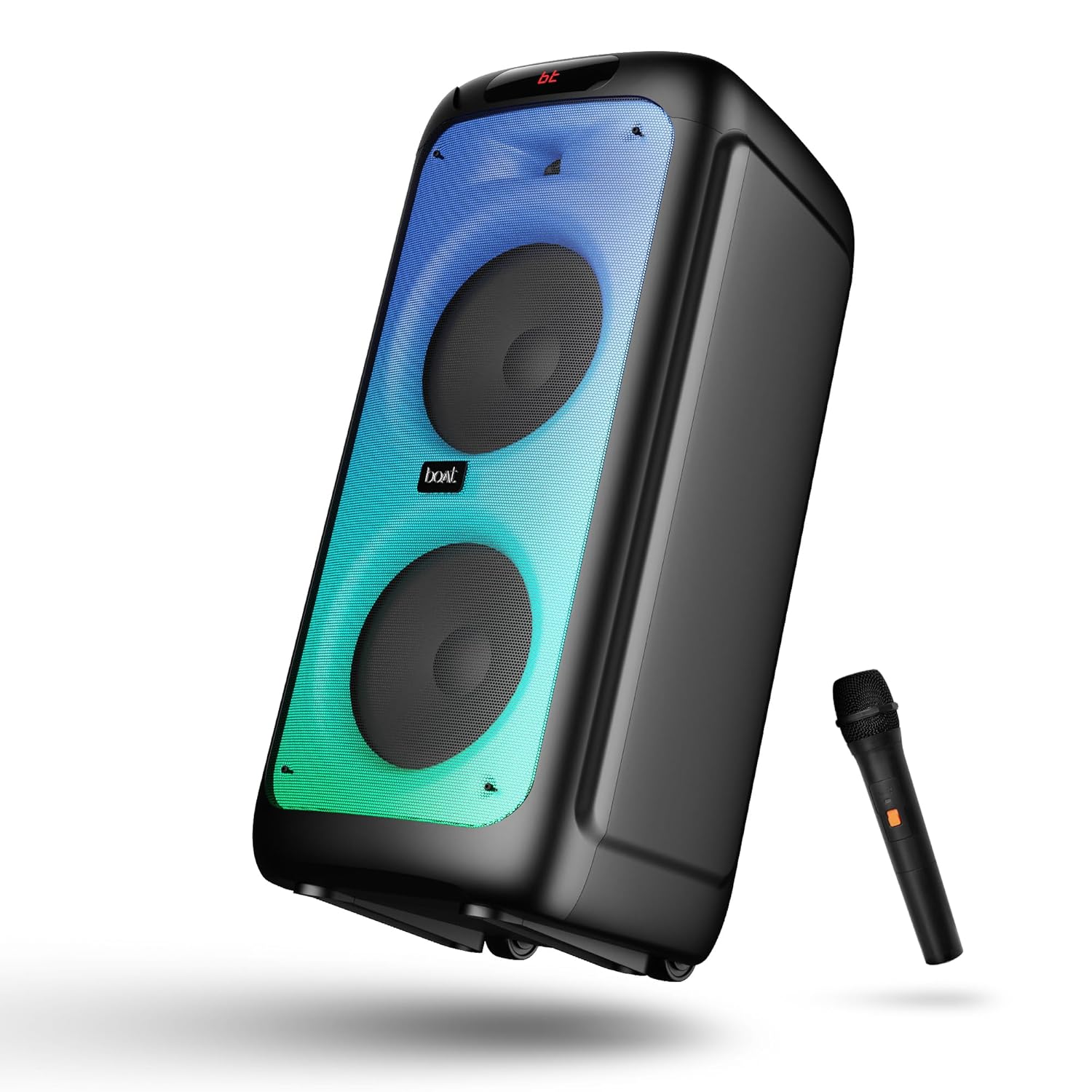
Figura 1: Faţă view of the boAt Partypal 390 speaker, showcasing its dual speaker design, integrated flame LEDs, and the included wired microphone.

Figura 2: Top panel of the speaker displaying the control buttons and various input ports including USB, AUX, Guitar In, Mic 1, Mic 2, and the USB Type-C charging port. Also shown are dedicated controls for Bass/Treble, LED modes, and volume.
Caracteristici cheie:
- Sunet caracteristic BoAt de 160 W: Oferă un sunet puternic și clar.
- Flame LEDs: Dynamic lighting effects to enhance the listening experience.
- Conectivitate multiplă: Bluetooth v5.3, AUX, USB, and TF card support.
- Funcționalitate Karaoke: Two microphone input ports for vocal performances.
- Intrare chitara: Port dedicat pentru conectarea unei chitare.
- Moduri EQ: Pre-set sound modes (Normal, Party, Pop, Rock, Jazz) for different audio preferences.
- Mod TWS: Allows wireless connection of two Partypal speakers for stereo sound.
- Comenzi bas și înalte: Adjustable audio settings for personalized sound.
- Redare lungă: Până la 6 de ore de viață a bateriei.
Înființat
1. Încărcarea difuzorului
Before first use, fully charge the speaker. Connect the provided USB Type-C charging cable to the speaker's charging port and the other end to a compatible USB power adapter (not included). The charging indicator will show the charging status. A full charge provides up to 6 hours of playback.

Figura 3: The speaker in an outdoor setting, illustrating its portability and battery life.
2. Pornire/Oprire
- To power on, press and hold the Power button located on the control panel until the display illuminates.
- To power off, press and hold the Power button again until the display turns off.
3. Împerechere Bluetooth inițială
- Ensure the speaker is powered on and in Bluetooth mode. The display will show "bt" and the Bluetooth indicator will flash, indicating it's ready for pairing.
- Pe dispozitivul mobil, activați Bluetooth și căutați dispozitivele disponibile.
- Select "boAt Partypal 390" from the list of devices.
- Once paired, the speaker will emit a confirmation sound, and the Bluetooth indicator will stop flashing.
Instrucțiuni de operare
1. Selectarea modului
Press the "Mode" button on the control panel to cycle through available input modes: Bluetooth, AUX, USB, and TF Card.
2. Mod Bluetooth
- După asocierea reușită, sunetul de la dispozitivul conectat se va reda prin difuzor.
- Use the volume knob on the speaker or your connected device to adjust the volume.
- Folosiți butoanele Anterior/Următor pentru a sări peste piese.
- Apăsați butonul Redare/Pauză pentru a controla redarea.
3. Mod AUX
- Connect an audio device to the AUX input port using a 3.5mm audio cable.
- Switch the speaker to AUX mode using the "Mode" button.
- Controlează redarea și volumul de pe dispozitivul conectat.
4. USB/TF Card Mode
- Insert a USB flash drive into the USB port or a TF card into the TF card slot.
- Difuzorul va comuta automat în modul USB sau card TF și va începe redarea sunetului. files. If not, switch manually using the "Mode" button.
- Use the Previous/Next buttons to navigate tracks and Play/Pause for playback control.
5. Karaoke Function (Microphone Input)
- Connect up to two wired microphones to the "MIC 1" and "MIC 2" input ports.
- Adjust microphone volume using the dedicated MIC VOL knob.
- Adjust microphone echo effect using the ECHO knob.
6. Intrare pentru chitară
- Connect a guitar to the "GUITAR IN" port.
- Adjust guitar volume using the dedicated GUITAR VOL knob.
7. Moduri EQ
The speaker offers several pre-set equalizer modes to optimize audio for different content types. Press the "EQ" button to cycle through:
- Normal
- Parte
- Pop
- stâncă
- Jazz

Figura 4: Visual representation of the available EQ modes for sound customization.
8. Mod TWS (Stereo True Wireless)
To connect two Partypal 390 speakers for a stereo audio experience:
- Ensure both speakers are powered on and in Bluetooth mode, but not yet paired to any device.
- On one speaker (this will be the primary speaker), press and hold the TWS button. The speaker will emit a sound indicating it's searching for another speaker.
- Cele două difuzoare se vor conecta automat între ele. Un sunet de confirmare va indica conectarea reușită a căștilor TWS.
- Now, pair your mobile device to the primary speaker via Bluetooth as described in the "Initial Bluetooth Pairing" section. Audio will play in stereo through both speakers.

Figura 5: Two Partypal 390 speakers wirelessly connected, demonstrating the TWS feature.
9. Control LED
Press the "LED Mode" button to cycle through different flame LED lighting effects or to turn them off.
10. Bass and Treble Controls
Use the dedicated Bass and Treble knobs on the control panel to adjust the low and high frequencies of the audio output according to your preference.
Întreţinere
- curatenie: Use a soft, dry, lint-free cloth to clean the speaker's exterior. Do not use liquid cleaners, aerosols, or solvents.
- Depozitare: Când nu este utilizată pentru perioade lungi de timp, depozitați difuzorul într-un loc răcoros și uscat, ferit de lumina directă a soarelui și de temperaturi extreme.
- Îngrijirea bateriei: Pentru a prelungi durata de viață a bateriei, evitați descărcarea completă frecventă a difuzorului. Încărcați-l regulat, chiar dacă nu este utilizat.
Depanare
| Problemă | Cauza posibila | Soluţie |
|---|---|---|
| Difuzorul nu pornește. | Baterie descărcată; Butonul de pornire nu este apăsat corect. | Încărcați complet difuzorul. Apăsați și mențineți apăsat butonul de pornire timp de câteva secunde. |
| Nici un sunet. | Volum prea mic; Mod de intrare incorect; Dispozitiv neconectat. | Increase speaker and device volume. Ensure correct mode is selected (Bluetooth, AUX, USB, TF). Re-pair Bluetooth device or check cable connections. |
| Asocierea Bluetooth nu reușește. | Difuzorul nu este în modul de asociere; Dispozitivul este prea departe; Interferență. | Ensure speaker is in Bluetooth pairing mode (flashing "bt"). Move device closer to speaker. Turn off other Bluetooth devices. Forget "boAt Partypal 390" on your device and try pairing again. |
| Microfonul nu funcționează. | Microphone not connected properly; MIC VOL too low. | Ensure microphone is securely plugged into MIC 1 or MIC 2 port. Increase the MIC VOL knob. |
| Conexiunea TWS eșuează. | Speakers already paired to a device; Speakers too far apart. | Ensure both speakers are not connected to any Bluetooth device. Place speakers within close proximity. Repeat TWS pairing steps. |
Specificații
Below are the technical specifications for the boAt Partypal 390 speaker:
| Numele modelului | Partypal 390 |
| Tip difuzor | Multimedia, Floor Standing |
| Putere de ieșire audio | 160 wați |
| Tehnologia de conectivitate | Bluetooth v5.3, AUX, USB, card TF |
| Gama Bluetooth | Până la 10 metri |
| Durata de viață a bateriei | Până la 6 ore |
| Capacitatea bateriei | 7500 mAh (Lead Acid) |
| Dimensiuni produs (D x L x H) | 70A x 32L x 32Î centimetri |
| Greutatea articolului | 10.8 kg |
| Nivel de rezistență la apă | Impermeabil |
| Componente incluse | Speaker, Charging Cable, User Manual, Warranty Card |

Figura 6: Diagram illustrating the physical dimensions of the Partypal 390 speaker.
Garanție și suport
Your boAt Partypal 390 speaker comes with a limited warranty. Please refer to the included Warranty Card for specific terms and conditions, including the warranty period and coverage details. For technical support, service, or warranty claims, please contact boAt customer service through their official website-ul sau informațiile de contact furnizate pe cardul de garanție.
For more information, visit the official boAt store: Magazinul boAt pe Amazon


