Informații importante privind siguranța
Read all instructions before using this product. Keep this manual for future reference. Adhere to all warnings on the product and in the operating instructions. Do not use this apparatus near water. Clean only with a dry cloth. Do not block any ventilation openings. Install in accordance with the manufacturer's instructions. Do not install near any heat sources such as radiators, heat registers, stoves, or other apparatus (including amplifiers) that produce heat. Only use attachments/accessories specified by the manufacturer. Unplug this apparatus during lightning storms or when unused for long periods of time. Refer all servicing to qualified service personnel. Servicing is required when the apparatus has been damaged in any way, such as power-supply cord or plug is damaged, liquid has been spilled or objects have fallen into the apparatus, the apparatus has been exposed to rain or moisture, does not operate normally, or has been dropped.
Produs terminatview
The Vivitar Singimals Kids Karaoke Speaker with Microphone (Model SNG200-ELPH-STK-6, Elliot the Elephant) is designed to provide an engaging karaoke experience for children. It features Bluetooth v5.1 connectivity, a 5W speaker, multicolor LED lighting, and a built-in rechargeable battery offering up to 12 hours of playtime.

Image: The Vivitar Singimals Kids Karaoke Speaker, featuring the Elliot the Elephant design, shown with its wired microphone attached. The speaker has a handle on top and control buttons on the front panel.
Conținutul pachetului
- Singimals Kids Karaoke Speaker (Elliot the Elephant)
- Microfon cu fir
- Cablu de încărcare USB
- Manual de utilizare
Înființat
Încărcarea difuzorului
- Localizați portul de încărcare USB de pe difuzor.
- Conectați cablul de încărcare USB furnizat la portul de încărcare al difuzorului.
- Conectați celălalt capăt al cablului USB la un adaptor de alimentare USB compatibil (nu este inclus) sau la portul USB al unui computer.
- Indicatorul luminos de încărcare se va aprinde în timpul încărcării și se va stinge când bateria este complet încărcată.
- O încărcare completă oferă până la 12 de ore de redare.
Conectarea microfonului
- Insert the microphone's 3.5mm jack into the MIC input port on the speaker.
- Ensure the microphone's ON/OFF switch is set to the "ON" position for use.

Image: A close-up of the top rear panel of the speaker, highlighting the USB, Micro SD, 5V 1A power, and MIC input ports. This illustrates where to connect the charging cable and microphone.
Instrucțiuni de operare
Pornire/Oprire
Locate the ON/OFF switch on the speaker's control panel. Slide it to "ON" to power on the device. Slide it to "OFF" to power off.
Conexiune Bluetooth
- Power on the karaoke speaker. It will automatically enter Bluetooth pairing mode, indicated by a flashing blue LED.
- Pe smartphone, tabletă sau alt dispozitiv compatibil Bluetooth, accesați setările Bluetooth.
- Caută available devices and select "Singimals" from the list.
- Once connected, the blue LED will stop flashing and remain solid. You can now play music from your device through the speaker.
Utilizarea microfonului
After connecting the microphone and ensuring its switch is "ON", speak or sing into the microphone. Your voice will be amplified through the speaker. Adjust the microphone volume using the dedicated controls if available, or the main volume controls.
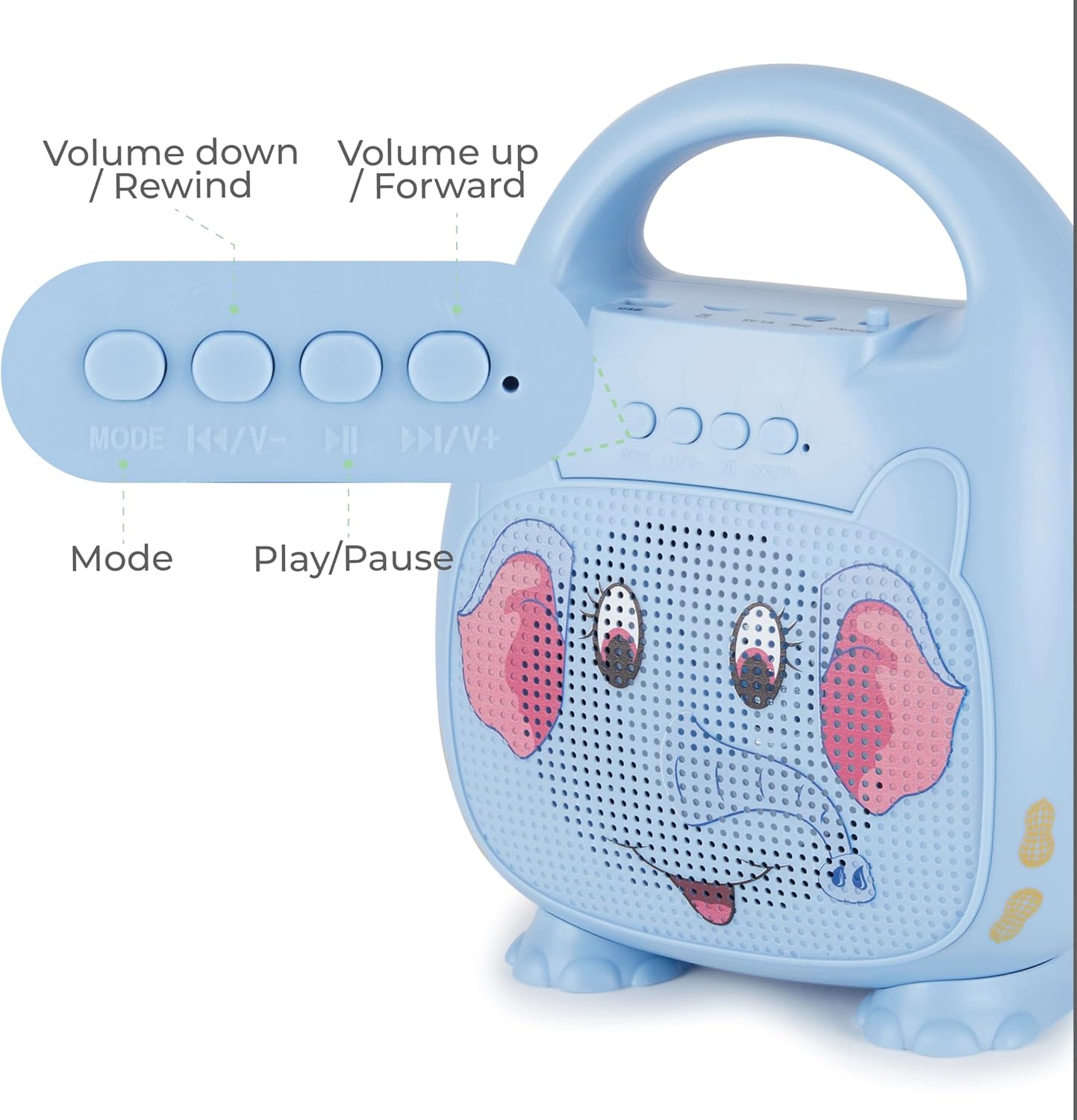
Imagine: O imagine detaliată view of the control panel on the speaker, showing buttons for Mode selection, Volume Down/Rewind, Play/Pause, and Volume Up/Forward. This illustrates how to navigate music and adjust settings.
Butoane de control
- Mod de administrare: Press to switch between Bluetooth, USB, and Micro SD modes.
- |<< / V-: Apăsați pentru a merge la piesa anterioară. Apăsați și mențineți apăsat pentru a reduce volumul.
- >> ||: Apăsați pentru a reda sau întrerupe muzica.
- >>| / V+: Apăsați pentru a trece la următoarea piesă. Apăsați și mențineți apăsat pentru a crește volumul.
Iluminare LED
The speaker features multicolor LED lighting that pulses and changes with the music, enhancing the karaoke experience. The lights activate automatically when the speaker is powered on.
Întreţinere
Curatenie
Wipe the speaker and microphone with a soft, dry cloth. Do not use liquid cleaners or abrasive materials.
Depozitare
Depozitați dispozitivul într-un loc răcoros și uscat, ferit de lumina directă a soarelui și de temperaturi extreme.
Îngrijirea bateriei
Pentru a prelungi durata de viață a bateriei, încărcați complet difuzorul înainte de prima utilizare și cel puțin o dată la trei luni dacă nu îl utilizați în mod regulat.
Depanare
| Problemă | Soluţie |
|---|---|
| Difuzorul nu pornește. | Ensure the battery is charged. Connect the USB charging cable and allow it to charge for at least 30 minutes before attempting to power on again. Check the ON/OFF switch. |
| Niciun sunet de la microfon. | Verify the microphone is securely plugged into the MIC port. Ensure the microphone's ON/OFF switch is in the "ON" position. Increase the volume on the speaker. |
| Nu se poate conecta prin Bluetooth. | Ensure the speaker is in Bluetooth pairing mode (flashing blue LED). Turn off and on Bluetooth on your device. Move your device closer to the speaker. Forget "Singimals" from your device's Bluetooth list and try pairing again. |
| Distorsiunea sunetului. | Reduce the volume on both the speaker and your connected device. Ensure there are no obstructions between your Bluetooth device and the speaker. |
Specificații
- Model: SNG200-ELPH-STK-6
- Marca: Vivitar
- Conectivitate: Bluetooth v5.1
- Ieșire difuzor: 5W
- Sursa de alimentare: Alimentat cu baterii (1 baterie litiu-ion, inclusă)
- Timp de joacă: Până la 12 ore
- Port de încărcare: USB
- Material: Metal, plastic
- Dimensiuni produs: 8.7 x 4.7 x 9.4 inci
- Greutatea articolului: 2.09 lire sterline (0.95 kilograme)
- Dispozitive compatibile: Smartphone, Tabletă, Calculator personal
Garanție și suport
For warranty information and customer support, please refer to the official Vivitar website-ul lor sau contactați departamentul lor de asistență pentru clienți. Păstrați bonul fiscal ca dovadă a achiziției.
Producător: Sakar International, Inc.
Informații suplimentare
Videoclipuri cu produse
Nu sunt disponibile videoclipuri oficiale ale vânzătorului pentru încorporarea în acest manual.


