Quican Smartwatch User Manual
Model: IDW208 Plus
Produs terminatview
The Quican Smartwatch IDW208 Plus is a versatile fitness tracker and smartwatch designed for daily use. It features a 1.8-inch HD display, built-in Alexa, Bluetooth call functionality, and comprehensive health monitoring. This manual provides essential information for setting up, operating, and maintaining your device.

Image: The Quican Smartwatch IDW208 Plus in Baby Pink, showing its square display and silicone band. Insets show call and Alexa listening screens.
Ce este în cutie
- Quican Smartwatch IDW208 Plus
- Cablu de încărcare
- Manual de utilizare (acest document)
Ghid de instalare
Încărcare inițială
Before first use, fully charge your smartwatch. The device charges quickly in approximately 2.5 hours.

Image: The Quican Smartwatch connected to its magnetic charging cable, illustrating the charging process.
Asocierea cu smartphone-ul dvs
The Quican Smartwatch is compatible with devices running iOS 9.0 or above and Android 6.0 or above. Follow these steps to pair your watch:
- Download the "Veryfit" App: Caută "Veryfit" in your smartphone's app store (Apple App Store for iOS, Google Play Store for Android) and install it.
- Activați Bluetooth: On your smartphone, go to your settings and ensure Bluetooth is turned on.
- Deschideți aplicația și adăugați dispozitivul: Launch the "Veryfit" app. Navigate to the device pairing section (often labeled "Device" or "Add Device").
- Scan and Connect: The app will search for nearby devices. Select "IDW208 Plus" from the list. You may be prompted to scan a QR code displayed on the smartwatch screen to complete the pairing process.

Image: A visual guide showing the steps to download the Veryfit app, enable Bluetooth, and connect the smartwatch by scanning a QR code.
Utilizarea ceasului inteligent
Navigare de bază
The smartwatch features a 1.8-inch HD touchscreen for intuitive navigation. Swipe across the screen to access different functions and menus. Use the physical button on the side to return to the home screen or power on/off the device.

Image: The smartwatch display showing the current time, date, and activity metrics like steps and calories burned.
Funcții inteligente
- Apeluri și notificări Bluetooth: Make and answer calls directly from your wrist. Receive SMS and app notifications (messaging or text responses are not supported).
- Alexa încorporată: Utilize voice commands for weather forecasts, alarms, timers, music control, and smart home device management.
- Music & Camera Control: Control music playback on your phone and remotely trigger your phone's camera shutter from the watch.
- Daily Utilities: Access features like stopwatch, flashlight, sedentary reminder, alarm clock, and find phone functionality.
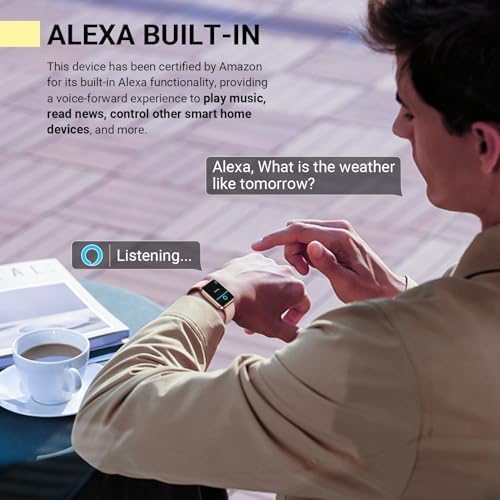
Image: The smartwatch screen showing "Listening..." with the Alexa wave animation, indicating voice command readiness.

Image: A collage of smartwatch screens demonstrating various utility features: weather forecast, alarm setting, drinking reminder, and the 'Find Your Phone' function.
Monitorizarea fitnessului și a sănătății
The smartwatch offers comprehensive health and fitness tracking capabilities:
- 120 de moduri sportive: Track various activities including running, walking, hiking, yoga, and more. Monitor exercise time, steps, distance, and calories burned.
- Monitorizarea ratei cardiace: Continuous 24/7 heart rate tracking to help you understand your cardiovascular health and optimize workouts.
- Monitorizarea oxigenului din sânge (SpO2): Provides insights into your blood oxygen levels, an important indicator of respiratory health.
- Urmărirea somnului: Monitorizează somnultages (light, deep, REM) and wakefulness, providing a detailed analysis of your sleep architecture.
- Stress Monitoring & Breathing Training: Track stress levels and engage in guided breathing exercises to promote relaxation.
- Urmărirea ciclului menstrual feminin: Record and predict menstrual periods, helping women stay organized and monitor cycle patterns.

Image: The smartwatch screen showing a list of workout modes, including outdoor run, outdoor cycle, and pool swim, highlighting its fitness tracking capabilities.

Imagine: O ilustrație care prezintăasing the various health monitoring features of the smartwatch, including heart rate, stress, blood oxygen, sleep tracking, breathing training, and women's health tracking.
Întreţinere
Curățarea ceasului inteligent
To maintain the appearance and functionality of your smartwatch, clean it regularly:
- Ștergeți ecranul și carcasa ceasului cu o lavetă moale,amp, cârpă fără scame.
- For the silicone band, you can use mild soap and water, then rinse thoroughly and dry completely before reattaching to the watch.
- Avoid using abrasive cleaners or solvents that may damage the watch's finish.
Rezistență la apă (IP68)
The Quican Smartwatch is IP68 waterproof, meaning it is resistant to dust and can withstand immersion in water up to 1.5 meters for up to 30 minutes. This makes it suitable for daily activities like hand washing and light rain. However, it is not recommended for hot showers, saunas, or diving, as steam and high water pressure can compromise the seals.

Image: The smartwatch being worn by individuals engaged in outdoor activities like running and cycling, emphasizing its IP68 waterproof and durable design.
Depanare
Probleme comune și soluții
| Emisiune | Cauză/Soluție posibilă |
|---|---|
| Ceasul nu se aprinde | Battery may be depleted. Connect to charger and allow it to charge for at least 10 minutes before attempting to power on. |
| Imposibil de asociat cu telefonul | Ensure Bluetooth is enabled on your phone and the watch is within range. Restart both the watch and phone. Check if the "Veryfit" app has necessary permissions. |
| Notificările nu apar | Verify notification permissions are enabled in the "Veryfit" app and your phone's settings. Ensure the app is running in the background. |
| Date inexacte despre sănătate (FC, SpO2, Somn) | Ensure the watch is worn snugly but comfortably on your wrist, about one finger's width above the wrist bone. Avoid excessive movement during measurements. Note that these are not medical devices and data is for reference only. |
| Durată scurtă de viață a bateriei | Reduce screen brightness, disable continuous heart rate monitoring if not needed, and limit excessive notifications. Ensure background app refresh is optimized. |
Specificații
| Caracteristică | Detaliu |
|---|---|
| Numărul de model | IDW208 Plus |
| Dimensiunea afișajului | 1.8 inchi |
| Rezoluția afișajului | 240 x 280 |
| Conectivitate | Bluetooth 5.3 |
| Capacitatea bateriei | 300 Miliamp Ore |
| Durata de viață a bateriei (utilizare obișnuită) | Până la 7 de zile |
| Durata de viață a bateriei (standby) | Până la 30 de zile |
| Timp de încărcare | Aproximativ. 2.5 ore |
| Rezistenta la apa | IP68 |
| Compatibilitatea sistemelor de operare | iOS 9.0+ / Android 6.0+ |
| Greutatea articolului | 1.38 uncii (39 grame) |
| Dimensiunile produsului | 10.7 x 3.5 x 0.7 inci |
Garanție și suport
Quican provides a 5 ani garanție for this smartwatch. If you encounter any issues with your fitness smartwatch, please do not hesitate to contact Quican customer support for assistance.
For further support, you may also refer to the official user guide PDF available online: Quican Smartwatch User Guide (PDF)


