Introducere
Mulțumesc pentru achizițieasing the BLOW BT500 Portable Bluetooth Speaker. This manual provides essential information for the safe and efficient use of your device. Please read it thoroughly before operation and keep it for future reference.
The BT500 is a compact wireless speaker featuring Bluetooth connectivity, a powerful rechargeable battery, volume control, FM radio, a microSD card slot, and a USB input. It is designed for versatile audio playback on the go.
Conținutul pachetului
- BLOW BT500 Bluetooth Speaker
- Cablu de încărcare micro USB
- 3.5mm Mini Jack Audio Cable
- Cureaua de transport

Image: The BLOW BT500 speaker shown with its included accessories: a micro USB charging cable, a 3.5mm mini jack audio cable, and a carrying strap. The speaker itself is black with a mesh grille and control buttons on top.
Produs terminatview

Imagine: Un unghi frontal view of the BLOW BT500 portable Bluetooth speaker. It is cylindrical, black, with a textured mesh exterior and a red 'B' logo on the front. A black carrying strap is attached.

Imagine: O parte view of the BLOW BT500 speaker, highlighting the control panel on the top surface. Buttons for Bluetooth, power, mode, volume up/next track, and volume down/previous track are visible.
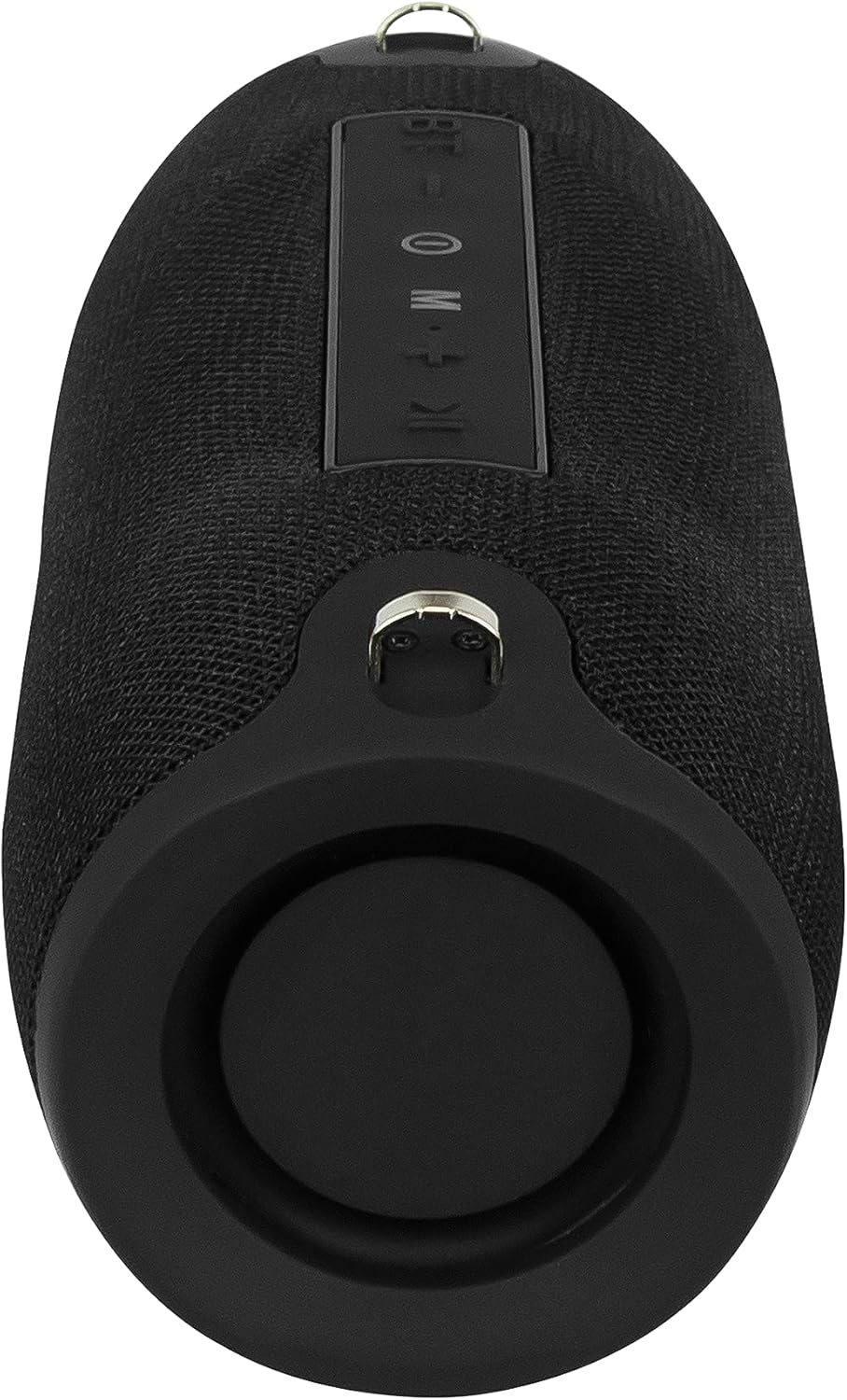
Imagine: Partea din spate view of the BLOW BT500 speaker, showing the protected port area. This area typically houses the charging port, USB input, and microSD card slot, covered by a rubber flap for protection.
Înființat
Încărcarea difuzorului
Before first use, fully charge the speaker. Connect the supplied micro USB cable to the speaker's charging port and the other end to a USB power source (e.g., computer USB port, USB wall adapter). The charging time is approximately 5-6 hours.
The charging indicator light will typically show red during charging and turn off or change color when fully charged.
Atașarea curelei de transport
Attach the included carrying strap to the designated loops on either end of the speaker for easy portability.
Instrucțiuni de operare
Pornire/Oprire
- Pentru a porni, apăsați și mențineți apăsat butonul Buton de pornire până când auziți un semnal sonor.
- Pentru a opri, țineți apăsat butonul Buton de pornire din nou până când difuzorul se oprește.
Modul Bluetooth
Upon powering on, the speaker will automatically enter Bluetooth pairing mode, indicated by a flashing LED light. If not, press the Butonul Mod (M). pentru a comuta la modul Bluetooth.
- Activați Bluetooth pe smartphone, tabletă sau alt dispozitiv.
- Caută dispozitivele Bluetooth disponibile.
- Selectați „BT500" din listă.
- Once paired, the speaker will confirm with an audible prompt, and the LED light will become solid.
- You can now play audio from your connected device.
Raza de acțiune Bluetooth este de aproximativ 10 metri (33 de picioare).
Mod radio FM
Apăsați tasta Butonul Mod (M). pentru a comuta la modul radio FM.
- Pentru a scana automat și a salva posturile, apăsați și mențineți apăsat butonul Buton Redare/Pauză.
- To switch between saved stations, use the Piesa anterioară (Reducerea volumului) și Următoarea piesă (Creșterea volumului) butoane.
USB/MicroSD Card Playback
Insert a USB flash drive or a microSD card (up to 32GB) into the respective slot. The speaker will automatically switch to the corresponding mode and begin playing audio files.
- Utilizați Buton Redare/Pauză pentru a întrerupe sau a relua redarea.
- Apăsați tasta Piesa anterioară (Reducerea volumului) sau Următoarea piesă (Creșterea volumului) buttons to skip tracks.
Mod AUX
Connect an external audio device (e.g., MP3 player, laptop) to the speaker's 3.5mm AUX input using the supplied mini jack cable. The speaker will automatically switch to AUX mode.
Controlează redarea de pe dispozitivul conectat.
Controlul volumului
- Țineți apăsat butonul Creșterea volumului butonul pentru a mări volumul.
- Țineți apăsat butonul Reducerea volumului butonul pentru a reduce volumul.
Întreţinere
- Păstrați difuzorul uscat. Nu îl expuneți la apă sau umiditate excesivă.
- Curățați difuzorul cu o lavetă moale și uscată. Nu utilizați substanțe de curățare abrazive sau solvenți.
- Evitați temperaturile extreme.
- Do not disassemble the speaker. This will void the warranty and may cause damage.
- Depozitați într-un loc răcoros și uscat atunci când nu este utilizat pentru perioade lungi de timp.
Depanare
| Problemă | Cauza posibila | Soluţie |
|---|---|---|
| Difuzorul nu pornește. | Bateria este epuizată. | Charge the speaker fully (5-6 hours). |
| Niciun sunet din difuzor. | Volumul este prea mic; Dispozitivul nu este conectat; Mod incorect. | Increase speaker and device volume; Ensure proper Bluetooth pairing or AUX connection; Press Butonul Mod (M). pentru a selecta intrarea corectă. |
| Asocierea Bluetooth nu reușește. | Difuzorul nu este în modul de asociere; Dispozitivul este prea departe; Interferență. | Ensure speaker is in Bluetooth mode (flashing LED); Move device closer to speaker (within 10m); Turn off other Bluetooth devices. |
| Recepția radioului FM este slabă. | Semnal slab; Interferențe de mediu. | Relocate the speaker to an area with better reception; The charging cable can sometimes act as an antenna, try connecting it. |
Specificații
| Caracteristică | Caietul de sarcini |
|---|---|
| Versiune Bluetooth | V4.2 |
| Gama Bluetooth | Până la 10 m (33 ft) |
| Ieșire difuzor | 2 x 6W |
| Gama de frecvente | 100 Hz – 20 kHz |
| Frecvența radio FM | 87.5 MHz – 108 MHz |
| Slot pentru card de memorie | MicroSD, max 32GB |
| Porturi de intrare | USB, 3.5mm Jack (AUX) |
| Curent de încărcare | DC 5V, 500mAh |
| Baterie încorporată | 2000mAh |
| Timp de încărcare | 5-6 ore |
| Timp de joacă | Până la 7 ore |
| Dimensiuni (L x l x H) | 220 x 98.7 x 94.8 mm (8.66 x 3.89 x 3.73 inchi) |
| Greutate | 750 g (1.65 lbs) |
| Dispozitive compatibile | Smartphone, tablet, laptop, desktop computer, MP3 player |
| Material | Plastic |
Garanție și suport
BLOW products are known for their quality and reliability. For warranty information and technical support, please refer to the warranty card included with your purchase or visit the official BLOW webPăstrați dovada achiziției pentru reclamații în garanție.
For further assistance, you may contact the retailer where you purchased the product.


