1. Introducere
This manual provides detailed instructions for the installation, operation, and maintenance of your SECULINK C17-4MP Dual-Band WiFi Dome Security Camera. This camera is designed for outdoor surveillance, featuring 4MP resolution, pan/tilt/zoom capabilities, automatic tracking, human detection, and color night vision. Please read this manual thoroughly before use to ensure proper functionality and safety.
2. Conținutul pachetului
Verificați dacă toate articolele sunt prezente în colet:
- SECULINK C17-4MP Dome Security Camera
- Adaptor de alimentare (încărcător)
- Șuruburi de montare și dibluri de perete
- Kit impermeabil pentru cablu de rețea (dacă este cazul)
- Ghid de pornire rapidă
3. Produs terminatview
The SECULINK C17-4MP camera features a robust dome design suitable for outdoor environments. Key components include:
- Obiectivul camerei: Captează video footage.
- LED-uri cu infraroșu: Oferă iluminare pentru vedere nocturnă.
- White Light LEDs (Floodlight): Enhance color night vision and act as a deterrent.
- Microfon: Pentru intrare audio și comunicare bidirecțională.
- Vorbitor: Pentru ieșire audio și comunicare bidirecțională.
- antene: For dual-band 2.4GHz/5GHz Wi-Fi connectivity.
- Slot pentru card Micro SD: Acceptă stocare locală de până la 256 GB.
- Buton de resetare: Pentru resetarea din fabrică.
- Port de alimentare: Intrare curent DC 12V.

Imaginea 3.1: Pesteview of the SECULINK C17-4MP camera and its mobile application interface.
4. Configurare
4.1 Descărcarea aplicației și înregistrarea contului
- Descărcați SECUEYE mobile application from the App Store (iOS) or Google Play Store (Android).
- Deschide aplicația și urmează instrucțiunile de pe ecran pentru a înregistra un cont nou sau pentru a te conecta dacă ai deja unul.
4.2 Pornirea camerei
Connect the provided power adapter to the camera's power port and plug it into an electrical outlet. The camera will initiate its self-test sequence, indicated by a rotating motion and status light changes.
4.3 Conectarea la Wi-Fi
The SECULINK C17-4MP supports dual-band Wi-Fi (2.4GHz and 5GHz) for flexible network connectivity.
- Ensure your mobile device is connected to the same Wi-Fi network you intend to connect the camera to.
- In the SECUEYE app, tap the "Add Device" or "+" icon.
- Select your camera model or scan the QR code on the camera (if available).
- Follow the app's instructions to enter your Wi-Fi network name (SSID) and password.
- The app will guide you through the pairing process, which may involve scanning a QR code displayed on your phone with the camera lens or listening for an audio prompt.
- Once connected, the camera's status light will indicate a successful connection (refer to the app or quick start guide for specific light indicators).
4.4 Montarea camerei
The camera is designed for wall mounting and is IP65/IP66 weatherproof, making it suitable for outdoor installation.
- Alegeți o locație de montare potrivită care să ofere viewunghiul de înclinare și se află în raza de acțiune Wi-Fi.
- Use the mounting template (if provided) or the camera base to mark the drill holes on the wall.
- Dați găuri și introduceți diblurile de perete.
- Fixați baza camerei pe perete folosind șuruburile furnizate.
- Attach the camera body to the base.
- Asigurați-vă că toate conexiunile cablurilor sunt sigure și protejate de intemperii, utilizând kitul de impermeabilizare, dacă este necesar.
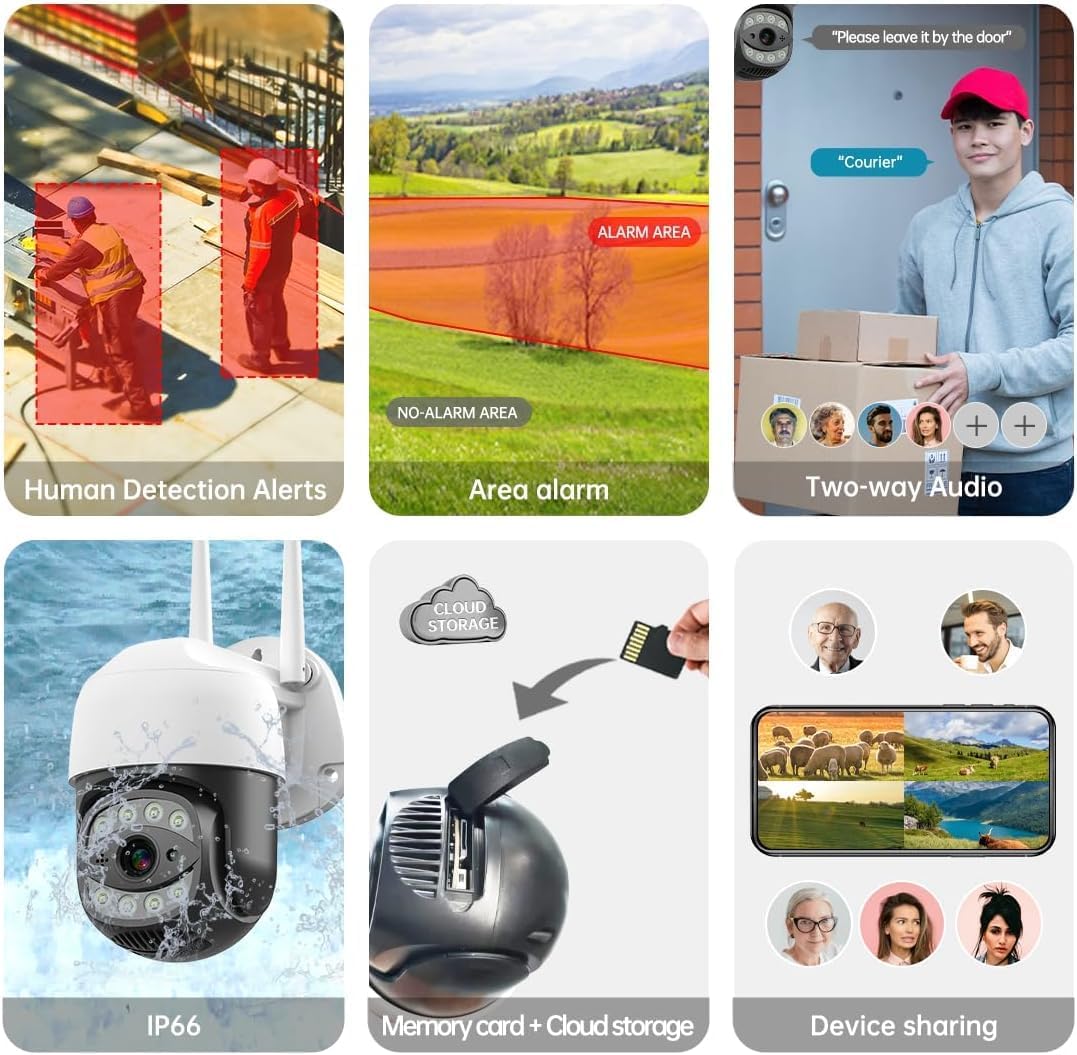
Image 4.1: The SECULINK C17-4MP camera is rated IP66 for dust and water resistance, suitable for various weather conditions.
5. Instrucțiuni de utilizare
5.1 În direct View și Redare
Accesați fluxul video în direct și reluațiview inregistrat footage through the SECUEYE app. The camera provides 4MP (2560x1440p) resolution for clear images.

Image 5.1: Visual comparison demonstrating the enhanced clarity of 5MP resolution over lower resolutions.
5.2 Pan, Tilt, and Digital Zoom (PTZ)
Controlează camera viewing angle remotely using the SECUEYE app. The camera offers:
- Rotație orizontală: 335 de grade
- Înclinare verticală: 90 de grade
- Zoom digital: mărire de 10x
Use pinch-to-zoom gestures on your mobile device to digitally zoom in on specific areas of interest.

Image 5.2: Demonstrates controlling the camera's pan and tilt functions via the mobile app.

Image 5.3: Illustration of the 10x digital zoom feature, allowing closer inspection of details.
5.3 Automatic Tracking and Human Motion Detection
The camera features intelligent detection capabilities to enhance security monitoring.
- Urmărire automată: When enabled, the camera will automatically detect and follow moving human figures within its field of view, recording their path.
- Detectarea mișcării umane: Advanced algorithms distinguish human activity from other movements (e.g., pets, swaying branches), reducing false alarms.
- Alerte: Upon detection, the camera can send real-time alerts to your mobile phone.
- Floodlight and Sound Alarm: Built-in spotlights activate upon motion detection at night, and a security siren can be triggered as an additional deterrent.

Image 5.4: The camera's AI Humanoid Detection identifies human presence and sends alerts.
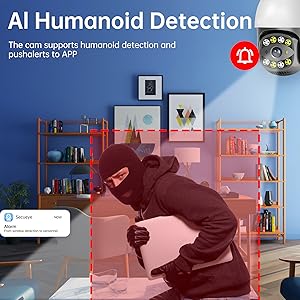
Image 5.5: The camera's automatic tracking capability follows detected human movement.

Image 5.6: Illustrates the camera's ability to differentiate human activity from other movements, reducing false alarms.
5.4 Moduri de vedere nocturnă
The camera offers multiple night vision options for clear surveillance in low-light conditions:
- Vedere nocturnă în infraroșu (IR): Uses IR LEDs to provide black and white video in complete darkness, with a range of up to 100ft (30m).
- Vedere de noapte color: Utilizes white light LEDs (floodlight) to capture full-color video at night when motion is detected or manually activated.
- Starlight Sensor: Enhances low-light performance to produce clearer images even without additional illumination.

Image 5.7: Demonstrates the different night vision modes: infrared (black and white), white light (color), and full-color night vision.

Image 5.8: The camera's infrared night vision provides visibility up to 20 meters in darkness.
5.5 Sunet bidirecțional
The built-in microphone and speaker allow for real-time two-way communication through the SECUEYE app. You can listen to audio from the camera's location and speak through the camera's speaker.
5.6 Opțiuni de stocare
The camera supports two primary storage methods for recorded footage:
- Card Micro SD: Insert a Micro SD card (up to 256GB, sold separately) into the designated slot for local storage. The camera can record 24/7 or motion-triggered videos.
- Stocare în cloud: Optional cloud storage services are available through the SECUEYE app for secure, remote backup of your recordings.
5.7 Partajarea dispozitivului
You can share access to your camera's live feed and recordings with family members or trusted individuals through the SECUEYE app, allowing multiple users to monitor the property simultaneously.
6. Întreținere
To ensure optimal performance and longevity of your SECULINK C17-4MP camera, consider the following maintenance tips:
- Curățați lentila: Periodically wipe the camera lens with a soft, clean, lint-free cloth to remove dust, dirt, or water spots that may affect image clarity. Avoid abrasive cleaners.
- Verificați conexiunea la alimentare: Ensure the power adapter and cable remain securely connected and free from damage, especially in outdoor environments.
- Actualizări firmware: Regularly check the SECUEYE app for available firmware updates. Updates often include performance improvements, new features, and security enhancements.
- Inspectați montarea: Periodically check the camera's mounting for stability, especially after severe weather conditions.
7. Depanare
If you encounter issues with your SECULINK C17-4MP camera, refer to the following common troubleshooting steps:
7.1 Camera nu se conectează la Wi-Fi
- Verificați semnalul Wi-Fi: Ensure the camera is within range of your Wi-Fi router. Weak signals can cause connection issues.
- Verify Network Credentials: Double-check that the Wi-Fi network name (SSID) and password entered in the app are correct.
- Compatibilitate router: Confirm your router supports 2.4GHz or 5GHz bands, and that the camera is attempting to connect to a compatible band.
- Reporniți dispozitivele: Power cycle both your Wi-Fi router and the camera.
- Resetare cameră: If issues persist, perform a factory reset on the camera (refer to the quick start guide for reset button location and procedure) and attempt the setup process again.
7.2 Calitate slabă a imaginii
- Curățați lentila: Ensure the camera lens is clean and free from smudges or dirt.
- Lățimea de bandă a rețelei: A slow internet connection can affect live stream quality. Check your network speed.
- Conditii de iluminare: Ensure adequate lighting for optimal image quality, especially for color night vision.
7.3 Motion Detection Not Working or Too Sensitive
- Reglați sensibilitatea: In the SECUEYE app settings, adjust the motion detection sensitivity level.
- Zone de detectare: Configure specific detection zones to monitor only relevant areas and exclude areas with frequent irrelevant motion (e.g., public roads, swaying trees).
- Check Schedule: Ensure motion detection is enabled for the desired time periods in the app.
7.4 No Recording to SD Card
- Insert SD Card Correctly: Ensure the Micro SD card is inserted properly into the slot.
- Formatează cardul SD: Format the SD card through the camera settings in the SECUEYE app.
- Card Capacity/Health: Ensure the SD card is not full or corrupted. Try a different, known-good SD card if necessary.
- Setări de înregistrare: Verify that continuous recording or motion-triggered recording is enabled in the app settings.
8. Specificații
| Caracteristică | Caietul de sarcini |
|---|---|
| Model | C17-4MP |
| Rezoluţie | 4MP (2560x1440p Max) |
| Senzor de imagine | CMOS |
| Distanța focală | 3.6mm |
| Unghiul de rotire a panoului | 335 ° orizontal |
| Unghi de rotație de înclinare | 90 ° pe verticală |
| Zoom digital | 10x |
| Vedere de noapte | IR-Cut, Starlight, LED (Color Night Vision) |
| Distanța de infraroșu | Până la 100 de picioare (30 metri) |
| Audio | Built-in Microphone and Speaker (Two-Way Audio) |
| Rezistenta la apa | IP65, IP66 (Waterproof) |
| Conectivitate | Dual-Band Wi-Fi (2.4GHz/5GHz), Wired Ethernet |
| Depozitare | Card Micro SD (până la 256 GB), Stocare în cloud |
| Putere | DC 12V, 9 Watts |
| Temperatura de operare | -10°C până la +50°C (14°F până la 122°F) |
| Compatibilitatea aplicațiilor | SECUEYE (iOS, Android) |
| Dimensiuni | 7 x 7 x 5 inci (Pachet) |
| Greutatea articolului | 1.2 lire sterline |
9. Garanție și asistență
For warranty information and technical support, please refer to the official SECULINK website-ul lor web sau contactați direct serviciul lor de asistență pentru clienți. Păstrați bonul fiscal ca dovadă a achiziției pentru reclamațiile în garanție.
Producător: SECULINK


