1. Introducere
This manual provides detailed instructions for the setup, operation, and maintenance of your Victrola Montauk Vinyl Record Player, Model VM-135-FNT. This belt-driven turntable system offers three playback speeds, integrated Bluetooth connectivity, and includes matching stereo speakers for a complete audio experience. Please read this manual thoroughly before use to ensure proper functionality and longevity of your product.

Figure 1: Victrola Montauk Vinyl Record Player with included stereo speakers.
2. Ce se află în cutie
- Victrola Montauk Turntable Unit
- Stereo Bluetooth Speakers (2 units)
- Capac de praf detasabil
- Adaptor de alimentare
- RCA Output Cable
- Cablu de intrare Aux de 3.5 mm
- Manual de instructiuni

Figure 2: All components included in the Victrola Montauk package.
3. Instrucțiuni de configurare
- Despachetați componente: Scoateți cu grijă toate articolele din ambalaj. Asigurați-vă că sunt prezente toate componentele enumerate.
- Place Turntable and Speakers: Position the turntable on a stable, level surface. Place the stereo speakers on either side of the turntable, ensuring they are within reach of the speaker cables.
- Install Drive Belt and Platter: Gently place the sub-platter onto the spindle. Carefully loop the drive belt around the motor pulley and the sub-platter. Then, place the main platter on top of the sub-platter.
- Balance Tone Arm: Install the counterweight onto the rear of the tone arm. Adjust the counterweight by rotating it until the tone arm is balanced and floats horizontally. Refer to the detailed instructions in the included manual for precise balancing.
- Instalați capacul anti-praf: Attach the removable dust cover to the hinges at the back of the turntable unit.
- Conectați difuzoarele: Connect the included speaker cables from the turntable's speaker outputs to the input terminals on the back of each stereo speaker. Ensure correct polarity (red to red, black to black).
- Conectare alimentare: Plug the power adapter into the DC IN port on the back of the turntable, then plug the adapter into a wall outlet.
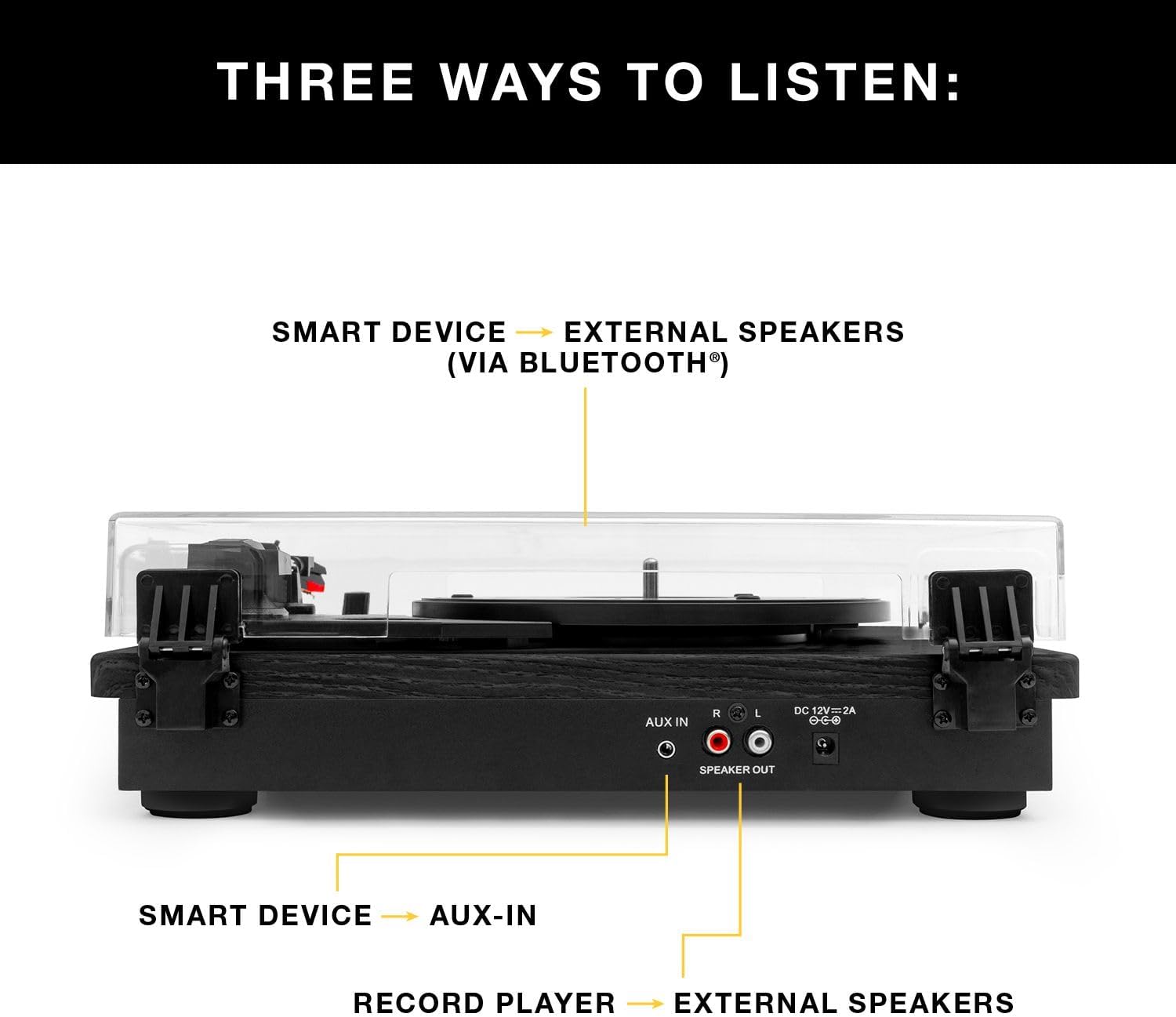
Figura 3: Spate view of the turntable showing audio output and power connections.
4. Instrucțiuni de utilizare
4.1 Redarea discurilor de vinil
- Pornire: Porniți platoul folosind comutatorul de alimentare.
- Selectați viteza: Choose the appropriate speed (33 1/3, 45, or 78 RPM) for your record using the speed selector switch.
- Înregistrare loc: Așezați cu grijă discul de vinil pe platou.
- Position Tone Arm: Release the tone arm lock. Gently lift the tone arm using the cueing lever and position the stylus over the desired track on the record.
- Lower Tone Arm: Slowly lower the cueing lever to gently place the stylus onto the record. Playback will begin automatically.
- Reglați volumul: Use the volume knob on the turntable to adjust the sound level.
- Sfârșitul redării: At the end of the record, the tone arm will automatically return to its rest position (if auto-stop is enabled). Alternatively, manually lift the tone arm using the cueing lever and return it to its rest.

Figure 4: Detail of the stylus and record during playback.
4.2 Redare Bluetooth
- Activați Bluetooth: Switch the turntable to Bluetooth mode. The Bluetooth indicator will flash, indicating it's ready for pairing.
- Asociați dispozitivul: On your smart device (phone, tablet, etc.), enable Bluetooth and select