1. Produs terminatview
The SOVMIKU Wireless Security Camera System provides comprehensive surveillance for indoor and outdoor environments. This system includes a 10-inch NVR monitor with a built-in 1TB HDD, two 3-megapixel wireless cameras, and features such as two-way audio, AI motion detection, and IP66 waterproof rating.

Figura 1: Pesteview of the SOVMIKU Wireless Security Camera System, including the NVR monitor, two cameras, and 1TB hard drive.
Caracteristici cheie:
- 10-inch NVR Monitor: Integrated display for live viewing și redare.
- 1TB HDD Built-in: Oferă ample storage for continuous recording with overwrite function.
- 3-Megapixel Cameras: Delivers clear 1536P video resolution.
- Audio bidirecțional: Microfon și difuzor încorporate pentru comunicare.
- Detecție mișcare prin inteligență artificială: Advanced detection to minimize false alarms and optimize recording.
- IP66 Impermeabil: Cameras are designed for reliable outdoor use in various weather conditions.
- Monitorizare de la distanță: Accesați mâncare live și înregistratătage via smartphone, tablet, or PC application.
- Compresie video H.265: Efficient storage utilization, reducing capacity requirements by approximately 50% compared to H.264.
2. Conținutul pachetului
Verificați dacă toate articolele enumerate mai jos sunt incluse în pachetul dumneavoastră:

Figure 2: Illustration of the items included in the SOVMIKU security camera system package.
- NVR Main Unit (with 1TB HDD built-in)
- 3-Megapixel IP66 Waterproof Cameras (Quantity: 2)
- Power Adapters for Cameras
- Adaptor de alimentare pentru NVR
- Mouse USB
- cablu LAN
- Cablu HDMI
- Mounting Screws and Anti-theft Stickers
- User Manual (Japanese, but this document serves as the English equivalent)
3. Ghid de instalare
3.1 Configurare inițială
The system is designed for simple setup. Cameras are pre-paired with the NVR. Simply power on the devices to begin surveillance.
- Conectați NVR-ul: Conectați adaptorul de alimentare al NVR-ului la NVR și introduceți-l într-o priză.
- Conectați camerele: Connect each camera's power adapter to the camera and plug it into a power outlet.
- Afișaj monitor: The NVR's integrated 10-inch monitor will display the camera feeds automatically.
- Conexiune mouse: Connect the included USB mouse to the NVR for navigation and configuration.

Figure 3: Diagram illustrating the simple power-on setup for the NVR and cameras, showing automatic wireless connection.
3.2 Instalarea camerei
The cameras are IP66 waterproof, suitable for both indoor and outdoor installation. Ensure a stable power source is available at the installation location.
- Montare: Folosiți șuruburile furnizate pentru a monta în siguranță camerele pe perete sau tavan.
- Ajustarea unghiului: The camera features 180° horizontal and 360° vertical adjustment for optimal viewing angles. Secure the angle after adjustment.
- Waterproofing Connections: For outdoor installations, ensure all cable connections are properly sealed and protected from moisture.
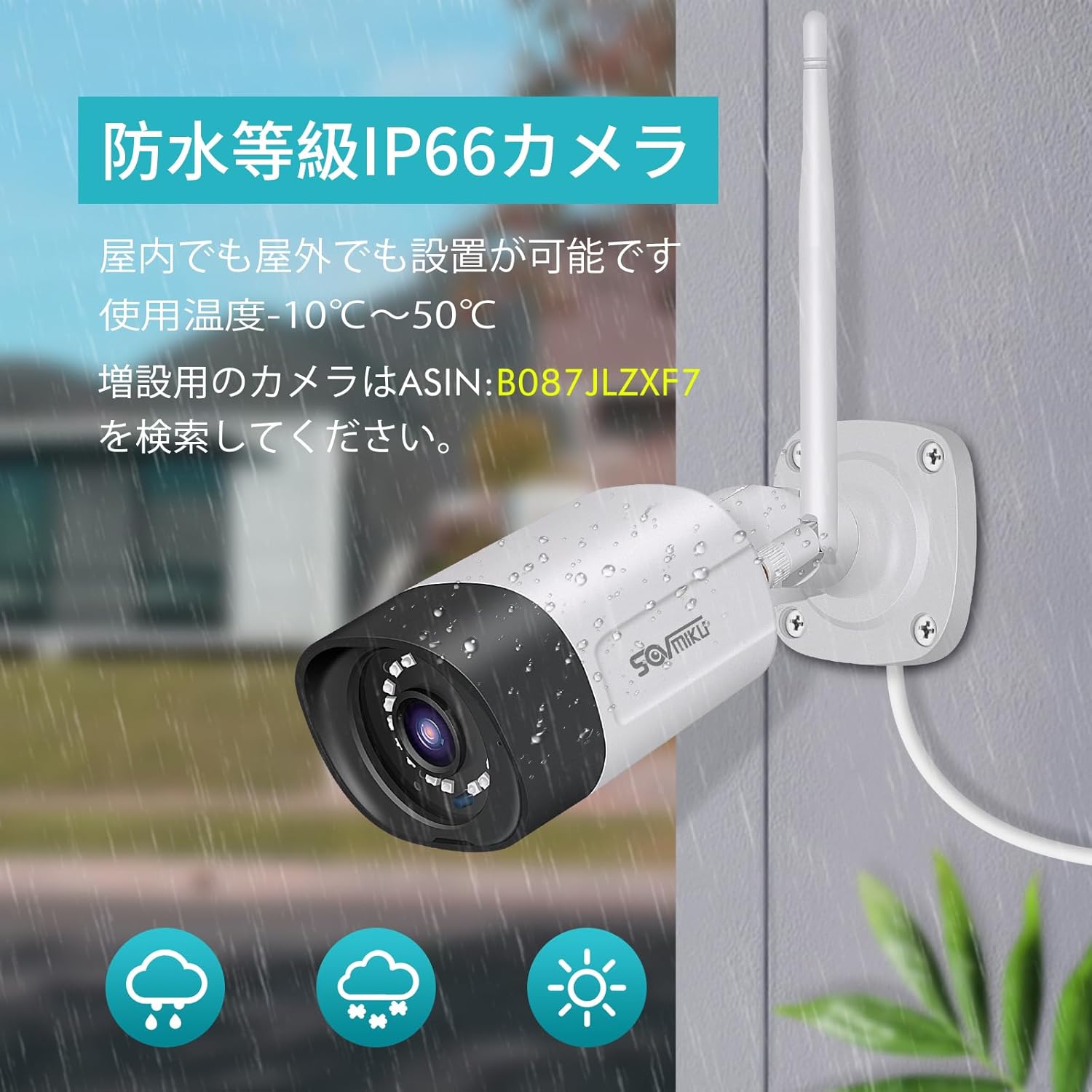
Figure 4: A SOVMIKU camera installed outdoors, demonstrating its IP66 waterproof rating against rain and snow.

Figure 5: Detailed diagram showing the camera components (wireless antenna, LED, lens, microphone, sensor light, speaker, adjustable bracket) and NVR ports (power, USB, HDMI, Ethernet, reset, TF card slot).
4. Instrucțiuni de utilizare
4.1 ViewTransmitere și redare în timp real
- On NVR Monitor: The 10-inch NVR monitor displays live feeds from connected cameras. Use the USB mouse to navigate the NVR interface for playback, system settings, and other functions.
- Remote Monitoring (EseeCloud App):
- Connect the NVR to your internet router using the provided LAN cable.
- Download the "EseeCloud" app on your smartphone or tablet (available for iOS).
- Follow the in-app instructions to add your NVR device.
- Odată conectat, poți view live feeds, access recorded footage, and receive notifications from anywhere.
- Software pentru PC: For PC monitoring, download the "EseeCloud" software.
4.2 Moduri de înregistrare
The system supports various recording modes to suit your needs:
- Înregistrare continuă: Records 24/7. The 1TB HDD with H.265 compression allows for extended recording periods (e.g., over 2 months for 2 cameras). Older data is automatically overwritten when the HDD is full.
- Înregistrare programată: Setați ore specifice pentru înregistrare.
- Înregistrare detectare mișcare: Înregistrează doar atunci când este detectată mișcare, economisind spațiu de stocare și reînregistrând evenimentele.view mai eficient.

Figure 6: Visual representation of continuous, scheduled, and motion detection recording modes, along with notification options via app or email.
4.3 Sunet bidirecțional
Fiecare cameră este echipată cu microfon și difuzor încorporate, permițând comunicarea bidirecțională.
- Initiating Communication: Use the EseeCloud app on your mobile device to speak through the camera's speaker and listen through its microphone.
- Sunet clar: The omnidirectional microphone and optimized algorithms ensure clear sound quality.

Figure 7: Demonstration of the two-way audio function, showing a user communicating with someone at their door via the camera and smartphone app.
4.4 AI Motion Detection and Notifications
The system utilizes AI human detection to accurately identify human movement, reducing false alarms from pets or environmental factors.
- Event Notification: When motion is detected, the system can send instant notifications to your mobile app or email.
- Efficient Search: Recorded events triggered by motion detection can be quickly searched and reviewed.

Figure 8: Illustration of H.265 video compression efficiency (1TB H.265 equals 2TB H.264) and AI human detection identifying a person in a scene.

Figure 9: A visual comparison demonstrating the superior clarity and detail of 5-megapixel resolution compared to 1.3-megapixel resolution, highlighting the system's high-definition capabilities.
5. Întreținere
Întreținerea regulată asigură performanța optimă și durata de viață a sistemului dumneavoastră de securitate.
- Curățarea lentilelor camerei: Curățați periodic lentilele camerei cu o lavetă moale,amp o lavetă pentru a îndepărta praful, murdăria sau petele de apă care ar putea obstrucționa viewEvitați produsele de curățare abrazive.
- Verificați conexiunile: Asigurați-vă că toate cablurile de alimentare și de rețea sunt conectate corect și nu prezintă deteriorări.
- Actualizări firmware: Check the EseeCloud app or SOVMIKU website for any available firmware updates for the NVR and cameras to ensure the latest features and security patches.
- Starea HDD-ului: While the 1TB HDD is built-in, it's good practice to periodically check its status through the NVR settings to ensure it's functioning correctly.
6. Depanare
If you encounter issues with your SOVMIKU security camera system, refer to the following common troubleshooting steps:
- Nicio imagine pe monitor:
- Ensure the NVR and cameras are powered on and their power adapters are securely connected.
- Check if the NVR's internal monitor is functioning. If using an external monitor, ensure the HDMI cable is connected correctly.
- Cameras Not Connecting to NVR:
- Verify that cameras are within range of the NVR's wireless signal. Walls and obstacles can reduce signal strength.
- Reporniți atât NVR-ul, cât și camerele.
- If adding new cameras or re-pairing, refer to the NVR's on-screen menu for camera pairing instructions.
- Fără acces de la distanță prin aplicație:
- Ensure the NVR is connected to your internet router via the LAN cable.
- Verificați-vă conexiunea la internet.
- Verify that the NVR is correctly added to the EseeCloud app and has an active network status.
- Calitate slabă a imaginii:
- Curățați obiectivul camerei.
- Asigurați-vă că nu există obstrucții în câmpul de acțiune al camerei view.
- Check the camera's resolution settings in the NVR interface.
- Probleme audio bidirecționale:
- Ensure the microphone and speaker settings are enabled in the NVR or app.
- Verificați dacă există obstacole fizice care blochează microfonul sau difuzorul camerei.
- Verify network stability for clear audio transmission.
7. Specificații
| Caracteristică | Detaliu |
|---|---|
| Marca | SOVMIKU |
| Numărul de model | SFWK-10V-2HB312-1T |
| Rezoluție captură video | 1536p (3 megapixeli) |
| Caracteristica specială | Impermeabil (IP66) |
| Numărul de canale | 8 (Suportă până la 8 camere) |
| Capacitate de stocare a memoriei | 1 TB HDD (Built-in) |
| Sursa de alimentare | Electric cu fir |
| Sistem de operare (aplicație) | iOS (and Android compatible via EseeCloud app) |
| Dispozitive compatibile | Smartphone, Tablet, PC |
| Alte caracteristici ale camerei | Front-facing, Night color (low light technology) |
| Modul de înregistrare | Continuous, Scheduled, Motion Detection |
| Interfață hardware | 802.11 ac/b/g/n (Wireless), Ethernet, HDMI, USB |
| Tip de lentile | Wide Angle (3.6 mm) |
| Dimensiuni produs (NVR) | 29 x 17 x 24 cm |
| Greutatea articolului | 2.88 kg |
| UPC | 616612550644 |
8. Garanție și asistență
SOVMIKU provides comprehensive support for its products.
- 1-Year Quality Warranty: Produsul vine cu o garanție de 12 luni de la data achiziției.
- Suport tehnic: Professional technical support is available to assist with setup, operation, and troubleshooting.
- Informații de contact: For any questions or issues, please contact SOVMIKU customer support via email or phone. (Specific contact details are usually provided in the physical manual or on the product's official website.)
- PSE Certification: Our products have passed PSE certification in accordance with Japanese electrical safety standards, ensuring safe usage.


