1. Introducere
This manual provides instructions for the safe and effective operation of your iJoy Stitch Speaker. Please read this manual thoroughly before using the device and retain it for future reference.

Image 1.1: The iJoy Stitch Speaker, showcasing the Stitch Hula Dancing design. This portable Bluetooth speaker is designed for wireless audio playback and features a silicone loop for portability.
2. Conținutul pachetului
Verificați dacă toate articolele sunt prezente în colet:
- iJoy Stitch Speaker
- Manualul de utilizare (acest document)
- Cablu de încărcare (Micro USB)

Image 2.1: The iJoy Stitch Speaker alongside its retail packaging, illustrating the product and its box.
3. Caracteristicile și componentele produsului
The iJoy Stitch Speaker is equipped with various features for versatile audio playback and portability.
3.1 Butoane de control
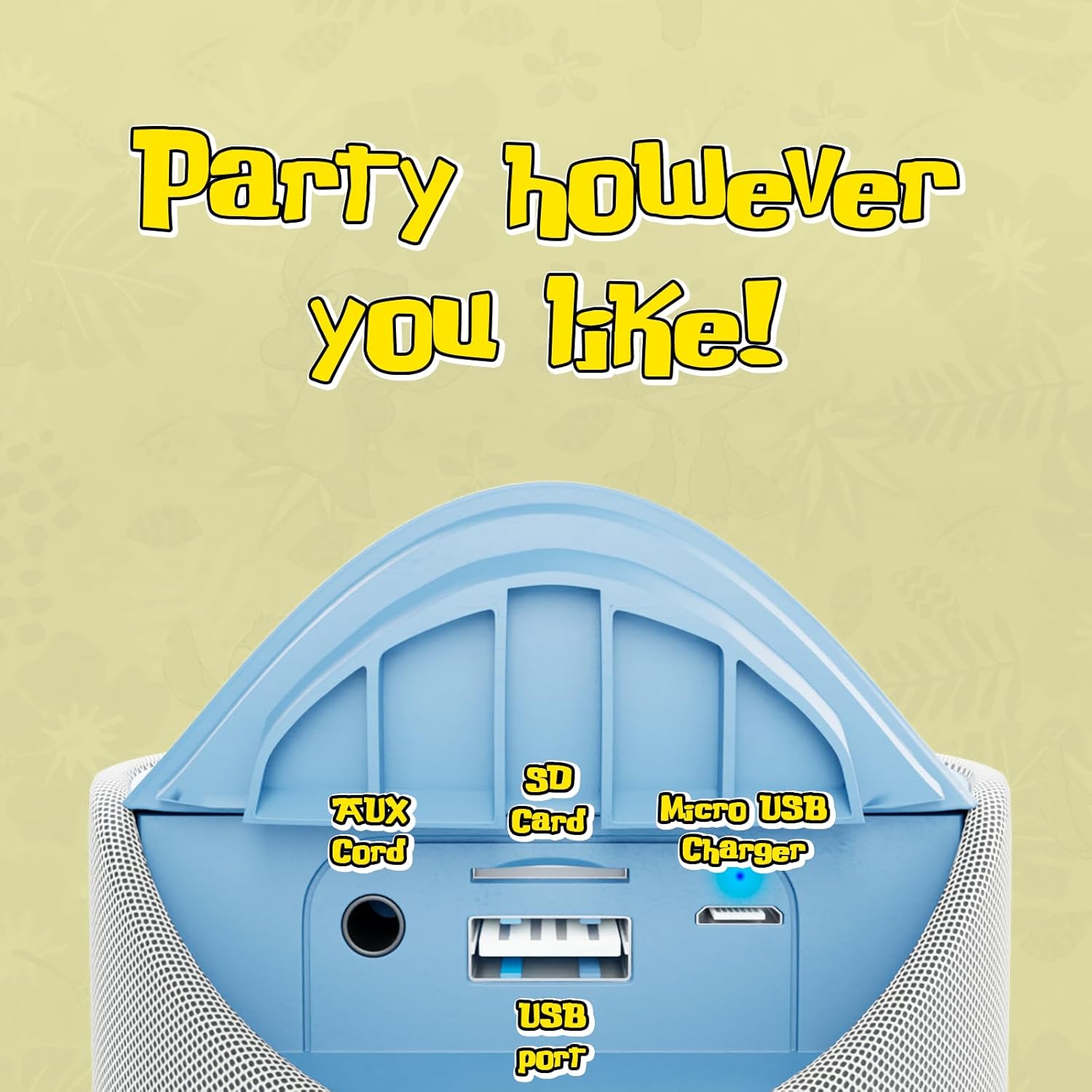
Image 3.1: Top panel of the speaker displaying the control buttons. These include Volume Down (-), Volume Up (+), Play/Pause/Call Answer, Mode Switch (M), and Power On/Off.
- Butonul de pornire (⏻): Apăsați și mențineți apăsat pentru a porni sau opri difuzorul.
- Buton Redare/Pauză/Apelare (⏸): Press to play or pause audio. Press to answer or end a phone call.
- Buton de reducere a volumului (−): Apăsați pentru a reduce volumul.
- Buton de creștere a volumului (+): Apăsați pentru a mări volumul.
- Buton de comutare a modului (M): Press to cycle through available modes (Bluetooth, FM Radio, SD Card, AUX).
3.2 Porturi și indicatori

Image 3.2: Rear panel of the speaker revealing the various input ports. These include the AUX port, SD Card slot, USB port, and Micro USB charging port.
- Port AUX: Pentru conectarea dispozitivelor audio externe prin intermediul unui cablu audio de 3.5 mm.
- Slot pentru card SD: Pentru redarea audio files directly from an SD memory card.
- Port USB: Pentru redarea audio fileeste direct de pe o unitate flash USB.
- Port de încărcare micro USB: Pentru încărcarea bateriei interne a difuzorului.
- Indicator LED: Indică starea de încărcare și starea de asociere Bluetooth.
4. Configurare și încărcare
4.1 Încărcarea difuzorului
- Connect the Micro USB end of the charging cable to the speaker's Micro USB charging port.
- Conectați capătul USB-A al cablului de încărcare la un adaptor de alimentare USB (nu este inclus) sau la portul USB al unui computer.
- The LED indicator will illuminate to show charging is in progress.
- Charging typically takes approximately 2 hours. The LED indicator will change or turn off once fully charged.
O încărcare completă oferă până la 3 de ore de redare.
4.2 Pornire/Oprire
- Pentru a porni: Apăsați și mențineți apăsat butonul de pornire (⏻) until the speaker indicates it is on (e.g., a sound prompt or LED illumination).
- Pentru a opri: Apăsați și mențineți apăsat butonul de pornire (⏻) again until the speaker indicates it is off.
5. Instrucțiuni de utilizare
5.1 Asociere Bluetooth
- Ensure the speaker is powered on and in Bluetooth mode. If not, press the Mode Switch (M) button until the speaker enters Bluetooth pairing mode (indicated by a flashing LED).
- Pe dispozitivul dvs. (de exemplu, smartphone, tabletă), activați Bluetooth și căutați dispozitivele disponibile.
- Select "iJoy Stitch Speaker" from the list of found devices.
- Once paired, the speaker will indicate a successful connection (e.g., a sound prompt or solid LED).
- Raza de acțiune Bluetooth este de aproximativ 9 metri.
5.2 SD Card / USB Playback
- Insert a formatted SD card or USB flash drive containing audio fileîn slotul corespunzător de pe difuzor.
- Press the Mode Switch (M) button to select SD Card mode or USB mode.
- Difuzorul va începe automat redarea sunetului files din suportul media introdus.
5.3 Radio FM
- Press the Mode Switch (M) button to select FM Radio mode.
- In FM mode, press the Play/Pause button (⏸) to automatically scan and save available radio stations.
- Use the Volume Up (+) și Reducere volum (−) pentru a naviga între posturile salvate.
5.4 Intrare AUX
- Conectați un capăt al unui cablu audio de 3.5 mm (nu este inclus) la portul AUX al difuzorului.
- Conectați celălalt capăt al cablului audio la mufa pentru căști sau la ieșirea audio a dispozitivului extern.
- Press the Mode Switch (M) button to select AUX mode.
- Acum se va reda sunetul prin difuzor de pe dispozitivul conectat.
5.5 Funcții de apel
- When a call is incoming while connected via Bluetooth, press the Play/Pause button (⏸) pentru a răspunde la apel.
- Apăsați butonul Redare / Pauză (⏸) again to end the call.
- To reject an incoming call, press and hold the Play/Pause button (⏸).
6. Întreținere
6.1 Curățare
Ștergeți difuzorul cu o cârpă moale și uscată. Nu utilizați substanțe de curățare abrazive sau solvenți.
6.2 Rezistența la apă
The speaker has an IPX4 water resistance rating, meaning it is protected against splashing water from any direction. It is not designed for submersion in water.
7. Depanare
| Problemă | Soluţie |
|---|---|
| Difuzorul nu pornește. | Asigurați-vă că bateria este încărcată. Conectați difuzorul la o sursă de alimentare folosind cablul Micro USB. |
| Niciun sunet din difuzor. | Check the volume level on both the speaker and your connected device. Ensure the correct mode (Bluetooth, SD, FM, AUX) is selected. |
| Nu se poate conecta prin Bluetooth. | Ensure the speaker is in Bluetooth pairing mode (flashing LED). Make sure your device's Bluetooth is enabled and within 30 feet of the speaker. Try restarting both devices. |
| Recepție radio FM slabă. | Relocate the speaker to an area with better signal. Ensure automatic station scanning has been performed. |
8. Specificații

Image 8.1: Visual representation of the speaker's dimensions, indicating it is approximately 6.3 inches tall and 2.9 inches across.
| Caracteristică | Detaliu |
|---|---|
| Numele modelului | Stitch Speaker |
| Marca | iBucurie |
| Tehnologia de conectivitate | Bluetooth |
| Tehnologia comunicațiilor fără fir | Bluetooth |
| Gama Bluetooth | 30 picioare (9 metri) |
| Tip difuzor | Difuzor Bluetooth portabil |
| Putere maximă de ieșire difuzor | 5 wați |
| Mod ieșire audio | Stereo |
| Sursa de alimentare | Alimentat cu baterie |
| Capacitatea bateriei | 800 Miliamp Ore |
| Timp de încărcare | 2 de ore |
| Timp de joacă | Până la 3 ore |
| Nivel de rezistență la apă | IPX4 (rezistent la apă) |
| Dimensiunile produsului | 3"A x 3"L x 6"Î (aprox. 7.6 cm A x 7.6 cm L x 15.2 cm Î) |
| Greutatea articolului | 8 uncii (aprox. 227 grame) |
| Material | Silicon |
| Metoda de control | Touch (Button Controls) |
| UPC | 810116713943 |
9. Garanție și asistență
The iJoy Stitch Speaker comes with a 90-Day Manufacturer Warranty. For warranty claims or technical support, please contact the manufacturer, Quest USA Corp, or refer to the contact information provided with your purchase documentation.
Pentru asistență suplimentară, vă rugăm să vizitați iJoy Store on Amazon.