1. Introducere
Welcome to the user manual for your Optoma HD30LV 1080p Full HD Home Projector. This document provides essential information for the safe and efficient operation of your device. Please read these instructions carefully before using the projector and retain them for future reference.
2. Produs terminatview
The Optoma HD30LV is designed to deliver a high-quality visual experience for home theater and gaming. It features 1080p Full HD resolution, 4K HDR input compatibility, and a compact design for versatile placement.
Caracteristici cheie:
- 4,500 lumeni: Provides bright images suitable for various lighting conditions.
- 4K UHD and HDR Compatible: Supports high-resolution and high dynamic range content for enhanced detail and color.
- Portabil și ușor: Designed for easy transport and flexible installation.
- Mod de joc îmbunătățit: Offers lightning-fast response times for a smooth gaming experience.
- Dual HDMI Connectors: Allows connection to multiple devices simultaneously.
Ce este în cutie:
- Optoma HD30LV Projector
- Cablu de alimentare
- Telecomanda
- Manual de utilizare (acest document)
Elemente vizuale ale produsului:

Faţă view of the Optoma HD30LV projector, showcasina lentilei și a ventilației.

Top view of the Optoma HD30LV projector, showing the control panel and focus/zoom adjustments.
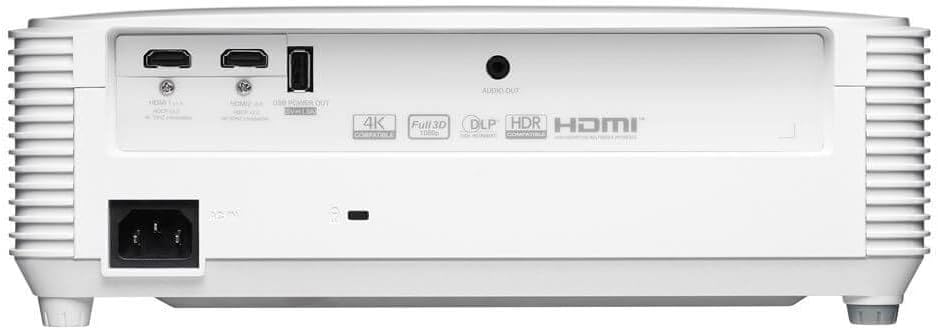
Spate view of the Optoma HD30LV projector, detailing the input and output ports.
Video produs:
Un produs oficial pesteview video demonstrating the features and design of the Optoma HD30LV projector.
3. Configurare
3.1 Despachetarea și plasarea
- Scoateți cu grijă proiectorul și toate accesoriile din ambalaj.
- Place the projector on a stable, flat surface or mount it securely according to the manufacturer's guidelines. Ensure adequate ventilation around the unit.
- Consider the throw distance for your desired screen size. The HD30LV can project a 120-inch image from approximately 13 feet 10 inches (4.22 meters) away.

Diagram illustrating recommended throw distances for 100-inch and 120-inch screen sizes for the HD30LV projector.
3.2 Conectarea dispozitivelor
The HD30LV features multiple connectivity options. Refer to the diagram below for port locations.

Detaliat view of the Optoma HD30LV projector's dimensions and labeled connectivity ports, including HDMI and USB.
- Putere: Connect the power cable to the projector and a suitable power outlet.
- HDMI: Use an HDMI cable to connect your video source (e.g., Blu-ray player, gaming console, streaming device) to one of the two HDMI 2.0 ports.
- Ieșire USB: A USB port (5V/1.5A) is available for powering compatible devices.
- Ieșire audio: Connect external audio systems via the 3.5mm stereo audio jack if desired.
- Blocare Kensington: For security, a Kensington lock slot is provided.
4. Instrucțiuni de utilizare
4.1 Pornire/Oprire
- Apăsați butonul de alimentare de pe proiector sau de pe telecomandă pentru a porni unitatea.
- Pentru a opri, apăsați din nou butonul de pornire. Confirmați oprirea dacă vi se solicită.
4.2 Ajustarea imaginii
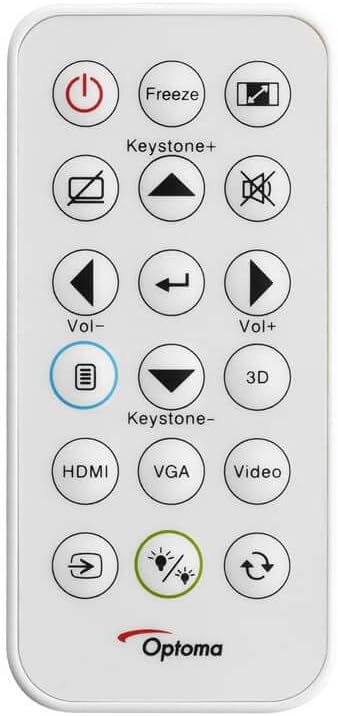
The remote control for the Optoma HD30LV projector, showing buttons for power, input, keystone, volume, and 3D functions.
- Focus: Rotiți inelul de focalizare de pe obiectiv până când imaginea este clară și ascuțită.
- Zoom: Reglați inelul de zoom de pe obiectiv pentru a modifica dimensiunea imaginii fără a mișca proiectorul.
- Corecție trapezoială: Use the 'Keystone+' and 'Keystone-' buttons on the remote control or the projector's control panel to correct trapezoidal image distortion.
- Sursa de intrare: Press the 'HDMI' button on the remote or the 'Source' button on the projector to cycle through available input sources.
4.3 Enhanced Features
- 4K HDR Input: The projector is compatible with 4K HDR signals, providing enhanced contrast and color. Ensure your source device is configured to output HDR.
- Mod de joc îmbunătățit: Activate this mode through the projector's menu for reduced input lag, optimizing your gaming experience.
- Full 3D: The projector supports Full 3D content from compatible sources. Active DLP Link 3D glasses (sold separately) are required for 3D viewing.

Visual comparison of different resolutions (SD, HD, Full HD 1080p) to demonstrate the clarity of the HD30LV's native 1080p output.
5. Întreținere
Întreținerea regulată asigură performanțe optime și prelungește durata de viață a proiectorului.
- Curățarea lentilei: Folosiți o lavetă moale, fără scame, special concepută pentru lentile optice. Evitați materialele abrazive sau substanțele chimice dure.
- Cleaning the Projector Casing: Ștergeți exteriorul cu un material moale, damp pânză. Nu utilizați agenți de curățare abrazivi sau solvenți.
- Ventilare: Ensure the projector's ventilation openings are clear and unobstructed to prevent overheating. Do not block air vents.
- Depozitare: Când nu este utilizat pentru perioade lungi de timp, depozitați proiectorul într-un loc răcoros și uscat, ferit de praf și temperaturi extreme.
6. Depanare
If you encounter issues with your Optoma HD30LV projector, refer to the following common problems and solutions:
| Problemă | Soluție posibilă |
|---|---|
| Nu este afișată nicio imagine | Check power connections. Ensure the correct input source is selected. Verify the video cable is securely connected. |
| Imaginea este neclară | Adjust the focus ring on the lens. Ensure the projection surface is flat and the projector is stable. |
| Imaginea este trapezoidală | Use the keystone correction function on the remote or projector control panel. Position the projector perpendicular to the screen if possible. |
| Nici un sunet | Check volume settings on the projector and source device. Ensure external audio systems are correctly connected and powered on. |
| Proiectorul se supraîncălzește sau se oprește | Ensure ventilation openings are clear. Operate the projector in a well-ventilated area. |
For more detailed troubleshooting or issues not listed here, please refer to the comprehensive support section on the Optoma website-ul sau contactați asistența pentru clienți.
7. Specificații
| Caracteristică | Detaliu |
|---|---|
| Numărul de model | HD30LV |
| Rezoluția afișajului | 1920 x 1080 (1080p Full HD) |
| Luminozitate | 4,500 lumeni |
| Tehnologia de conectivitate | HDMI, USB |
| Caracteristici speciale | 4K HDR Input, Compact Size, Full 3D, High Brightness, Low Input Lag |
| Dimensiunile produsului | 9.61 x 12.44 x 4.25 inchi (244 x 316 x 108 mm) |
| Greutatea articolului | 6.35 lire (2.88 kg) |
| Producător | Optoma Technology Inc |
| baterii | Necesită 1 baterie litiu-metal (inclusă pentru telecomandă) |
8. Garanție și asistență
For information regarding your product's warranty, please refer to the warranty card included with your projector or visit the official Optoma website. Optoma provides customer support for technical assistance, service, and parts.
Suport online: Vizitați Optoma Support Page for FAQs, downloads, and contact information.
Informații de contact: Refer to your product packaging or the Optoma website pentru cele mai recente date de contact ale serviciului clienți.


