Introducere
This manual provides detailed instructions for the operation and maintenance of your TONOR K61 Karaoke Machine. Please read this manual thoroughly before using the product to ensure proper function and longevity. Keep this manual for future reference.
Produs terminatview
The TONOR K61 is a portable PA speaker system designed for various audio applications, including karaoke, music playback, and public address. It features wireless microphone connectivity, dynamic lighting effects, and multiple input options.
- Stable Multi-Connection: Equipped with Bluetooth 5.0 for reliable wireless transmission, and supports Micro TF card and USB flash drive connections. An Aux input is also available.
- High-Definition Stereo: Features two 6.5-inch woofers and two 2.5-inch tweeters, providing clear audio with built-in stereo and bass boost.
- Efecte de lumină dinamice: Offers six distinct lighting modes that synchronize with music rhythm to enhance ambiance.
- Baterie puternică: Integrated 3600mAh lithium-ion battery provides up to five hours of continuous music playback at moderate volume.
- Multi-Function Microphones: Includes two UHF wireless microphones with automatic pairing and clear sound. The speaker also has two additional microphone jacks for wired connections.
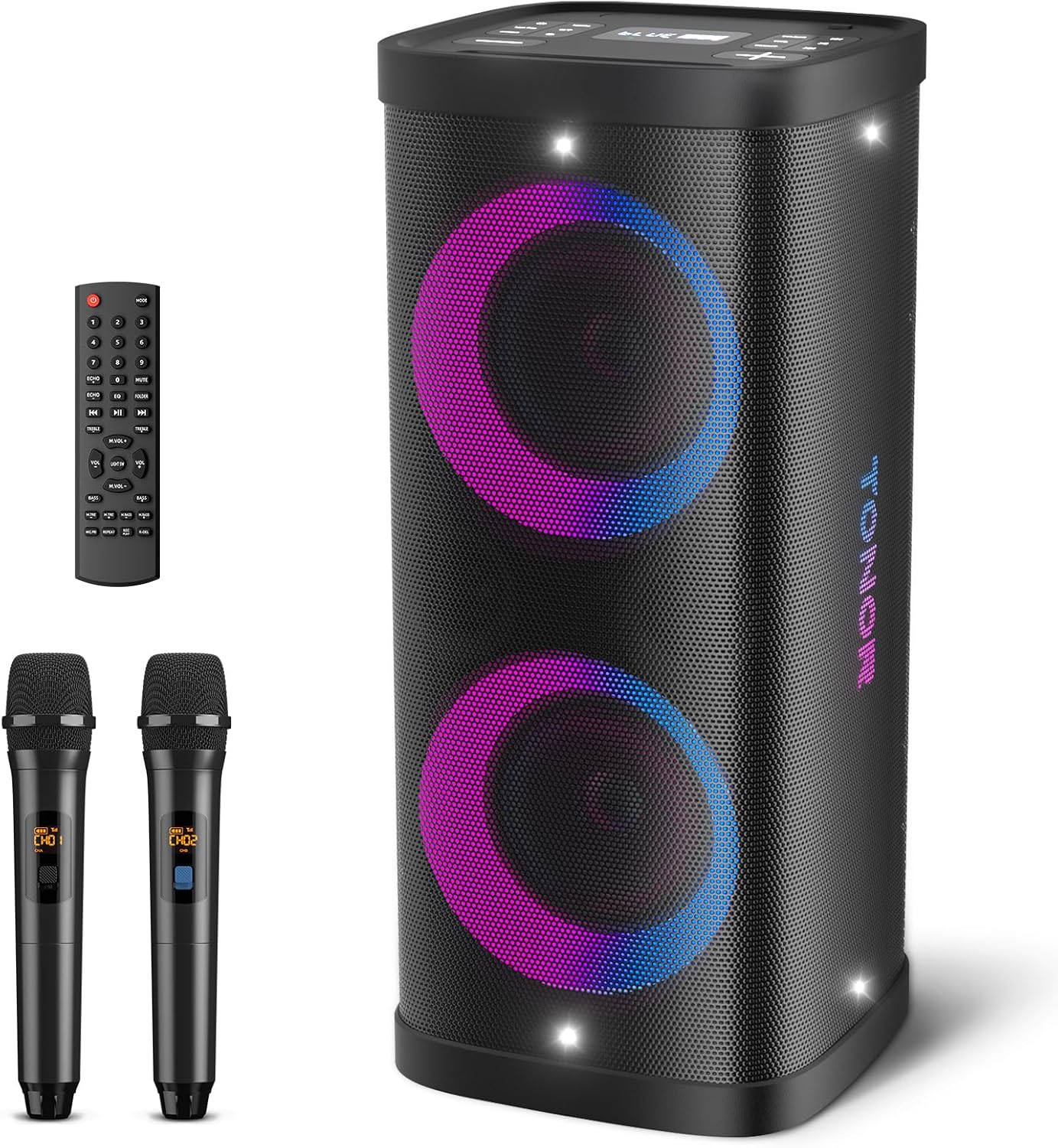
Figure 1: TONOR K61 Karaoke Machine with included wireless microphones and remote control.
Conținutul pachetului
Verificați dacă toate articolele sunt prezente în colet:
- TONOR K61 Portable PA Speaker
- UHF Wireless Microphones (x2)
- Telecomanda
- Cablu de încărcare USB
- Cablu auxiliar
- Manual de utilizare

Figure 2: All components included with the TONOR K61 Karaoke Machine.
Înființat
- Încărcarea difuzorului: Connect the provided USB charging cable to the speaker's Type-C port and a compatible USB power adapter (not included). The battery indicator on the control panel will show charging status. Ensure the speaker is fully charged before first use for optimal battery life.
- Pornire: Locate the power switch on the control panel (refer to Figure 3). Flip the switch to the "ON" position. The display will illuminate, indicating the speaker is active.
- Configurare microfon:
- Insert 2 AA batteries into each wireless microphone (batteries not included).
- Press and hold the power button on each microphone. The microphones will automatically pair with the speaker upon activation.
- For wired microphones, connect them to the MIC 1 or MIC 2 jacks on the control panel.
- Asociere Bluetooth:
- Ensure the speaker is in Bluetooth mode (indicated by "BLUE" on the display). If not, press the "MODE" button to cycle through input modes.
- On your smartphone or other Bluetooth-enabled device, search for "TONOR K61" in the Bluetooth settings.
- Select "TONOR K61" to pair. A confirmation tone will sound from the speaker upon successful pairing.

Figure 3: Top control panel of the TONOR K61, showing input ports and function buttons.
Instrucțiuni de operare
Funcțiile panoului de control:
- Butonul MOD: Cycles through input modes (Bluetooth, TF Card, USB, Aux).
- Redare/Pauză: Controlează redarea media.
- Anterioara Urmatoarea: Sare la piesa anterioară sau următoare.
- Butoane de volum: Adjust master volume and microphone echo/volume.
- Buton EQ: Parcurge presetările egalizatorului.
- Buton REC: Initiates recording to a connected TF card or USB drive.
- Butonul TWS: Activates True Wireless Stereo pairing with another compatible speaker.
- Buton Mod lumină: Changes the dynamic light effects.
Funcții de control de la distanță:
The included remote control provides comprehensive control over the speaker's functions, including individual microphone volume adjustments, echo, EQ, and light modes. It also features sound effects like applause and whistle.

Figure 4: Remote control for the TONOR K61, offering extended functionality.
Efecte de lumină dinamice:
The speaker features six different lighting modes. Press the Light Mode button on the control panel or remote to cycle through these effects. The lights will flash in sync with the music's rhythm.

Figura 5: Examples of the dynamic light effects available on the TONOR K61.
Funcționalitate Karaoke:
Connect your smartphone or tablet via Bluetooth and use a karaoke app or YouTube to display lyrics. Adjust microphone volume and echo effects to your preference using the control panel or remote.
Video 1: Demonstration of the TONOR K61 Karaoke Machine in use, showcasing microphone clarity and light synchronization. This video illustrates the product's primary function and user experience.
Întreţinere
- curatenie: Folosiți o lavetă moale și uscată pentru a curăța exteriorul difuzorului. Nu utilizați produse de curățare abrazive sau solvenți.
- Depozitare: Depozitați difuzorul într-un loc răcoros și uscat, ferit de lumina directă a soarelui și de temperaturi extreme.
- Îngrijirea bateriei: Pentru depozitare prelungită, încărcați bateria la aproximativ 50% la fiecare trei luni pentru a menține starea de funcționare a acesteia.
- Expunerea la apă: While designed for outdoor use, avoid submerging the speaker in water. Wipe off any moisture immediately.
Depanare
| Problemă | Soluţie |
|---|---|
| Fără putere | Ensure the power switch is ON. Charge the speaker battery. |
| Niciun sunet de la difuzor | Check master volume. Ensure correct input mode is selected. Verify Bluetooth connection. |
| Niciun sunet de la microfon | Ensure microphones are powered ON and have fresh batteries. Check microphone volume. Verify wireless connection or wired connection for wired mics. |
| Bluetooth nu se conectează | Ensure speaker is in Bluetooth mode. Turn off and on Bluetooth on your device. Move device closer to speaker. |
| Luminile nu funcționează | Press the Light Mode button to activate or change effects. |
Specificații
| Caracteristică | Detaliu |
|---|---|
| Marca | TONOR |
| Model | K61 (Button Type) |
| Dimensiunile produsului | 10.43 x 10.43 x 23.23 inci |
| Greutatea articolului | 23.2 lire sterline |
| Tehnologia de conectivitate | Bluetooth 5.0, Aux, Micro TF Card, USB |
| Dispozitive compatibile | Smartphone, Tablet, MP3 Players |
| Capacitatea bateriei | 3600mAh |
| Redare continuă | Până la 5 ore (la 80% volum) |
| Tip microfon | UHF Wireless (x2 included) |
| Dimensiune woofer | 6.5 inci (x2) |
| Dimensiunea tweeterului | 2.5 inci (x2) |
Garanție și suport
For warranty information or technical support, please refer to the contact details provided in your product packaging or visit the official TONOR webPăstrați bonul fiscal ca dovadă a achiziției.


