1. Introducere
This manual provides essential information for the safe and efficient operation of your Fenton RP118B Bluetooth Turntable. Please read it thoroughly before using the device and retain it for future reference.

Image 1.1: The Fenton RP118B Bluetooth Turntable in its open position, showcasing a vinyl record ready for playback.
2. Instrucțiuni de siguranță
- Sursa de alimentare: Asigurați-vă că sursa de alimentare corespunde volumuluitage specificat pe unitate.
- Apă și umiditate: Nu expuneți unitatea la ploaie sau umezeală. Nu așezați obiecte umplute cu lichide, cum ar fi vaze, pe unitate.
- Ventilare: Asigurați o ventilație adecvată. Nu acoperiți orificiile de ventilație.
- Căldură: Nu amplasați unitatea în apropierea surselor de căldură, cum ar fi calorifere, registre de căldură, sobe sau alte aparate (inclusiv ampliificatori) care produc căldură.
- curatenie: Curățați numai cu o cârpă uscată.
- Service: Pentru toate lucrările de întreținere, adresați personalului de service calificat.
3. Conținutul pachetului
Verificați dacă toate articolele sunt prezente la despachetare:
- Fenton RP118B Bluetooth Turntable
- Adaptor de alimentare
- USB Cable (for PC encoding)
- Manual de instructiuni
4. Produs terminatview
The Fenton RP118B turntable is designed for playing vinyl records. Its black polyurethane leather suitcase design provides a classic aesthetic. This turntable offers three playback speeds (33, 45, and 78 RPM). It features integrated stereo speakers for clear sound reproduction. Bluetooth connectivity allows for connecting external speakers, headphones, and other devices. The PC encoding function via USB enables conversion of vinyl records to MP3 files for digital archiving. The turntable includes a tonearm with manual or automatic stop functionality and a 3.5mm AUX input. Its belt drive system ensures stable record playback. The RP118B combines traditional vinyl playback with modern features in a compact format.

Imaginea 4.1: Pesteview of the Fenton RP118B's key features, including USB encoding, headphone output, integrated speakers, Bluetooth, and Line In.
4.1. Controale și conexiuni

Imaginea 4.2: Detaliată view of the turntable's control panel and connection ports.
- platou: Supports the vinyl record.
- Arme de ton: Ține stylusul și urmărește canelurile discului.
- Stylus/Needle: Citește informațiile audio de pe înregistrare.
- Selector de viteză: Comutați între 33, 45 și 78 RPM.
- Comutator de oprire automată: Enables or disables automatic tonearm stop at the end of a record.
- Buton de alimentare/volum: Pornește/oprește unitatea și ajustează volumul difuzorului.
- Indicator luminos: Afișează starea alimentării și a Bluetooth-ului.
- Jack pentru căști: Pentru conectarea căștilor.
- Line In (AUX) Jack: Pentru conectarea surselor audio externe.
- Port USB: For PC connection for MP3 encoding.
- Line Out (RCA) Jacks: Pentru conectarea la dispozitive externe ampsuflante sau difuzoare alimentate.
- Intrare DC 5V: Pentru conectarea adaptorului de alimentare.
- BT OUT/PHONO/BT IN Switch: Selects Bluetooth transmission, Phono output, or Bluetooth reception mode.
5. Configurare
5.1. Despachetarea și plasarea
- Scoateți cu grijă platanul din ambalaj.
- Place the unit on a stable, level surface away from direct sunlight, heat sources, and excessive dust or vibration.
- Remove any protective materials from the tonearm and stylus.
5.2. Conexiune la alimentare
- Connect the DC 5V power adapter to the DC 5V input port on the turntable.
- Conectați adaptorul la o priză de perete adecvată.
5.3. External Audio Connections (Optional)
- To External Speakers/Ampmai în viață: Connect RCA cables (not included) from the "Line Out" jacks on the turntable to the audio input of your ampamplificator sau difuzoare amplificate.
- To Headphones: Conectați căști de 3.5 mm la mufa pentru căști.
- From External Audio Source (AUX In): Connect a 3.5mm audio cable (not included) from your external device (e.g., MP3 player, smartphone) to the "Line In" jack on the turntable.
6. Instrucțiuni de utilizare
6.1. Redarea unui disc de vinil
- Deschideți capacul platanului rotativ.
- Pune un disc de vinil pe platou.
- Selectați viteza corespunzătoare (33, 45 sau 78 RPM) folosind comutatorul selector de viteză. Pentru discuri de 45 RPM, plasați adaptorul de 45 RPM inclus pe ax.
- Rotiți butonul de Pornire/Volum în sensul acelor de ceasornic pentru a porni unitatea.
- Set the BT OUT/PHONO/BT IN switch to "PHONO" mode.
- Lift the tonearm using the cue lever and position it over the desired track of the record.
- Gently lower the tonearm onto the record using the cue lever. The record will begin to play.
- Reglați volumul folosind butonul Pornire/Volum.
- At the end of the record, if the Auto Stop switch is ON, the platter will stop rotating. If OFF, the platter will continue to rotate, and you must manually lift the tonearm.
- Pentru a opri redarea, ridicați brațul și readuceți-l în poziția sa de repaus.

Image 6.1: The three-speed turntable platter, capable of playing 33 1/3, 45, and 78 RPM records.
6.2. Bluetooth Reception (BT IN)
Use this function to stream audio from your smartphone or tablet to the turntable's built-in speakers.
- Rotiți butonul de Pornire/Volum în sensul acelor de ceasornic pentru a porni unitatea.
- Set the BT OUT/PHONO/BT IN switch to "BT IN" mode. The indicator light will flash, indicating pairing mode.
- Enable Bluetooth on your smartphone or tablet and search for "Fenton RP118B" (or similar).
- Select the turntable from the list of available devices to pair. Once paired, the indicator light will stop flashing and remain solid.
- Play music from your device. Audio will be streamed through the turntable's speakers.
- Reglați volumul folosind butonul Pornire/Volum de pe platan și/sau de pe dispozitivul conectat.

Image 6.2: The turntable utilizing Bluetooth wireless technology to receive audio from a smartphone.
6.3. Bluetooth Transmission (BT OUT)
Use this function to stream audio from your playing vinyl record to external Bluetooth speakers or headphones.
- Ensure your external Bluetooth speaker or headphones are in pairing mode.
- Rotiți butonul de Pornire/Volum în sensul acelor de ceasornic pentru a porni unitatea.
- Set the BT OUT/PHONO/BT IN switch to "BT OUT" mode. The indicator light will flash.
- The turntable will automatically search for and attempt to pair with nearby Bluetooth audio devices.
- După asociere, indicatorul luminos va înceta să clipească.
- Begin playing a vinyl record as described in section 6.1. The audio will be transmitted to your paired Bluetooth device.
- Adjust the volume on your connected Bluetooth speaker or headphones.
6.4. USB Encoding (Vinyl to MP3)
This feature allows you to convert your vinyl records into digital MP3 files pe computerul dvs.
- Conectați platanul la computer folosind cablul USB furnizat.
- Install the necessary recording software on your computer (software typically provided on a CD or available for download from the manufacturer's website-ul).
- Follow the instructions provided with the recording software to capture the audio from your vinyl record.
- Play the vinyl record on the turntable as you would normally. The audio will be sent to your computer for recording.
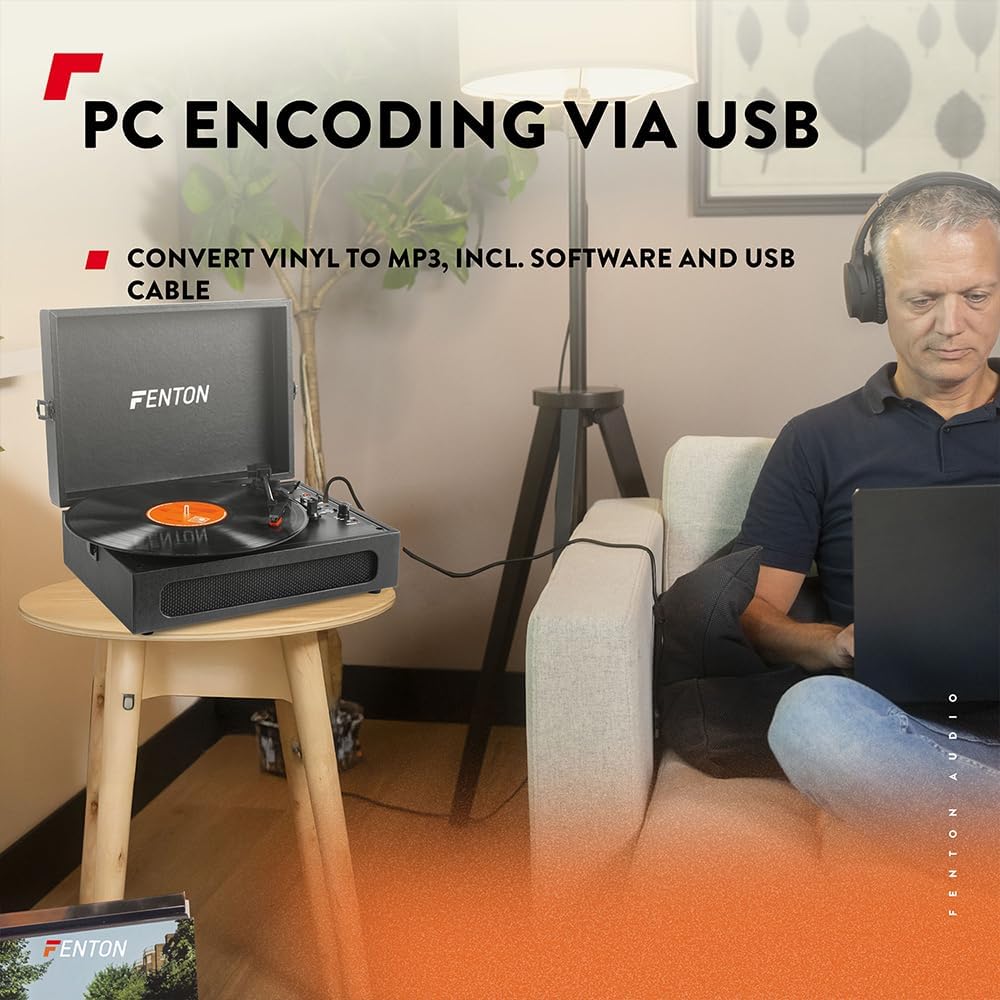
Image 6.3: USB encoding in progress, converting vinyl audio to MP3 files pe un computer.
6.5. Using the AUX Input (Line In)
Connect an external audio device (e.g., smartphone, MP3 player) to the turntable's built-in speakers.
- Connect a 3.5mm audio cable from your external device's headphone or line-out jack to the "Line In" jack on the turntable.
- Rotiți butonul de Pornire/Volum în sensul acelor de ceasornic pentru a porni unitatea.
- Ensure the BT OUT/PHONO/BT IN switch is not in "BT IN" mode (it can be in PHONO or BT OUT, as Line In is a separate input).
- Play audio from your external device. The sound will be routed through the turntable's speakers.
- Reglați volumul folosind butonul Pornire/Volum de pe platan și/sau de pe dispozitivul conectat.
7. Întreținere
7.1. Curățarea platanului rotativ
- Deconectați întotdeauna unitatea de la priză înainte de curățare.
- Folosiți o lavetă moale și uscată pentru a șterge suprafețele exterioare. Nu utilizați produse de curățare abrazive, ceruri sau solvenți.
- Gently brush the stylus with a soft brush designed for stylus cleaning, moving from back to front.
- Păstrați capacul anti-praf închis atunci când nu îl utilizați pentru a preveni acumularea de praf.
7.2. Înlocuirea stylusului
The stylus is a consumable part and will wear out over time. A worn stylus can damage your records and degrade sound quality. Replace the stylus after approximately 300-500 hours of playback, or if you notice a significant drop in sound quality or visible damage.
- Consult the manufacturer's website or your retailer for compatible replacement styli.
- Follow the instructions provided with the replacement stylus for proper installation.
8. Depanare
| Problemă | Cauza posibila | Soluţie |
|---|---|---|
| Fără putere | Power adapter not connected; Power outlet not working; Power/Volume knob off. | Ensure power adapter is securely connected. Try a different outlet. Turn Power/Volume knob clockwise to ON. |
| Fără sunet din difuzoare | Volume too low; BT OUT/PHONO/BT IN switch in incorrect position; Headphones connected. | Increase volume. Set switch to "PHONO" for vinyl or "BT IN" for Bluetooth reception. Disconnect headphones. |
| Sunet distorsionat sau cu sărituri | Record dirty or damaged; Stylus worn or dirty; Turntable not level. | Clean record. Clean or replace stylus. Place turntable on a level surface. |
| Probleme de asociere Bluetooth | Device too far; Turntable not in pairing mode; Incorrect BT mode selected. | Move device closer. Ensure turntable is in "BT IN" (for reception) or "BT OUT" (for transmission) mode and indicator is flashing. Restart both devices. |
| Record stops prematurely (Auto Stop) | Auto Stop switch is ON. | This is normal operation. If you prefer continuous rotation, set the Auto Stop switch to OFF. |
9. Specificații
| Marca | Fenton |
| Numărul de model | RP118B |
| Culoare | Negru |
| Material | Poliuretan |
| Tip motor | Condus de centură |
| Viteze de redare | 33 1/3, 45, 78 RPM |
| Dispozitive compatibile | Personal computer, MP3 player, smartphone, headphones, speakers, tablet |
| Versiune Bluetooth | 5.0 (for reception and transmission) |
| Funcționalitate USB | PC encoding (Vinyl to MP3) |
| Ieșiri audio | RCA Line Out, 3.5mm Headphone Jack |
| Intrări audio | Intrare AUX de 3.5 mm |
| Boxe integrate | Yes, stereo |
| Greutatea articolului | 3.25 kilograme |
| Alimentare electrică | DC 5V (Adapter included) |

Image 9.1: Dimensions of the Fenton RP118B turntable.
10. Garanție și asistență
For warranty information, please refer to the documentation included with your purchase or visit the official Fenton website. For technical support or service inquiries, please contact your retailer or the manufacturer directly.
Producător: Tronios BV


