1. Introducere
This manual provides detailed instructions for the installation, operation, and maintenance of your Anpviz 6MP PTZ PoE IP Security Camera. Please read this manual thoroughly before using the product to ensure proper functionality and safety.
Caracteristici cheie:
- Rezoluție 6MP: Captures clear video at 3072x2048@25fps.
- Zoom optic 20X: Allows for detailed remote monitoring.
- Rotație panoramică la 360° și înclinare la 90°: Provides comprehensive coverage with remote control.
- Detectarea oamenilor și a vehiculelor prin inteligență artificială: Advanced intelligence for accurate alerts.
- Urmărire automată: Automatically follows detected subjects.
- Audio bidirecțional: Microfon și difuzor încorporate pentru comunicare.
- Viziune nocturnă inteligentă în culori: Offers three night vision modes including full-color in low light conditions up to 300ft.
- IP66 Impermeabil: Durable design for outdoor and indoor use.
- Conectivitate PoE: Simplifies installation with power and data over a single Ethernet cable.

Figure 1: Anpviz 6MP PTZ PoE IP Security Camera
2. Ce se află în cutie?
Verificați dacă toate componentele sunt prezente la despachetare:
- 1 x Anpviz 6MP PTZ PoE IP Camera
- 1 x adaptor de alimentare
- 1 x Screw Pack for mounting
- 1 x Autocolant de avertizare
- 1 x Waterproof Lid for cable connections

Figura 2: Componente incluse
3. Configurare
3.1 Instalare fizică
The camera is designed for wall mounting. Ensure the mounting surface is strong enough to support the camera's weight (4.64 pounds). Use the provided screws for secure installation.
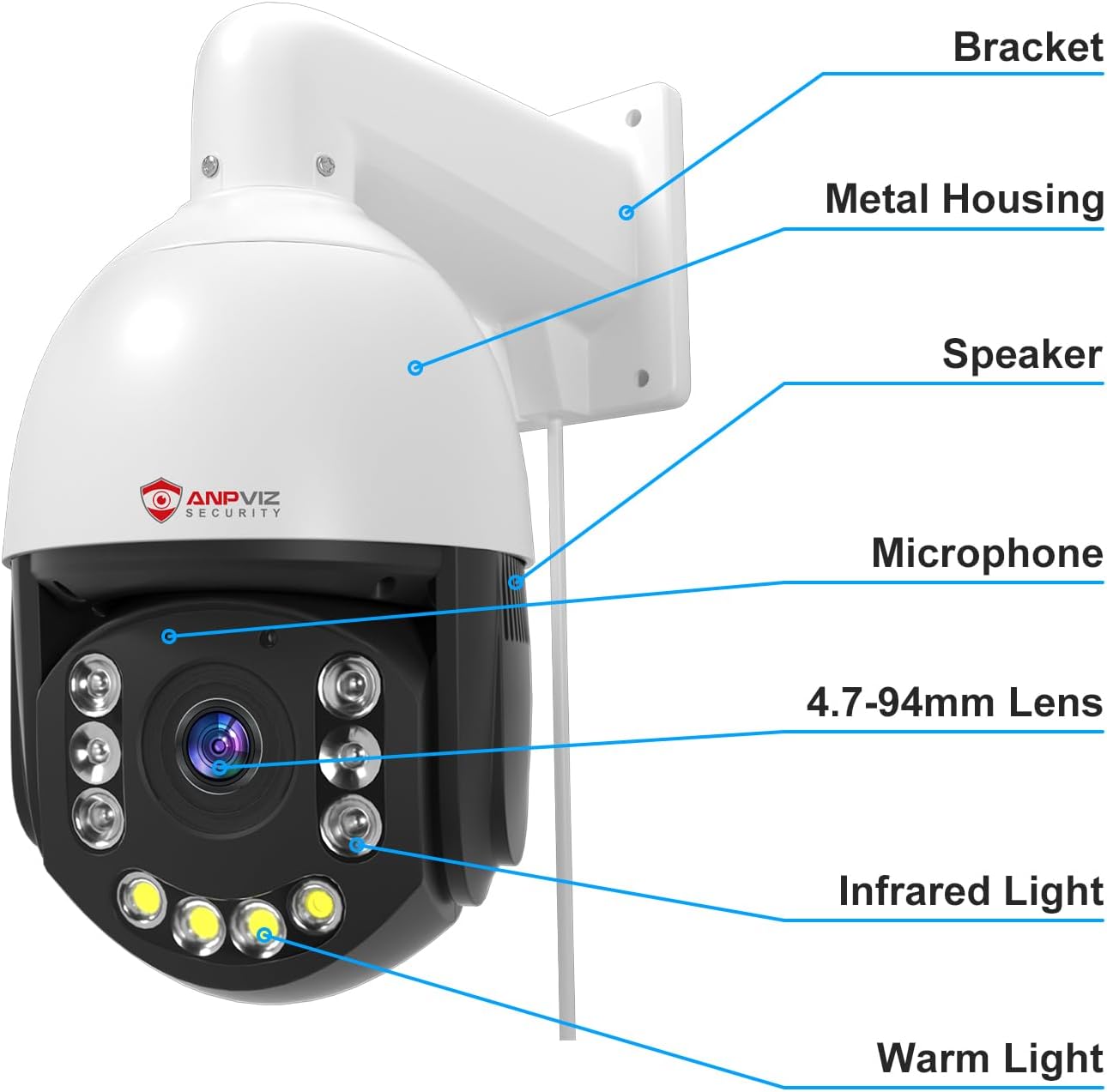
Figure 3: Camera components and mounting bracket
3.2 Conectarea la rețea și la alimentare
This camera supports Power over Ethernet (PoE), allowing both power and data transmission through a single Ethernet cable. Connect the camera to a PoE-enabled switch or NVR. Alternatively, use the included power adapter if PoE is not available.
3.3 Initial Configuration with SearchTools
To locate and configure your camera on the network, use the Anpviz SearchTools software. This tool helps discover the camera's IP address and allows for initial setup.
Video 1: This video demonstrates how to download and use the SearchTools software to find your camera on the network for initial setup.
4. Instrucțiuni de utilizare
The Anpviz PTZ camera offers various functionalities for comprehensive surveillance.
4.1 Controlul Panoramic, Tilt și Zoom (PTZ)
Camera dispune de funcții de panoramare la 360° și înclinare la 90°, permițându-vă să reglați de la distanță... viewing angle. The 20X optical zoom provides clear magnification of distant objects.
Video 2: This video illustrates the 360° pan and 90° tilt functions, along with the 20X optical zoom capability of the camera.

Figure 4: 360° Pan and 90° Tilt for wide area coverage
Video 3: This video showcases the 20X optical zoom feature, demonstrating its ability to magnify distant details clearly.

Figure 5: 20X Optical Zoom in action
4.2 AI Human and Vehicle Detection & Auto Tracking
The camera utilizes advanced AI to distinguish between humans and vehicles, reducing false alarms. When a human or vehicle is detected, the camera can automatically track its movement.

Figure 6: AI Human and Vehicle Detection alerts

Figure 7: Visual representation of person and vehicle detection
4.3 Sunet bidirecțional
Communicate with visitors or deter intruders using the built-in microphone and speaker. This feature allows for real-time two-way conversations through the camera.

Figure 8: Two-Way Audio interaction with a delivery person
4.4 Viziune nocturnă inteligentă color
The camera offers three night vision modes: Smart Color Night Vision (default), Color Night Vision (full-time color), and IR Night Vision (black and white). In Smart Color mode, the camera's lights activate upon person/vehicle detection, providing color video.

Figure 9: Smart Color Night Vision with spotlight activation

Figure 10: Motion detection triggering spotlight for color night vision
4.5 Preset and Cruise Functions
Configure preset positions for the camera to quickly move to specific areas. Combine with patrol mode to automatically cycle through a sequence of presets, ensuring continuous monitoring of critical zones.

Figure 11: Smart Playback via Videolink APP
5. Întreținere
5.1 Curățare
Curățați regulat obiectivul și carcasa camerei cu o lavetă moale șiamp cloth. Avoid using harsh chemicals or abrasive materials that could damage the camera's finish or lens coating.
5.2 de actualizări de firmware
Verificați periodic Anpviz website for firmware updates. Keeping your camera's firmware up-to-date ensures optimal performance, security, and access to new features.
6. Depanare
6.1 Fără flux video
- Verificați puterea: Ensure the camera is receiving power, either via PoE or the power adapter.
- Conexiune retea: Verify the Ethernet cable is securely connected and the network is operational.
- Adresa IP: Use SearchTools to confirm the camera's IP address and ensure it's not conflicting with other devices.
6.2 PTZ Control Not Responding
- Software/Aplicație: Ensure you are using the correct and updated control software or mobile application.
- Latența rețelei: High network latency can affect real-time control. Check your network speed.
- Ciclu de alimentare: Disconnect and reconnect power to the camera to restart it.
6.3 Poor Night Vision Quality
- Curățenia lentilei: Curățați obiectivul camerei pentru a îndepărta murdăria sau petele.
- Obstrucții: Ensure there are no obstructions blocking the infrared or warm lights.
- Selectarea modului: Verify the correct night vision mode is selected (Smart Color, Color, or IR) based on your environment.
7. Specificații
| Caracteristică | Detaliu |
|---|---|
| Numele modelului | PTZIP46620ED-SA-US |
| Rezoluţie | 6MP (3072x2048@25fps) |
| Zoom optic | 20X |
| Pan Range | 360 de grade |
| Interval de înclinare | 90 de grade |
| Detectare | AI Human/Vehicle Detection, Auto-Tracking |
| Audio | Sunet bidirecțional (microfon și difuzor încorporate) |
| Vedere de noapte | 300ft Smart Color Night Vision (Smart Color/Color/IR) |
| Conectivitate | Wired PoE |
| Sursa de alimentare | Corded Electric, PoE |
| Rezistență la intemperii | IP66 rezistent la apa |
| Material | Metal |
| Dimensiuni (L x l x H) | 8 x 4 x 10 inci |
| Greutate | 4.64 lire sterline |
| Temperatura de operare | -22°F (-30°C) până la 140°F (60°C) |

Figure 12: IP66 Waterproof and temperature resistance
8. Garanție și asistență
8.1 Informații despre garanție
Anpviz products typically come with a manufacturer's warranty. Please refer to the warranty card included with your product or visit the official Anpviz website-ul pentru termenii și condițiile specifice de garanție.
8.2 Suport tehnic
For technical assistance, troubleshooting, or any questions regarding your Anpviz security camera, please contact Anpviz customer support. Contact information can usually be found on the official website-ul sau în ambalajul produsului.
Video 4: This video highlights the IP66 waterproof rating, demonstrating the camera's durability for outdoor and indoor environments.


