1. Introducere
This manual provides essential information for the proper setup, operation, and maintenance of your YUBWVO W50 Laptop Stand. Please read these instructions carefully before using the product to ensure optimal performance and longevity.

Figure 1: YUBWVO W50 Laptop Stand with a laptop.
2. Caracteristicile produsului
- Baza rotativa la 360°: The stand features a 360° rotatable axis, allowing for easy screen sharing and collaborative work.
- Ajustare ergonomică: Easily lifts your laptop to an ergonomic eye level, promoting better posture and reducing neck and back strain.
- Design pliabil și portabil: Designed for convenience, the stand can be fully folded for easy storage and transport.
- Disipare îmbunătățită a căldurii: An X-shape design combined with a 100% aluminum alloy body ensures optimal ventilation and airflow, preventing laptop overheating.
- Compatibilitate largă: Compatible with most laptops and portable monitors ranging from 11 to 16 inches, including various MacBook, Dell, HP, and Chromebook models.
3. Conținutul pachetului
- 1 x YUBWVO W50 Laptop Stand
- 1 x Manual de utilizare
4. Instrucțiuni de configurare
Follow these steps to set up your YUBWVO W50 Laptop Stand:
- Carefully remove the laptop stand from its packaging.
- Place the folded stand on a stable, flat surface.
- Unfold the base legs to form a stable support structure.
- Extend the main arm of the stand to your desired height and angle. The joints are designed to hold their position firmly.
- Adjust the laptop holding arms to securely cradle your device. Ensure the anti-slip pads are in contact with your laptop.
- Place your laptop or portable monitor onto the stand.
Video: Setup and Adjustment Demonstration
This video demonstrates the unfolding, adjustment, and placement of a laptop and portable monitor on the YUBWVO W50 Laptop Stand, highlighting its versatility and ease of use.
5. Instrucțiuni de utilizare
5.1 Reglarea înălțimii și a unghiului
The YUBWVO W50 Laptop Stand offers multiple points of articulation for customized height and angle adjustments. To adjust:
- Gently hold your device with one hand.
- With the other hand, carefully move the stand's arms to achieve your desired viewing height and angle. The joints are designed to be firm to maintain stability.
- Ensure the stand is stable before releasindispozitivul dumneavoastră.

Figure 2: Multi-angle adjustment points.
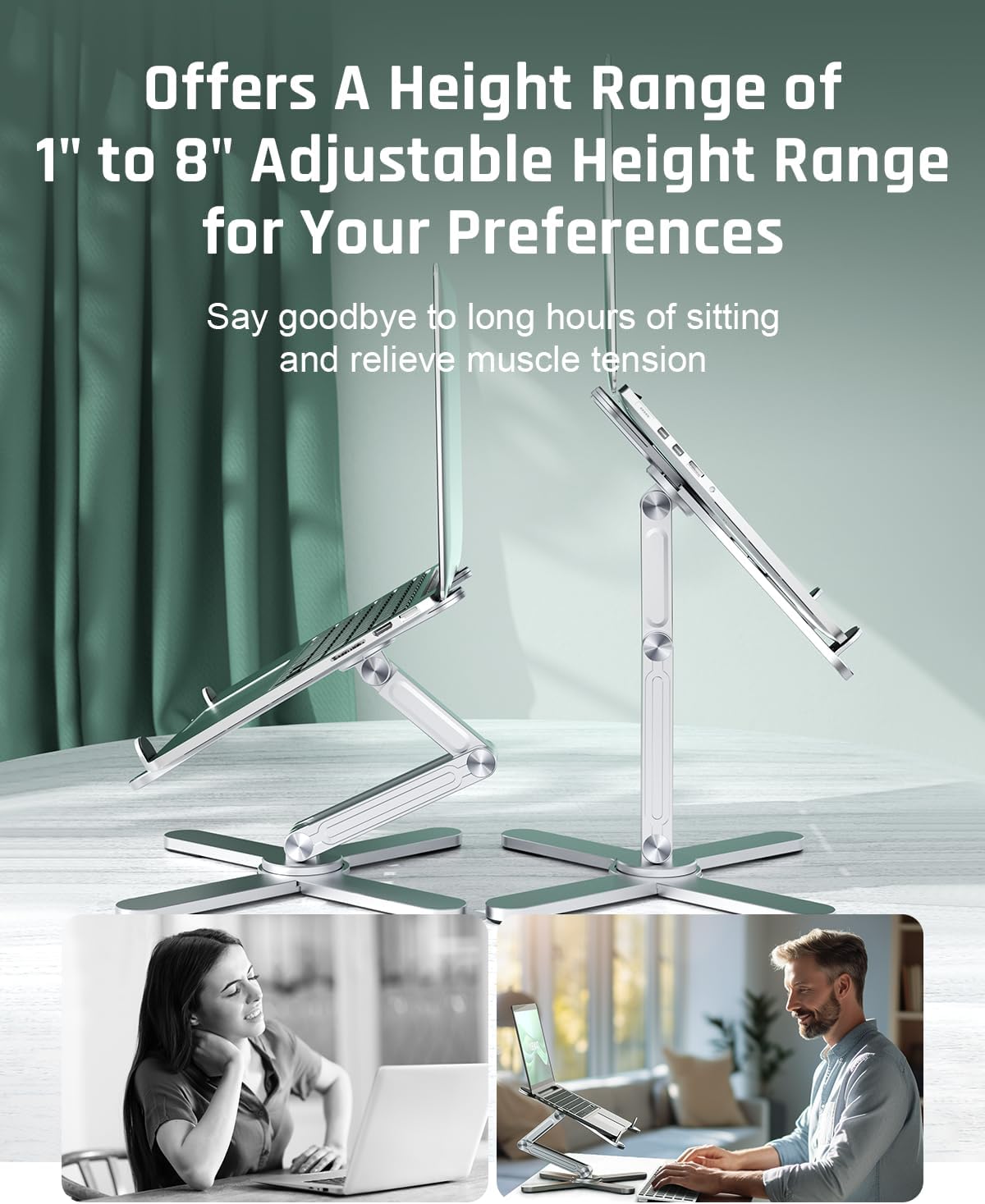
Figure 3: Adjustable height for ergonomic comfort.
5.2 Using the 360° Swivel Base
The base of the stand can rotate 360 degrees, facilitating easy screen sharing and collaborative work environments.
- With your device securely on the stand, gently rotate the base to face the desired direction.
- The smooth rotation allows for quick adjustments without needing to lift or reposition the entire stand.

Figure 4: 360-degree swivel functionality.
5.3 Pliere pentru depozitare
To fold the stand for storage or transport:
- Remove your device from the stand.
- Gently collapse the main arm and then fold the base legs inward until the stand is in its compact form.

Figure 5: Folded dimensions for portability.
6. Întreținere
To ensure the longevity and proper functioning of your YUBWVO W50 Laptop Stand:
- curatenie: Ștergeți suportul cu o lavetă moale,amp pânză. Evitați utilizarea agenților de curățare abrazivi sau a solvenților care pot deteriora finisajul.
- Depozitare: When not in use, fold the stand to its compact size and store it in a dry, cool place away from direct sunlight.
- Inspecţie: Periodically check all joints and connections to ensure they are secure. Do not attempt to over-tighten or disassemble the joints.
7. Depanare
- Standul pare instabil: Ensure all base legs are fully extended and placed on a flat, stable surface. Verify that your device is centered on the stand.
- Difficulty adjusting joints: The joints are designed to be firm to support your device. Apply steady, even pressure when adjusting. Do not force the joints.
- Laptop sliding: Ensure the anti-slip silicone pads on the holding arms are clean and free of debris. Verify your laptop's size is within the compatible range (11-16 inches).
8. Specificații
| Caracteristică | Caietul de sarcini |
|---|---|
| Dimensiunile produsului | 1.5 x 15 x 12 inci (pliat) |
| Greutatea articolului | 2.75 lire sterline |
| Numărul de model al articolului | W50-STAND |
| Material | Aliaj de aluminiu |
| Dispozitive compatibile | Laptops and portable monitors from 11 to 16 inches (e.g., MacBook, Dell, HP, Chromebook) |
| Rotaţie | Baza pivotanta 360° |
9. Garanție și asistență
YUBWVO products are manufactured with quality and reliability in mind. For warranty information or technical support, please refer to the contact details provided with your purchase documentation or visit the official YUBWVO website-ul.
Vă rugăm să păstrați dovada achiziției pentru orice reclamații în garanție.


