BIGTREETECH Manta E3EZ + CB1 eMMC Control Board Kit User Manual
Model: Manta E3EZ + CB1 eMMC Control Board Kit
Marcă: BIGTREETECH
1. Introducere
This manual provides comprehensive instructions for the installation, operation, and maintenance of the BIGTREETECH Manta E3EZ + CB1 eMMC Control Board Kit. This kit is designed to enhance the performance of Ender-3 V2, Ender-3 Pro, Ender-3, and Voron 3D Printers, particularly for users looking to run Klipper firmware.
The Manta E3EZ control board features an ARM Cortex-M0+ series STM32G0B1RE master chip, offering robust performance and compatibility. Paired with the CB1 eMMC core control board, it provides a stable and efficient solution for advanced 3D printing applications.
2. Caracteristici cheie
- Integrated Solution: This kit includes both the BIGTREETECH Manta E3EZ silent control board and the CB1 eMMC core control board, specifically designed for seamless integration with Ender-3 series 3D printers to run Klipper firmware.
- High-Performance Main Chip: The Manta E3EZ board is equipped with an ARM Cortex-M0+ series STM32G0B1RE master chip, boasting a 32-bit main frequency of 64MHz, ensuring reliable and fast processing.
- Furnizare robustă de energie: The board supports a maximum motor power supply of 56V, providing ample power for various motor configurations.
- BTB Connection: The main control board and core board utilize a BTB (Board-to-Board) connection, ensuring perfect pairing with the BIGTREETECH CB1 core board for stable communication.
- Advanced eMMC Storage: The BIGTREETECH CB1 eMMC incorporates Samsung Electronics' eMMC5.1 technology, delivering high-speed data transfer with a read speed of 300MB/s and a write speed of 200MB/s. This storage method offers enhanced stability and durability, mitigating issues associated with traditional card slot damage.
- Consum eficient de energie: The CB1 eMMC operates with low power consumption, using only 0.5W.
- Powerful CB1 Processor: The BIGTREETECH CB1 eMMC features a quad-core 64-bit ARM Cortex-A53 @ 1.5GHz processor, 1GB DDR3 memory chip, and 32GB storage, providing powerful performance for demanding applications.
- Conectivitate cuprinzătoare: Includes an onboard 100M Ethernet interface and supports WIFI transmission for flexible networking options.
3. Componente și interfețe ale produsului
3.1.view of Manta E3EZ and CB1 eMMC
The image below displays the BIGTREETECH Manta E3EZ control board and the CB1 eMMC core control board, highlighting their compact design and integrated nature.

Figure 3.1: BIGTREETECH Manta E3EZ and CB1 eMMC Control Board Kit.
3.2. High-Performance Chipset
The Manta E3EZ board is powered by a 32-bit, 64 MHz ARM Cortex-M0+ series STM32G0B1RE MCU. This powerful microcontroller ensures smooth and efficient operation for your 3D printer. It supports both Marlin and Klipper firmware, offering flexibility based on user preference.

Figure 3.2: Detail of the 32-bit MCU on the Manta E3EZ board.
3.3. EZ Driver Slots
The board features 5 mistake-proof EZ Driver Slots, simplifying driver installation. These slots allow for easy selection between SPI and UART in firmware without the need for jumpers, reducing the risk of incorrect insertion.
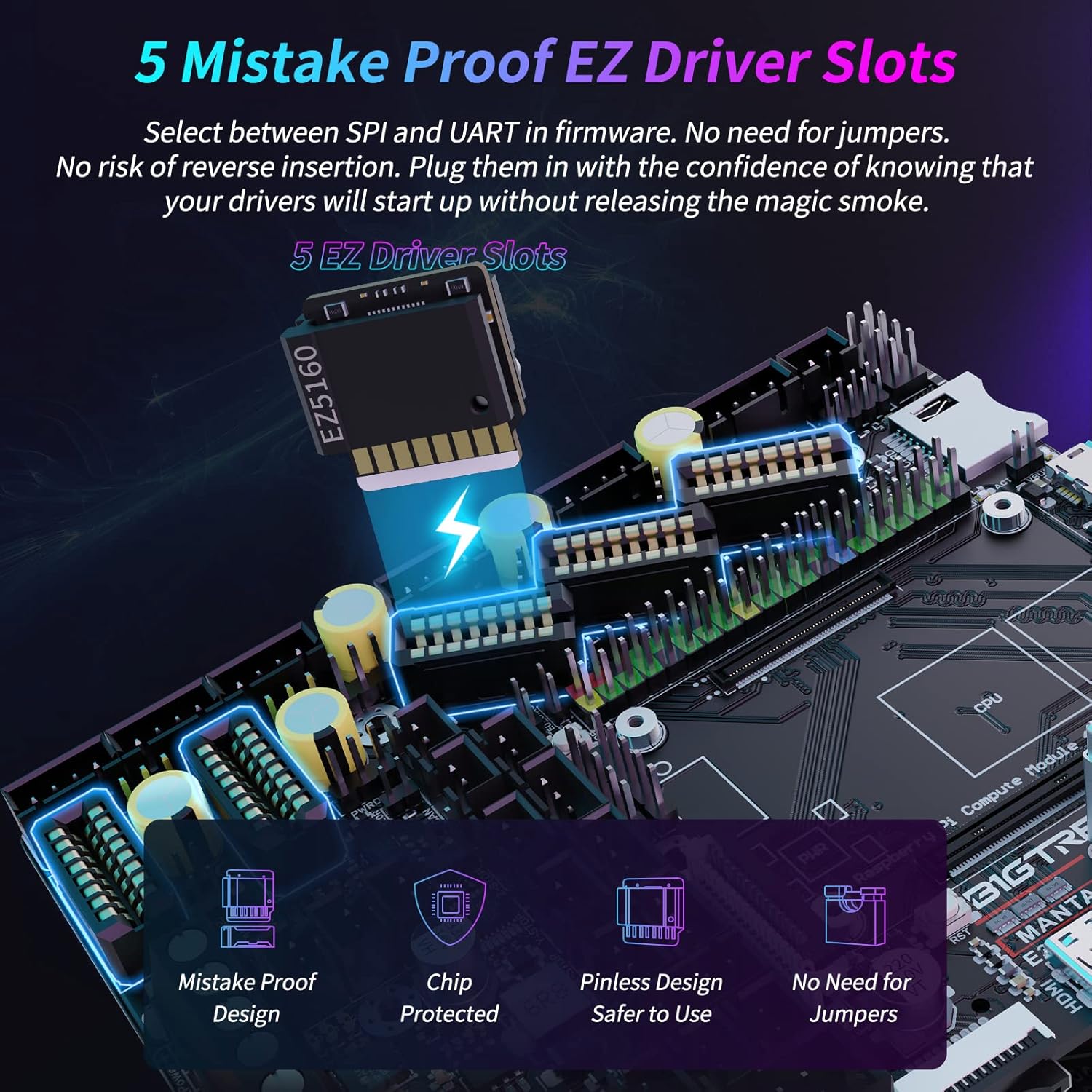
Figure 3.3: EZ Driver Slots for simplified driver installation.
3.4. Rich Connectivity and Interface Diagram
The Manta E3EZ board offers extensive connectivity options to support various 3D printer accessories and configurations. The diagrams below illustrate the rich array of ports and their functions, including motor drivers, fan headers, endstops, and communication interfaces.

Figure 3.4: Rich Connectivity Overview.

Figure 3.5: Detailed Interface Diagram with port labels.
3.5. CB1 eMMC Specifications
The CB1 eMMC module significantly enhances the kit's capabilities with its high-speed Samsung eMMC 5.1 technology, offering fast read/write speeds and stable storage. It also features a powerful quad-core processor and ample memory for complex tasks.

Figure 3.6: CB1 eMMC Module Specifications.
3.6. Compatibility and Upgrades
The Manta E3EZ board is designed to work seamlessly with other Manta series motherboards, and the CB1 eMMC offers an easy upgrade path from previous versions, providing improved data storage and reliability.

Figure 3.7: Compatibility with Manta Series Motherboards.

Figure 3.8: CB1 eMMC Heat Sink Compatibility.

Figure 3.9: Upgrading from CB1 V2.2 to CB1 eMMC.
4. Ghid de instalare
4.1. Listă de verificare preinstalare
- Ensure your 3D printer is powered off and disconnected from the mains.
- Gather necessary tools: screwdriver set, wire cutters/strippers, multimeter (optional).
- Familiarize yourself with your 3D printer's existing wiring and mainboard layout.
- Download the latest firmware (Klipper or Marlin) compatible with Manta E3EZ from the official BIGTREETECH GitHub repository.
4.2. Etape de instalare
- Scoateți placa de bază veche: Carefully disconnect all wires from your existing 3D printer mainboard. Take photos for reference if needed. Unscrew and remove the old mainboard.
- Install Manta E3EZ: Mount the BIGTREETECH Manta E3EZ board into the designated mainboard slot of your Ender-3 series or Voron printer. Ensure it is securely fastened.
- Connect CB1 eMMC: Insert the CB1 eMMC core control board into the dedicated BTB socket on the Manta E3EZ board. Ensure proper alignment and firm connection.
- Wire Components: Reconnect all motor, endstop, heater, thermistor, and fan wires to their corresponding ports on the Manta E3EZ board, referring to the interface diagram (Figure 3.5). Pay close attention to polarity for power connections.
- Conexiune la sursa de alimentare: Connect the printer's power supply to the Manta E3EZ board. Verify voltage settings if applicable.
- Pornire inițială: Before connecting to a computer, briefly power on the printer to check for any immediate issues (e.g., smoke, unusual smells). If all seems well, power off.
- Firmware intermitent: Connect the board to your computer via USB. Follow the specific instructions provided by BIGTREETECH for flashing Klipper or Marlin firmware onto the Manta E3EZ board. This typically involves placing a firmware file on an SD card and inserting it into the board, or using a DFU utility.
- Configurare: Configure the firmware settings (e.g., printer dimensions, motor steps, thermistor types) according to your specific printer model and components.
5. Instrucțiuni de utilizare
5.1. Klipper Firmware Operation
For Klipper users, the CB1 eMMC acts as the host for the Klipper firmware. You will typically interact with Klipper via a web interface (e.g., Mainsail or Fluidd) accessible from your computer or a network device.
- Conexiune retea: Ensure the CB1 eMMC is connected to your network via Ethernet or Wi-Fi.
- Acces Web Interfata: Deschide a web browser and navigate to the IP address of your CB1 eMMC (or the hostname if configured).
- Printer Control: Utilizați web interface to control printer movements, temperatures, and start/stop prints.
- G-code Upload: Încărcați codul G files directly to the CB1 eMMC via the web interface for printing.
5.2. Marlin Firmware Operation (if applicable)
If you choose to use Marlin firmware, operation will be similar to other Marlin-based mainboards, typically through an LCD screen or a host software like Pronterface or OctoPrint.
- LCD Control: Navigate menus and control printer functions directly from the connected LCD screen.
- Conexiune USB: Connect the Manta E3EZ to your computer via USB for direct control and G-code sending using host software.
5.3. Videoclip oficial al produsului
For a visual guide on the BIGTREETECH Manta E3EZ MotherBoard and its support for Klipper with CB1, please watch the official product video below. This video provides an overview of the board's features and capabilities.
Video 5.1: BIGTREETECH Manta E3EZ MotherBoard Support Klipper with CB1. This video demonstrates the key features and functionality of the Manta E3EZ board in conjunction with the CB1 module, highlighting its use with Klipper firmware.
6. Întreținere
- Păstra curat: Regularly clean the board and surrounding area to prevent dust and debris buildup, which can affect performance and lead to overheating. Use compressed air or a soft brush.
- Verificați conexiunile: Periodically inspect all wire connections to ensure they are secure and free from corrosion. Loose connections can cause intermittent issues or damage.
- Actualizări firmware: Keep your firmware updated to the latest stable version. Check the official BIGTREETECH GitHub for release notes and update procedures.
- Monitorizarea temperaturii: Ensure adequate cooling for the stepper drivers and main chip, especially during long prints. Verify fan operation.
- Evitați descărcarea statică: Always handle the board with anti-static precautions (e.g., grounding wrist strap) to prevent damage to sensitive electronic components.
7. Depanare
7.1. Probleme comune și soluții
| Emisiune | Cauza posibila | Soluţie |
|---|---|---|
| Board not powering on | Incorrect wiring, faulty power supply, short circuit. | Double-check all power connections. Test power supply voltage. Inspect for visible damage or short circuits. |
| Motoarele nu se mișcă sau se mișcă neregulat | Incorrect stepper driver installation, wrong motor wiring, misconfigured firmware. | Ensure stepper drivers are correctly inserted and configured (SPI/UART). Verify motor wiring matches the board's pinout. Check firmware motor definitions. |
| Temperature readings incorrect | Faulty thermistor, incorrect thermistor type in firmware. | Check thermistor wiring. Verify the thermistor type configured in your firmware matches your physical thermistor. |
| CB1 eMMC not detected/network issues | Loose BTB connection, incorrect network settings, faulty eMMC module. | Ensure CB1 is firmly seated. Verify network cable connection or Wi-Fi credentials. Re-flash CB1 image if necessary. |
If you encounter issues not listed here, please refer to the official BIGTREETECH documentation or community forums for further assistance.
8. Specificatii tehnice
| Caietul de sarcini | Detaliu |
|---|---|
| Marca | BIGTREETECH |
| Model | Manta E3EZ + CB1 eMMC Control Board Kit |
| Chip principal | ARM Cortex-M0+ series STM32G0B1RE (32-bit, 64MHz) |
| Max Motor Voltage | 56 volți |
| CB1 Processor | Quad-core 64-bit ARM Cortex-A53 @ 1.5GHz |
| CB1 Memory | 1 GB DDR3 |
| CB1 Storage | 32GB eMMC 5.1 (300MB/s Read, 200MB/s Write) |
| Interfata retea | 100M Ethernet, Wi-Fi support |
| Culoare | Negru |
| ASIN | B0C6MBP56R |
9. Garanție și asistență
BIGTREETECH products typically come with a manufacturer's warranty. Please refer to the official BIGTREETECH webconsultați site-ul sau documentația de achiziție pentru termenii și condițiile specifice de garanție.
For technical support, firmware downloads, and additional resources, please visit the official BIGTREETECH website or their GitHub repository:
Community forums and online resources can also be valuable for troubleshooting and sharing experiences with other users.


