Introducere
The Focusrite Scarlett 2i2 4th Gen USB Audio Interface is designed for high-fidelity, studio-quality recording, songwriting, streaming, and podcasting. It features ultra-low-noise mic pres, studio-grade converters, and a comprehensive software bundle to enhance your audio production. This manual provides essential information for setting up, operating, and maintaining your device.
Înființat
Ce este în cutie
- Interfață audio Scarlett 2i2 generația a 4-a
- Cablu USB-A la C
Connecting Your Scarlett 2i2
Connect the Scarlett 2i2 to your computer using the provided USB-A to C cable. The device is bus-powered, meaning it draws power directly from your computer via the USB connection. For devices requiring additional power, a 5V DC USB-C input is available on the rear panel.

Figura 1: Față view of the Scarlett 2i2 4th Gen interface.
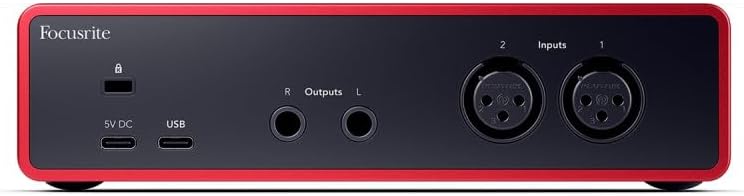
Figura 2: Spate view showing USB-C ports for connection and optional power.
Instalare software
To get started, visit the official Focusrite website and download the necessary utility program (driver) for your operating system (Mac OS, Windows OS, iOS, ChromeOS). The Scarlett 2i2 comes with the Hitmaker Expansion software bundle, including Pro Tools Intro+, Ableton Live Lite, Auto-Tune Access for Vocals, Softube Marshall Silver Jubilee 2555 for guitar, Native Instruments MASSIVE synth, and more. Ensure your antivirus software is temporarily disabled during software and plugin downloads to prevent interference.
For detailed step-by-step instructions on software setup, please refer to the official Ghidul utilizatorului (PDF).
Initial Connection and Power-Up
Once connected, the LED lights on the interface will illuminate, indicating power. The gain halos around the input knobs will also light up, providing visual feedback on input levels.
Funcționează
Input and Output Controls
The Scarlett 2i2 features two 4th Gen mic inputs with 69dB of analogue gain, ensuring high-fidelity recording. It also includes Hi-Z instrument inputs for direct guitar connection. Use the gain knobs to adjust input levels for each channel. The gain halos will change color to indicate signal strength (green for good, red for clipping).
The interface offers a powerful 120dB dynamic range and ultra-low distortion design for pure playback through any headphones, controlled by the independent headphone volume knob.
Caracteristici cheie
- Alimentare fantomă 48V: Activate for condenser microphones requiring phantom power.
- Inst Button: Toggles between line and instrument level input for optimal recording.
- Câștig automat: Automatically sets optimal recording levels in seconds, preventing clipping and ensuring a great take every time.
- Clip Safe: Prevents audio clipping by automatically adjusting gain, ensuring your recordings are always clean.
- Mod aer: Newly enhanced Air mode brings the character of a big studio console to your sound, adding presence and harmonic richness.
- Monitorizare directă: Allows you to hear your input signal directly through your headphones or speakers with zero latency.
Întreţinere
The Scarlett 2i2 is built with a durable aluminum body. To ensure longevity, keep the device clean and free from dust. Avoid exposing it to extreme temperatures or moisture. Handle cables with care to prevent damage to the ports. For detailed cleaning instructions and long-term storage recommendations, consult the official User Guide.
Depanare
Probleme comune și soluții
- Garbled Audio: If you experience distorted or garbled audio, try wiggling or unplugging and replugging the USB-C cable. Ensure all connections are secure.
- Software/Plugin Download Issues: Temporarily disable your antivirus software before downloading and installing the Hitmaker Expansion bundle or any related plugins. Re-enable it after installation is complete.
- Fără ieșire de sunet: Check your monitor and headphone volume levels. Ensure the correct input channels are selected and that phantom power (48V) is enabled for condenser microphones if needed. Verify that your computer's audio settings are configured to use the Scarlett 2i2 as the input/output device.
For more in-depth troubleshooting steps and solutions, please refer to the official Ghidul utilizatorului (PDF).
Specificații
| Caracteristică | Detaliu |
|---|---|
| Greutatea articolului | 1.73 lire sterline |
| Dimensiunile produsului | 7.09 x 3.9 x 1.79 inci |
| Numărul de model al articolului | AMS-SCARLETT-2I2-4G |
| Materialul corpului | Aluminiu |
| Nume Culoare | Roşu |
| Dispozitive compatibile | Microfon, Instrument, Calculator Personal, Tabletă, Căști, Smartphone, Monitoare de Studio |
| Tip conector | USB-C |
| Interfață hardware | USB 2.0 |
| Software acceptat | Toate programele de înregistrare audio |
| Platformă hardware | Interfață audio |
| Sistem de operare | Mac OS, Windows OS, iOS, ChromeOS |
| Numărul de canale | 2 |
Garanție și suport
The Focusrite Scarlett 2i2 4th Gen comes with a three-year warranty, ensuring peace of mind. For any assistance, technical support is available 24/7/365.
For detailed warranty information, support contacts, and additional resources, please refer to the official Ghidul utilizatorului (PDF) sau vizitați Focusrite Store on Amazon.