1. Introducere
Thank you for choosing the FLYLINKTECH BD10 6000A 12V Car Jump Starter and Power Bank. This device is designed to provide emergency jump-starting for vehicles and serve as a portable power bank for various electronic devices. Please read this manual thoroughly before use to ensure safe and optimal operation.

Image 1.1: The FLYLINKTECH BD10 Jump Starter unit with its smart battery clamps.
2. Informații de siguranță
Respectați întotdeauna următoarele măsuri de siguranță pentru a preveni vătămările corporale sau deteriorarea dispozitivului sau a vehiculului:
- Nu încercați să porniți asistat o baterie înghețată.
- Asigurați conexiunea cu polaritatea corectă (cheia roșieamp la pozitiv, negru clamp to negative). Reverse polarity can cause damage.
- Do not allow the smart clamps to touch each other when connected to the jump starter.
- Țineți aparatul departe de copii.
- Do not expose the device to extreme temperatures (above 60°C / 140°F or below -20°C / -4°F) or direct sunlight for extended periods.
- Nu dezasamblați sau modificați dispozitivul.
- Folosiți doar clapeta inteligentă furnizatăampși cabluri de încărcare.
- If the device becomes excessively hot during use, disconnect it immediately.

Image 2.1: The jump starter incorporates multiple safety features such as spark-proof, reverse polarity, overvoltage, short circuit, overload, and high-temperature protection.
3. Conținutul pachetului
Verificați dacă toate articolele sunt prezente în colet:
- FLYLINKTECH BD10 Jump Starter Unit
- Baterie inteligentă Clamps
- Cablu USB-C la USB-C
- Cablu USB-A la USB-C
- Adaptor încărcător auto de 12V CC
- Manual de utilizare
- Cutie de depozitare

Image 3.1: The complete package includes the jump starter, smart clamps, various cables, user manual, and a protective storage case.
4. Configurare și încărcare
4.1 Taxa inițială
Before first use, fully charge the jump starter. The device features a 26800mAh battery capacity.
- Connect the provided USB-C cable to the jump starter's USB-C input port.
- Connect the other end of the cable to a compatible USB wall charger (not included). For fastest charging, use a PD 45W charger.
- The LED screen will display the charging status and battery percentage.
4.2 Timpi de încărcare
| Evaluare încărcător | Timp de încărcare aproximativ |
|---|---|
| 5W | 18 de ore |
| 18W | 7 de ore |
| 45W | 2 de ore |
Note: A 45W wall charger is not included in the package.

Image 4.1: The device supports PD 45W fast charging, significantly reducing recharge time when using a compatible charger.
5. Instrucțiuni de utilizare
5.1 Pornirea cu sarcină a unui vehicul
The FLYLINKTECH BD10 is capable of jump-starting all gas engines and diesel engines up to 12.0L.
- Ensure Sufficient Charge: Check the jump starter's LED screen to ensure it has at least 50% charge.
- Conectați Smart Clamps: Insert the blue plug of the smart clamps into the jump starter's 12V output port. Ensure a firm connection.
- Conectați la bateria mașinii:
- Atașați roșu (+) clamp to the vehicle's positive battery terminal.
- Atașați negru (-) clamp to the vehicle's negative battery terminal.
- Indicator de verificare: Deșteptul clamp indicator light should turn solid green, indicating a correct connection. If it flashes or shows red, check connections and battery status.
- Press BOOST (if needed): If the vehicle battery is extremely low or completely dead, press the 'BOOST' button on the jump starter. Wait for the indicator light on the smart clamps to turn solid green.
- Pornirea vehiculului: Attempt to start your vehicle. If it doesn't start on the first try, wait 30 seconds before trying again. Do not attempt more than 3 consecutive starts.
- Îndepărtați Clamps: Odată ce vehiculul pornește, scoateți imediat cheia inteligentă.ampde la bateria mașinii, apoi deconectați-le de la demarorul.

Image 5.1: The jump starter connected to a car battery, ready for operation. It supports 6000A peak current, 12V output, and is suitable for a wide range of engines.

Image 5.2: Visual guide illustrating the four steps to jump-start a vehicle: connect the plug, attach clamps, press boost, and start the engine.
5.2 Funcția bateriei externe
The BD10 can charge multiple electronic devices via its USB-A and USB-C ports.
- Ieșire USB1: Up to 18W (max)
- Ieșire USB2: Up to 18W (max)
- Ieșire USB-C: Până la 45 W (PD)
Connect your device using the appropriate USB cable to the desired output port. The LED screen will show 'OUT' and the wattage being drawn.

Image 5.3: The jump starter functioning as a power bank, simultaneously charging a smartphone and a tablet via its USB ports.
5.3 lanterne cu LED
The built-in LED flashlight offers three modes: constant light, SOS signal, and strobe light.
- Press and hold the flashlight button to turn on the constant light.
- Press the button again to cycle through SOS and strobe modes.
- Apăsați și mențineți apăsat din nou pentru a opri.

Image 5.4: The integrated LED flashlight provides illumination, an SOS signal, and a strobe function for emergency situations.
5.4 Informative LED Screen
The 6.0-inch LED screen provides real-time information about the device's status:
- Nivel baterie: Afișează procentul de baterie rămasătage.
- IN/OUT Indicator: Shows whether the device is charging (IN) or discharging (OUT).
- Wattage Afișaj: Indicates the power (W) being drawn or supplied.
- Avertismente de eroare: Displays specific error codes or symbols if an issue occurs.
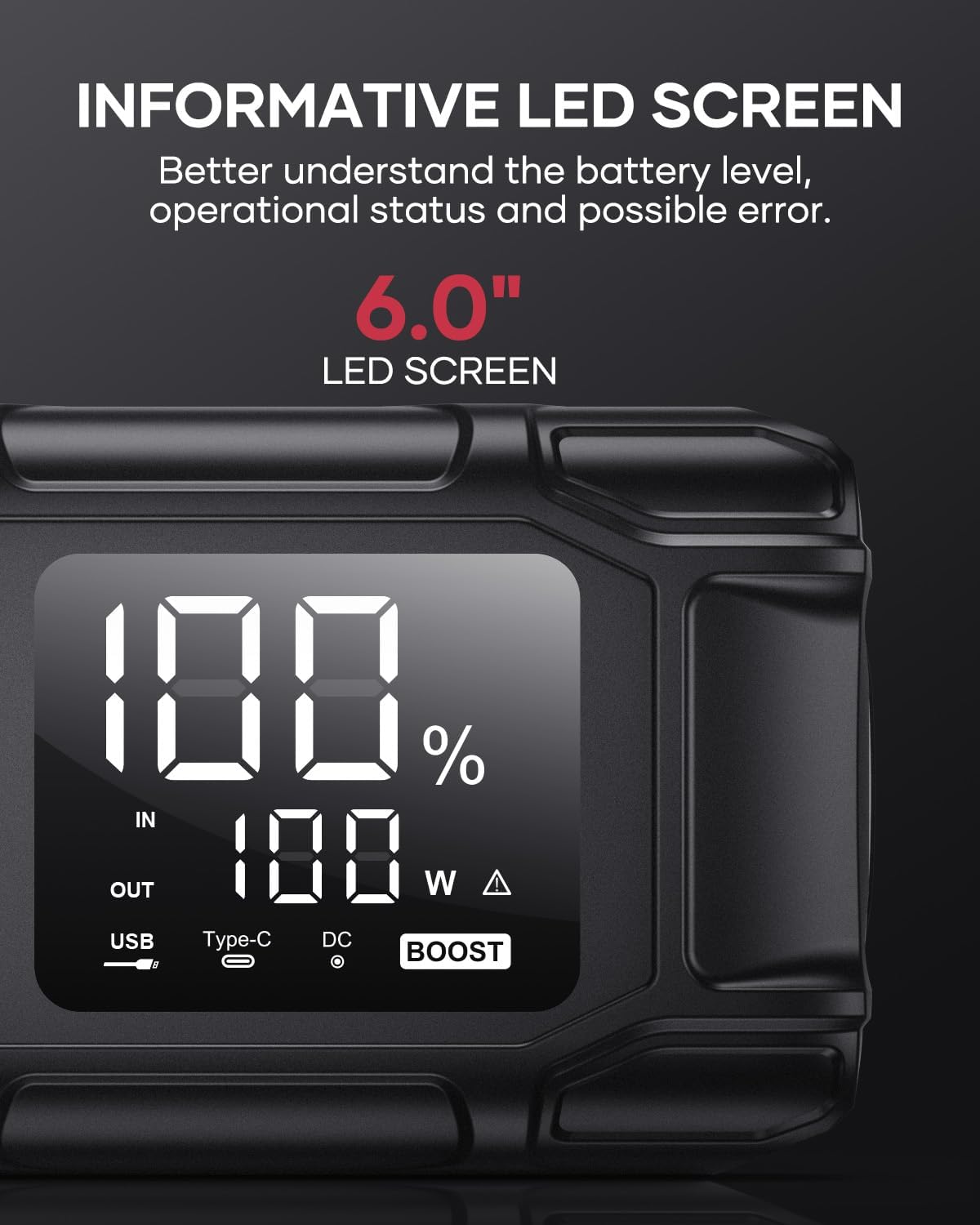
Image 5.5: The 6.0-inch LED screen provides clear information on battery percentage, input/output status, and power consumption.
6. Întreținere
- Reîncărcați regulat: Pentru a prelungi durata de viață a bateriei, reîncărcați demarorul la fiecare 3-6 luni, chiar dacă nu îl utilizați.
- Depozitare: Store the device in its protective case in a cool, dry place, away from direct sunlight and moisture.
- curatenie: Ștergeți dispozitivul cu o lavetă moale și uscată. Nu utilizați substanțe chimice dure sau materiale abrazive.
- Clamp Îngrijire: Asigurați-vă că cl-ul inteligentamps are clean and free of corrosion before and after each use.
7. Depanare
The device features multiple alarm situations indicated by audible signals and screen displays:
- Vol. Scăzuttage Protecție: Audible signal "3". Recharge the device.
- Vol. Externtage Exceeds Vehicle Voltage: Audible signal "4". Check vehicle battery voltage.
- Protecție la scurtcircuit: Audible signal "5". Check clamp connections for short circuits.
- Safety Mode Activated: Audible signal "6". Device has entered safety mode due to an issue.
- Protecție la supracurent: Audible signal "7". Reduce load or check connections.
- Alarmă de temperatură înaltă/joasă: Audible signal "8". Allow device to return to operating temperature range (-20°C to 60°C).
- Reverse Connection: Audible signal "9". Correct the clamp polaritate.

Imaginea 7.1: Pesteview of the device's multi-alarm system, indicating various protection states with unique audible signals.
Dacă problemele persistă după parcurgerea acestor pași, vă rugăm să contactați serviciul de asistență pentru clienți.
8. Specificații
| Caracteristică | Caietul de sarcini |
|---|---|
| Marca | FLYLINKTECH |
| Model | BD10 |
| Curent de ieșire de vârf | 6000 Ampere |
| Capacitatea bateriei | 26800mAh |
| Ieșire Voltage | 12V |
| Intrare/ieșire USB-C | PD 45W |
| Ieșire USB-A | 18 W (maximum) |
| Applicable Engine Types | All Gas, up to 12.0L Diesel |
| Temperatura de operare | -20°C până la 60°C (-4°F până la 140°F) |
| Dimensiunile produsului | 23.95 x 10 x 5.69 cm |
| Greutatea articolului | 920 g |

Image 8.1: The device is designed to operate reliably in extreme climates, from -20°C (-4°F) to 60°C (140°F).
9. Garanție și asistență
FLYLINKTECH is committed to providing high-quality products. For any questions, technical assistance, or warranty claims, please refer to the contact information provided with your purchase or visit the official FLYLINKTECH website. Vă rugăm să păstrați dovada achiziției în scopul garanției.


