1. Introducere
The EPOS Impact 1060T is a professional double-sided wireless headset designed for PC use, optimized for high-performance communication environments. It features advanced AI Noise Cancellation and Super Wideband Audio to ensure exceptional clarity during calls, even in noisy surroundings. The headset is Microsoft Teams Certified, providing seamless integration and optimal performance for virtual meetings.
Engineered for all-day comfort, the Impact 1060T includes soft memory foam earpads and a lightweight frame. Smart features such as a 360° busylight, mic-tip LED mute alerts, and intuitive boom-arm call control enhance efficiency and focus. This manual provides detailed instructions for setting up, operating, and maintaining your headset to ensure optimal performance and longevity.

Figure 1: EPOS Impact 1060T highlighting key features.
2. Conținutul pachetului
Verificați dacă toate articolele sunt prezente în colet:
- EPOS Impact 1060T Wireless Headset
- Cablu USB-C la USB-C
- Adaptor USB-C la USB-A
- Soft Carry Pouch
- Ghid de siguranță
- Fișă de conformitate
- Ghid rapid
- BTD 800a Dongle (for models with dongle)

Figure 2: EPOS Impact 1060T package contents.
3. Configurare
3.1 Încărcare inițială
Before first use, fully charge your headset. Connect the provided USB-C to USB-C cable to the headset and a power source. Use the USB-C to USB-A adapter if your power source only has USB-A ports. The headset can also be charged wirelessly if a compatible charging stand is available (charging stand sold separately for some models).
3.2 Pornire/Oprire
- Pentru a porni: Apăsați și țineți apăsat butonul de pornire până când se aprinde indicatorul luminos.
- Pentru a opri: Apăsați și țineți apăsat butonul de Pornire/Oprire până când indicatorul luminos se stinge.
3.3 Conectarea la dispozitive
The EPOS Impact 1060T offers versatile connectivity options:
- Asociere Bluetooth:
- Asigurați-vă că setul cu cască este oprit.
- Apăsați și mențineți apăsat butonul de pornire timp de aproximativ 4 secunde, până când indicatorul LED clipește în albastru și roșu, indicând modul de asociere.
- On your device (PC, smartphone), go to Bluetooth settings and select "EPOS Impact 1060T" from the list of available devices.
- După conectare, indicatorul LED va afișa o lumină albastră continuă.
- Conexiune USB-C cu fir: Connect the headset directly to your device using the provided USB-C to USB-C cable. The headset will be recognized automatically.
- USB-A Wired Connection: Use the USB-C to USB-A adapter with the USB-C cable to connect to devices with USB-A ports.
- Using the BTD 800a Dongle: For optimal wireless performance and extended range, plug the BTD 800a USB dongle into your PC. The headset will automatically connect to the dongle.
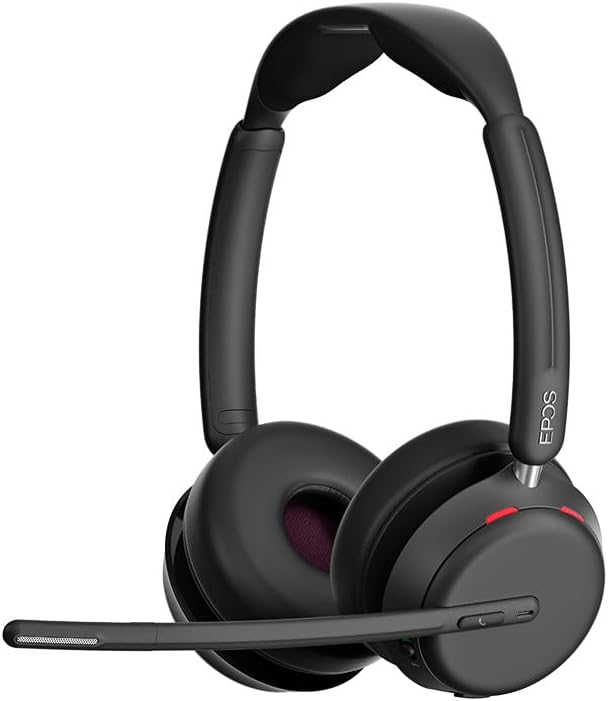
Figura 3: Față view of the EPOS Impact 1060T Headset.
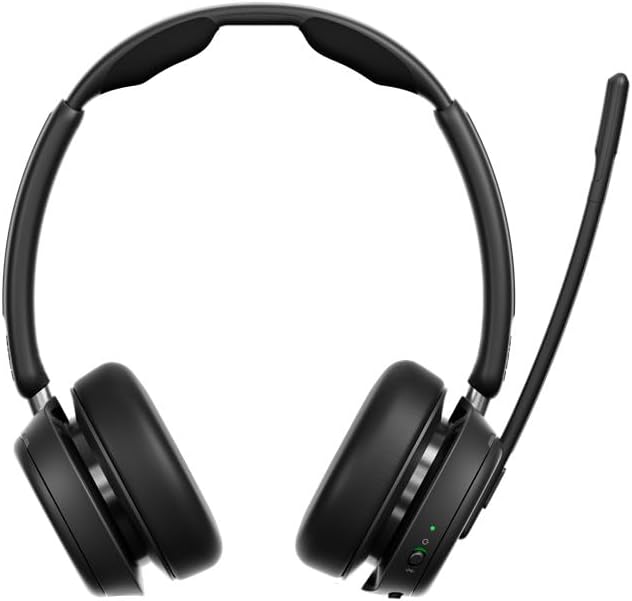
Figura 4: Spate view of the EPOS Impact 1060T Headset.
4. Instrucțiuni de utilizare
4.1 Purtarea căștilor
Adjust the headband for a comfortable and secure fit. The memory foam earpads are designed for extended wear. The microphone boom arm can be rotated to either side for optimal voice pickup.
4.2 Gestionarea apelurilor
- Răspundeți/Terminați apelul: Use the intuitive inline controller or the dedicated call button on the earcup.
- Dezactivați/activați sunetul microfonului:
- Lower the microphone boom arm to unmute and raise it to mute.
- A mic-tip LED will alert you if the microphone is muted.
- Alternatively, use the mute button on the inline controller.
- Controlul volumului: Adjust the volume using the dedicated buttons on the inline controller or earcup.
4.3 Noise Cancellation and Audio Features
- Anulare a zgomotului prin inteligență artificială: Three digital beamforming microphones powered by EPOS AI™ actively block out background noise, ensuring your voice is heard clearly.
- Super Wideband Audio: Provides rich, natural sound for both calls and media.
- BrainAdapt™ Technology: Designed to reduce brain fatigue and enhance focus during long calls.
4.4 Funcții inteligente
- Lumină ocupată: A 360° busylight on the headset signals your availability to colleagues, preventing interruptions during calls.
- Certificat Microsoft Teams: Optimized for Microsoft Teams, offering dedicated controls and seamless integration for calls and meetings.

Figure 5: Headset optimized for Unified Communications.
Video 1: "Powerful Sound and Comfort for Your Workday" - An official EPOS video showcasing the features and comfort of the Impact series headsets, including the 1060T.
Video 2: "EPOS IMPACT 860T Microsoft Teams Headset" - An official EPOS video demonstrating features of the similar Impact 860T model, highlighting Microsoft Teams integration and sound quality.
Video 3: "EPOS Impact 860T ANC Headset" - An official EPOS video showcasing the Active Noise Cancellation and design of the similar Impact 860T model.
5. Întreținere
- curatenie: Folosiți o lavetă moale și uscată pentru a curăța setul cu cască. Evitați utilizarea lichidelor sau a produselor de curățare abrazive.
- Depozitare: When not in use, store the headset in the provided soft carry pouch to protect it from dust and damage.
- Îngrijirea bateriei: Pentru a prelungi durata de viață a bateriei, evitați descărcarea completă frecventă a acesteia. Încărcați-o regulat.
- Actualizări de software: Integrate with EPOS Manager for device updates and analytics to ensure optimal performance and access to the latest features.
6. Depanare
If you experience issues with your EPOS Impact 1060T, refer to the following common solutions:
| Problemă | Cauza posibila | Soluţie |
|---|---|---|
| Nu există sunet/microfonul nu funcționează | Headset not paired/connected, incorrect audio device selected, microphone muted. | Ensure headset is paired/connected. Check device audio settings to select "EPOS Impact 1060T" as input/output. Unmute microphone. |
| Poor audio quality/background noise | Weak Bluetooth signal, environmental interference, microphone not positioned correctly. | Move closer to the connected device. Ensure no obstructions. Adjust microphone boom arm for optimal voice pickup. |
| Căștile nu se încarcă | Cable not connected properly, faulty cable/charger, wireless charging misalignment. | Verify cable connections. Try a different USB port or charger. Ensure headset is correctly placed on the wireless charging pad. |
| Headset randomly restarts/disconnects | Firmware issue, device compatibility, low battery. | Ensure headset firmware is up to date via EPOS Manager. Fully charge the headset. Try connecting to a different device to isolate the issue. |
7. Specificații
- Nume model: IMPACT 1060T
- Tehnologie de conectivitate: Wireless (Bluetooth)
- Versiune Bluetooth: 5.0
- Controlul zgomotului: Anularea adaptivă a zgomotului
- Microfon: AI Noise Cancellation with three digital beamforming microphones
- Audio: Super Wideband Audio
- Forma căștii: La ureche
- Material: Fabric/Silicone
- Greutatea articolului: 3.68 uncii (0.23 lire)
- Dimensiuni produs: 19.69 x 19.69 x 11.02 inci
- Baterii: 1 baterie litiu-ion (inclusă)
- Caracteristici speciale: Adjustable Headband, Lightweight, Noise Cancellation, Volume Control, Wireless Charging
- Producător: Demant Sound Epos Audio A/S
8. Garanție și asistență
The EPOS Impact 1060T is built for durability and comes with a 3 an garanție. For technical support, warranty claims, or further assistance, please visit the official EPOS website-ul lor web sau contactați serviciul lor de asistență pentru clienți. Păstrați dovada achiziției pentru validarea garanției.
For additional resources and software updates, visit the EPOS Store on Amazon.


