Introducere
This manual provides detailed instructions for the setup, operation, and maintenance of your ATTACK SHARK Wireless Bluetooth/USB Wired Gaming Mechanical Keyboard. This compact 100-key keyboard features RGB backlighting, hot-swappable switches, and multiple connectivity options for versatile use across various devices.

Image: The ATTACK SHARK Wireless Mechanical Keyboard, showcasing its 100-key layout, RGB backlighting, orange coiled USB-C cable, and a cloud-shaped wrist rest.
Conținutul pachetului
Verificați dacă toate articolele sunt prezente în colet:
- ATTACK SHARK Wireless Mechanical Keyboard
- Cloud Keyboard Wrist Rest
- USB-C to USB-A Data Cable (Coiled)
- Tastatură și extractor de comutator
- Receptor USB de 2.4 GHz
- Additional Switches (Red Switch type)
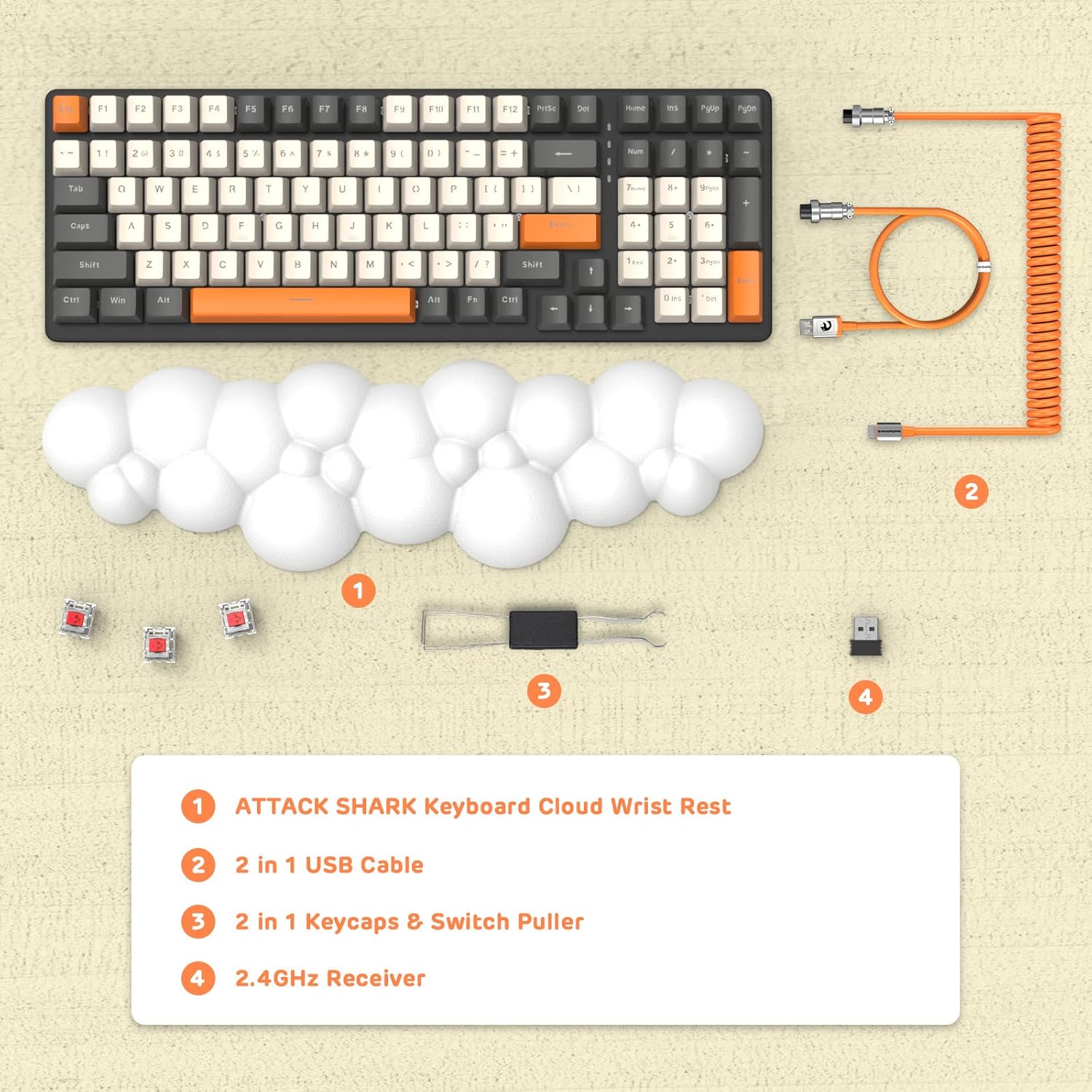
Imagine: O imagine de sus view displaying the keyboard, cloud wrist rest, coiled USB cable, keycap and switch puller, and 2.4GHz USB receiver, along with spare switches.
Înființat
The keyboard supports three connection modes: Bluetooth 5.0, 2.4GHz Wireless, and USB-C Wired.
1. Conexiune prin cablu (USB-C)
- Connect the USB-C end of the provided coiled cable to the keyboard's USB-C port.
- Conectați capătul USB-A al cablului la un port USB disponibil al computerului.
- The keyboard will automatically switch to wired mode (indicated by FN+5).

Image: A visual representation of the keyboard connecting to various devices (laptop, tablet, desktop, smartphone) via wired USB, 2.4GHz wireless, and Bluetooth.
2. Conexiune wireless de 2.4 GHz
- Localizați receptorul USB de 2.4 GHz.
- Conectați receptorul USB la un port USB disponibil de pe computer.
- Presa FN + 4 on the keyboard to activate 2.4GHz wireless mode. The indicator light will show the connection status.
3. Conexiune Bluetooth
The keyboard can store up to three Bluetooth devices.
- Apăsați și mențineți apăsat FN + 1, FN + 2, sau FN + 3 for 3-5 seconds to enter Bluetooth pairing mode for the desired channel. The indicator light will flash rapidly.
- On your device (e.g., laptop, tablet, smartphone), navigate to Bluetooth settings and search for available devices.
- Select "ATTACK SHARK Keyboard" (or similar name) from the list to pair.
- Odată împerecheat, indicatorul luminos va înceta să clipească și va rămâne fix.
- Pentru a comuta între dispozitivele Bluetooth asociate, apăsați pur și simplu FN + 1, FN + 2, sau FN + 3.
Instrucțiuni de operare
Controlul iluminării de fundal RGB
The keyboard features customizable RGB backlighting with multiple modes.
- Comutați modul de iluminare de fundal: Presa FN + INS to cycle through different RGB lighting effects.
- Reglați luminozitatea: Presa FN + ↑ (Săgeată în sus) pentru a crește luminozitatea, FN + ↓ (Săgeată în jos) pentru a reduce luminozitatea.
- Ajustați viteza: Presa FN + ← (Săgeată stânga) pentru a reduce viteza efectului, FN + → (Săgeată dreapta) pentru a crește viteza efectului.

Image: The keyboard displaying various RGB lighting patterns, with key combinations for switching modes and adjusting brightness/speed.
Comutatoare interschimbabile la cald
The keyboard's PCB supports 3-pin mechanical switches, allowing for easy replacement without soldering. This feature enables customization of typing feel and extends the keyboard's lifespan.
- Folosește extractorul de taste furnizat pentru a scoate cu grijă tastele dorite.
- Use the switch puller to gently grasp and remove the switch from the PCB.
- Align the pins of the new 3-pin switch with the holes on the PCB and press firmly until it clicks into place.
- Puneți la loc capacul tastei.

Imagine: O imagine detaliată view of the keyboard's PCB with a switch removed, demonstrating the hot-swappable feature. Spare red switches are also shown.
Baterie și încărcare
The keyboard is equipped with a 4000mAh lithium battery.
- Durata de viață a bateriei: Up to 200 hours of use with the backlight turned off.
- Încărcare: Connect the keyboard via the USB-C cable to a power source. The charging indicator light will show the charging status.
- Vol. Scăzuttage Indicator: The keyboard features a low voltage indicator to alert you when charging is required.

Image: The keyboard shown from the side, emphasizing its 4000mAh lithium battery capacity.
Întreţinere
Pentru a asigura longevitatea și performanța optimă a tastaturii dumneavoastră:
- curatenie: Use a soft, dry cloth to wipe the keyboard surface. For deeper cleaning, remove keycaps using the provided puller and use compressed air to clear debris from between switches.
- Odihnă pentru încheietura mâinii: The PU material of the wrist rest is durable and washable. Clean with a damp cârpă și săpun blând dacă este necesar.
- Depozitare: Depozitați tastatura într-un loc răcoros și uscat, ferit de lumina directă a soarelui și de temperaturi extreme.
- Evitați lichidele: Do not expose the keyboard to liquids. In case of spills, immediately disconnect power and allow it to dry completely before use.
Depanare
| Emisiune | Cauza posibila | Soluţie |
|---|---|---|
| Tastatura nu răspunde în modul wireless. | Low battery, incorrect mode selected, receiver not connected, or Bluetooth not paired. | Charge the keyboard. Ensure correct mode (FN+4 for 2.4G, FN+1/2/3 for Bluetooth) is selected. Verify 2.4G receiver is securely plugged in. Re-pair Bluetooth if necessary. |
| Keys are "sticking" or registering multiple inputs. | Debris under keycap/switch, faulty switch. | Remove keycap and switch, clean thoroughly with compressed air. If issue persists, replace the switch using the hot-swappable feature. |
| RGB backlight not working or dim. | Backlight turned off, brightness set too low, or low battery. | Press FN+INS to cycle modes. Adjust brightness with FN+↑ / FN+↓. Charge the keyboard. |
| Keyboard not recognized by device. | Driver issue, incorrect connection mode, or device compatibility. | Ensure correct connection mode is active. Try a different USB port or device. For wired mode, ensure the cable is fully inserted. Check device's operating system for necessary drivers (usually plug-and-play). |
Specificații
- Model: 3b5c1fdb-29da-409c-b4b7-12e9e72fb741
- Conectivitate: Bluetooth 5.0, 2.4GHz Wireless (RF), USB-C Wired
- Aspect: Compact 100 Keys (98% layout)
- Comutatoare: Hot-Swappable 3-pin Mechanical (Red Switch variant)
- Iluminare de fundal: RGB Backlit (9 modes)
- Baterie: Baterie cu litiu de 4000 mAh
- Dispozitive compatibile: Laptop, PC, Tablet (Mac/Win Supported)
- Material: Polyurethane (PU) for wrist rest
- Dimensiuni: 16.97 x 6.42 x 2.52 inci (Pachet)
- Greutatea articolului: 2.94 lire sterline
- Caracteristici speciale: Ergonomic design, Custom Coiled Aviator Keyboard Cable, Keycap and Switch Puller included.
Garanție și suport
For warranty information and technical support, please refer to the documentation provided with your purchase or visit the official ATTACK SHARK webPăstrați dovada achiziției pentru orice reclamații în garanție.
Producător: ATACA RECHINUL
Data primului disponibil: 8 mai 2023


