1. Produs terminatview
The EPOMAKER Aura75 is a 75% layout mechanical keyboard kit designed for customization and versatile connectivity. It features a compact design, hot-swappable switch sockets, and dynamic RGB backlighting. This kit supports multiple connection modes and is compatible with various operating systems.
Caracteristici cheie:
- 75% Layout: Optimized for functionality and space efficiency.
- Conectivitate trimodală: Supports 2.4GHz wireless, Bluetooth 5.0, and USB-C wired connections.
- PCB înlocuibil la cald: Allows for easy installation and removal of 3-pin and 5-pin mechanical switches without soldering.
- Dynamic RGB Backlight: Features per-key RGB lighting and unique side lighting effects.
- Buton multifuncțional: Provides control over volume and RGB brightness.
- Absorbția sunetului: Equipped with silicone pads and IXPE switch cushioning for a quieter typing experience.
- Construcție durabilă: Crafted with a robust injection-molded casing and PC plate.
2. Ghid de instalare
Continutul pachetului:
- EPOMAKER Aura75 Keyboard Kit
- Cablu USB-C
- Dongle wireless de 2.4 GHz
- Extractor pentru chei
- Comutator Extractor
2.1 Installing Switches and Keycaps
The Aura75 is a barebone kit, meaning switches and keycaps are not pre-installed. You will need to install your preferred 3-pin or 5-pin mechanical switches and keycaps.
- Align the pins of your mechanical switch with the hot-swappable socket on the PCB.
- Gently press the switch until it clicks into place. Ensure the pins are straight to avoid bending.
- Repeat for all desired switch positions.
- Place your chosen keycaps onto the installed switches, pressing firmly until they are secure.
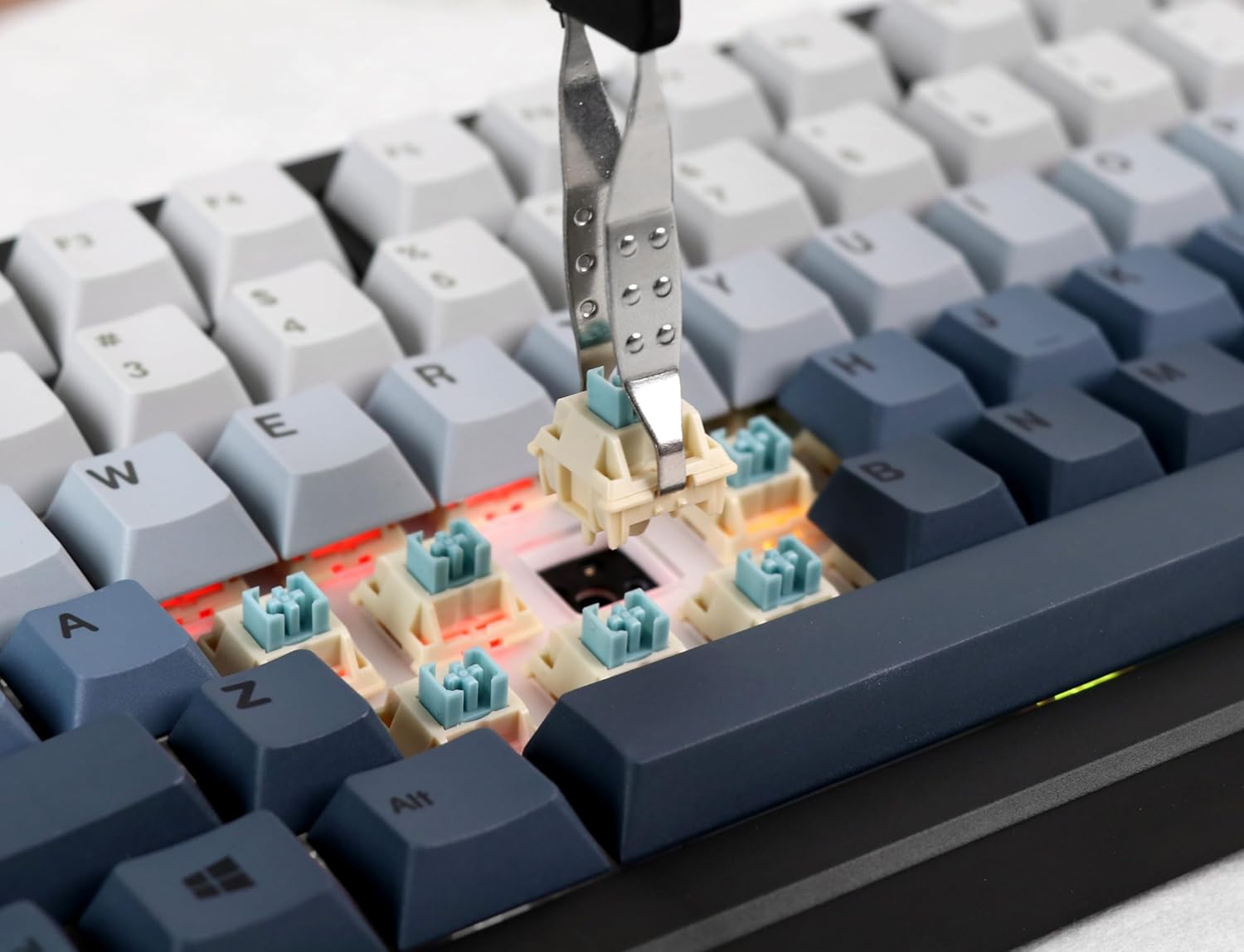
Image: Proper installation of a mechanical switch into the hot-swappable PCB.

Image: The hot-swappable barebone kit featuring south-facing RGB LEDs and tuned plate-mounted stabilizers.
2.2 Connecting the Keyboard:
The Aura75 offers three connectivity options:
- USB-C cu fir: Connect the keyboard directly to your device using the provided USB-C cable.
- Wireless 2.4 GHz: Insert the 2.4GHz USB dongle into your device. Flip the switch on the back of the keyboard to the 2.4G position.
- Bluetooth 5.0: Flip the switch on the back of the keyboard to the Bluetooth position. Press FN + 1/2/3 to enter pairing mode for up to three different devices. The indicator light will flash, then become solid upon successful connection.
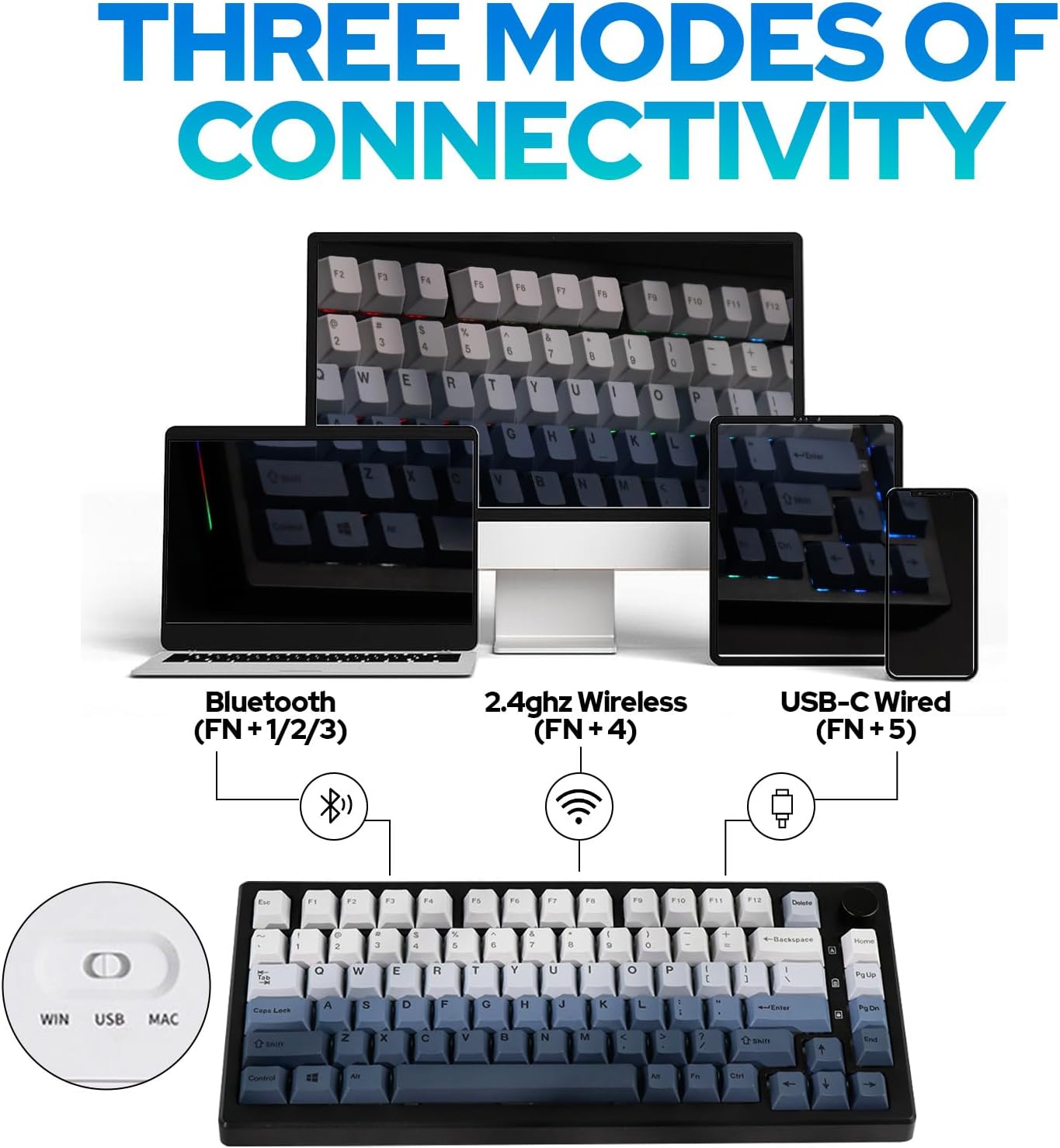
Imagine: Pesteview of the three connectivity modes: Bluetooth (FN+1/2/3), 2.4GHz Wireless (FN+4), and USB-C Wired (FN+5).

Imagine: Detaliată view of the keyboard's rear, highlighting the connectivity switch, 2.4GHz dongle storage, and USB-C port.
2.3 Adjusting Keyboard Height:
Tastatura are douătage adjustable feet on the underside to customize the typing angle for ergonomic comfort.
3. Instrucțiuni de utilizare
3.1 RGB Backlight Control:
The Aura75 features extensive RGB lighting options, including per-key and side lighting.
- FN + \|: Cycle through different backlight effects (Light Effect 1-20).
- FN + Home/PU: Cycle through different backlight colors/brightness (Light Effect 1-10).
- FN + L: Activează/dezactivează iluminarea de fundal.
- FN + L_Ctrl: Toggle sidelight effect on/off.
- FN + L_Alt: Cycle through sidelight colors.
- FN + Z/X: Adjust sidelight brightness/speed.

Imagine: Prezentarea tastaturiiasing its RGB backlight and unique side light effects.

Image: FN key combinations for adjusting backlight effects, colors, brightness, and speed.
3.2 Multifunction Knob:
The knob located on the top right of the keyboard serves dual functions:
- Roti: Adjusts system volume or RGB brightness.
- Presa: Comută între controlul volumului și controlul luminozității RGB.

Image: The multifunction knob, used to switch between volume and RGB brightness adjustments.
3.3 Operating System Mode Switching:
The keyboard supports both Windows and Mac operating systems.
- Modul Windows: Presa FN + W.
- Modul Mac: Presa FN + E. If this does not work, try FN + Q.
3.4 Software Programming:
The EPOMAKER Aura75 is programmable using the dedicated EPOMAKER software. This software allows for:
- Key remapping
- Macro creation
- Customizing lighting effects
- Setting sleep modes

Image: The EPOMAKER software interface for advanced keyboard customization.
4. Întreținere
Regular maintenance helps ensure the longevity and optimal performance of your EPOMAKER Aura75 keyboard.
- Curățarea tastelor: Use a keycap puller to remove keycaps. Clean them with a mild soap solution and a soft cloth, then air dry completely before reattaching.
- Cleaning the PCB/Switches: Use compressed air to remove dust and debris from between switches. For deeper cleaning, carefully remove switches with a switch puller and clean the PCB with a soft brush.
- Îngrijirea cablului: Evitați îndoirile bruște sau tragerea excesivă a cablului USB-C pentru a preveni deteriorarea.
- Îngrijirea bateriei: For wireless modes, ensure the keyboard is charged regularly. Avoid fully depleting the battery for extended periods.
5. Depanare
Probleme comune și soluții:
- Tastatura nu răspunde:
- Ensure the keyboard is fully charged or connected via USB-C.
- Check the connectivity switch on the back of the keyboard (Wired, 2.4G, Bluetooth).
- For 2.4GHz, ensure the dongle is securely inserted.
- Pentru Bluetooth, reconectați dispozitivul dacă este necesar.
- Incorrect key functions in Mac OS:
- Ensure the keyboard is set to Mac mode by pressing FN + E. If this does not resolve the issue, try pressing FN + Q.
- RGB lights not working or flickering:
- Check brightness settings using the multifunction knob or FN key combinations.
- Ensure the keyboard is not in a low-power state.
- Update keyboard firmware using the EPOMAKER software.
- Accidental key presses (high sensitivity):
- Some users may find the actuation point of certain switches sensitive. Adjust your typing style or consider different switch types if customization is desired.
6. Specificații
| Caracteristică | Detaliu |
|---|---|
| Marca | EPOMAKER |
| Numărul de model | Aura75 |
| Aspect | 75% |
| Tehnologia de conectivitate | Wireless 2.4GHz, Bluetooth 5.0, USB-C cu fir |
| Dispozitive compatibile | Consolă de jocuri, Laptop, PC, Smartphone, Tabletă |
| Caracteristici speciale | Backlit, Ergonomic, Hot-Swappable, Programmable Keys |
| Iluminarea tastaturii | RGB |
| Material | Plastic |
| Greutatea articolului | 2.12 lire sterline |
| Dimensiuni pachet | 14.92 x 8.11 x 1.77 inci |
| Producător | EPOMAKER |
| Prima disponibilă | 6 mai 2023 |
7. Garanție și asistență
For warranty information and technical support, please refer to the official EPOMAKER website-ul lor web sau contactați direct serviciul lor de asistență pentru clienți. Păstrați bonul fiscal pentru reclamații în garanție.
Official EPOMAKER Store: Visit EPOMAKER Store
8. Resurse suplimentare
Videoclipuri despre produse:
EPOMAKER Sea Salt Switch VS Sea Salt Silent Switch
Video: A comparison between EPOMAKER Sea Salt Switches and Sea Salt Silent Switches, demonstrating their sound and feel differences.
AURA75 Keyboard Kit Typing Sound
Video: Demonstrates the typing sound profile of the AURA75 Keyboard Kit, highlighting its acoustic characteristics.
F75 purple gaming keyboard
Video: O scurtă prezentareview of the F75 keyboard, showcasing its design and RGB lighting in a purple variant.
Typing Video Epomaker AULA F75 Black Pink Gradient
Video: A short typing demonstration on an Epomaker AULA F75 keyboard with a black and pink gradient keycap set.


