1. Introducere
The BIGTREETECH Manta M5P is a 32-bit motherboard designed for 3D printing applications, specifically optimized for running Klipper firmware. When paired with the BIGTREETECH CB1 V2.2 Core Board, it forms a powerful system capable of running a Linux operating system, eliminating the need for a separate Raspberry Pi in many setups. This integration simplifies wiring and conserves space, making it an ideal solution for 3D printers such as the Ender 3 and Voron V0.
This manual provides detailed instructions for the setup, operation, and maintenance of your Manta M5P+CB1 V2.2 Core Board to ensure optimal performance and longevity.

Figura 1: The BIGTREETECH Manta M5P motherboard (left) and the BIGTREETECH CB1 V2.2 core board (right).
2. Caracteristici cheie
The Manta M5P+CB1 V2.2 system offers a range of features designed to enhance 3D printer control and performance:
- Klipper Optimization: Engineered to run Klipper firmware directly with the CB1 core board, providing advanced control and faster processing. Without the CB1, the Manta M5P can run Marlin firmware.
- CB1 Core Board (V2.2): Features a 64-bit ARM Cortex-A53 1.5GHz quad-core processor, 1GB DDR3 RAM, 100M Ethernet, and 100M WiFi. It supports Linux/Debian, offering high speed and stability for various applications.
- Integrated Display Interfaces: Includes an onboard HDMI interface for direct connection to BIGTREETECH HDMI5/HDMI7 touchscreens and an SPI interface for compatible SPI touchscreens, enabling intuitive operation.
- Conectivitate extinsă: Supports plug-and-play USB cameras for monitoring, and features dedicated ports for filament runout sensors, RGB light strips, BLTouch, and ADXL345 accelerometers.
- Advanced Driver Support: Integrated SPI and UART modes for TMC drivers (e.g., TMC2209, TMC2208, TMC5160T Pro) with easily configurable jumpers and a DIAG pin.
- Enhanced Power Management: Utilizes a TPS5450-5A power chip providing 5A output, matching Raspberry Pi power requirements. High-efficiency MOSFETs reduce heat generation.
- CAN Bus Support: Simplifies wiring and improves anti-interference capabilities.
- User-Friendly Upgrades: MCU firmware can be upgraded via an SD card or DFU mode using Klipper's make flash command. Features replaceable fuses for easy maintenance.

Figura 2: The Manta M5P with the CB1 core board, illustrating its capability to run Linux and Klipper.

Figura 3: Specifications and features of the BIGTREETECH CB1 V2.2 core board.
3. Configurare și instalare
3.1 Instalare hardware
- Mounting the CB1: Carefully align the BTB headers of the CB1 V2.2 core board with the corresponding headers on the Manta M5P motherboard. Gently press down until the CB1 is securely seated.
- Conexiune de alimentare: Connect a suitable 24V DC power supply to the Manta M5P. Ensure the polarity is correct. The board features a 5A power chip for stable operation.
- Stepper Motor Drivers: Install your TMC stepper motor drivers (e.g., TMC2209, TMC2208, TMC5160T Pro) into the designated sockets (M0-M4). Configure the jumpers for SPI or UART mode as required by your drivers and desired functionality. Refer to the driver's specific documentation for jumper settings.
- Conexiuni periferice:
- Endstops: Connect X, Y, Z endstops to the respective ports. Pay close attention to wiring to avoid misconfiguration.
- Heaters & Thermistors: Connect hotend and heated bed heaters, along with their corresponding thermistors.
- Fani: Connect part cooling and hotend fans to the appropriate fan ports. The Manta M5P has three 2-pin fan ports, selectable for 5V/12V/24V.
- Afişa: Connect your HDMI5/HDMI7 touchscreen via an HDMI cable or an SPI touchscreen to the SPI interface.
- Senzori: Connect optional sensors such as filament runout detectors, BLTouch, or ADXL345 accelerometers to their dedicated ports.
- Cameră USB: Plug in a compatible USB camera for remote monitoring.
- RGB Light Strip: Connect an RGB light strip if desired.
- Conexiune retea: Connect an Ethernet cable for wired network access, or ensure the CB1's WiFi antenna is properly connected for wireless connectivity.

Figura 4: Abundant connectivity options on the Manta M5P board.
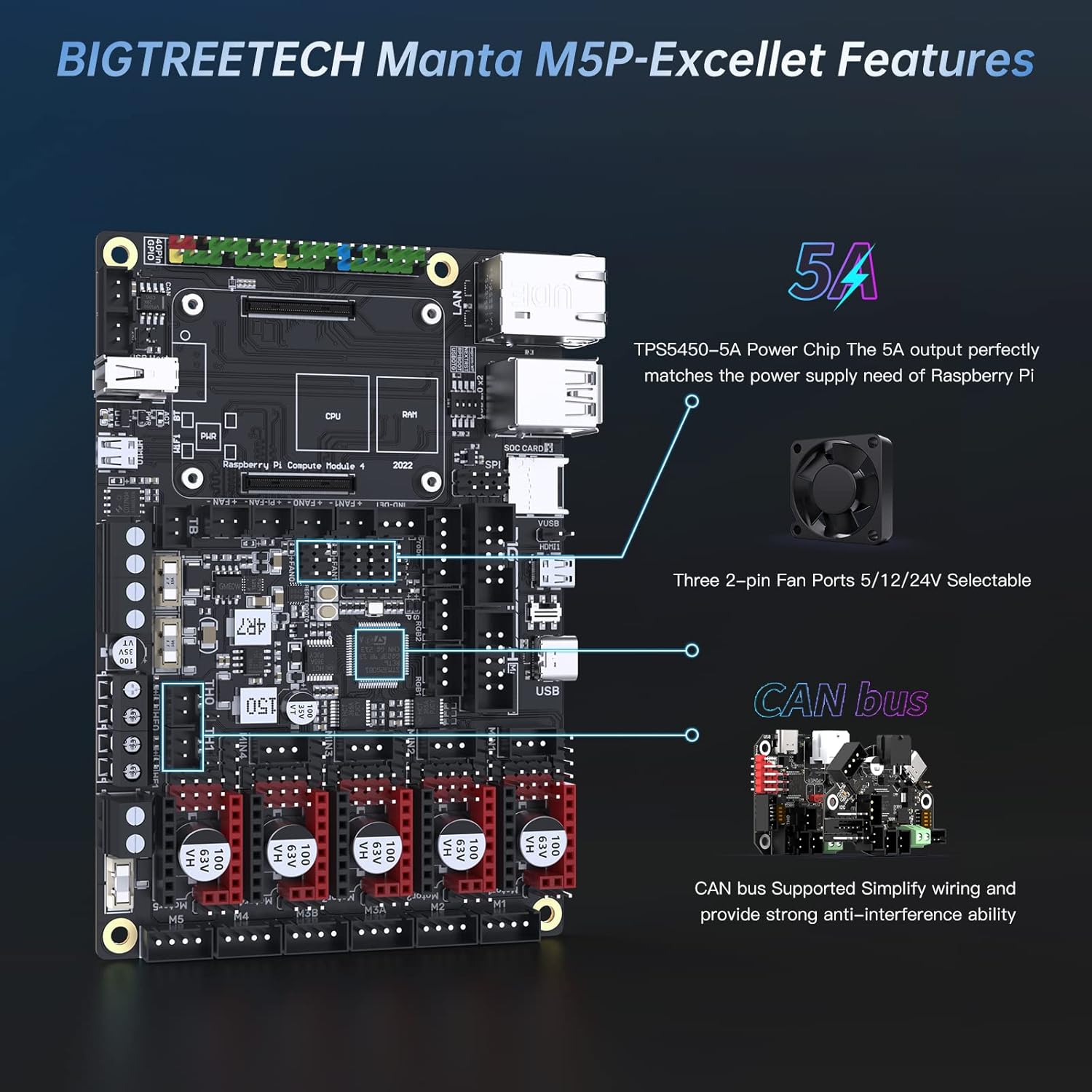
Figura 5: Key features of the BIGTREETECH Manta M5P, including power and fan connections.
3.2 Configurare software
For detailed software setup, including Klipper firmware installation and configuration, please refer to the official BIGTREETECH GitHub repository. This resource provides the most up-to-date instructions and configuration files for your specific setup.
- Klipper Firmware: Follow the instructions on the BIGTREETECH GitHub for compiling and flashing Klipper firmware to the Manta M5P and configuring the CB1 for Linux operation.
- Marlin Firmware: If you choose to run Marlin firmware without the CB1, download the appropriate Marlin firmware for the Manta M5P and configure it according to your printer's specifications.
4. Instrucțiuni de utilizare
Once the hardware is installed and the firmware is configured, you can begin operating your 3D printer with the Manta M5P+CB1 V2.2 system.
- Klipper Interface: Access Klipper's web interface (e.g., Mainsail or Fluidd) via your web browser using the IP address of your CB1. From here, you can control your printer, upload G-code, monitor print progress, and adjust settings.
- Afișare locală: If using an HDMI or SPI touchscreen, you can interact directly with the printer's interface for basic controls and monitoring.
- Monitorizare de la distanță: Utilize the connected USB camera to remotely monitor your 3D printing projects through the Klipper web interfata.

Figura 6: Compatibility with Klipper touch mode and other Manta series boards.
5. Întreținere
Regular maintenance ensures the longevity and reliable operation of your Manta M5P+CB1 V2.2 Core Board.
- Actualizări firmware: Periodically check the BIGTREETECH GitHub for firmware updates. MCU firmware can be updated via an SD card or by using the DFU mode with Klipper's make flash command. Keeping firmware updated can introduce new features and bug fixes.
- Înlocuirea siguranței: The board features replaceable fuses. If a fuse blows, replace it with a fuse of the same rating to prevent damage to the board or connected components.
- curatenie: Keep the board free from dust and debris. Use compressed air or a soft brush to gently clean the components. Ensure the board is powered off and disconnected before cleaning.
- Verificări de conectare: Verificați periodic toate conexiunile cablurilor pentru a vă asigura că sunt fixate și nu prezintă deteriorări. Conexiunile slăbite pot duce la probleme intermitente.

Figura 7: Additional features for maintenance and protection on the Manta M5P.
6. Depanare
This section addresses common issues you might encounter. For more in-depth troubleshooting, consult the BIGTREETECH GitHub repository.
- Placa de bază nu pornește:
- Verify the power supply is correctly connected and providing the specified voltage (24V DC).
- Verificați cablul de alimentare dacă nu este deteriorat.
- Inspect the fuse on the board. If blown, replace it.
- Klipper Not Connecting/Starting:
- Ensure the CB1 is properly seated on the Manta M5P.
- Verify network connectivity (Ethernet or WiFi) for the CB1.
- Confirm that Klipper firmware is correctly flashed to the Manta M5P and the CB1's operating system is running.
- Check Klipper logs for error messages.
- Stepper Motors Not Moving or Moving Incorrectly:
- Ensure stepper motor drivers are correctly installed and configured (jumpers for SPI/UART mode).
- Verify motor wiring.
- Check Klipper configuration for correct motor settings (steps/mm, direction).
- Afișajul nu funcționează:
- For HDMI displays, ensure the HDMI cable is securely connected.
- For SPI displays, verify the SPI connection and ensure the display is enabled in the firmware configuration.
For further assistance, please refer to the official BIGTREETECH GitHub resources or contact customer support.
7. Specificații
| Caracteristică | Caietul de sarcini |
|---|---|
| Marca | BIGTREETECH |
| Numele modelului | BIGTREETECH Manta M5P+CB1 V2.2 |
| Numărul de model al articolului | 1020000397 |
| Sistem de operare | Linux (with CB1), Marlin (without CB1) |
| Processor (CB1) | ARM Cortex-A53 1.5GHz (Quad-core) |
| RAM (CB1) | 1 GB DDR3 |
| Viteza memoriei | 1333 MHz |
| Tehnologia de conectivitate | Ethernet, HDMI, Wi-Fi |
| Tip fără fir | Bluetooth, WiFi |
| Dimensiunile produsului | 3.93 x 1.96 x 0.39 inci |
| Greutatea articolului | 8.1 uncii |
8. Garanție și asistență
BIGTREETECH provides comprehensive after-sales support for the Manta M5P+CB1 V2.2 Core Board.
- Resurse oficiale: Firmware updates and detailed installation steps are available on the official BIGTREETECH GitHub repository. It is recommended to consult this resource for the latest information and guides.
- Serviciu clienți: If you encounter any problems during the use of your product, please contact BIGTREETECH customer service as soon as possible for assistance. They are committed to providing satisfactory solutions.
For the most current support information, please visit the Magazinul BIGTREETECH pe Amazon sau oficialul lor website-ul.


