1. Introducere
The ATTACK SHARK G6 Gaming Mouse is a versatile peripheral designed for both gaming and daily productivity. It offers three distinct connection modes: wired, 2.4G wireless, and Bluetooth, ensuring reliable and accurate transmission across various devices. Its ergonomic design, adjustable DPI settings, and customizable RGB lighting provide a tailored user experience.

Figure 1: The ATTACK SHARK G6 Gaming Mouse (Blue/White) with its USB receiver.
2. Caracteristici
- Conectivitate trimodală: Seamlessly switch between wired (USB-C), 2.4G wireless (via USB receiver), and Bluetooth connections for maximum flexibility.
- DPI reglabil: Features 5 adjustable DPI levels (1200/1600/2000/2400/4000) for precise control and responsiveness, suitable for various tasks from detailed work to fast-paced gaming.
- 11 Chroma RGB Lighting Modes: Customize your setup with 11 distinct RGB lighting effects, enhancing your gaming atmosphere.
- 10 butoane programabile: Equipped with 10 function buttons, strategically placed for easy access, allowing for quick actions like light changes, one-click web access, and navigation.
- Design ergonomic: Specifically designed for right-hand users with a comfortable thumb rest, reducing fatigue during extended use.
- Butoane cu clic silențios: Left and right buttons feature a silent click design, minimizing noise and preventing disturbance to others.
- Baterie reîncărcabilă: Built-in 500mAh lithium battery, rechargeable via Type-C, providing long-lasting use on a single charge (approx. 3-4 hours for full charge).
- Compatibilitate largă: Compatible with Windows, Mac, Android, and other operating systems, ensuring broad usability.

Figura 2: Pesteview of the 10 programmable buttons and ergonomic finger rests.
3. Conținutul pachetului
Vă rugăm să verificați conținutul pachetului la despachetare pentru a vă asigura că sunt prezente toate articolele:
- ATTACK SHARK G6 Gaming Mouse
- Receptor wireless USB 2.4G
- Cablu de încărcare USB-C
- Manual de utilizare (acest document)
4. Configurare
4.1. Încărcarea mouse-ului
Before first use, it is recommended to fully charge the mouse. Connect the supplied USB-C charging cable to the mouse's Type-C port and the other end to a USB power source (e.g., computer USB port, USB wall adapter). The charging indicator will show status (refer to LED indicator section for details). A full charge typically takes 3-4 hours.

Figure 3: Charging the G6 Gaming Mouse via its Type-C port.
4.2. Moduri de conectare
The G6 mouse supports three connection methods:
- Modul wireless 2.4G:
- Locate the USB 2.4G wireless receiver, usually stored in a compartment on the underside of the mouse.
- Conectați receptorul la un port USB disponibil de pe computer.
- Porniți mouse-ul folosind comutatorul de alimentare de pe partea inferioară. Mouse-ul ar trebui să se conecteze automat.
- Mod Bluetooth:
- Turn on the mouse and switch it to Bluetooth mode (refer to the switch on the underside).
- Pe dispozitivul dvs. (computer, tabletă, telefon), accesați setările Bluetooth și căutați dispozitive noi.
- Select "ATTACK SHARK G6" (or similar name) from the list to pair.
- Modul cu fir:
- Conectați cablul USB-C furnizat la portul Type-C al mouse-ului.
- Conectați celălalt capăt al cablului la un port USB de pe computer.
- The mouse will function immediately in wired mode and will also charge simultaneously.
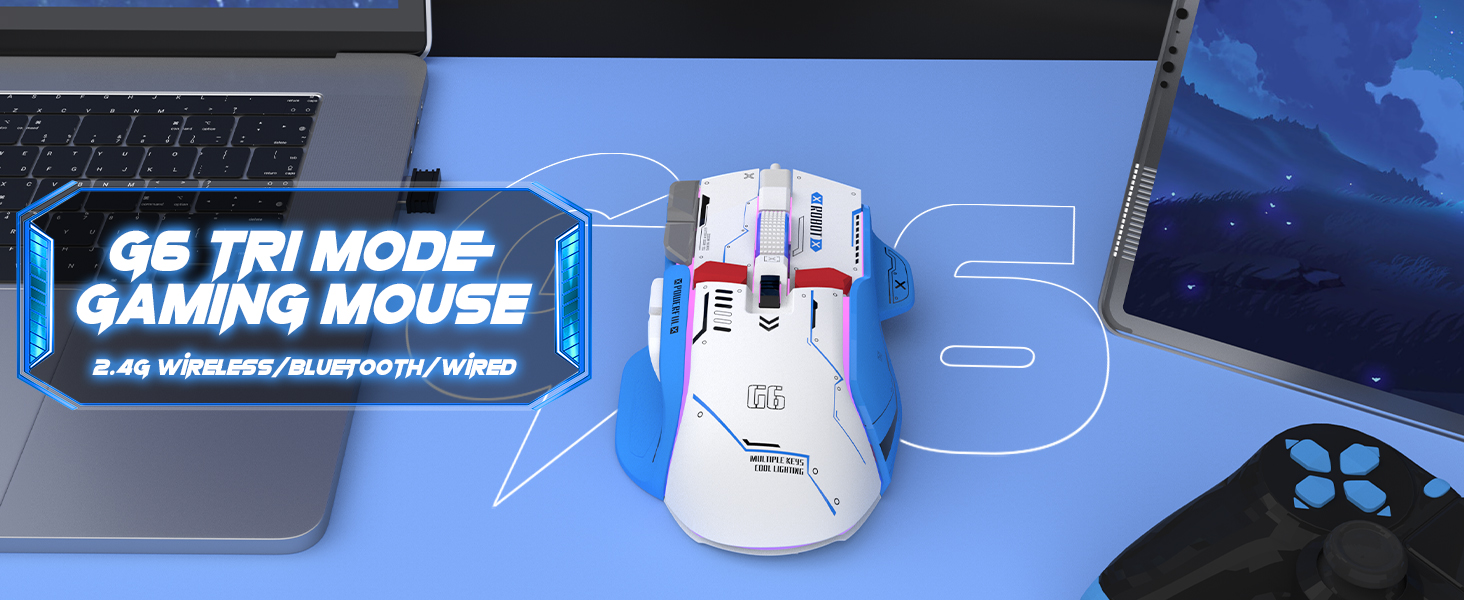
Figure 4: The G6 mouse supports 2.4G wireless, Bluetooth, and wired connections.
5. Instrucțiuni de utilizare
5.1. Ajustarea DPI-ului
The G6 mouse features a dedicated DPI button (refer to Figure 2 for location) to cycle through 5 adjustable DPI levels: 1200, 1600, 2000, 2400, and 4000. Press the DPI button to switch between sensitivity settings to match your preference or game requirements.
5.2. Controlul iluminării RGB
The mouse offers 11 Chroma RGB lighting modes. Use the dedicated Light Control button (refer to Figure 2) to cycle through the different lighting effects. To turn off the RGB lighting, continue pressing the button until the lights are off, or refer to the software if available for more advanced control.

Figure 5: The G6 mouse features 11 kinds of RGB backlight modes.
5.3. Funcții butoane
The G6 mouse has 10 function buttons. Their default functions are:
- Click stânga: Butonul stâng standard al mouse-ului.
- Click dreapta: Standard right mouse button (silent click).
- Rotiță de defilare: Derulați în sus/în jos, faceți clic pe butonul din mijloc.
- Butonul DPI: Parcurge ciclic setările DPI.
- Buton de control al luminii: Comută între modurile de iluminare RGB.
- Buton înainte: Navighează înainte în web browsers/folders.
- Buton înapoi: Navighează înapoi în web browsers/folders.
- Buton de declanșare: Rapid fire function (default, may be programmable).
- Desktop Button: One-click access to desktop.
- Webpage Button: One-click access to web browser.

Figura 6: Detaliat view of key features including finger rests and Type-C port.

Figure 7: The silent click feature ensures quiet operation, ideal for shared spaces.
6. Întreținere
To ensure the longevity and optimal performance of your ATTACK SHARK G6 Gaming Mouse, follow these maintenance guidelines:
- curatenie: Folosiți o lavetă moale și uscată pentru a șterge suprafața mouse-ului. Pentru murdăria persistentă, ștergeți ușor suprafața mouse-ului.amp cloth with mild soap can be used, but ensure no liquid enters the mouse. Do not use harsh chemicals or abrasive materials.
- Depozitare: Depozitați mouse-ul într-un loc răcoros și uscat, ferit de lumina directă a soarelui și de temperaturi extreme.
- Evitați picăturile: Protejați mouse-ul de căderi și impacturi, care pot deteriora componentele interne.
- Îngrijirea cablului: When using wired mode or charging, handle the USB-C cable carefully to prevent bending or fraying.
7. Depanare
If you encounter issues with your ATTACK SHARK G6 Gaming Mouse, please refer to the following common solutions:
| Problemă | Soluție posibilă |
|---|---|
| Mouse-ul nu răspunde (Wireless/Bluetooth) |
|
| Setările DPI nu se modifică |
|
| Iluminarea RGB nu funcționează sau se blochează |
|
| Conexiune intermitentă sau cu întârziere |
|
7.1. Ghid video al produsului
For a visual guide on the mouse's features and operation, please watch the official product video:
Video: G6 Wireless/wired/bluetooth gaming mouse. This video demonstrates the RGB lighting effects and general appearance of the G6 gaming mouse in different colors.
8. Specificații
| Caracteristică | Detaliu |
|---|---|
| Marca | ATACA RECHINUL |
| Numărul de model | G6 |
| Tehnologia de conectivitate | Bluetooth, Wired, Wireless (2.4G) |
| Tehnologia de detectare a mișcării | Optic |
| Niveluri DPI reglabile | 1200/1600/2000/2400/4000 |
| Moduri RGB | 11 Chroma RGB modes |
| Numărul de butoane | 10 |
| Capacitatea bateriei | Baterie reîncărcabilă cu litiu de 500 mAh |
| Port de încărcare | Tip-C |
| Greutatea articolului | 7.4 uncii (aproximativ 210 grame) |
| Dimensiuni pachet | 6.38 x 5.43 x 2.13 inci |
| Compatibilitate | Windows, Mac, Android, iOS |
9. Garanție și asistență
ATTACK SHARK products are designed and manufactured to the highest quality standards. This product is covered by a limited warranty from the date of purchase. For detailed warranty terms, technical support, or customer service inquiries, please contact your retailer or visit the official ATTACK SHARK website-ul.
Suport online: Visit the ATTACK SHARK Store on Amazon


