1. Introducere
This manual provides essential instructions for the proper installation, operation, and maintenance of your Interphone Cellularline U-Com 6R Motorcycle Bluetooth Intercom. Please read this manual thoroughly before using the device to ensure optimal performance and safety.
The U-Com 6R is designed to enhance your riding experience with reliable Bluetooth 5.2 communication, allowing connection with up to two riders over a distance of 1 kilometer. It offers compatibility with various OEM and GPS systems and features a long-lasting, replaceable battery.
2. Informații de siguranță
Always prioritize safety while riding. Operating the intercom should not distract you from road conditions or traffic. Ensure the device is securely mounted and all cables are properly routed to avoid interference with helmet functionality or rider movement.
- Nu încercați să dezasamblați sau să modificați dispozitivul.
- Țineți dispozitivul departe de temperaturi extreme și lumina directă a soarelui.
- Asigurați-vă că capacul portului de încărcare este închis etanș atunci când nu încărcați, pentru a menține rezistența la apă.
- Adjust volume to a safe level that allows you to hear ambient traffic sounds.
3. Conținutul pachetului
Verificați dacă toate articolele enumerate mai jos sunt incluse în pachetul dumneavoastră:
- U-Com 6R Main Unit
- Helmet Mounting Bracket (Clip and Adhesive options)
- Set difuzoare
- Microfon Boom
- Microfon cu fir
- Cablu de încărcare USB-C
- Tampoane Velcro pentru difuzoare și microfoane
- Bureți pentru microfon
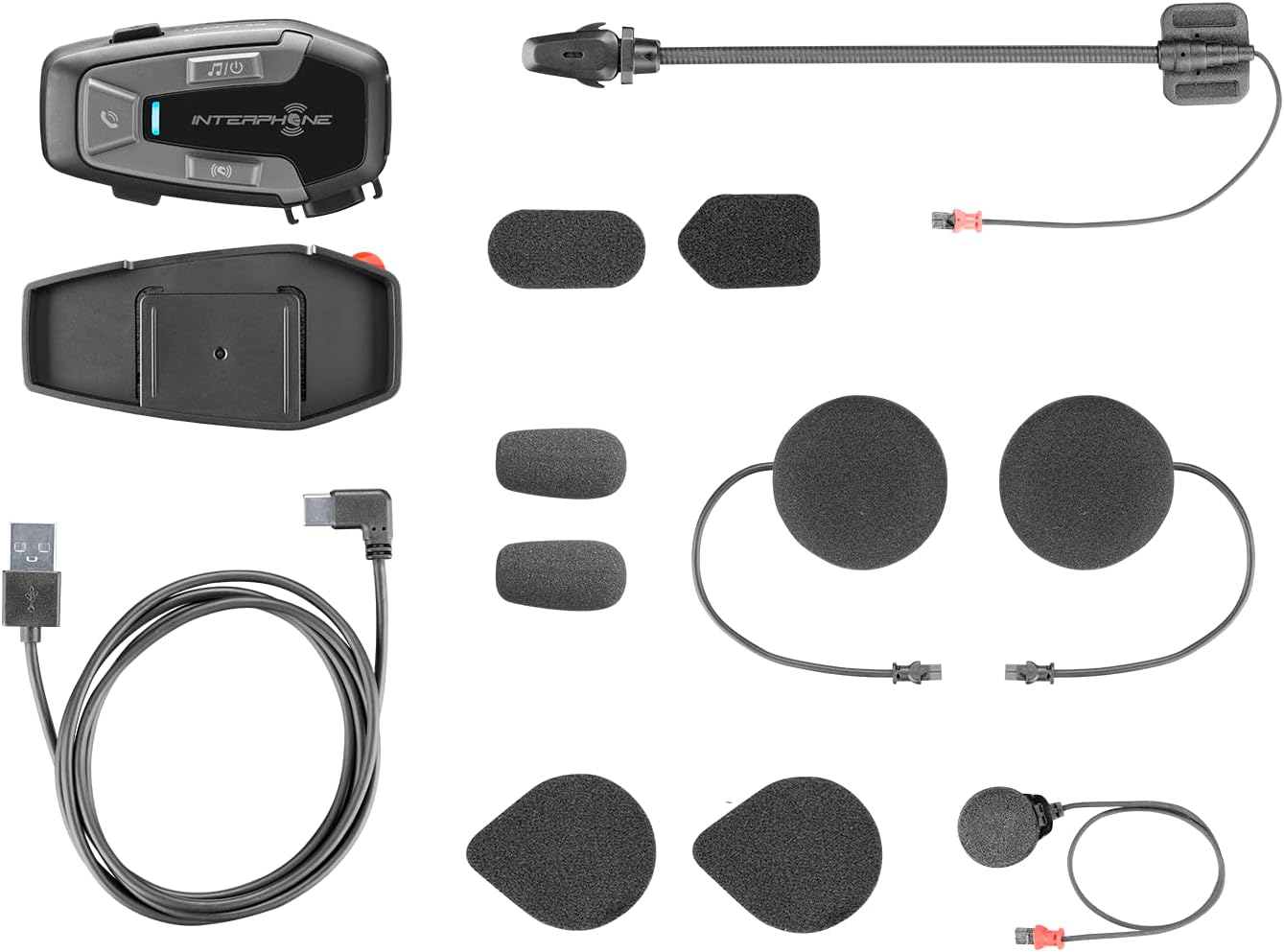
Figura 3.1: All components included in the Interphone U-Com 6R package. This image displays the main intercom unit, mounting accessories, speakers, two types of microphones (boom and wired), and the USB-C charging cable.
4. Dispozitiv terminatview
4.1. Main Unit Controls

Figura 4.1: Faţă view of the Interphone U-Com 6R main unit. This image highlights the primary control buttons for music, call management, and intercom functions, along with the LED indicator.
- Buton Muzică: Controls music playback (play/pause, skip tracks).
- Buton de apelare: Manages phone calls (answer/end, voice assistant).
- Buton interfon: Initiates and manages intercom conversations.
- Indicator LED: Displays device status (pairing, charging, power).
4.2. Porturi și conectori

Figura 4.2: Latura view of the Interphone U-Com 6R unit. This image clearly shows the USB-C charging port and the speaker/microphone connector.
- Port USB-C: Folosit pentru încărcarea dispozitivului.
- Speaker/Microphone Connector: Connects the speaker and microphone assembly to the main unit.
5. Instalare
5.1. Montarea unității principale
The U-Com 6R can be mounted to your helmet using either the clip mount or the adhesive mount.
- Clip Mount: Slide the clip between the helmet shell and the inner padding on the left side. Ensure it is securely fastened.
- Suport adeziv: Clean the desired mounting area on the left side of your helmet. Peel off the protective film from the 3M adhesive on the bracket and firmly press it onto the helmet for at least 30 seconds. Allow 24 hours for the adhesive to fully cure before use.
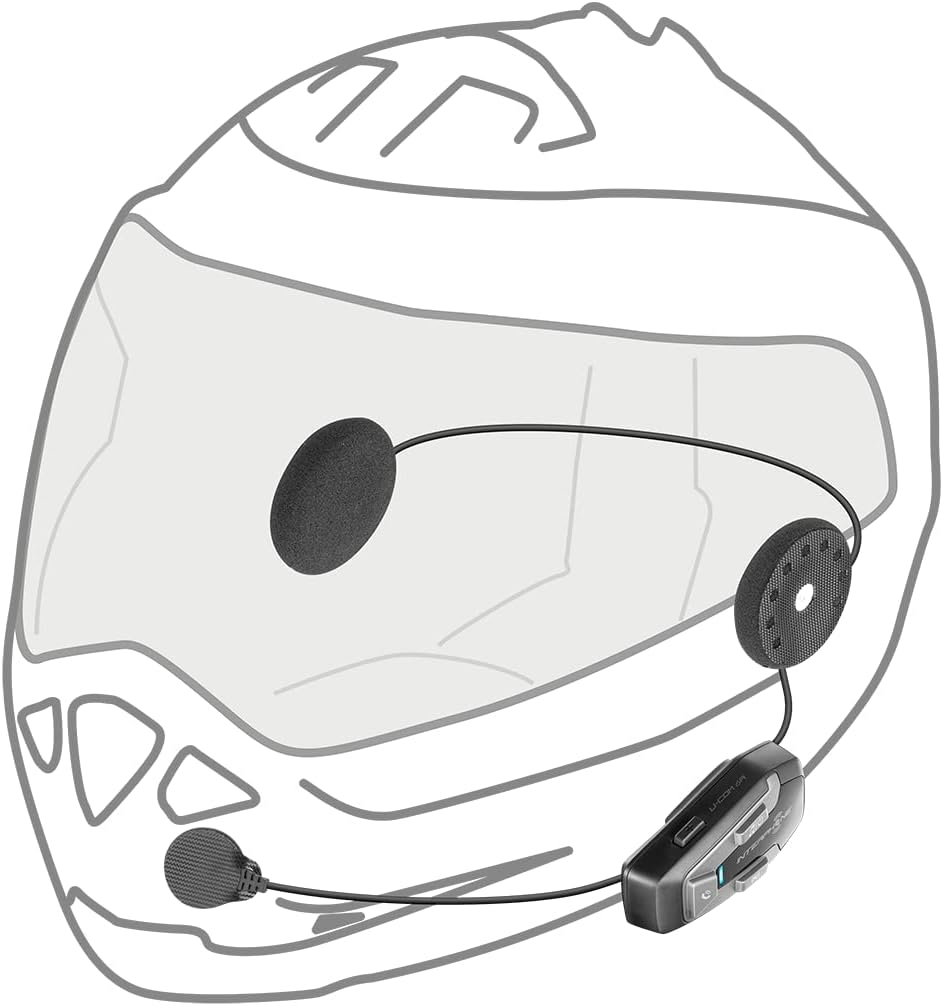
Figura 5.1: Adhesive mounting bracket for the Interphone U-Com 6R. This image shows the bracket with the 3M adhesive backing, ready for attachment to a helmet.
5.2. Instalarea difuzoarelor și a microfonului
Position the speakers inside the helmet's ear pockets. The microphone should be placed in front of your mouth, ensuring clear voice pickup.
- Attach the speakers to the helmet's interior using the provided Velcro pads. Ensure the speaker with the shorter wire is for the left ear and the longer wire for the right.
- Alegeți microfonul potrivit pentru tipul de cască:
- Microfon cu braț: Ideal for open-face or modular helmets. Attach it to the inside of the helmet near your mouth.
- Microfon cu fir: Suitable for full-face helmets. Attach it to the inside of the chin bar, close to your mouth.
- Connect the speaker and microphone assembly to the main U-Com 6R unit.
- Tuck all wires neatly under the helmet padding to prevent discomfort or entanglement.

Figura 5.2: Installation of speakers and wired microphone inside a full-face helmet. This diagram illustrates the placement of the flat speakers in the ear recesses and the wired microphone near the chin bar.

Figura 5.3: Installation of speakers and boom microphone inside an open-face helmet. This diagram shows the placement of speakers and the flexible boom microphone extending towards the rider's mouth.
6. Configurare și operare de bază
6.1. Încărcarea dispozitivului
Before first use, fully charge the U-Com 6R. Connect the supplied USB-C cable to the charging port on the unit and to a USB power source. The LED indicator will show charging status and turn off when fully charged. A full charge provides approximately 15 hours of talk time.
6.2. Pornire/Oprire
- Pornire: Press and hold the Music button for 3 seconds. The LED will flash blue.
- Oprire: Press and hold the Music button for 5 seconds. The LED will turn red and then off.
6.3. Împerecherea Bluetooth cu telefonul mobil
- With the U-Com 6R powered off, press and hold the Call button for 5 seconds until the LED flashes red and blue alternately, indicating pairing mode.
- Pe telefonul mobil, activați Bluetooth și căutați dispozitive noi.
- Select "Interphone U-Com 6R" from the list of available devices.
- Once paired, the LED on the U-Com 6R will flash blue periodically.
6.4. Intercom Pairing (Up to 2 Riders)
The U-Com 6R supports communication with one other rider. For Mesh 2.0 technology with multiple riders, refer to the advanced features section or the full online manual.
- Ensure both U-Com 6R units are powered on and not connected to other devices.
- On both units, press and hold the Intercom button for 5 seconds until the LED flashes red and blue alternately.
- The units will automatically search and pair with each other. Once connected, the LEDs will flash blue.
- To initiate an intercom conversation, briefly press the Intercom button on either unit.
7. Funcționare
7.1. Apeluri telefonice
- Răspunde la apel: Apăsați scurt butonul de apelare.
- Terminare apel: Apăsați scurt butonul de apelare.
- Respinge apelul: Apăsați și mențineți apăsat butonul de apel timp de 2 secunde.
- Asistent vocal: Briefly press the Call button twice to activate your phone's voice assistant (Siri, Google Assistant).
7.2. Redarea muzicii
- Redare/Pauză: Briefly press the Music button.
- Următoarea piesă: Press the Music button twice.
- Pista anterioară: Press the Music button three times.
7.3. Reglarea volumului
The U-Com 6R features dedicated buttons for volume control, typically integrated with the main control panel. Refer to the device overview (Figure 4.1) for button locations.
- Creșteți volumul: Press the 'Volume Up' button.
- Reduceți volumul: Press the 'Volume Down' button.
7.4. GPS and OEM System Compatibility
The U-Com 6R is designed with Bluetooth 5.2 to ensure broad compatibility with various GPS navigation devices and original equipment manufacturer (OEM) systems found on motorcycles. Pair these devices as you would a mobile phone, following their respective pairing instructions.
8. Întreținere
- curatenie: Folosiți un moale, damp cloth to clean the unit. Do not use abrasive cleaners or solvents.
- Rezistenta la apa: The U-Com 6R is waterproof. However, ensure the USB-C port cover is fully sealed to maintain its water-resistant properties.
- Îngrijirea bateriei: For optimal battery life, avoid fully discharging the battery frequently. Charge the device regularly, especially if it will be stored for extended periods. The integrated battery is replaceable, extending the product's lifespan.
- Depozitare: Păstrați dispozitivul într-un loc răcoros și uscat atunci când nu este utilizat.
9. Depanare
| Problemă | Cauza posibila | Soluţie |
|---|---|---|
| Dispozitivul nu pornește. | Baterie descărcată. | Încărcați complet dispozitivul. |
| Nu se poate conecta la telefon/interfon. | Device not in pairing mode; distance too far; interference. | Ensure device is in pairing mode (flashing red/blue). Move closer to the other device. Turn off other Bluetooth devices. |
| Fără sunet sau calitate audio slabă. | Volume too low; speakers incorrectly positioned; loose connection. | Increase volume. Check speaker placement and connections. Ensure microphone is correctly positioned. |
| Conexiunea interfonului se întrerupe frecvent. | În afara razei de acțiune; interferențe din mediul înconjurător. | Stay within 1 km range. Avoid areas with strong radio interference. |
9.1. Resetare din fabrică
If issues persist, a factory reset may resolve them. Consult the full online manual or contact customer support for specific instructions on performing a factory reset for the U-Com 6R.
10. Specificații
| Caracteristică | Detaliu |
|---|---|
| Numărul de model | INTERPHOUCOM6R |
| Versiune Bluetooth | 5.2 |
| Gama de interfon | Up to 1 Kilometer (between 2 riders) |
| Timp de vorbire | Aproximativ 15 ore |
| Tip baterie | Lithium Polymer (included, replaceable) |
| Conectivitate | Bluetooth, Mesh 2.0 (compatible with Sena) |
| Rezistenta la apa | Da |
| Greutate | 0.36 kilograme (12.7 uncii) |
| Dimensiuni | 9.09 x 5.83 x 2.64 inci (Pachet) |
| Compatibilitate | GPS and OEM systems, most other brands on the market |
11. Garanție și asistență
Interphone products are manufactured to high-quality standards. For warranty information, please refer to the warranty card included with your product or visit the official Interphone website. For technical support or further assistance, please contact Interphone customer service through their official channels.
Puteți găsi mai multe informații și resurse de asistență vizitând Interphone Store on Amazon.


