1. Introducere
This manual provides essential information for the safe and effective use of your Panasonic HC-X2000 UHD 4K Pro Camcorder. Please read this manual thoroughly before using the product and retain it for future reference. Understanding the features and operations will ensure optimal performance and longevity of your camcorder.
2. Produs terminatview
2.1 Caracteristici cheie
- UHD 4K Video Recording: Captures high-resolution 4K video at broadcast-compatible frame rates.
- Lentila cu zoom optic 24x: Features a 25mm wide-angle to 600mm telephoto range.
- 5-Axis Hybrid Image Stabilization: Combines optical and electronic stabilization for smooth footage.
- Wi-Fi integrat: Enables wireless control from a tablet or smartphone via the HC ROP app.
- Professional Audio Inputs: Supports 24-bit PCM audio recording with XLR inputs.
- 3G-SDI and HDMI Outputs: Provides versatile connectivity for professional workflows.
- Design compact și ușor: Engineered for mobility and ease of use in various shooting environments.
2.2 Componente incluse
The following items are typically included with your Panasonic HC-X2000 Camcorder:
- Panasonic HC-X2000 UHD 4K 3G-SDI/HDMI Pro Camcorder
- Detachable Handle Unit
- Baterie Litiu-Ion
- Adaptor AC/Încărcător
- Oculară
- Parasolar
- Suport pentru microfon

Figure 2.2.1: The Panasonic HC-X2000 Camcorder shown with its detachable handle unit, battery, and other accessories.
3. Configurare
3.1 Încărcarea și instalarea bateriei
- Connect the AC adapter to the battery charger and a power outlet.
- Insert the battery into the charger. The charging indicator will illuminate.
- După ce încărcarea este completă, scoateți bateria din încărcător.
- Aliniați bateria încărcată cu slotul pentru baterie din spatele camerei video și glisați-o înăuntru până când se fixează în siguranță cu un clic.
3.2 Introducerea unui card SD
- Open the SD card slot cover on the side of the camcorder.
- Insert the SD card (UHS-I compatible recommended for 4K recording) into the slot with the label facing the correct direction until it clicks.
- Închideți capacul slotului pentru card SD.
3.3 Attaching the Handle Unit
- Align the handle unit with the accessory shoe on top of the camcorder.
- Glisați unitatea mânerului înainte până când se blochează în poziție.
- Secure the handle unit using the locking screw.

Figure 3.3.1: The Panasonic HC-X2000 Camcorder with the detachable handle unit and an external light attached.
4. Instrucțiuni de utilizare
4.1 Pornire/Oprire
- Pentru a porni, glisați comutatorul POWER în poziția ON.
- Pentru a opri, glisați comutatorul POWER în poziția OFF.
4.2 Înregistrare de bază
- Open the LCD monitor or extend the viewcăutare.
- Press the REC START/STOP button to begin recording. The REC indicator will illuminate.
- Apăsați din nou butonul REC START/STOP pentru a opri înregistrarea.
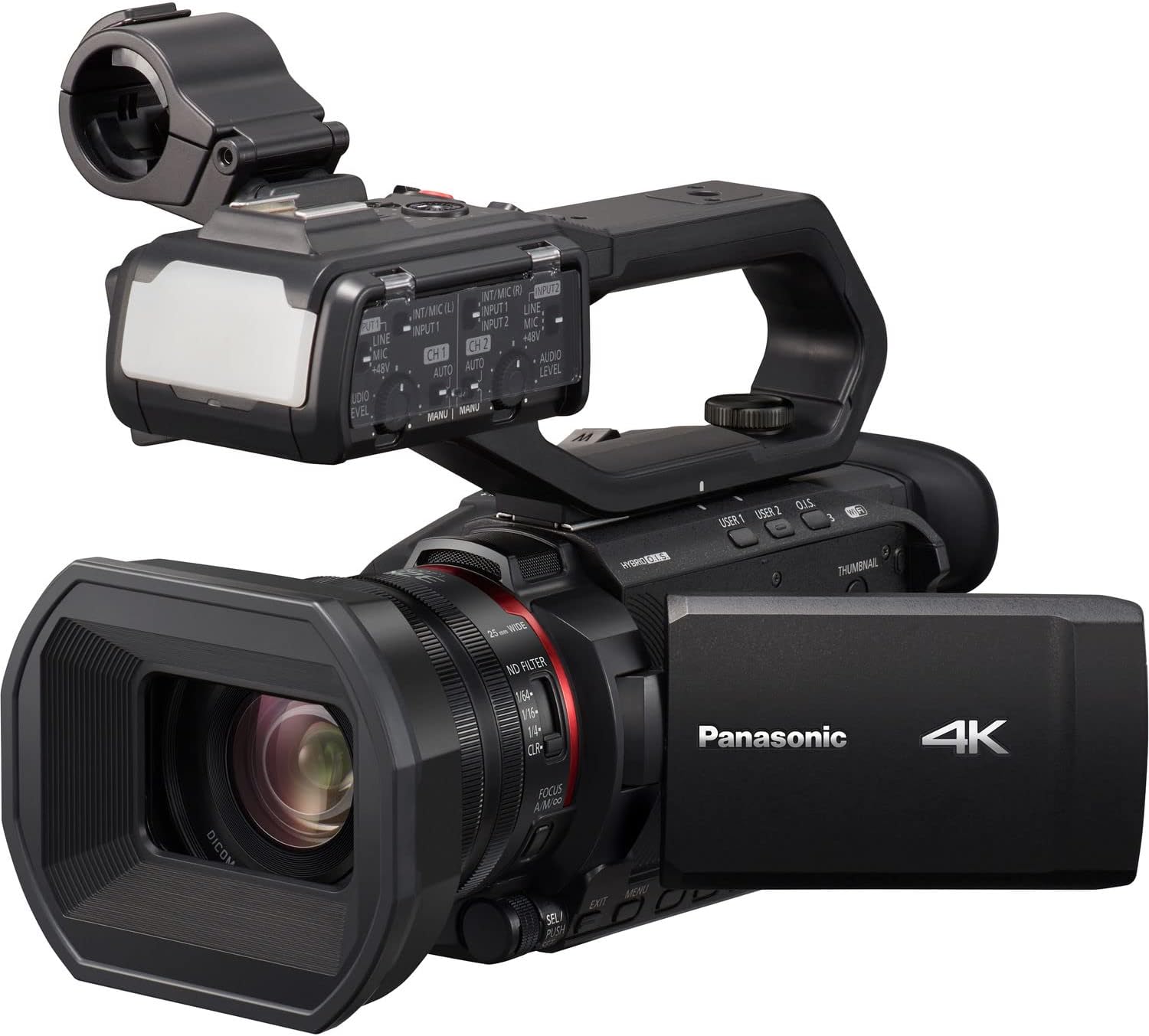
Figure 4.2.1: The Panasonic HC-X2000 Camcorder with its LCD monitor open, displaying the recording interface.
4.3 Operarea zoomului
Use the zoom lever located on the handle or the lens barrel to adjust the zoom. Push the lever towards 'T' for telephoto (zoom in) and 'W' for wide-angle (zoom out).
4.4 Ajustarea focalizării
The camcorder supports both auto-focus (AF) and manual focus (MF). Switch between modes using the AF/MF switch on the lens barrel. In MF mode, rotate the focus ring to adjust focus manually.
4.5 Stabilizarea imaginii
The 5-Axis Hybrid O.I.S. (Optical Image Stabilizer) is typically active by default. Ensure it is enabled in the menu settings for stable handheld footage.
4.6 Control Wi-Fi
To use Wi-Fi control, enable Wi-Fi in the camcorder's menu and connect your smartphone or tablet to the camcorder's Wi-Fi network. Use the Panasonic HC ROP app for remote camera settings and lens control.
5. Întreținere
5.1 Curățarea camerei video
- Obiectiv: Folosiți o lavetă moale, fără scame, special concepută pentru lentile optice. Pentru petele persistente, folosiți cu moderație o soluție de curățare a lentilelor.
- Corp: Wipe the camcorder body with a soft, dry cloth. Avoid using strong detergents or solvents.
- Monitor LCD: Ștergeți ușor cu o cârpă moale și uscată.
5.2 Îngrijirea bateriei
- Încărcați complet bateria înainte de prima utilizare.
- Depozitați bateriile într-un loc răcoros și uscat atunci când nu sunt utilizate.
- Evitați descărcarea completă frecventă a bateriei pentru a-i prelungi durata de viață.
5.3 Depozitare
When storing the camcorder for extended periods, remove the battery and store the unit in a dry, dust-free environment, preferably in a protective case.
6. Depanare
| Problemă | Cauza posibila | Soluţie |
|---|---|---|
| Camera video nu pornește. | Bateria nu este încărcată sau nu este introdusă corect. | Charge the battery and ensure it is securely inserted. |
| Nu se poate înregistra video. | No SD card, SD card full, or write-protected. | Insert an SD card, delete unnecessary files, or unlock the write-protection switch on the card. |
| Imaginea este neclară. | Incorrect focus, dirty lens, or image stabilization off. | Adjust focus, clean the lens, or enable image stabilization. |
| Nicio înregistrare audio. | Microphone not connected, audio levels too low, or input settings incorrect. | Check microphone connection, adjust audio input levels, and verify audio settings in the menu. |
7. Specificații
| Caracteristică | Detaliu |
|---|---|
| Numărul de model | HC-X2000 |
| Senzor | 1/2.5" 8.29M MOS Sensor |
| Rezoluție video | UHD 4K (3840 x 2160), Full HD (1920 x 1080) |
| Zoom optic | 24x |
| Distanța focală | 25mm - 600mm (35mm equivalent) |
| Stabilizarea imaginii | 5-Axis Hybrid O.I.S. |
| Conectivitate | 3G-SDI, HDMI, USB, Wi-Fi |
| Format audio | PCM pe 24 de biți |
| Medii de stocare | Card SD/SDHC/SDXC |
| Dimensiuni (L x A x A) | 10.12 x 6.26 x 5.08 inci (aprox.) |
| Greutate | 16.88 lire sterline (aprox.) |
8. Garanție și asistență
Pentru informații despre garanție și asistență tehnică, vă rugăm să consultați site-ul oficial Panasonic. website or contact your authorized Panasonic dealer. Keep your proof of purchase for warranty claims.
Resurse online: For the latest drivers, firmware updates, and detailed FAQs, visit the official Panasonic support page for the HC-X2000 model.


