1. Introducere și Pesteview
This manual provides detailed instructions for the installation, operation, and maintenance of your Yansoo 3-Channel Dash Cam. Please read this manual thoroughly before using the device to ensure proper functionality and safety.
Caracteristicile produsului:
- Înregistrare pe 3 canale: Simultaneously captures video from the front (170° wide-angle), rear (165°), and inside (140°) of your vehicle.
- Video de înaltă definiție: Supports 1080P Front video + AHD-720P Rear video + AHD-720P Inside video.
- Vedere nocturnă îmbunătățită: Features 4 unique infrared LED fill lights, F1.8 aperture, and WDR technology for optimal performance in low light.
- Emergency Lock (G-Sensor): Automatically detects sudden shocks or collisions and locks the current video footage pentru a preveni suprascrierea.
- Înregistrare în buclă: Continuously records and automatically overwrites the oldest unlocked video files când cardul de memorie este plin.
- Monitor de parcare: Activates recording when motion or shocking is detected while parked (requires separate hardwire kit for 24/7 monitoring).
- Adjustable Interior Camera: The interior lens can be rotated 60° for flexible positioning.
Continutul pachetului:
- Yansoo 3-Channel Dash Cam Unit
- Cameră spate cu cablu
- Suport pentru ventuză
- Car Charger (Type-C)
- Cablu de date USB
- Manual de utilizare
- Mounting Hardware for Rear Camera
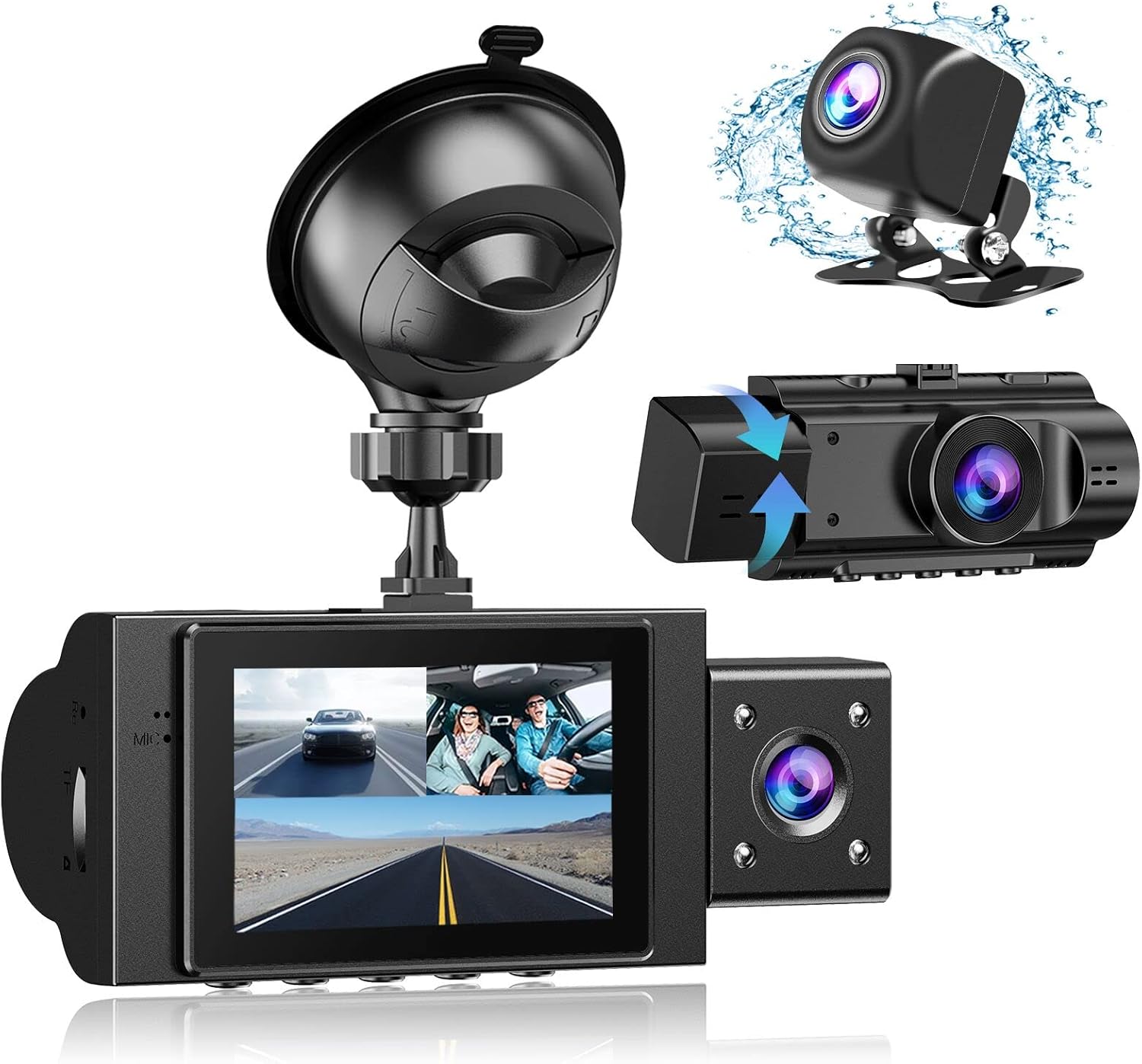
Image: The Yansoo 3-Channel Dash Cam unit with its suction cup mount and the separate rear camera, illustrating the complete package.
2. Configurare
2.1 Introducerea cardului de memorie
The dash cam supports Micro Memory cards up to 64GB (Class 10 or above recommended, not included). Please format the card in the camera menu before first use.
- Locate the memory card slot on the side of the dash cam.
- Insert the Micro Memory card into the slot until it clicks into place.
- Pentru a scoate cardul, împingeți ușor până când acesta iese.

Image: A four-panel illustration showing the steps to insert a Micro SD card into the dash cam's slot.
2.2 Montarea camerei de bord
Mount the main dash cam unit to your windshield using the provided suction cup mount. Choose a location that does not obstruct your view în timpul conducerii.
- Clean the chosen area on your windshield thoroughly.
- Atașați suportul cu ventuză la unitatea camerei de bord.
- Apăsați ferm ventuza pe parbriz și rotiți maneta pentru a o fixa.
- Reglați unghiul camerei pentru a asigura o imagine clară view a drumului din fata.

Image: The Yansoo 3-Channel Dash Cam mounted on a car's windshield, showing its position relative to the driver's view.
2.3 Instalarea camerei din spate
The rear camera provides a view of the vehicle's rear. It can be installed inside the rear window or externally above the license plate.
- Conectați cablul camerei spate la unitatea principală a camerei de bord.
- Route the cable neatly along the vehicle's interior trim to the rear.
- Mount the rear camera in the desired location, ensuring a clear view.

Image: A diagram illustrating the recommended cable routing path for the dash cam and rear camera within a car's interior.
2.4 Conexiune la alimentare
Connect the dash cam to your vehicle's cigarette lighter socket using the provided car charger. The camera will automatically power on and begin recording when the vehicle starts.

Image: The Yansoo 3-Channel Dash Cam connected to a power source, indicating its readiness for operation.
3. Instrucțiuni de utilizare
3.1 Operare de bază
- Pornire/Oprire: The camera powers on/off automatically with your vehicle's ignition. You can also manually power on/off by pressing and holding the power button.
- Porniți/Opriți înregistrarea: Recording starts automatically when the camera powers on. Press the "OK" button to manually stop or start recording.
- Comutați afișajul Views: Press the "Up" button to cycle through different display modes (Front, Inside, Rear, Picture-in-Picture combinations).
Video: Demonstration of the Yansoo X88 Dash Cam's recording capabilities, showcasing its ability to capture clear video footage.
Video: Footage from the Yansoo X88 Dash Cam demonstrating its clear day and night recording capabilities.
Video: A demonstration of the Yansoo X88 Dash Cam's 1080P Full HD recording quality.
3.2 Setări meniu
To access the menu settings, stop recording (if active) by pressing the "OK" button, then press the "M" button twice.
- Rezoluţie: Adjust video resolution for front, inside, and rear cameras.
- Înregistrare în buclă: Setați durata segmentelor video (de exemplu, 1, 3, 5 minute).
- Sensibilitatea senzorului G: Adjust the sensitivity of the emergency lock feature.
- Monitor de parcare: Enable or disable the parking monitoring function.
- Data/Ora: Setați data și ora corecte pentru ora exactăamps pe înregistrări.
- Limbă: Select your preferred language for the menu.
Video: A step-by-step guide on how to set the date and time on the Yansoo Dash Cam.
4. Întreținere
- Formatare obișnuită: Format the memory card regularly (e.g., once a month) to prevent data corruption and ensure optimal recording performance.
- Curățarea lentilelor: Păstrați lentilele camerei curate folosind o lavetă moale, fără scame. Evitați materialele abrazive care ar putea zgâria lentila.
- Actualizări firmware: Check the official Yansoo webpentru orice actualizări de firmware disponibile pentru a îmbunătăți performanța și a adăuga noi funcții.
- Considerații legate de temperatură: Evitați expunerea camerei de bord la temperaturi extreme pentru perioade lungi de timp.
5. Depanare
| Problemă | Cauza posibila | Soluţie |
|---|---|---|
| Camera nu pornește. | No power from cigarette lighter; loose connection. | Check car charger connection; ensure vehicle ignition is on. |
| Înregistrarea se oprește pe neașteptate. | Memory card full or corrupted; G-Sensor triggered. | Format memory card; adjust G-Sensor sensitivity. |
| Video footage is blurry. | Protective film on lens; dirty lens. | Remove protective film; clean lenses with a soft cloth. |
| Data/ora este incorectă. | Date/Time not set or battery low. | Set Date/Time in menu; ensure continuous power supply. |
| Camera se blochează sau funcționează defectuos. | Eroare software. | Use a needle to press the "RE" (Reset) button. |
6. Specificații
| Caracteristică | Detaliu |
|---|---|
| Dimensiunile produsului | 4.13 x 1.57 x 1.77 inci |
| Greutatea articolului | 1.23 lire sterline |
| Rezoluție captură video | 1080p (Front), 720p (Inside & Rear) |
| Câmp de View | 170° (Front), 140° (Inside), 165° (Rear) |
| Tehnologia de conectivitate | USB |
| Caracteristica specială | G-Sensor, Loop Recording, Parking Monitor, Night Vision |
| Tip de montare | Suport de aspirație |
| Producător | Yansoo |
7. Garanție și asistență
Yansoo offers comprehensive after-sales support for your dash cam.
- Garantie: 1-YEAR warranty from the date of purchase.
- Serviciu tehnic: 7*24 hours technical service is available.
- Contact: For any questions or issues, please contact our customer service team via Amazon or the after-sales email provided in the original product packaging.
- Manual de utilizare (PDF): A digital version of the user manual is available for download Aici.


