Manual de utilizare al unității principale AXIS F9114
Model: 01991-001
Introducere
This manual provides comprehensive instructions for the installation, operation, and maintenance of the Axis F9114 Main Unit. Please read this manual carefully before using the product to ensure proper functionality and safety.
Produs terminatview
The AXIS F9114 is a main unit designed for the F-Series surveillance system. It supports up to four F21 or F7 sensor units, providing a flexible and discreet surveillance solution. This unit acts as the central processing hub for connected camera sensors.
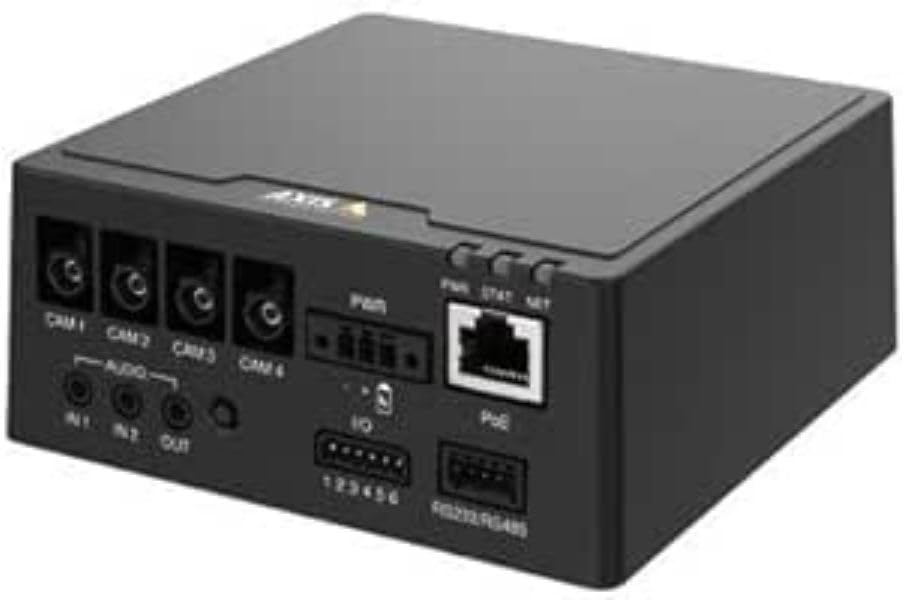
Figura 1: Faţă view of the AXIS F9114 Main Unit, showing camera input ports (CAM 1-4), audio input/output, power input, I/O ports, and an Ethernet port with PoE support.
Caracteristici cheie:
Supports up to 4 Axis F-Series sensor units (e.g., F21, F7).
Central processing unit for video and audio streams.
Design compact pentru instalare flexibilă.
Integrated Power over Ethernet (PoE) for simplified power and data connectivity.
Multiple I/O ports for external device integration.
Audio input/output capabilities.
Configurare și instalare
Continutul pachetului:
Unitatea principală AXIS F9114
Ghid de instalare
(Power supply and sensor units sold separately, unless specified)
Connecting Sensor Units:
Ensure the main unit is powered off before connecting any sensor units.
Connect the cables from your AXIS F-Series sensor units (e.g., F21, F7) to the designated "CAM 1", "CAM 2", "CAM 3", and "CAM 4" ports on the rear of the F9114 Main Unit. Ensure a secure connection.
Each sensor unit requires a dedicated port.
Alimentarea unității:
Alimentare prin Ethernet (PoE): Connect an Ethernet cable from a PoE-enabled switch or injector to the "PoE" port on the F9114. This will provide both power and network connectivity.
Sursă de alimentare externă: If PoE is not used, connect a compatible DC power adapter (not included) to the "PWR" input terminal. Refer to specifications for voltage cerințe.
Conexiune retea:
Connect an Ethernet cable from your network to the "PoE" port on the F9114. This provides network access for configuration and video streaming.
Conexiuni audio și I/O:
Audio: Connect external microphones to "IN 1" or "IN 2" and speakers to "OUT" if audio functionality is required.
I/O: Use the "IO" terminal block for connecting external devices such as alarm sensors or relays. Refer to the detailed wiring diagram in the full technical documentation for specific connections.
Operațiunea
Pornire inițială:
Once all connections are secure and power is supplied, the unit will begin its startup sequence. Observe the LED indicators for status.
Indicatoare LED:
PWR (putere): Indicates power status. (e.g., Solid green for normal operation).
STAT (Stare): Indicates operational status. (e.g., Flashing for network activity, solid for ready).
NET (Rețea): Indicates network connection and activity.
Accesarea dispozitivului:
Use the AXIS IP Utility or a network scanner to discover the IP address of the F9114 on your network.
Deschide a web browser and enter the IP address to access the device's web interfata.
Log in using the default credentials (refer to the installation guide or Axis website for current defaults).
Follow the on-screen instructions to configure network settings, video streams, and other system parameters.
Management video:
The F9114 integrates with various video management software (VMS) solutions. Refer to your VMS documentation for adding and managing the device.
Întreţinere
curatenie: Folosiți o cârpă moale și uscată pentru a curăța exteriorul unității. Nu utilizați substanțe chimice dure sau produse de curățare abrazive.
Actualizări firmware: Verificați periodic sistemul de comunicații Axis website for firmware updates. Keeping the firmware updated ensures optimal performance, security, and access to new features.
Conditii de mediu: Ensure the unit is operated within its specified temperature and humidity ranges to prevent damage.
Depanare
Probleme comune și soluții:
Fără putere:
Verify power cable connection (if using external power).
Ensure PoE switch/injector is active and providing power (if using PoE).
Verificați sursa de alimentare.
Fără conexiune la rețea:
Verificați conexiunea cablului Ethernet.
Verify network switch/router functionality.
Confirm IP address settings are correct or DHCP is functioning.
No Video from Sensor Unit:
Ensure sensor unit cables are securely connected to the F9114.
Verify the sensor unit is compatible with the F9114.
Check the sensor unit's status indicators (if available).
Access the F9114 web interface to confirm sensor unit detection and configuration.
Aţi uitat parola:
Refer to the Axis Communications support documentation for password reset procedures, which typically involve a factory reset button or specific software tools.
For more detailed troubleshooting, refer to the comprehensive support resources available on the Axis Communications website-ul.
Specificații
Caracteristică
Detaliu
Marca
Axis Communications
Numărul de model
01991-001
Greutatea articolului
1.87 lire sterline
Dimensiunile produsului (Lxlxh)
19.69 x 19.69 x 11.02 inci
Producător
AXIS - CAMERA
ASIN
B0BWNS49VS
Data primului disponibil
23 februarie 2023
Note: Specifications are subject to change without notice. For the most current information, please refer to the official Axis Communications website-ul.
Garanție și suport
Informații despre garanție:
For detailed warranty information, please refer to the warranty statement provided with your product or visit the official Axis Communications webPăstrați dovada achiziției pentru reclamații în garanție.
Suport tehnic:
If you encounter issues that cannot be resolved using this manual or the troubleshooting section, please contact Axis Communications technical support. Support resources, including FAQs, documentation, and contact information, are available on their official website-ul.
Tabele comparative ale produselor AXIS T3 2025: Sisteme video de rețea, audio, control acces și interfonie Acest document din trimestrul 3 al anului 2025 de la Axis Communications oferă tabele comparative complete ale produselor pentru gama lor extinsă de soluții video de rețea, audio, de control al accesului și de interfonie. Acesta detaliază specificațiile, caracteristicile și informațiile despre modele pentru diverse linii de produse, inclusiv camere, înregistratoare, software și sisteme de interfonie.
Ghid de instalare pentru seria de camere panoramice AXIS M43 Acest ghid de instalare oferă informații esențiale pentru configurarea seriei de camere panoramice AXIS M43, inclusiv modelele AXIS M4327-P și AXIS M4328-P. Acesta acoperă procedurile de instalare, siguranța și conformitatea cu reglementările.
Ghid de instalare pentru camera bullet AXIS Q1808-LE de 150 mm | AXIS Communications Acest ghid complet de instalare oferă instrucțiuni detaliate pentru configurarea camerei bullet AXIS Q1808-LE de 150 mm. Acesta acoperă informații esențiale privind siguranța, considerații legale, conformitate cu reglementările și proceduri pas cu pas de montare și configurare.