Introducere
This manual provides essential information for the safe and efficient operation of your Boxlight P8 WX35NXT DLP Projector. Please read this manual thoroughly before using the projector and retain it for future reference. The Boxlight P8 WX35NXT is an Ultra Short Throw DLP projector designed for various applications, offering WXGA resolution and 3500 ANSI lumens brightness.
Informații importante privind siguranța
- Do not block ventilation openings: Ensure proper airflow around the projector to prevent overheating.
- Avoid direct eye exposure to the lens: The projector emits a bright light that can cause eye damage.
- Do not place near water or moisture: This can lead to electric shock or fire.
- Use only specified power supply: Refer to the product label for correct voltage și cerințele actuale.
- Manipulați cu grijă: Evitați să scăpați proiectorul sau să îl supuneți la impacturi puternice.
- Service: Pentru toate lucrările de întreținere, adresați personalului de service calificat.
Conținutul pachetului
Verificați dacă toate articolele sunt prezente în colet:
- Boxlight P8 WX35NXT DLP Projector
- Cablu de alimentare
- Telecomanda (cu baterii)
- Cablu VGA
- Manual de utilizare (acest document)
Produs terminatview
Componente pentru proiector

Figura 1: Top view of the Boxlight P8 WX35NXT projector. This image displays the main lens assembly, the integrated control panel with navigation buttons, and the overall casing design. The projector features an ultra-short throw lens positioned at the top front, allowing for projection from a very short distance.
- Lentila de proiectie: Located at the front-top, designed for ultra-short throw projection.
- Panou de control: Buttons for power, menu navigation, source selection, and keystone correction.
- Grile de ventilație: Located on the sides and front for heat dissipation.
- Inel de focalizare: Manual adjustment for image sharpness.
Porturi de conectivitate
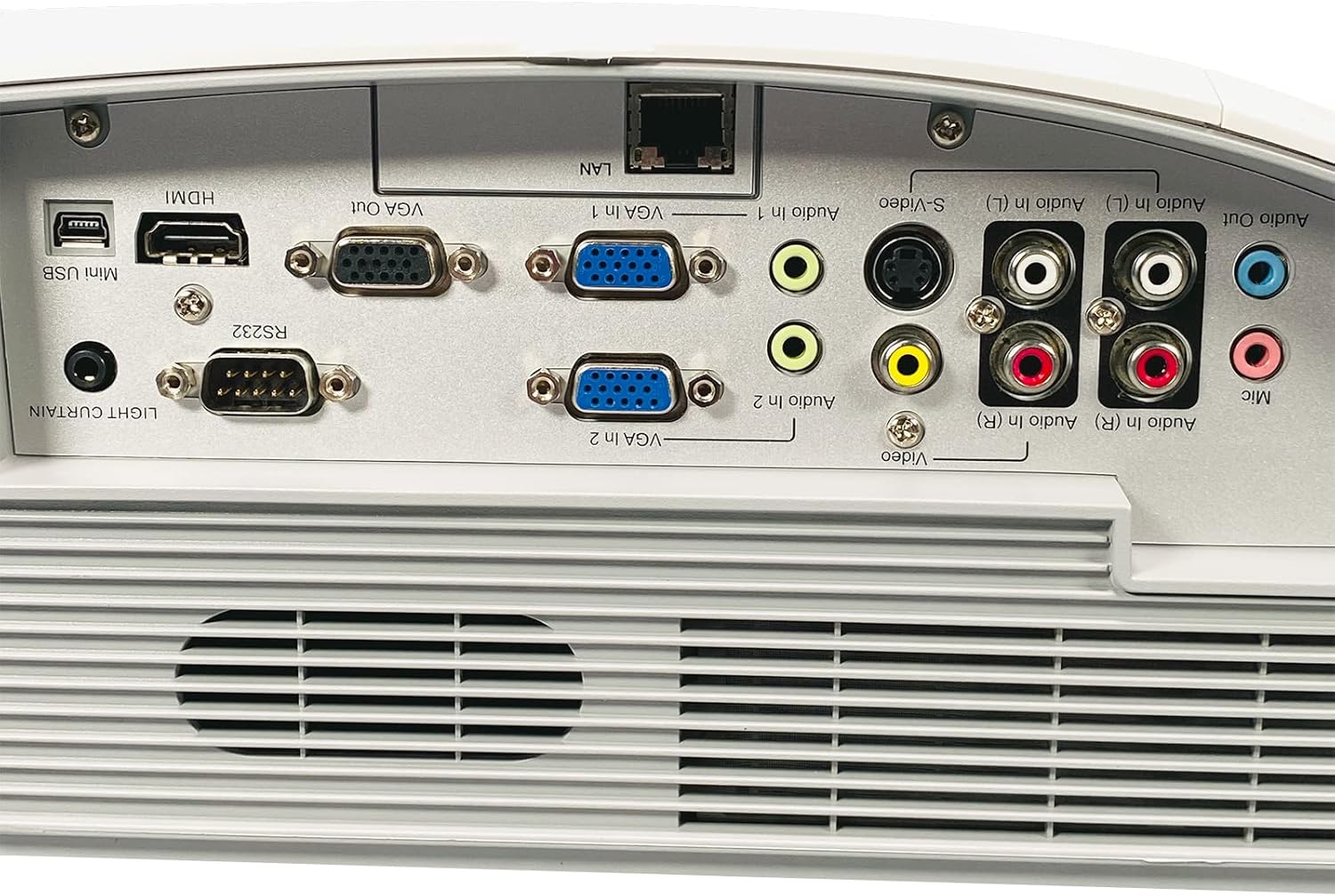
Figura 2: Rear panel of the Boxlight P8 WX35NXT projector, detailing the various input and output ports. From left to right, ports include Mini USB, HDMI, RS232, VGA Out, VGA In (x2), LAN, S-Video, Composite Video (RCA), Audio In (L/R), Audio Out, and Microphone input.
- HDMI: Intrare video și audio digitală.
- VGA In (x2): Intrare video analogică pentru computere.
- Ieșire VGA: Analog video output for a monitor.
- LAN (RJ-45): Network connection for control and monitoring.
- Mini-USB: For service or interactive features.
- RS232 (DB-9 pini): Port serial pentru controlul proiectorului.
- S-Video: Intrare video analogica.
- Video compozit (RCA): Intrare video analogica.
- Audio In (L/R): RCA audio inputs.
- Ieșire audio: Ieșire audio.
- Microfon: Intrare microfon.
Ghid de instalare
1. Amplasarea proiectorului
As an ultra-short throw projector, the P8 WX35NXT is designed to be placed very close to the projection surface (screen or wall). Position the projector on a stable, flat surface directly in front of the screen. Ensure there are no obstructions to the projection path or ventilation openings.
2. Conexiune la alimentare
- Conectați cablul de alimentare la intrarea de alimentare a proiectorului.
- Conectați celălalt capăt al cablului de alimentare la o priză cu împământare.
3. Conectarea surselor de intrare
Connect your video source (e.g., computer, Blu-ray player) to the appropriate input port on the projector's rear panel (refer to Figure 2).
- HDMI: For digital video and audio.
- VGA: For analog computer video. Connect an audio cable separately if needed.
- S-Video/Composite: Pentru surse video de definiție standard.
4. Pornirea inițială
- Apăsați tasta Putere button on the projector's control panel or remote control.
- The power indicator light will change, and the projector will begin its startup sequence.
5. Ajustarea focalizării
Adjust the focus ring located near the lens until the projected image is clear and sharp.
Instrucțiuni de operare
Pornire/Oprire
- Pentru a porni: Apăsați tasta Putere butonul o dată.
- Pentru a opri: Apăsați tasta Putere button twice. The projector will display a shutdown confirmation. Confirm to power off.
Selectarea sursei de intrare
Apăsați tasta Sursă button on the control panel or remote control to cycle through available input sources (HDMI, VGA1, VGA2, S-Video, Video).
Navigare meniu
Utilizați Meniu button to open the On-Screen Display (OSD) menu. Use the arrow buttons to navigate and the Intră pentru a selecta opțiunile. Apăsați butonul Meniu din nou pentru a ieși.
Ajustări de imagine
- Luminozitate/Contrast: Adjust these settings in the OSD menu to optimize image quality for your viewing mediu.
- Raport de aspect: Select the appropriate aspect ratio (e.g., 16:10, 4:3) from the OSD menu to match your content.
- Corecție trapezoială: If the image appears trapezoidal, use the keystone correction function (often a dedicated button or in the OSD) to square the image.
Întreţinere
Curățarea proiectorului
- Casing: Use a soft, dry cloth to wipe the projector casing. For stubborn stains, dampen the cloth slightly with water and a mild detergent, then wipe dry.
- Obiectiv: Use a professional lens cleaning cloth and lens cleaning solution. Avoid abrasive materials or excessive pressure.
- Ventilare: Periodically check and clean the ventilation grilles to ensure proper airflow. Use a soft brush or compressed air to remove dust.
Lamp Înlocuire
The Boxlight P8 WX35NXT uses a DLP light source, which typically has a very long lifespan and does not require frequent lamp replacement like traditional projectors. If a light source issue occurs, contact technical support.
Depanare
| Problemă | Cauza posibila | Soluţie |
|---|---|---|
| Nu este afișată nicio imagine |
|
|
| Imaginea este neclară |
|
|
| Imaginea este trapezoidală |
|
|
| Fără sunet |
|
|
Specificații
| Marca | Boxlight |
| Model | P8 WX35NXT |
| Tehnologia de afișare | DLP |
| Rezoluție nativă | 1280x800 (WXGA) |
| Rezolutie maxima | 1080p (FHD) |
| Luminozitate | 3500 ANSI Lumens |
| Raport de contrast | 3000:1 |
| Raportul de aspect | 16:10 (nativ) |
| Raportul de aruncare | Ultra-short Throw |
| Conectivitate | HDMI, VGA In (x2), VGA Out, LAN (RJ-45), Mini USB, RS232, S-Video, Composite Video, Audio In (L/R), Audio Out, Mic |
| Difuzoare încorporate | 10.0 wați mono |
| Greutatea articolului | 17.7 lbs (8.03 kg) |
| Intrare de putere | AC 100-240V~ 50/60 Hz 3.6A |
Garanție și suport
For technical support or warranty inquiries, please contact Boxlight directly. Refer to the product label for specific contact information.

Figura 3: Product label on the underside of the projector. This label provides essential information including the manufacturer's address, technical support contact details, model number (P8 WX35NXT), input power specifications, and regulatory compliance marks (CE, UL, FC).
- Producător: Boxlight
- Suport tehnic: International +1 360-464-2119, USA and Canada 1-866-972-1549
- Website: www.boxlight.com
- Model: P8 WX35NXT
- Nr. de serie: 330901135450075 (Example, actual serial number varies per unit)
Please register your product on the Boxlight website to activate your warranty and receive product updates.


