Introducere
This manual provides detailed instructions for the setup, operation, and maintenance of your BEITONG Asura 2NS Wireless Controller. Please read this manual carefully before using the product to ensure optimal performance and longevity.

Imagine: față view of the BEITONG Asura 2NS Wireless Controller, showcasindesignul său ergonomic și dispunerea butoanelor.
Configurare și compatibilitate
The BEITONG Asura 2NS Wireless Controller offers multi-platform compatibility and various connection methods.
Compatibilitate:
- PC: Windows 7/8/10/11, Steam
- Nintendo Switch: Switch, Switch Lite, Switch OLED
- Android: Mobile & TV (supports native games only)
- Steam Deck
Metode de conectare:
- Conexiune prin cablu: Connect the controller directly to your PC or Steam Deck using a USB cable.
- Conexiune Bluetooth:
- For PC/Steam Deck: Caută Bluetooth device name "Xbox Wireless Controller".
- Pentru Android: Caută Bluetooth device name "BEITONG 2585NS".
- Pentru Nintendo Switch: Connection will be automatic once pairing mode is initiated on the controller and console.
Nota: The BEITONG Gamepad Assistant software is available for key testing and firmware upgrades if required. It is not mandatory for basic operation.

Imagine: Pesteview of key features for Nintendo Switch, including screenshot, Bluetooth, 6-axis gyro, 5 levels vibration, key layout adjust-free, key value switchable, and Turbo function.
Instrucțiuni de operare
Motion Control (Nintendo Switch Only):
The controller features a 6-axis gyro sensor and BEITONG somatosensory mapping technology. This supports native Switch sensing games. You can adjust the somatosensory sensitivity to 3 different levels to suit various game requirements. This function is exclusively for Nintendo Switch games.

Image: Visual representation of the 6-axis gyro sensor and somatosensory mapping technology in action, with the controller shown above a Nintendo Switch console.
Precizie joystick:
Equipped with ALPS joysticks from Japan, the controller provides pixel-high accurate positioning, ensuring high accuracy, fine tuning, and easy positioning in games.

Image: Close-up of the ALPS joystick, highlighting its precision and responsiveness for gaming.
Key Layout and HOME Key Function:
- Switch Original Key Layout: The controller maintains the original key layout for seamless integration with Nintendo Switch games.
- Tasta HOME: Press the [HOME] key to return to the Switch home page. When connected to PC or Android, the [HOME] key can also be used to switch the function of the left stick and D-pad.
- Auto-Keyed Value: A&B keys automatically adapt to key values depending on the connected platform.

Image: Illustration of the Turbo function setup and the auto-keyed value feature for A&B buttons, adapting to different platforms.
Vibrație dublă:
Built-in double vibrating motors provide immersive feedback. The vibration intensity is adjustable with 5 gears, allowing you to customize the experience according to different game scenes.
Funcția Turbo:
To set the Turbo function, simultaneously press the Turbo button and any of the ABXY, LB, RB, LT, RT keys. This allows for rapid input of commands.
Funcția de captură de ecran:
To take a screenshot on your Nintendo Switch, simultaneously press the Turbo butonul și R3 (right stick click) button. Note that this function is only available on the Nintendo Switch.

Image: Diagram showing the location of the dual vibrate motors within the controller and the function of the HOME key to exchange left stick and D-pad functions in PC mode.
LB/RB Mechanical Switches:
The LB/RB buttons utilize ALPS mechanical point-touch switches, providing a crisp and responsive feel similar to a gaming mouse click.
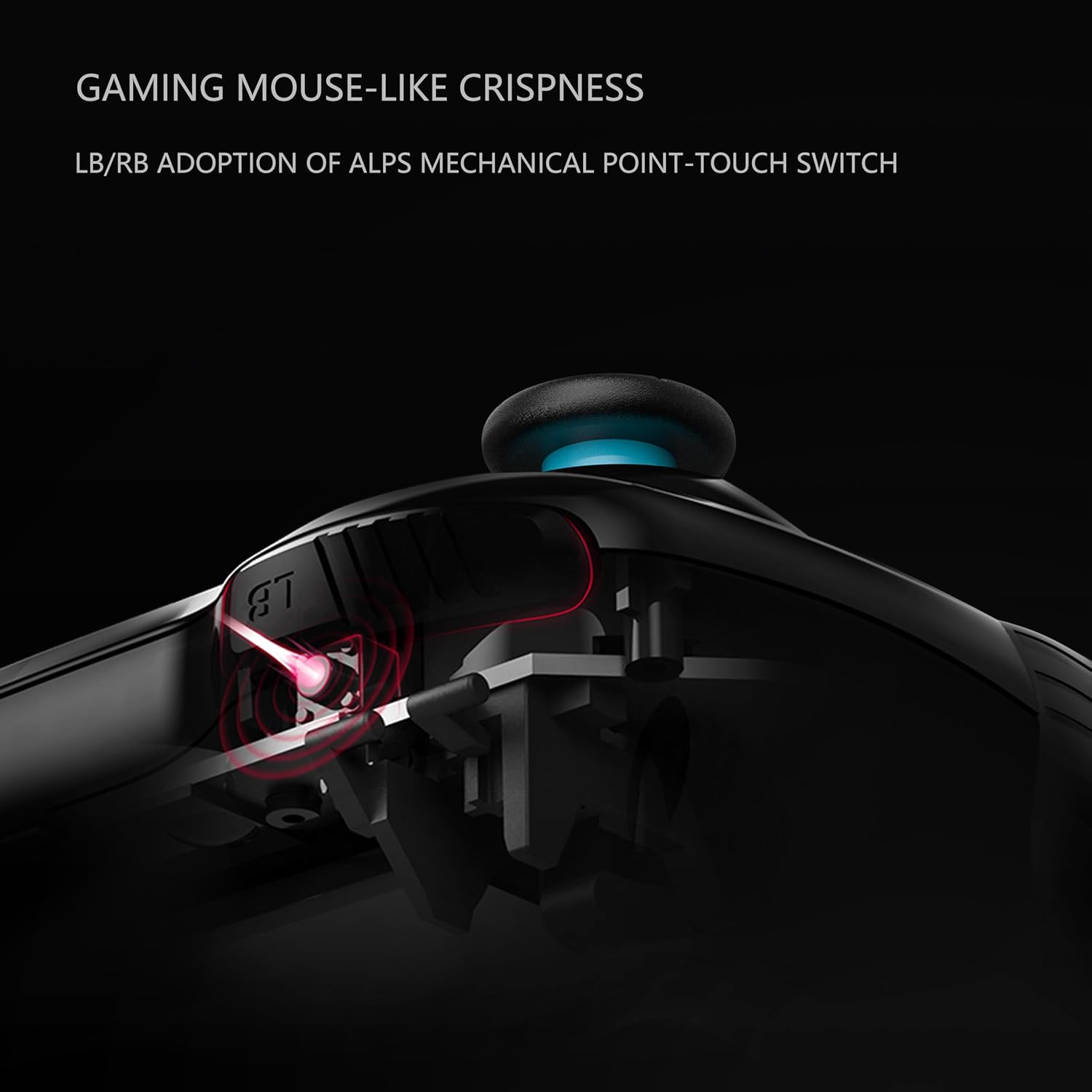
Imagine: Secțiune transversală view illustrating the ALPS mechanical point-touch switch used in the LB/RB buttons, emphasizing their tactile feedback.
Întreţinere
Proper maintenance ensures the longevity and performance of your controller.
- curatenie: Folosiți o lavetă moale și uscată pentru a curăța controlerul. Pentru murdăria persistentă, ștergeți ușor.amp Se poate folosi o lavetă, dar asigurați-vă că nu pătrunde umezeală în dispozitiv. Evitați substanțele chimice dure sau produsele de curățare abrazive.
- Depozitare: Depozitați controlerul într-un loc răcoros și uscat, ferit de lumina directă a soarelui și de temperaturi extreme.
- Îngrijirea bateriei: Dacă nu veți utiliza controlerul pentru o perioadă lungă de timp, asigurați-vă că este complet încărcat înainte de depozitare. Evitați descărcarea completă și frecventă a bateriei.
- Evitați picăturile: Protejați controlerul de impacturi fizice și căderi, care pot deteriora componentele interne.
Depanare
If you encounter issues with your BEITONG Asura 2NS Wireless Controller, refer to the following common solutions:
- Controlerul nu se conectează:
- Asigurați-vă că controlerul este încărcat.
- Verify Bluetooth is enabled on your device (PC, Android, Switch).
- Check that you are searching for the correct Bluetooth device name (e.g., "Xbox Wireless Controller" for PC/Steam Deck, "BEITONG 2585NS" for Android).
- Try restarting both the controller and the host device.
- Pentru conexiunea cu fir, asigurați-vă că este conectat corect cablul USB.
- Butoanele/Joystick-urile nu răspund:
- Verificați dacă controlerul este conectat corect.
- Reporniți controlerul.
- Asigurați-vă că nu există obstacole fizice care să împiedice apăsarea butoanelor sau mișcarea joystick-ului.
- Vibrațiile nu funcționează:
- Verificați dacă jocul acceptă feedback prin vibrații.
- Check the vibration intensity settings on the controller.
- Actualizarea firmware-ului: If issues persist, consider checking for and installing the latest firmware using the BEITONG Gamepad Assistant software.
Specificații
| Caracteristică | Detaliu |
|---|---|
| Numărul de model | BTP-2585NS |
| Dimensiunile produsului | 16.51 x 104.14 x 6.35 cm |
| Greutate | 540 g |
| Tip baterie | 1 baterie cu litiu polimer (inclusă) |
| Conectivitate | Bluetooth 5.0, Wired USB |
| Controlul mișcării | 6-Axis Gyro Sensor (Switch only) |
| Vibrație | Dual Motors, 5 adjustable levels |
Garanție și suport
For warranty information and technical support, please refer to the official BEITONG website-ul web sau contactați distribuitorul. Păstrați dovada achiziției pentru a putea solicita garanție.


