Introducere
Welcome to the user manual for your CANYON Sandy KW-44 Smartwatch. This guide provides essential information on setting up, operating, maintaining, and troubleshooting your device. Please read this manual carefully to ensure optimal performance and longevity of your smartwatch.
Înființat
1. Conținutul pachetului
Înainte de a începe, asigurați-vă că toate articolele sunt prezente în pachet:
- CANYON Sandy KW-44 Smartwatch
- Cablu de încărcare
- Manual de utilizare (acest document)

Figure 1: Product packaging showing the smartwatch and brand details.
2. Încărcarea ceasului inteligent
Înainte de prima utilizare, încărcați complet ceasul inteligent.
- Connect the charging cable to the charging port on the smartwatch.
- Conectați celălalt capăt al cablului la un adaptor de alimentare USB (nu este inclus) sau la portul USB al unui computer.
- Indicatorul de încărcare de pe ecran va afișa starea de încărcare.
- O încărcare completă durează de obicei aproximativ 2 ore.
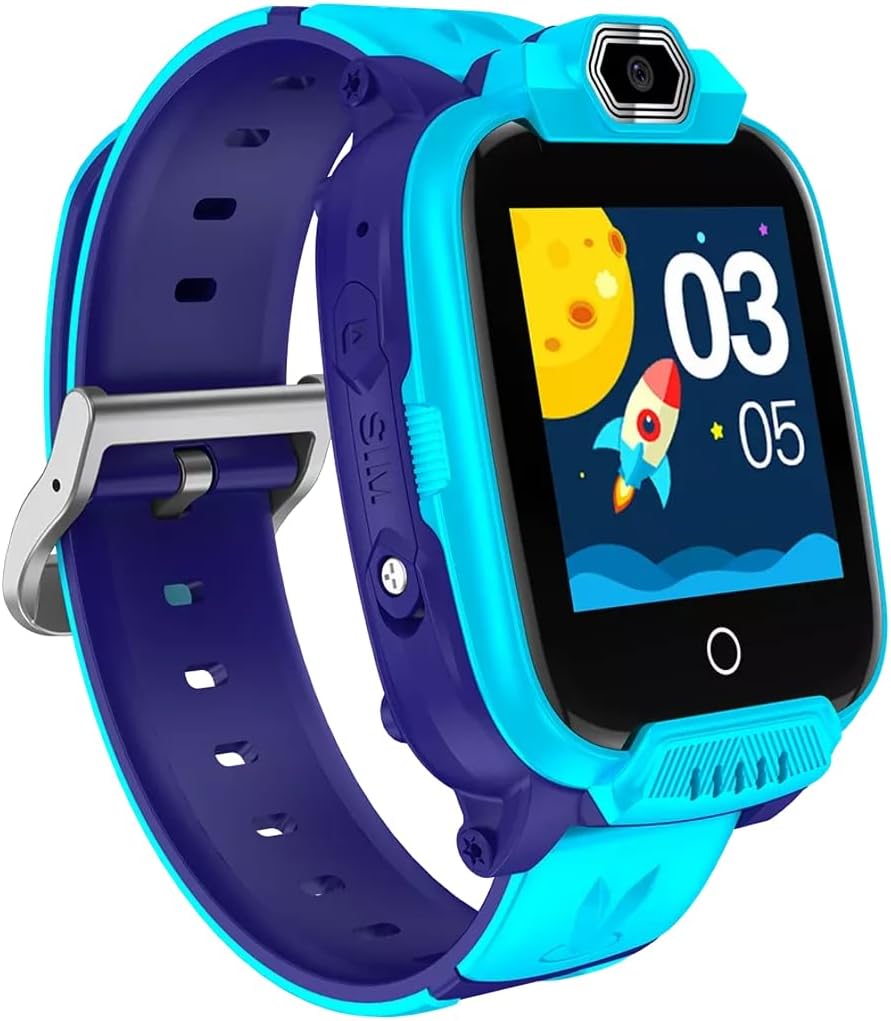
Figura 2: Înclinat view of the CANYON Sandy KW-44 Smartwatch, showing the side buttons and SIM card slot area.
3. Instalarea cartelei SIM (opțional)
The smartwatch supports a SIM card for call functions.
- Power off the smartwatch.
- Localizați slotul pentru cartela SIM pe lateralul dispozitivului (consultați Figura 2).
- Carefully insert a nano-SIM card into the slot with the gold contacts facing up, ensuring it clicks into place.
- Închideți bine capacul slotului cartelei SIM.
- Porniți ceasul inteligent.
4. Instalarea și asocierea aplicației
To unlock full features and manage your smartwatch, download the companion app on your smartphone.
- Caută the "CANYON Life" app (or similar, check product documentation for exact app name) in your smartphone's app store (Google Play Store or Apple App Store).
- Descărcați și instalați aplicația.
- Deschideți aplicația și urmați instrucțiunile de pe ecran pentru a crea un cont sau pentru a vă conecta.
- Activați Bluetooth pe smartphone-ul dvs.
- In the app, select "Add Device" and choose your CANYON Sandy KW-44 from the list of available devices.
- Confirmați solicitarea de asociere atât pe smartphone, cât și pe ceasul inteligent.
Instrucțiuni de operare
1. Navigare de bază

Figura 3: Față view of the CANYON Sandy KW-44 Smartwatch, showing the main display with time and a rocket graphic.
- Pornire/Oprire: Press and hold the power button (usually on the side) to turn the device on or off.
- Touch screen: Swipe left/right or up/down to navigate through menus and features. Tap to select an option.
- Butonul Înapoi: A dedicated button or a swipe gesture may be used to go back to the previous screen.
2. Efectuarea și primirea apelurilor
With a properly installed and activated SIM card, you can make and receive calls directly from your smartwatch.
- Efectuarea unui apel: Access the "Dialer" or "Contacts" app on the smartwatch, select a contact or dial a number, and tap the call icon.
- Primirea unui apel: When a call comes in, the smartwatch will ring and display the caller ID. Tap the green answer icon to accept or the red icon to decline.
3. Utilizarea camerei
The smartwatch is equipped with a built-in camera.
- Navigate to the "Camera" application on your smartwatch.
- Încadrează-ți fotografia folosind ecranul ca viewcăutare.
- Atingeți butonul de captură de pe ecran pentru a face o fotografie.
- Photos are saved to the smartwatch's internal memory.

Figura 4: Înclinat view of the CANYON Sandy KW-44 Smartwatch, highlighting the camera lens above the display.
4. Alte caracteristici
Explore other functionalities available on your smartwatch, which may include:
- Afișare timp: Fețe de ceas personalizabile.
- Notificări: Primește alerte pentru apeluri, mesaje și notificări ale aplicațiilor de pe smartphone-ul asociat.
- Urmărirea activității: Monitor steps, distance, and calories (if supported by the model).
- Player muzical: Play music stored on the device or control music on your paired phone.
Întreţinere
1. Curatenie
- Wipe the smartwatch and strap with a soft, damp pânză.
- Nu utilizați substanțe chimice dure sau produse de curățare abrazive.
- Asigurați-vă că dispozitivul este uscat înainte de încărcare.
2. Îngrijirea bateriei
- Evitați temperaturile extreme, care pot afecta durata de viață a bateriei.
- Nu lăsați bateria complet descărcată pentru perioade lungi de timp.
- Utilizați numai cablul de încărcare furnizat.
3. Rezistență la apă (IP67)
The CANYON Sandy KW-44 Smartwatch is rated IP67, meaning it is protected from dust and can withstand immersion in water up to 1 meter for 30 minutes.
- Do not use the smartwatch for swimming or diving.
- Evitați expunerea la apă fierbinte, abur sau jet de apă sub presiune.
- Ensure all ports and covers are securely closed to maintain water resistance.
Depanare
| Problemă | Soluție posibilă |
|---|---|
| Ceasul inteligent nu se pornește. | Asigurați-vă că bateria este încărcată. Conectați-o la încărcător timp de cel puțin 30 de minute. |
| Nu se poate conecta la smartphone. |
|
| Cartela SIM nu a fost detectată. |
|
| Ecranul nu răspunde. | Restart the smartwatch by pressing and holding the power button. If unresponsive, allow the battery to drain completely and then recharge. |
Specificații
| Caracteristică | Detaliu |
|---|---|
| Marca | CANION |
| Numele modelului | Sandy KW-44 |
| Numărul de model | CNE-KW44BL |
| Dimensiunea ecranului | 1.44 inchi |
| Tehnologia de conectivitate | Bluetooth |
| Comunicare wireless standard | Bluetooth |
| Capacitate de stocare a memoriei | 512 MB |
| Tip baterie | 1 Lithium-polymer (Rechargeable) |
| Componente incluse | Cablu de încărcare |
| Lățimea curelei | 20 milimetri |
| Evaluare de rezistență la apă | IP67 (Dust protected, immersion up to 1m for 30 min) |
Garanție și suport
Pentru informații despre garanție și asistență tehnică, vă rugăm să consultați site-ul oficial CANYON website or contact their customer service. Details are typically provided on the product packaging or the manufacturer's official support page.
Producător: CANION


