Introducere
The NUX DA-30BT is a 30-watt personal monitor amplifier designed for electronic drums, keyboards, digital pianos, and synthesizers. It features Bluetooth connectivity for audio streaming and two independent input channels, allowing multiple musicians to share monitoring in various settings.
Conținutul pachetului
Vă rugăm să bifați căsuța pentru următoarele elemente:
- NUX DA-30BT Personal Monitor Ampmai în viață
- Cablu de alimentare
- Input Cables (as specified by manufacturer)
- Manual de utilizare (acest document)
Produs terminatview
Controale panoului frontal
The front panel of the DA-30BT provides all essential controls for input, tone, and power management.
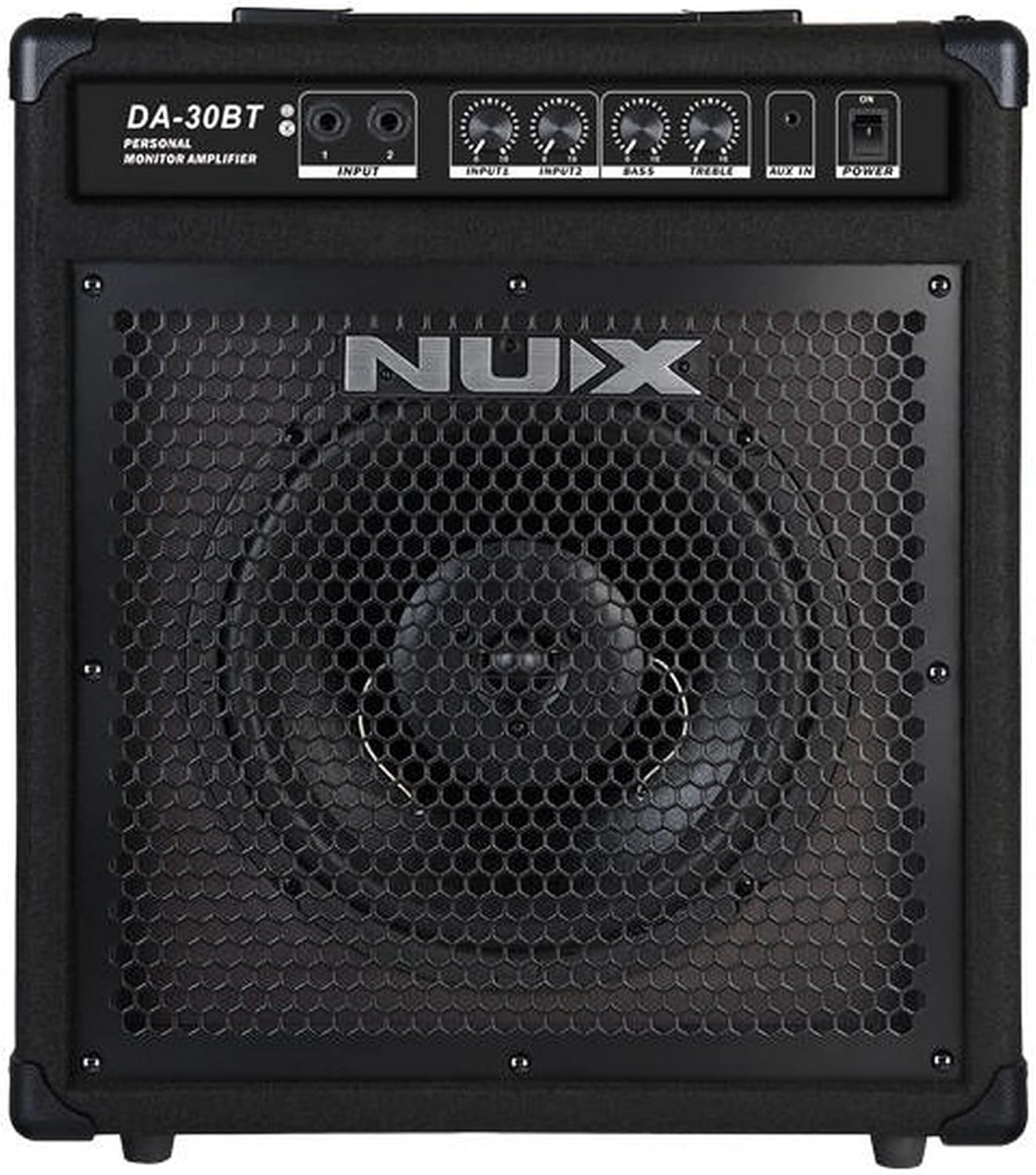
Imagine: față view of the NUX DA-30BT amplifier, showing the speaker grille, control panel with input jacks, volume knobs, bass and treble controls, auxiliary input, and power switch.
- INPUT 1 (1/4" Jack): Main input for instruments like electronic drums or keyboards.
- INPUT 2 (1/4" Jack): Secondary input for another instrument or audio source.
- INPUTS Volume Controls: Independent volume knobs for INPUT 1 and INPUT 2.
- Control BASS: Reglează răspunsul de joasă frecvență al ampmai în viață.
- Controlul înaltelor: Adjusts the high-frequency response of the ampmai în viață.
- INTRARE AUX (mufă de 3.5 mm): Stereo input for connecting external audio devices like smartphones or MP3 players.
- Întrerupător: Întoarce ampmai viață pornită sau oprită.
- Indicator Bluetooth: Lights up when Bluetooth is active and paired.
Conexiuni la panoul din spate
The rear panel houses the power input and important product information.

Imagine: Spate view of the NUX DA-30BT amplifier, showing the AC power inlet, regulatory information, and serial number label.
- Priză de alimentare CA: Conectați aici cablul de alimentare furnizat.
- Număr de serie: Unique identifier for your unit.
- Informații de reglementare: Compliance markings and electrical specifications.
Înființat
- Conexiune de alimentare:
Connect the supplied power cable to the AC Power Inlet on the rear panel of the DA-30BT and then to a suitable electrical outlet.
- Conectarea instrumentului:
For electronic drums, keyboards, or other instruments, connect a 1/4" instrument cable from your device's output to either the INPUT 1 or INPUT 2 jack on the front panel.
- Auxiliary Device Connection (Optional):
To play audio from an external device (e.g., smartphone, MP3 player), connect a 3.5mm stereo audio cable from your device's headphone output to the AUX IN jack on the front panel.
- Asociere Bluetooth:
Turn on the DA-30BT. The Bluetooth indicator will flash, indicating it's ready for pairing. On your Bluetooth-enabled device, search for "NUX DA-30BT" and select it to pair. The indicator will become solid once paired.
Instrucțiuni de operare
- Pornire/Oprire:
Apăsați comutatorul POWER de pe panoul frontal pentru a porni amplifier on or off. Ensure all volume controls are set to minimum before powering on to prevent sudden loud noises.
- Adjusting Input Volume:
Use the independent volume knobs for INPUT 1 and INPUT 2 to set the desired level for each connected instrument. Adjust the master volume on your instrument as needed.
- Controlul tonului:
Use the BASS and TREBLE controls to adjust the amplifier's tonal characteristics. Turn clockwise to increase, counter-clockwise to decrease.
- Using Auxiliary Input:
When an external device is connected to the AUX IN, control its volume directly from the external device. The AUX IN signal is mixed with the instrument inputs.
- Bluetooth Audio Playback:
Once paired, play audio from your Bluetooth device. The volume can be controlled from your device and the overall ampvolumul lifitorului.
Întreţinere
- curatenie: Disconnect power before cleaning. Use a soft, dry cloth to wipe the exterior. Do not use liquid cleaners or solvents.
- Depozitare: Depozitați ampA se păstra într-un loc răcoros și uscat, ferit de lumina directă a soarelui și de temperaturi extreme.
- Manipulare: Evitați să scăpați unitatea sau să o supuneți la impacturi puternice.
Depanare
- Fără ieșire de sunet:
- Asigurați amplifier is powered on and the power indicator is lit.
- Check all cable connections (instrument, power).
- Verify instrument and amplifier volume controls are not set to minimum.
- Test with a different instrument or cable to rule out faulty equipment.
- Bluetooth nu se conectează:
- Asigurați-vă că Bluetooth este activat pe dispozitiv.
- Ensure the DA-30BT is in pairing mode (Bluetooth indicator flashing).
- Forget "NUX DA-30BT" from your device's Bluetooth settings and try pairing again.
- Mutați dispozitivul mai aproape de ampmai în viață.
- Sunet distorsionat:
- Reduce the volume on your instrument or the amplifier's input volume controls.
- Check if the BASS or TREBLE controls are set too high, causing clipping.
- Ensure cables are fully inserted and not damaged.
Specificații
| Caracteristică | Detaliu |
|---|---|
| Numele modelului | DA-30BT |
| Putere de ieșiretage | 30 wați |
| Dispozitive compatibile | Electronic Drums, Keyboards, Digital Pianos, Synthesizers |
| Conectivitate | Bluetooth, 1/4 inch phone jack (x2), 3.5mm AUX IN |
| Sursa de alimentare | Electric cu fir |
| Material | Plastic, Metal |
| Dimensiuni produs (L x l x H) | 3.31 x 2.36 x 4.96 inci |
| Greutatea articolului | 5.7 uncii (162 grame) |
| UPC | 885947103447 |
Informații importante privind siguranța
Please read and follow these safety instructions to prevent damage to the product or injury to yourself and others:
- Nu deschideți amplifier casing. În interior nu există piese care să poată fi reparate de utilizator. Apelați la personal de service calificat pentru orice operațiune de service.
- Nu expuneți această unitate la ploaie sau umezeală.
- Do not place liquid-filled objects, such as vases, on the unit.
- Asigurați o ventilație corespunzătoare. Nu blocați nicio deschidere de ventilație.
- Use only the power supply specified by the manufacturer.
- Protejați cablul de alimentare împotriva călcării sau ciupitului.
- Deconectați unitatea în timpul furtunilor cu descărcări electrice sau când nu este utilizată pentru perioade lungi de timp.
Garanție și suport
Pentru informații despre garanție și asistență tehnică, vă rugăm să consultați site-ul oficial NUX. website or contact your local NUX distributor. Keep your purchase receipt as proof of purchase.
NUX oficial Website: www.nuxefx.com


