1. Introducere
This user manual provides comprehensive instructions for the installation, operation, and maintenance of your Weiser SmartCode Keypad Electronic Deadbolt. This advanced keyless entry system offers enhanced security and convenience for your home.
The SmartCode deadbolt features a sleek design, a backlit keypad for visibility, and the ability to store up to 50 user codes. It operates on 4 AA batteries and includes SmartKey re-key technology for added security and flexibility.
2. Informații de siguranță
Please read and understand all instructions before installing and using this product. Keep this manual for future reference.
- Nu încercați să dezasamblați sau să modificați încuietoarea. Acest lucru poate deteriora produsul și poate anula garanția.
- Use only the specified battery type (4 AA alkaline batteries). Do not mix old and new batteries or different types of batteries.
- Asigurați polaritatea corectă atunci când introduceți bateriile.
- Keep all keys and user codes in a secure location.
- Avoid exposing the lock to extreme temperatures or direct moisture.
- Regularly check the lock's functionality and battery level.
3. Conținutul pachetului
Verificați dacă toate componentele sunt prezente înainte de a începe instalarea:

Image: Complete package contents of the Weiser SmartCode Keypad Electronic Deadbolt.
- Electronic Deadbolt (Exterior Keypad Assembly)
- Electronic Deadbolt (Interior Battery Unit)
- Zăvor
- Placă de grevă
- Placa de montare
- Installation Hardware (Screws)
- 2 Chei
- Instrument SmartKey
- Manual de instalare (acest document)
Note: 4 AA batteries are required and not included in the package.
4. Configurare și instalare
The Weiser SmartCode deadbolt is designed for easy installation. For a seamless setup experience, it is highly recommended to use the free BILT app, which provides step-by-step interactive 3D instructions with voice and video guidance.
4.1 Compatibilitatea ușilor
This lock is designed to fit standard doors 1-3/8" to 1-3/4" (35 mm - 44 mm) thick with an adjustable backset (2-3/8" or 2-3/4"). It is ideal for most exterior and interior residential doors.
4.2 Pași de instalare (pesteview)
- Pregătiți ușa: Ensure your door is properly drilled and aligned for a deadbolt installation.
- Instalați zăvorul: Insert the latch into the door edge, ensuring the correct backset is selected.
- Instalați ansamblul exterior: Place the exterior keypad assembly onto the door, feeding the cable through the cross bore.
- Instalați placa de montare: Secure the mounting plate to the door using the provided screws, ensuring the cable passes through the plate.
- Connect the Cable and Install Interior Assembly: Connect the cable from the exterior assembly to the interior battery unit. Mount the interior unit to the mounting plate.
- Instalați bateriile: Insert 4 AA alkaline batteries into the interior unit, observing polarity.
- Efectuați procesul de manipulare a ușii: This crucial step teaches the lock the orientation of your door. Follow the specific instructions in the full manual or BILT app.
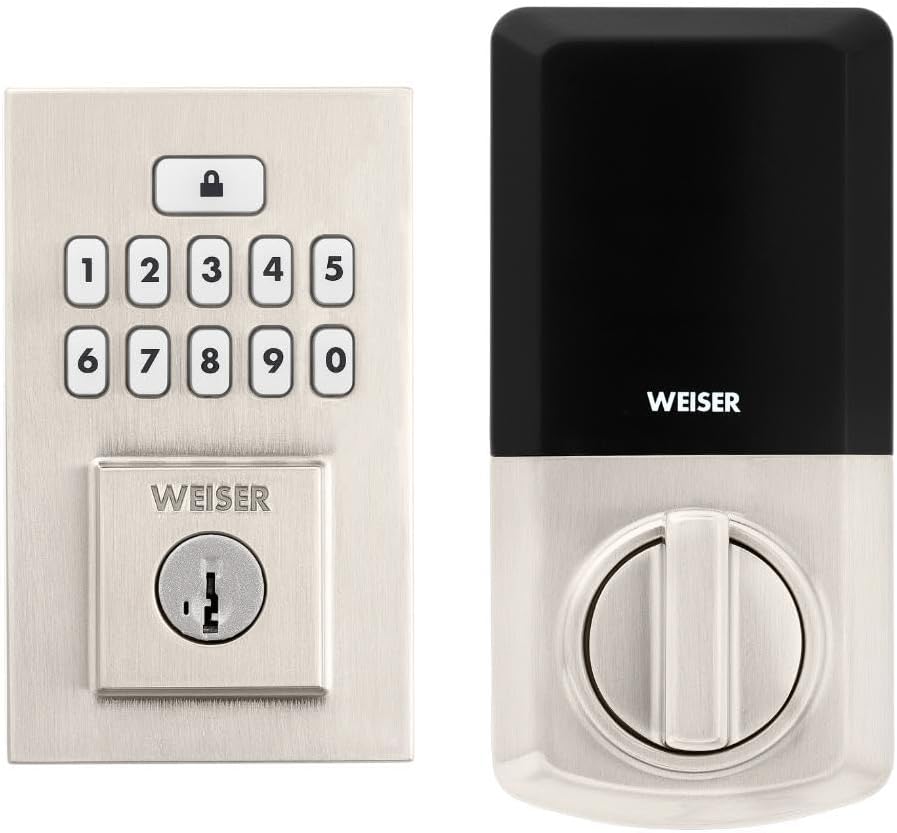
Image: Assembled Weiser SmartCode Keypad Electronic Deadbolt, showing both exterior and interior components.

Image: Close-up of the exterior keypad, featuring the backlit numeric buttons and keyhole.
5. Instrucțiuni de utilizare
5.1 Încuierea ușii
- Blocare cu o singură atingere: Press the Lock button (top button with padlock icon) on the keypad. The deadbolt will extend.
- Funcție de blocare automată: If enabled, the deadbolt will automatically extend after a set period (e.g., 30 seconds) once unlocked.
5.2 Deblocarea ușii
- Utilizarea unui cod de utilizator: Enter your personalized 4-8 digit user code on the keypad. The deadbolt will retract.
- Folosind cheia: Introduceți cheia fizică în gaura cheii și rotiți-o pentru a o debloca.
5.3 Programarea codurilor de utilizator
The lock supports up to 50 user codes and 1 master code. Refer to the detailed programming instructions in the full manual for adding, deleting, or modifying codes.
- Cod principal: The master code is used to add and delete user codes. It does not unlock the door.
- Coduri de utilizator: These codes are used to unlock the door.


Image: Icons illustrating user management, programming, and auto-lock features.
5.4 SmartKey Re-key Technology
The SmartKey re-key technology allows you to re-key your lock in seconds, maintaining key control and protecting against lost, stolen, or unauthorized keys without removing the lock from your door. Use the provided SmartKey tool and follow the instructions carefully.

Image: SmartKey Security feature, demonstrating how to re-key the lock.
6. Întreținere
6.1 Înlocuirea bateriei
The lock operates on 4 AA alkaline batteries. When the batteries are low, the lock will provide an audible and/or visual low battery warning. Replace all four batteries simultaneously to ensure optimal performance.
- Scoateți capacul bateriei de pe unitatea interioară.
- Scoateți bateriile vechi și aruncați-le în mod corespunzător.
- Introduceți baterii alcaline AA noi, asigurându-vă că polaritatea este corectă (+/-).
- Înlocuiți capacul bateriei.
Note: Battery life can vary based on usage frequency and environmental conditions. If the auto-lock feature is frequently used, battery life may be shorter.
6.2 Curățare
Curățați încuietoarea cu o lavetă moale,amp Evitați utilizarea de produse de curățare abrazive, solvenți sau spray-uri chimice, deoarece acestea pot deteriora finisajul și componentele electronice.
7. Depanare
| Problemă | Cauza posibila | Soluţie |
|---|---|---|
| Lock does not respond or keypad is not lit. | Baterii descărcate. | Înlocuiți toate cele patru baterii AA. |
| Lock beeps 3 times during programming or code entry. | Incorrect code, programming error, or lock not handed correctly. | Verify the code. Re-attempt programming steps carefully. Perform the door handing process again. If issues persist, reset the unit to factory settings (refer to full manual). |
| Deadbolt extends when door is open (Auto-lock issue). | The lock does not have a sensor to detect if the door is open or closed. Auto-lock activates after the set time regardless of door position. | This is normal operation. Ensure the door is closed before the auto-lock time expires, or disable the auto-lock feature if it causes inconvenience. |
| Keypad is difficult to see at night. | Lumina de fundal nu este activă. | The keypad is backlit and stays lit for 30 seconds after inactivity. Ensure there is enough battery power. |
| Lock is not operating smoothly. | Misalignment of door or strike plate, or internal mechanism issue. | Check door and frame alignment. Ensure the strike plate is correctly installed. If the issue persists, contact customer support. |
8. Specificații
| Caracteristică | Detaliu |
|---|---|
| Numărul de model | 9GED92600-003 |
| Dimensiunile produsului | 6.99 x 2.86 x 13.97 cm (2.75 x 1.13 x 5.5 țoli) |
| Greutatea articolului | 454 g (1 lb) |
| Culoare | Nichel satinat |
| Stil | Contemporan |
| Termina | Periat |
| Material | Metal |
| Tip blocare | Deadbolt, Electronic |
| Tastatura | 10-Button, Backlit |
| Coduri utilizator | Up to 50 user codes, 1 master code |
| Sursa de alimentare | 4 baterii AA (nu sunt incluse) |
| Compatibilitatea grosimii ușii | 1-3/8" to 1-3/4" (35 mm - 44 mm) |
| Set de copt | Reglabil 2-3/8" sau 2-3/4" |
| Caracteristici speciale | Weather Resistant, Anti-Bump, Auto-Lock, One-Touch Lock, Back-Lit Keypad, SmartKey Security |
| Grad ANSI | Clasa 2 |
| Țara de origine | China |
9. Garanție și asistență
9.1 Informații despre garanție
The Weiser SmartCode Keypad Electronic Deadbolt comes with a 1 an garanție de la data achiziției. Această garanție acoperă defectele de material și de fabricație în condiții normale de utilizare. Vă rugăm să păstrați dovada achiziției pentru reclamațiile în garanție.
For full warranty details and limitations, please refer to the official Weiser website-ul sau contactați asistența pentru clienți.
9.2 Asistență pentru clienți
For technical assistance, troubleshooting, or warranty inquiries, please contact Weiser customer support:
- Suport online: Visit the official Weiser website cu întrebări frecvente, tutoriale video și formulare de contact.
- Asistență telefonică: Refer to the contact information provided on the Weiser packaging or website pentru programul de asistență telefonică.
- Aplicația BILT: Utilize the BILT app for interactive 3D installation and programming guidance.
When contacting support, please have your product model number (9GED92600-003) and purchase date available.


