Produs terminatview
The Ratakee Digital AM/FM Radio Alarm Clock (Model RA01SA) is designed for ease of use and clear readability, featuring large 1.4-inch LED digits. This versatile alarm clock offers multiple alarm sound options, an AM/FM radio with preset capabilities, a dimmable display, sleep timer, and snooze function. It operates via AC power with a battery backup for continued functionality during power outages.
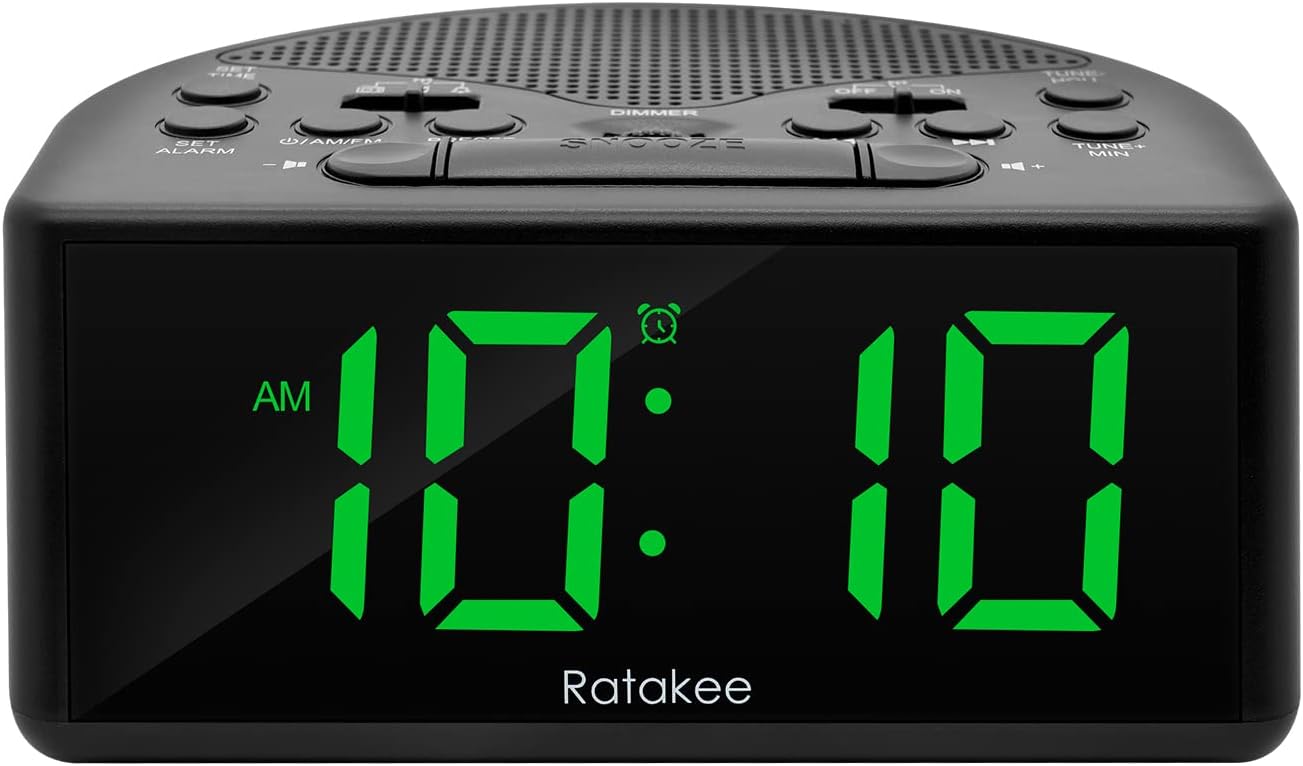
Figura 1: Față view of the Ratakee Digital AM/FM Radio Alarm Clock displaying 10:10 AM.
Înființat
Pornirea ceasului cu alarmă
The alarm clock can be powered by an AC outlet or by batteries for backup.
- Putere AC: Connect the included power cord to the AC120V outlet and plug it into a wall socket. The display will light up, and the radio will be operational.
- Baterie de rezerva: Pentru puteretage protection, insert 3 AA batteries (not included) into the battery compartment located on the bottom of the unit. When powered by batteries, the display will auto-dim after 20 seconds of no operation to conserve power, but the clock, alarm, and radio functions will remain active.

Figure 2: Illustration of the dual power methods: AC cord connection and battery compartment for 3 AA batteries.
Instrucțiuni de operare
This section details the operation of your Ratakee alarm clock. Refer to Figure 3 for button and switch locations.

Figure 3: Top panel controls of the Ratakee Digital AM/FM Radio Alarm Clock.
Setarea orei
- Țineți apăsat butonul REGLEAZA ORA timp de 2 secunde. Cifrele orei vor începe să clipească.
- Utilizați TUNE+ HOU pentru a regla ora.
- Utilizați TUNE- MIN pentru a regla minutul.
- Apăsați tasta REGLEAZA ORA Apăsați din nou butonul pentru a confirma și a ieși din modul de setare a orei.
Setarea alarmei
The alarm clock offers three selectable alarm sounds: AM/FM radio, music, or a classic beep.

Figure 4: The alarm clock offers three distinct alarm sound options.
- Țineți apăsat butonul SETEAZA ALARMA timp de 2 secunde. Cifrele orei alarmei vor clipi.
- Utilizați TUNE+ HOU buton pentru a seta ora alarmei.
- Utilizați TUNE- MIN button to set the alarm minute.
- Slide the alarm tone switch (located near the SETEAZA ALARMA button) to select your desired alarm sound: radio, music, or beep.
- Apăsați tasta SETEAZA ALARMA button again to confirm the alarm time and sound.
- To turn the alarm ON or OFF, use the dedicated ON/OFF slide switch for the alarm (located on the top panel, near the right side).
Reglarea volumului alarmei: The alarm volume is adjustable from 5 to 15 levels. When using the radio as an alarm, the clock will play the last station you listened to at the set volume level.
Funcționarea radio AM/FM
The radio allows you to store up to 20 AM and 20 FM stations.

Figure 5: The alarm clock features AM/FM radio with strong reception capabilities.
- Turn Radio On/Off: Apăsați tasta ON/AM/FM buton pentru a porni sau opri radioul.
- Comutare benzi: În timp ce radioul este pornit, apăsați butonul ON/AM/FM buton pentru a comuta între benzile AM și FM.
- Reglare manuală: Utilizați TUNE+ HOU şi TUNE- MIN butoane pentru a regla manual frecvența dorită.
- Scanare/Presetare automată: Apăsați tasta PRESETARE button to scan and store available stations automatically.
- Recall presetări: Utilizați PRESETARE button to cycle through stored stations.
- Reglați volumul: Utilizați VOLUM + şi VOLUM - butoane pentru a regla volumul radioului (niveluri 1-16).
Nota: When listening to FM stations with earphones (via the earphone jack), stereo mode will automatically activate for enhanced sound.
Afișaj Dimmer
The alarm clock features a full-range dimmable LED display (0-100% brightness).

Figure 6: Adjusting the display brightness from 0% to 100% for optimal viewing.
Rotiți DIMMER knob (located on the top panel) to adjust the display brightness to your preferred level.
Sleep Timer
Temporizatorul de oprire permite radioului să redea muzică pentru o durată setată înainte de a se opri automat.
To activate the sleep timer, press the DORMI button. Each press will cycle through available sleep timer durations (e.g., 10, 20, 30, 60, 90 minutes). The radio will turn off automatically after the selected time.
Funcția de amânare
Când sună alarma, apăsați butonul mare PUI DE SOMN button (located on the top center) to temporarily silence the alarm for an additional 9 minutes of sleep.

Figure 7: Easily activate the snooze function for a short delay in your alarm.
Mufă pentru căști
A 3.5mm earphone jack is provided on the side of the unit for private listening. Plug in your earphones to enjoy radio content without disturbing others.
Întreţinere
- curatenie: To clean the unit, wipe it with a soft, dry cloth. Do not use abrasive cleaners or solvents.
- Înlocuire baterie: If using battery backup, replace the 3 AA batteries when the display dims significantly or the clock functions become unreliable during a power outage. Asigurați polaritatea corectă atunci când introduceți baterii noi.
- Depozitare: Dacă depozitați unitatea pentru o perioadă lungă de timp, scoateți bateriile pentru a preveni scurgerile.
Depanare
| Problemă | Cauză/Soluție posibilă |
|---|---|
| Afișajul este slab iluminat sau stins. |
|
| Alarma nu sună. |
|
| Recepție radio slabă sau statică. |
|
| Cannot set radio presets. |
|
Specificații
| Caracteristică | Detaliu |
|---|---|
| Marca | Ratakee |
| Numărul de model | RA01SA |
| Tip de afișare | Digital LED (Green Digits) |
| Dimensiunea afișajului | 1.4 inches (LED Digits) |
| Sursa de alimentare | Corded Electric (AC120V) / Battery Powered (3 AA batteries, not included) |
| Dimensiunile produsului | 5.4 cm lățime x 2.4 cm înălțime |
| Greutatea articolului | 0.4 kilograme (14 uncii) |
| Trupe de radio | AM/FM (20 AM, 20 FM presets) |
| Tonuri de apel de alarmă | 3 (AM/FM Radio, Music, Beep) |
| Volumul alarmei | Adjustable (5-15 levels) |
| Afișaj Dimmer | 0-100% (Rotary Knob) |
| Sleep Timer | 10-90 minute |
| Durata amânării | 9 minute |
| Mufă pentru căști | Da |
| Material | Plastic |
| Utilizare în interior/exterior | De interior |
Garanție și suport
Tip garantie: Garanție pe viață
For technical support, troubleshooting assistance, or warranty claims, please contact Ratakee customer service. Refer to the product packaging or the official Ratakee website pentru cele mai recente informații de contact.
You may also find helpful resources and frequently asked questions on the manufacturer's support page.
