1. Introducere
This manual provides detailed instructions for the setup, operation, and maintenance of your FoMaKo NDI PTZ Camera System BN302. This system is designed for professional video production and live streaming applications, featuring advanced NDI capabilities, AI auto-tracking, and a comprehensive control interface.
The BN302 system includes:
- Two (2) FoMaKo KN30A NDI PTZ Cameras
- One (1) FoMaKo KC608 Pro PTZ Controller Keyboard
2. Componentele produsului de mai susview

Image 2.1: The FoMaKo NDI PTZ Camera System BN302, showing two KN30A cameras and the KC608 Pro controller.
2.1 FoMaKo KN30A NDI PTZ Camera
The KN30A camera features 30x optical zoom, NDI 6 & NDI HX3 certification, and advanced AI auto-tracking. It supports multiple video outputs including 3G-SDI, HDMI, IP, and USB3.0, making it versatile for various production environments.

Image 2.2: Rear panel of the KN30A camera, illustrating the various input/output ports.
2.2 FoMaKo KC608 Pro PTZ Controller Keyboard
The KC608 Pro is a dedicated PTZ controller designed for precise and intuitive control of multiple cameras. It features a joystick for pan, tilt, and zoom, along with dedicated buttons for presets, exposure, and tracking functions.
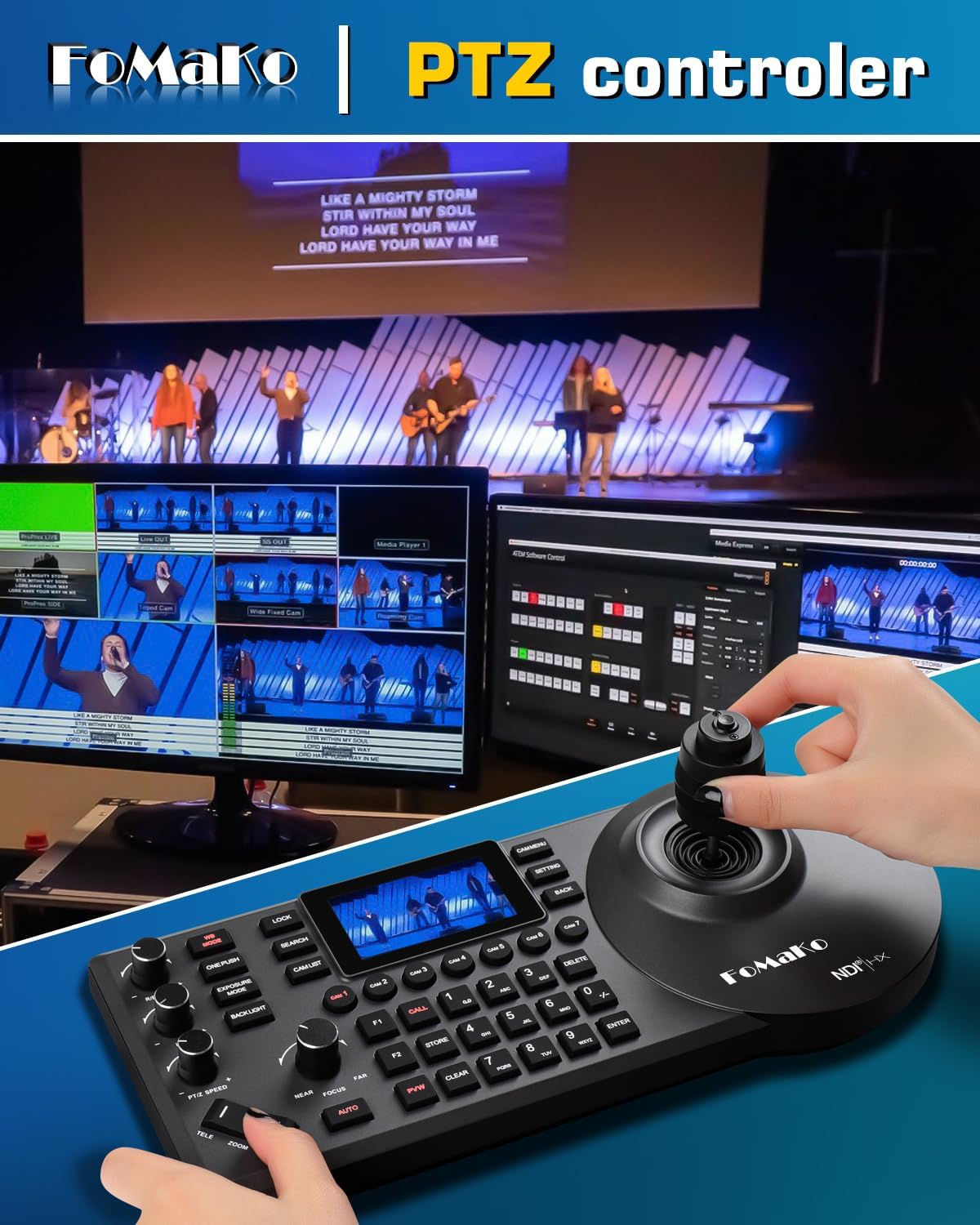
Image 2.3: The KC608 Pro PTZ Controller Keyboard, demonstrating its use for camera control.
3. Caracteristici cheie
- Official NDI 6 & NDI HX3 Certification: Ensures stable, high-quality video transmission over IP networks, even with limited bandwidth. Compatible with vMix, OBS, Propresenter, StreamYards, Streamlabs, Wirecast, Zoom, and other live streaming software.
- Advanced AI Auto-Tracking (Gen 3): Offers customizable tracking modes, sensitivity, figure size, and target switching. Activate tracking with F2 on the remote and switch targets with F4.
- Zoom optic 30X: Provides clear, high-definition 1080p video with a 58.1-degree field of view. Fast auto-focus maintains image clarity during movement and zooming.
- Multiple Video Resolutions: Supports 1080P60/50, 1080P30/25, 720P60/50, 720P30/25.
- Efficient Video Encoding: H.264/H.265 encoding ensures smooth and clear motion video under various bandwidth conditions.
- Conectivitate versatilă: Includes 3G-SDI, HDMI, IP, NDI, and USB3.0 outputs.
- Suport Power over Ethernet (PoE): Simplifică instalarea prin furnizarea de energie și date printr-un singur cablu Ethernet.
- Gear Transmission Structure: Enhances precision for preset positioning and increases durability compared to belt-driven systems.
- Extensive Control Options: Supports RS232/RS485, TCP/IP, RTSP, RTMP, VISCA OVER IP, VISCA, SRT, network protocols, 360-degree IR remote control, FoMaKo PTZ controller, and webpage control.
4. Ghid de instalare
4.1 Despachetarea și inspecția
- Despachetați cu grijă toate componentele din ambalaj.
- Verify that all items listed in the product bundle are present.
- Inspect each camera and the controller for any signs of physical damage.
4.2 Conexiunea fizică
Asigurați-vă că toate dispozitivele sunt oprite înainte de a face conexiuni.

Imaginea 4.1: Example diagram of a multi-camera live streaming setup using FoMaKo NDI PTZ cameras and controller.
Camera Connections (KN30A)
- Putere: Connect the provided power adapter to the DC12V port or use a PoE-enabled network switch for Power over Ethernet.
- Network (IP/NDI): Connect an Ethernet cable from the camera's LAN port to your network switch or router. If using PoE, this also provides power.
- Ieșire HDMI: Connect an HDMI cable from the camera's HDMI port to a display, video switcher, or capture device.
- Ieșire 3G-SDI: Connect a 3G-SDI cable from the camera's 3G-SDI port to a compatible video switcher or capture device.
- Ieșire USB3.0: Connect a USB3.0 cable to a computer for use as a webcam or for direct capture.
- Control (RS232/RS485): For serial control, connect to a compatible control device using RS232 or RS485 ports.
Controller Connections (KC608 Pro)
- Putere: Connect the provided power adapter to the controller.
- Reţea: Connect an Ethernet cable from the controller's LAN port to the same network as your cameras for IP control.
4.3 Configurația inițială a rețelei
For IP control and NDI functionality, ensure your cameras and controller are on the same network. Cameras typically come with a default IP address (e.g., 192.168.1.77). You can change the IP address through the camera's web interface or the controller's menu.

Imaginea 4.2: Example of network settings accessible via the camera's menu or web interfata.
5. Ghid de operare
5.1 Pornire/Oprire
After all connections are made, power on the cameras and the controller. The power indicator on the camera will illuminate.
5.2 Control PTZ
Using the KC608 Pro Controller
The KC608 Pro controller provides tactile control over camera movements:
- joystick: Use the joystick to pan (left/right), tilt (up/down), and zoom (twist).
- Reglarea vitezei: Adjust PTZ speed and preset speed using dedicated knobs or buttons on the controller.
- Selectarea camerei: Use the camera selection buttons (e.g., CAM1, CAM2) to choose which camera to control.
Utilizarea telecomenzii IR
The included IR remote control allows basic PTZ functions and preset recall.

Image 5.1: The IR remote control for basic camera functions.
Web Controlul interfeței
Accesați camera web interfață prin introducerea adresei sale IP într-un web browser. This interface provides comprehensive control over all camera settings, including PTZ, image parameters, and network configuration.
5.3 AI Auto-Tracking
The Gen 3 AI auto-tracking feature allows the camera to automatically follow a designated subject.

Image 5.2: The AI auto-tracking feature in action, highlighting a tracked subject.
- Activare: Press the F2 button on the remote control or use the controller/web interface to enable auto-tracking.
- Target Switching: Press F4 on the remote control to switch between detected tracking targets.
- Personalizare: Adjust tracking modes, sensitivity, figure size, AI-Track speed, and other parameters via the web interface or controller menu.
5.4 Preset Configuration
The camera supports up to 255 presets (10 via IR remote control) for quick recall of specific camera positions and zoom levels.
- Stocarea presetărilor: Poziționați camera în poziția dorită view, then use the controller or remote to store the preset to a specific number.
- Reamintirea presetărilor: Select the desired preset number on the controller or remote to move the camera to the stored position.
6. Opțiuni de conectivitate
The KN30A camera offers a variety of connectivity options to integrate into diverse production workflows:
- NDI/IP: Primary output for high-quality, low-latency video over standard Ethernet networks. Supports NDI 6 and NDI HX3.
- HDMI: Direct video output for monitors, switchers, or capture cards.
- 3G-SDI: Professional video output for long cable runs and broadcast-grade equipment.
- USB 3.0: Connects directly to a computer for use as a high-quality webcam or for software-based streaming.
- RS232/RS485: Serial control ports for integration with third-party control systems.
- Intrare linie audio: 3.5mm audio input for embedding external audio into the video stream.
7. Întreținere
- curatenie: Use a soft, dry cloth to clean the camera body and controller. For the lens, use a specialized lens cleaning cloth and solution. Avoid abrasive cleaners.
- Actualizări firmware: Verificați periodic pagina oficială a FoMaKo website for available firmware updates to ensure optimal performance and access to new features. Follow the provided instructions carefully during the update process.
- Depozitare: When not in use for extended periods, store the equipment in a dry, dust-free environment.
8. Depanare
8.1 Fără ieșire video
- Verificați puterea: Ensure the camera is powered on and the power indicator light is illuminated.
- Conexiuni prin cablu: Verify that all video cables (HDMI, SDI, Ethernet for NDI/IP) are securely connected to both the camera and the receiving device.
- Selectare intrare: Confirm that your receiving device (monitor, switcher, computer) is set to the correct input source.
- Network Configuration (NDI/IP): Ensure the camera and receiving device are on the same network subnet and that NDI discovery is functioning.
8.2 PTZ Control Issues
- Putere controler: Ensure the KC608 Pro controller is powered on.
- Conexiune retea: Verify the controller's network cable is connected and that it can communicate with the cameras (check IP settings).
- Selectarea camerei: Make sure the correct camera is selected on the controller.
- Protocol de control: Confirm that the camera and controller are configured to use compatible control protocols (e.g., VISCA over IP).
8.3 Auto-Tracking Malfunction
- Conditii de iluminare: Ensure adequate and consistent lighting in the tracking area. Extreme backlighting or low light can affect performance.
- Tracking Settings: Review the AI auto-tracking settings via the web interface or controller. Adjust sensitivity and tracking modes as needed.
- Obstrucții: Ensure there are no objects obstructing the camera's view a subiectului.
9. Specificatii tehnice
| Caracteristică | Caietul de sarcini |
|---|---|
| Marca | FoMaKo |
| Numărul de model | BN302 (Kit) / KN30A (Camera) |
| Zoom optic | 30X |
| Rezoluție captură video | 1080p (1080P60/50, 1080P30/25, 720P60/50, 720P30/25) |
| Tehnologia senzorului foto | CMOS |
| Tehnologia de conectivitate | NDI, LAN, HDMI, 3G-SDI, USB3.0 |
| Codificare video | H.264/H.265 |
| Caracteristici speciale | AI Tracking, NDI 6 & NDI HX3 Certified, PoE Support |
| View Angle (FOV) | 58.1 de grade |
| Interfață de control | RS232/RS485, TCP/IP, VISCA OVER IP, VISCA, IR Remote, Webpagină |
| Presetări | Up to 255 (10 via remote) |
| Dimensiunile produsului | 6.93 x 5.63 x 6.3 inches (Camera) |
| Greutatea articolului | 18.48 pounds (Total Kit) |
10. Garanție și asistență
FoMaKo provides a 3-Year Limited Warranty for this product. This warranty covers manufacturing defects and ensures reliable operation under normal use conditions.
- Garanție de rambursare a banilor în 30 de zile: Achiziție fără riscuri.
- Instruire online gratuită: Resources available to assist with initial setup and operation.
- Asistență de specialitate 24/7: Customer support responses typically within 24 hours. Please include your Order ID when contacting support. Remote assistance for setup is available if necessary.
- Asistență tehnică pe viață pentru clienți: Ongoing technical assistance for the lifespan of the product.
For support, please refer to the contact information provided with your purchase or visit the official FoMaKo website-ul.
11. Scenarii de aplicare
The FoMaKo NDI PTZ Camera System BN302 is suitable for a wide range of professional AV and live streaming applications, including but not limited to:
- Church worship live services
- Educational institutions (classrooms, lecture halls)
- Live streaming and broadcasting
- Studio productions
- University events
- Factory live monitoring
- Sports clubs / eSports events
- Training classrooms
- Large conferences and theaters
- Concerts and live performances

Image 11.1: Visual representation of diverse environments where the FoMaKo PTZ camera system can be effectively utilized.


