Introducere
This manual provides essential information and instructions for the Apple 35W Dual USB-C Port Compact Power Adapter (Model MNWM3AM/A). This adapter is designed to efficiently charge two devices simultaneously, offering convenience and portability for various Apple devices.
Informații de siguranță
Please read all safety instructions before using the product to prevent injury or damage.
- Use the adapter only in dry locations. Avoid exposure to liquids, moisture, or extreme temperatures.
- Ensure the adapter is fully inserted into a power outlet.
- Do not attempt to disassemble, repair, or modify the adapter.
- A nu se lăsa la îndemâna copiilor.
- Unplug the adapter during lightning storms or when unused for extended periods.
- Use only with compatible USB-C charging cables (sold separately).
Conținutul pachetului
Pachetul conține următorul articol:
- Apple 35W Dual USB-C Port Compact Power Adapter
Note: Charging cables are sold separately.
Produs terminatview
The Apple 35W Dual USB-C Port Compact Power Adapter features a compact design with folding prongs for easy storage and travel. It includes two USB-C ports, allowing for simultaneous charging of two devices.
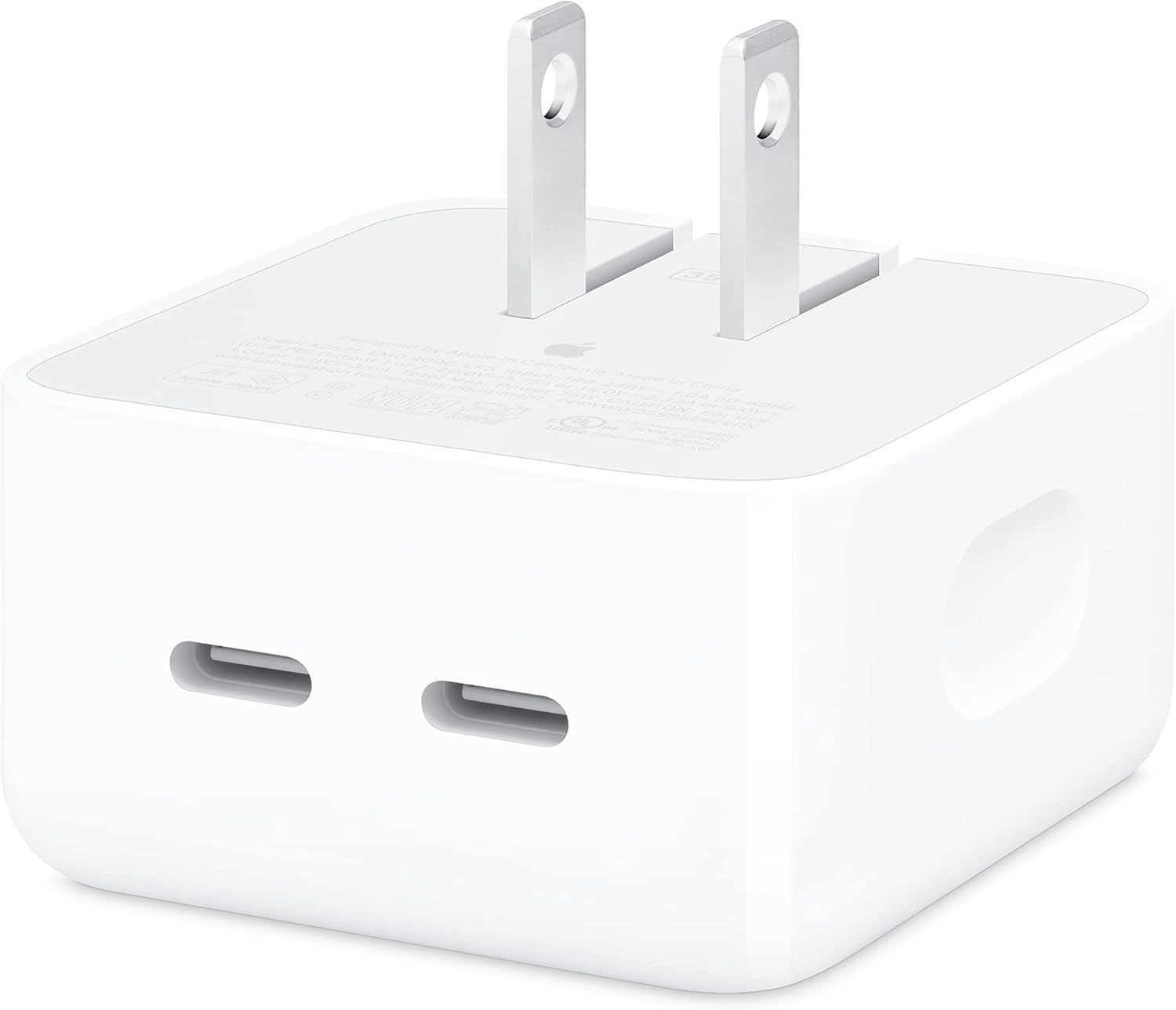
This image shows the Apple 35W Dual USB-C Port Compact Power Adapter from the front, highlighting its two USB-C charging ports and the unfolded electrical prongs.

This image displays the rear side of the power adapter, where the '35W' power rating and detailed electrical specifications are printed.

Această imagine ilustrează partea profile of the adapter, showing its compact form factor and the folded electrical prongs, ready for storage or travel.
Înființat
Follow these steps to set up your Apple 35W Dual USB-C Port Compact Power Adapter:
- Desfaceți țepii: Gently pull out the foldable electrical prongs from the adapter body.
- Conectați-vă la priza: Plug the adapter firmly into a standard wall power outlet.
- Connect Charging Cables: Insert your USB-C charging cables (sold separately) into the two USB-C ports on the adapter.
- Conectați dispozitive: Connect the other end of the charging cables to your compatible devices.
Instrucțiuni de operare
The Apple 35W Dual USB-C Port Compact Power Adapter can charge one or two devices simultaneously. The power distribution adjusts based on the number of connected devices and their power requirements.
Încărcare cu un singur dispozitiv
When only one device is connected, the adapter can deliver up to 35W of power, enabling fast charging for compatible devices.
Dual Device Charging
When two devices are connected, the 35W power is intelligently distributed between the two USB-C ports. For example, it can provide 17.5W to each port, or dynamically adjust based on the devices' needs. This allows for simultaneous charging of devices like an iPhone and an Apple Watch, or an iPad and AirPods.
Dispozitive compatibile
This adapter is compatible with a wide range of USB-C powered devices, including:
- iPhone models (iPhone 8 and later, including iPhone 16 Pro, iPhone 16 Pro Max, iPhone 16, iPhone 16 Plus, iPhone 16e, iPhone 15 Pro, iPhone 15 Pro Max, iPhone 15, iPhone 15 Plus, iPhone 14 Pro, iPhone 14 Pro Max, iPhone 14, iPhone 14 Plus, iPhone 13 Pro, iPhone 13 Pro Max, iPhone 13 mini, iPhone 13, iPhone SE (3rd generation), iPhone 12 Pro, iPhone 12 Pro Max, iPhone 12 mini, iPhone 12, iPhone 11 Pro, iPhone 11 Pro Max, iPhone 11, iPhone SE (2nd generation), iPhone XS, iPhone XS Max, iPhone XR, iPhone X, iPhone 8, iPhone 8 Plus)
- iPad models
- MacBook Air models
- Modele Apple Watch
- AirPods models
- Other USB-C compatible phones, tablets, and computers
Întreţinere
To ensure the longevity and proper functioning of your power adapter, follow these maintenance guidelines:
- curatenie: Always unplug the adapter from the power outlet before cleaning. Use a soft, dry, lint-free cloth to wipe the exterior. Do not use liquid cleaners or aerosols.
- Depozitare: When not in use, fold the prongs and store the adapter in a cool, dry place away from direct sunlight and moisture.
- Manipulare: Evitați să scăpați adaptorul sau să îl supuneți la impacturi puternice.
Depanare
If you encounter issues with your Apple 35W Dual USB-C Port Compact Power Adapter, try the following solutions:
- Dispozitivul nu se încarcă:
- Ensure the adapter is securely plugged into a working power outlet.
- Verify that the USB-C cable is properly connected to both the adapter and your device.
- Încearcă să folosești un alt cablu USB-C pentru a exclude un cablu defect.
- Test the adapter with a different device to confirm its functionality.
- Încercați o priză diferită.
- Încărcare lentă:
- Ensure your device supports fast charging and that you are using a compatible USB-C cable.
- If two devices are connected, the power is split. Disconnect one device to see if the charging speed for the other improves.
- Close any power-intensive applications on your device while charging.
- Adapter is Hot:
- It is normal for power adapters to become warm during operation. If the adapter becomes excessively hot, disconnect it immediately and contact Apple Support.
- Ensure the adapter has adequate ventilation and is not covered.
Specificații
| Caracteristică | Caietul de sarcini |
|---|---|
| Numărul de model | MNWM3AM/A |
| Dimensiunile produsului | 2.76 x 1.18 x 3.31 inci |
| Greutatea articolului | 4.6 uncii |
| Producător | Măr |
| Data primului disponibil | 17 iunie 2022 |
| Tip conector | USB tip C |
| Total porturi USB | 2 |
| Vol. De intraretage | 100-240V ~ 1.0A 50-60Hz |
| Putere de ieșire | 35 W (maximum) |
| Ieșire 1 sau 2 | 20.0V=1.75A sau 15.0V=2.33A sau 9.0V=3.0A sau 5.0V=3.0A |
| Caracteristici speciale | Fast Charging, Lightweight Design, Retractable Plug, Travel-friendly |
| Culoare | Alb |
Garanție și suport
This Apple product is covered by Apple's standard limited warranty. For detailed warranty information, please refer to the warranty documentation included with your purchase or visit the official Apple support website. For technical assistance, troubleshooting, or service, please contact Apple Support directly.
Puteți găsi mai multe informații și resurse de asistență la site-ul oficial Asistență Apple website-ul.


