1. Introducere
This manual provides detailed instructions for setting up, operating, and maintaining your MINIX X35-i Plus 4K Ultra HD Industrial Android Player. This device is designed for reliable performance in digital signage and various industrial applications, offering robust connectivity and a pre-rooted Android 11 firmware.

Image 1.1: MINIX X35-i Plus Industrial Android Player. This image displays the compact black device alongside icons indicating its key features: 4K Ultra HD resolution, WiFi 6 connectivity, and Android 11 operating system.
2. Conținutul pachetului
Vă rugăm să verificați dacă toate articolele enumerate mai jos sunt incluse în pachetul dumneavoastră:
- MINIX X35-i Plus Unit
- Antenă cu bandă dublă
- Cablu HDMI
- Cablu USB-C la USB-A
- 12V 2A Power Adapter (with multiple plug types)
- Telecomanda
- Ghid de instalare

Image 2.1: Contents of the MINIX X35-i Plus package. This image shows the main unit, a power adapter with interchangeable international plugs, a remote control, an HDMI cable, a USB-C to USB-A cable, a dual-band antenna, and a setup guide.
3. Produs terminatview
The MINIX X35-i Plus features a compact design with various ports for comprehensive connectivity. Understanding the layout of these ports is essential for proper setup and operation.
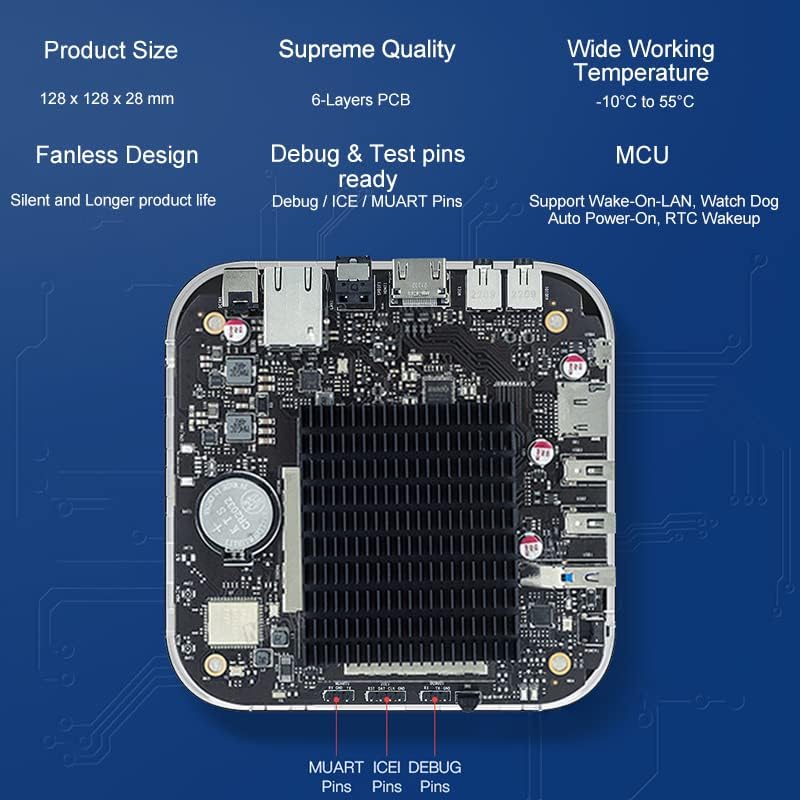
Image 3.1: MINIX X35-i Plus device with port labels and dimensions. The image highlights the device's dimensions (128mm x 128mm x 28mm) and labels its ports: Power Button, USB 3.0, 2x USB 2.0, TF Card Slot, OTG, Kensington Lock, Headphone Jack, Microphone Jack, HDMI 2.0, Gigabit Ethernet, S/PDIF, and DC 12V Power Jack.
Design intern
The device incorporates industrial-grade components and a 6-layer PCB for stable, long-term operation. Its fanless design ensures silent operation and extended product life, suitable for continuous 24/7 use.

Imaginea 3.2: Intern view of the MINIX X35-i Plus PCB. This image shows the internal circuit board, highlighting the fanless heatsink design and debug/test pins (MUART, ICEI, DEBUG) for advanced users or developers.
4. Ghid de instalare
Follow these steps to set up your MINIX X35-i Plus:
- Conectați antena: Screw the dual-band antenna onto the designated connector at the rear of the device.
- Conectare la afișaj: Connect one end of the HDMI cable to the HDMI port on the MINIX X35-i Plus and the other end to an HDMI input on your display (TV, monitor, projector).
- Conectare la rețea (opțional):
- Conexiune prin cablu: Connect an Ethernet cable from your router or network switch to the Gigabit Ethernet port on the device.
- Conexiune wireless: The device supports 802.11ax Dual-Band Wi-Fi 6. You will configure the Wi-Fi connection after initial power-on.
- Conectarea perifericelor (opțional):
- Dispozitive USB: Connect USB keyboards, mice, or other peripherals to the available USB 3.0 (x1) or USB 2.0 (x2) ports.
- Dispozitive audio: Connect headphones or external speakers to the 3.5mm Headphone Jack. For digital audio, use the S/PDIF port.
- Microfon: Connect a microphone to the 3.5mm Microphone Jack.
- Pornire: Connect the 12V 2A power adapter to the DC 12V Power Jack on the device, then plug the adapter into a power outlet. The device should automatically power on or can be turned on using the power button.
5. Instrucțiuni de utilizare
5.1 Initial Boot and Android 11 System
Upon first power-on, the device will boot into the Android 11 operating system. Follow the on-screen prompts for initial setup, including language selection and network configuration. The device features a pre-rooted firmware, allowing for advanced customization.

Image 5.1: Android 11 operating system interface. This image illustrates the Android 11 system running on the MINIX X35-i Plus, emphasizing its 'rooted firmware' and 'customization accept' features.
5.2 Conectivitate la rețea (Wi-Fi 6)
The MINIX X35-i Plus supports Wi-Fi 6 (802.11ax) for faster and more reliable wireless connections. To connect to Wi-Fi:
- Navigați la Setări > Rețea și Internet > Wifi.
- Activează Wi-Fi-ul On.
- Selectați rețeaua dorită din listă și introduceți parola dacă vi se solicită.

Image 5.2: Illustration of Wi-Fi 6 capabilities. This image highlights the device's Wi-Fi 6 support, indicating speeds up to 2400Mbps, which is three times faster than Wi-Fi 5.
5.3 Caracteristici avansate
- Trezire prin LAN (WOL): Allows the device to be powered on remotely via a network message. Ensure this feature is enabled in the system settings if required.
- Putere automată: Configures the device to automatically power on when electricity is supplied, ideal for unattended installations.
- RTC (Real-Time Clock) Wakeup: Enables scheduled power-on times.
- Câine de pază: A hardware feature that monitors system operation and can automatically restart the device if it becomes unresponsive, ensuring continuous uptime.
- Suport ecran tactil: The device supports touch screen displays, making it suitable for interactive digital signage applications.
Image 5.3: MINIX X35-i Plus connected to a touch screen display. This image demonstrates the device's compatibility with touch screen interfaces, suitable for interactive kiosks or digital signage.
5.4 Scenarii de aplicare
The MINIX X35-i Plus is versatile and can be deployed in various industrial and commercial settings:
- Digital Signage
- Distribuitoare automate
- Echipament medical
- Console de jocuri
- Robot Assistance
- Digital POS Registers

Image 5.4: Various use cases for the MINIX X35-i Plus. This image depicts the device being used in diverse environments such as vending machines, medical equipment, game consoles, robot assistance, digital POS registers, and advertising machines.
6. Întreținere
The MINIX X35-i Plus is designed for low maintenance due to its fanless construction and robust components.
- curatenie: Use a soft, dry cloth to clean the exterior of the device. Avoid using liquid cleaners or aerosols directly on the unit.
- Ventilare: Although fanless, ensure the device is placed in a location with adequate airflow to prevent heat buildup, especially during continuous operation.
- Actualizări firmware: Periodically check the official MINIX website pentru actualizări de firmware pentru a asigura performanță și securitate optime.
7. Depanare
If you encounter issues with your MINIX X35-i Plus, refer to the following common solutions:
- Fără putere:
- Asigurați-vă că adaptorul de alimentare este conectat corect atât la dispozitiv, cât și la o priză funcțională.
- Verificați că priza este funcțională.
- Fără ieșire de afișare:
- Check that the HDMI cable is firmly connected to both the device and the display.
- Ensure your display is set to the correct HDMI input source.
- Try a different HDMI cable or display if possible.
- Telecomanda nu răspunde:
- Asigurați-vă că nu există obstrucții între telecomandă și receptorul IR al dispozitivului.
- Înlocuiți bateriile telecomenzii.
- Consider using a USB keyboard and mouse for easier navigation if the remote remains problematic.
- Cannot Connect to Wi-Fi/Network:
- Verify that the Wi-Fi antenna is properly attached.
- Verificați routerul și conexiunea la internet.
- Asigurați-vă că introduceți parola Wi-Fi corectă.
- Dacă utilizați o conexiune cu fir, asigurați-vă că cablul Ethernet este conectat corect.
- Issues with Google Account or Bluetooth Pairing:
- Ensure the device has a stable internet connection for Google account services.
- For Bluetooth, ensure the peripheral is in pairing mode and within range.
- Restart the device and attempt pairing again.
- Sistemul nu răspunde:
- Press and hold the power button for 5-10 seconds to force a shutdown, then restart the device.
- If the issue persists, a factory reset may be necessary (refer to advanced settings, this will erase all data).
8. Specificații
| Caracteristică | Caietul de sarcini |
|---|---|
| Numele modelului | X35-i Plus |
| CPU | RK3566 Cortex-A55 Quad-Core |
| GPU | Mali-G52-2EE |
| Memorie | 2 GB DDR4 |
| Stocare internă | 32 GB eMMC 5.1 |
| Sistem de operare | Android 11 (Pre-Rooted Firmware) |
| Ieșire video | HDMI 2.0, up to 4K@60Hz |
| Ieșire audio | HDMI 2.0, 3.5mm stereo jack, optical S/PDIF |
| Conectivitate wireless | 802.11ax Dual-Band Wi-Fi 6, Bluetooth 5.0 |
| Rețea prin cablu | RJ-45 Gigabit Ethernet |
| Interfață periferică | Micro SD card reader, USB 3.0 x1, USB 2.0 x2, OTG port x1, Kensington Lock, 3.5mm Headphone jack, 3.5mm Microphone jack, IR Receiver |
| Alimentare electrică | 12V/2A adapter (CE, FCC certified) |
| Caracteristici speciale | Wake On LAN, Auto Power, RTC, Watchdog, HDMI CEC, Portrait mode, Miracast, Electrostatic Prevention for interfaces, Gigabit Ethernet Port with lightning protection design, Over-voltage protectie |
| Dimensiunile produsului | 5.04 x 5.04 x 1.1 inchi (128 x 128 x 28 mm) |
| Greutatea articolului | 1.61 lire sterline (730 grame) |
| Culoare | Negru |
9. Informații despre garanție
For detailed warranty information, please refer to the official MINIX website-ul web sau contactați punctul de vânzare. Termenii și condițiile de garanție pot varia în funcție de regiune și de comerciant.
10. Suport
If you require further assistance or have questions not covered in this manual, please utilize the following support channels:
- Official MINIX Website: Vizita www.minix.com.hk for product information, FAQs, and firmware downloads.
- MINIX Forum: Engage with the community and find solutions at www.theminixforum.com.
- Amazon Customer Support: For purchase-related inquiries, log in to your Amazon account, go to 'Your Orders', and select 'Ask Product Question' for the MINIX X35-i Plus.
- Social Media: Connect with MINIX on Facebook at http://www.facebook.com/minixtech.