1. Introducere
This manual provides detailed instructions for the TIMBOOTECH Wireless HDMI Transmitter and Receiver 4K, Model Q3. This device allows for wireless transmission of video and audio signals from various HDMI-enabled sources to a display, projector, or HDTV. Please read this manual thoroughly before use to ensure proper setup and operation.

Image: The TIMBOOTECH Wireless HDMI Transmitter (TX) and Receiver (RX) units, along with Micro HDMI and Mini HDMI adapters.
2. Ce se află în cutie
Vă rugăm să verificați dacă toate articolele enumerate mai jos sunt incluse în pachetul dumneavoastră:
- 1 x TIMBOOTECH Wireless HDMI Transmitter (TX)
- 1 x TIMBOOTECH Wireless HDMI Receiver (RX)
- 1 x USB C Cable (for power)
- 1 x External Antenna (for RX)
- 1 x Adaptor Micro HDMI
- 1 x Adaptor mini HDMI
- 1 x Manual de utilizare

Image: A visual representation of the complete package contents, including the transmitter, receiver, cables, adapters, and manual.
3. Produs terminatview
The TIMBOOTECH Wireless HDMI system consists of two main components:
- Transmițător (TX): Connects to your source device (e.g., laptop, camera, cable box) via HDMI to send the signal wirelessly.
- Receptor (RX): Connects to your display device (e.g., TV, monitor, projector) via HDMI to receive the wireless signal.
The system supports 4K resolution at 30Hz and utilizes 2.4G/5G dual-band transmission for stable connectivity. It is designed for plug-and-play operation, requiring no software installation or Wi-Fi network for direct transmission.
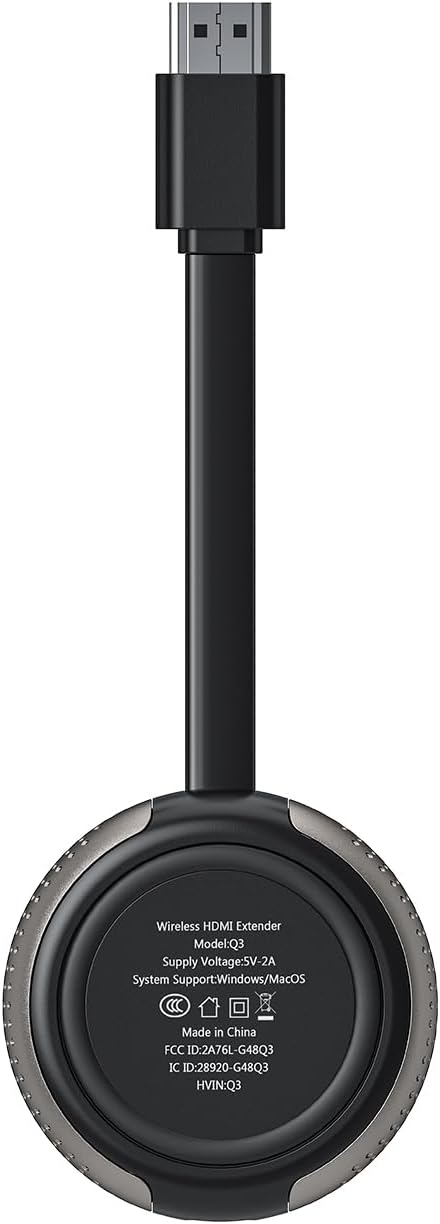
Image: The underside of the device, displaying the model number Q3 and power requirements.
4. Instrucțiuni de configurare
Follow these steps to set up your TIMBOOTECH Wireless HDMI system:
- Conectați receptorul (RX):
Plug the Receiver (RX) into an HDMI input port on your display device (TV, monitor, or projector). Connect the external antenna cable to the RX unit. Power the RX unit by connecting the USB C cable to a 5V/1A USB power source (e.g., a TV USB port or a USB power adapter, not included). - Conectați emițătorul (TX):
Plug the Transmitter (TX) into the HDMI output port of your source device (e.g., laptop, camera, cable box). If your source device has a Micro HDMI or Mini HDMI port, use the appropriate adapter provided. Power the TX unit by connecting its USB C cable to a 5V/1A USB power source (e.g., your laptop's USB port or a USB power adapter). - Împerecherea automată:
The Transmitter and Receiver are pre-paired from the factory. Once both units are powered on and connected, they should automatically establish a connection within approximately 5 seconds. The indicator lights on both units will show a stable connection. - Selectați intrare:
Switch your display device to the correct HDMI input channel where the Receiver (RX) is connected.

Image: Step-by-step visual guide for connecting the transmitter and receiver to source and display devices.

Image: The transmitter connected to a camera, demonstrating compatibility with various HDMI output devices.
5. Instrucțiuni de utilizare
5.1. Mirror and Extend Modes
The system supports both Mirror and Extend display modes when connected to a computer:
- Modul oglindă: Duplicates your source device's screen onto the connected display.
- Modul extindere: Extends your source device's desktop, allowing for a multi-screen setup where you can drag windows between displays.
To switch between modes, adjust your computer's display settings (e.g., Windows Display Settings or macOS System Preferences).

Image: Comparison of Mirror Mode and Extend Mode functionality.
5.2. Multiple Transmitters (Up to 8 TXs)
One Receiver (RX) can be paired with up to eight Transmitters (TXs) simultaneously. This feature is useful for presentations or environments where multiple sources need to share a single display.
- To switch between active Transmitters, press the button on the desired TX unit.
- To disconnect a Transmitter, press its button once. Press again to reconnect.

Image: A meeting room setup demonstrating one receiver connected to a display, receiving input from multiple transmitters connected to laptops.
5.3. Wireless Casting from Smartphones/Tablets
The Receiver (RX) alone can enable wireless screen mirroring from Android phones, tablets, iPhones, and iPads to a TV, monitor, or projector using protocols like Miracast, DLNA, and Airplay. This functionality does not require the Transmitter (TX).
- Connect your mobile device to the Receiver's Wi-Fi hotspot.
- Activate screen mirroring (Smartview for Android, Screen Mirroring for iOS) on your mobile device and select the Receiver.
5.4. Setări personalizabile
The receiver allows for customization of the startup interface, switching between portrait and landscape modes, modifying account names and passwords, and adjusting channel settings. Refer to the on-screen menu accessible via the receiver for these options.
6. Întreținere
- Păstrați dispozitivele curate și fără praf. Folosiți o cârpă moale și uscată pentru curățare.
- Evitați expunerea dispozitivelor la temperaturi extreme, umiditate sau lumina directă a soarelui.
- Do not attempt to disassemble or repair the units yourself. This will void the warranty.
- Ensure proper ventilation around the units during operation to prevent overheating.
7. Depanare
| Problemă | Cauza posibila | Soluţie |
|---|---|---|
| Niciun semnal pe afișaj |
|
|
| Calitate video slabă sau pâlpâire |
|
|
| Rază scurtă de transmisie |
|
|
| Mobile device screen mirroring fails |
|
|
8. Specificații
| Caracteristică | Detaliu |
|---|---|
| Marca | TIMBOOTECH |
| Numărul de model | Q3 |
| Tehnologia de conectivitate | Wireless, HDMI, Micro/Mini HDMI, Wifi |
| Transmisie fără fir | 2.4G/5G Dual-Band Protocol |
| Rezoluție Max | 4K@30Hz (Receiver), 1080p (TX to RX) |
| Interval de transmisie | Up to 165FT/50M (line of sight); 32FT/10M (through walls/floors) |
| Latența | <0.1S |
| Multi-Transmitter Support | 1 Receiver pairs with up to 8 Transmitters |
| Screen Mirroring Protocols | Miracast, DLNA, Airplay (Receiver only) |
| Dispozitive compatibile | Laptop, PC, Blu-ray Player, Camera, DVD, DSLR, Set-top boxes, Cable/Satellite boxes, Tablet, iPhone, iPad, Television, Monitor, Projector |
| Intrare de putere | 5V/1A (via USB C) |
| Greutatea articolului | 8.8 uncii |
| Dimensiunile produsului | 5.51 x 1.98 x 0.78 inci |

Image: A feature comparison table detailing the capabilities of the TIMBOOTECH Wireless HDMI system.
9. Garanție și asistență
9.1. Informații despre garanție
TIMBOOTECH provides a 24-month warranty for this product, ensuring a pleasant experience. This includes a 30-day money-back return and refund guarantee, and a 1-year free replacement for manufacturing defects.
9.2. Asistență pentru clienți
For any questions, technical assistance, or warranty claims, please contact TIMBOOTECH customer service. Expert customer service is available 7 days a week, 24 hours a day via WhatsApp or email.
Refer to the contact information provided in your product packaging or on the official TIMBOOTECH website-ul pentru cele mai recente detalii de asistență.


