Introducere
Thank you for choosing the Nasuque Bluetooth Keyboard. This wireless, rechargeable, and ultra-slim keyboard is designed for seamless compatibility with Mac OS and iOS devices, including MacBook Pro/Air, iMac, iPhone, and iPad Pro/Air/Mini. Featuring a full-size layout with a numeric keypad and a stable scissor mechanism beneath each key, it offers a comfortable and precise typing experience. Its multi-device capability allows you to connect and switch between up to three devices effortlessly.

Image: The Nasuque Bluetooth Keyboard in silver, showcasing its full layout and slim profile.
Conținutul pachetului
Vă rugăm să vă asigurați că toate articolele sunt prezente în colet:
- Nasuque Bluetooth Keyboard
- Cablu de încărcare USB
- Dust Cover (Silicone protector)
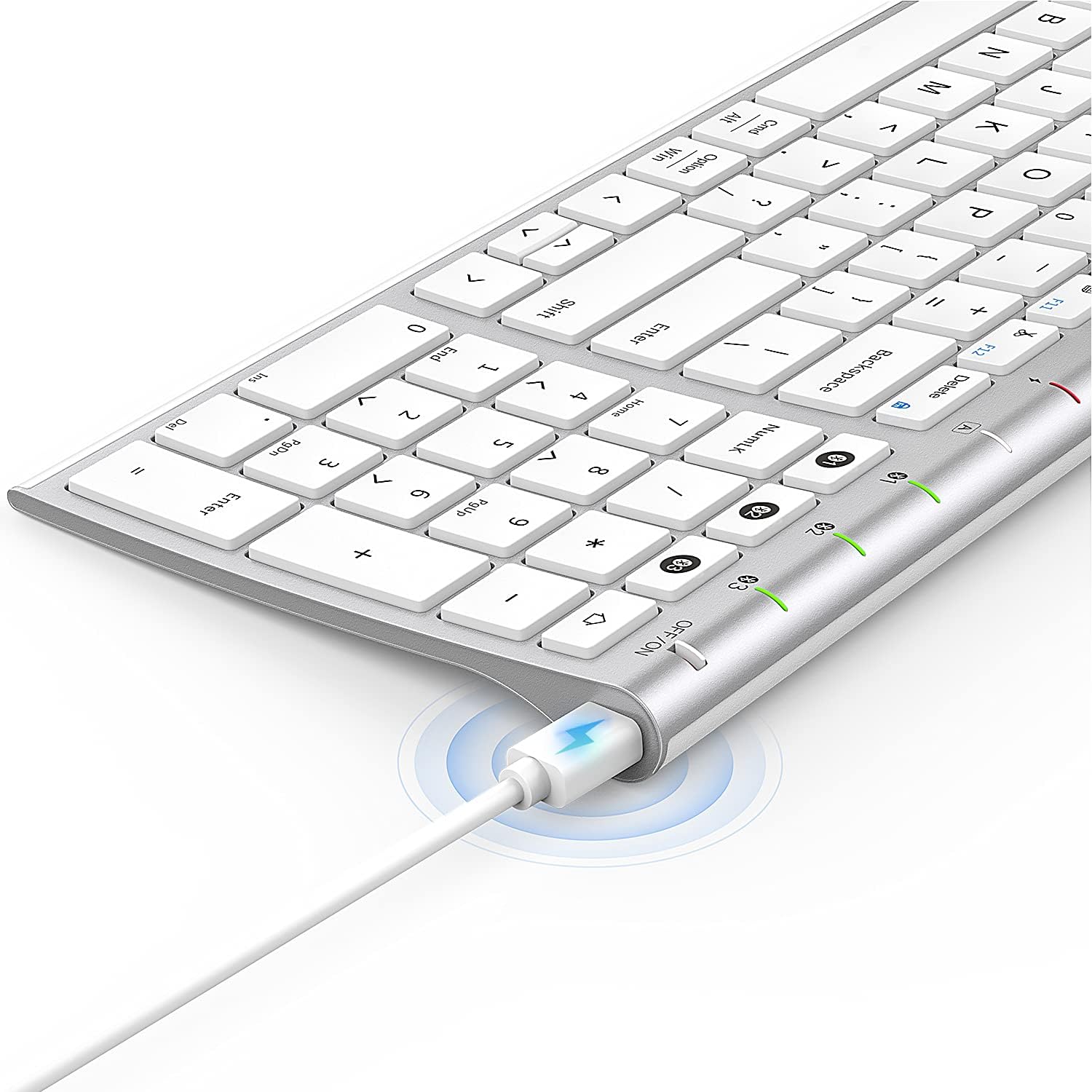
Image: The included USB charging cable, used to recharge the keyboard's built-in battery.
Configurare și asociere
Pornire/Oprire
Locate the ON/OFF switch on the top right side of the keyboard. Slide the switch to the "ON" position to power on the keyboard. Slide it to "OFF" when not in use to conserve battery.
Încărcarea tastaturii
The keyboard features a built-in rechargeable lithium battery. Connect the included USB charging cable to the charging port on the keyboard and the other end to a USB power source (e.g., computer USB port, USB wall adapter). The charging indicator light will illuminate during charging and turn off when fully charged.
Împerechere Bluetooth cu mai multe dispozitive
This keyboard supports connection with up to three devices simultaneously. Follow these steps to pair your devices:
- Asigurați-vă că tastatura este pornită.
- Apăsați tasta Fn key and one of the Bluetooth channel keys (1, 2, sau 3) simultaneously to select a channel. For first-time pairing, choose an unused channel.
- Apăsați lung pe Fn key and the selected Bluetooth channel key (1, 2, sau 3) for 3-5 seconds until the corresponding channel indicator light (01, 02, sau 03) starts blinking rapidly. This indicates the keyboard is in pairing mode.
- On your device (MacBook, iMac, iPhone, iPad, etc.), go to Bluetooth settings and enable Bluetooth.
- Caută available devices. The keyboard will appear as "Nasuque Keyboard" or similar. Select it to connect.
- Once connected, the indicator light will stop blinking and remain solid for a few seconds before turning off.
- Repeat these steps for up to two additional devices using the other Bluetooth channels.
To switch between paired devices, simply short press the Fn key and the corresponding Bluetooth channel key (1, 2, sau 3).
Cerințe de sistem: Compatible with Mac OS X 10.12 or higher and Bluetooth 4.0 or higher.

Image: The keyboard's top right corner showing the three Bluetooth channel indicators (01, 02, 03) for multi-device pairing.

Image: An illustration demonstrating the keyboard's ability to easily switch between a laptop, tablet, and smartphone.
Video: A demonstration of the Nasuque Bluetooth Keyboard's multi-device connectivity and ease of use with various Apple devices.
Instrucțiuni de operare
Taste funcționale
The keyboard features a row of function keys (F1-F12) that perform various system functions when pressed in combination with the Fn key. These include media controls (play/pause, volume), brightness adjustment, and other shortcuts common to Mac OS.
Tastatură numerică
The integrated numeric keypad provides convenient data entry for numbers and calculations. Ensure the Num Lock key is active if needed for specific applications.

Imagine: Un prim-plan view of the keyboard's compact full-size layout, highlighting the numeric keypad.
Experiență de tastare
The keyboard utilizes a stable scissor mechanism beneath each key, providing a responsive and comfortable typing experience with a low profile.
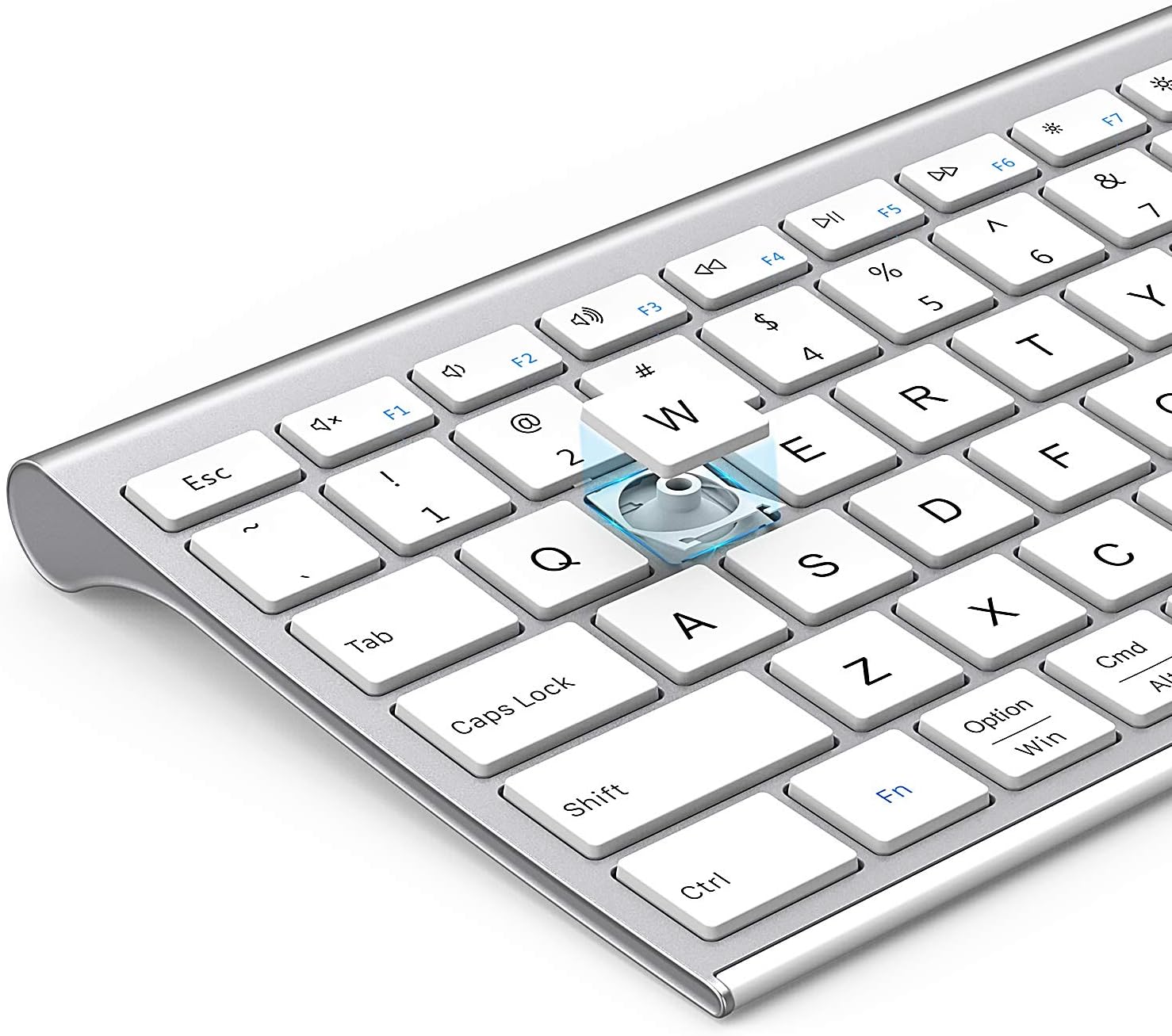
Imagine: O explozie view of a keycap, illustrating the underlying scissor mechanism for stable and precise typing.
Întreţinere
Pentru a asigura longevitatea și performanța optimă a tastaturii, urmați aceste instrucțiuni de întreținere:
- curatenie: Folosiți o lavetă moale, uscată și fără scame pentru a șterge suprafața tastaturii. Pentru murdăria persistentă, ștergeți ușor.ampCurățați cârpa cu apă sau o soluție de curățare delicată. Evitați umiditatea excesivă.
- Capac de praf: Utilize the included silicone dust cover when the keyboard is not in use to protect it from dust, spills, and debris.
- Depozitare: Depozitați tastatura într-un loc răcoros și uscat, ferit de lumina directă a soarelui și de temperaturi extreme.
- Evitați lichidele: Do not expose the keyboard to liquids. In case of accidental spills, immediately power off the keyboard and allow it to dry completely before use.
Depanare
If you encounter issues with your Nasuque Bluetooth Keyboard, please refer to the following common solutions:
| Problemă | Cauza posibila | Soluţie |
|---|---|---|
| Keyboard does not connect or is not detected. | Keyboard is off, low battery, not in pairing mode, or device Bluetooth is off. |
|
| Tastele nu răspund sau se tastează greșit. | Low battery, connection interference, or software issue. |
|
| Dificultăți la comutarea între dispozitive. | Incorrect key press or device not properly paired to selected channel. |
|
Specificații
| Caracteristică | Detaliu |
|---|---|
| Model | B09XQL2NJY |
| Conectivitate | Bluetooth (Multi-device support for up to 3 devices) |
| Compatibilitate | Mac OS X 10.12 or higher, Bluetooth 4.0 or higher (MacBook Pro/Air, iMac, iPhone, iPad Pro/Air/Mini) |
| Dimensiuni (L x l x H) | 14.41 x 4.92 x 0.64 inci |
| Greutate | 1.12 lire sterline |
| Baterie | Baterie reîncărcabilă cu litiu |
| Distanța de operare | Până la 8 metri (26 picioare) |
| Mecanism cheie | Foarfecă-comutator |

Image: Diagram illustrating the precise dimensions of the Nasuque Bluetooth Keyboard.
Garanție și asistență
For warranty information, technical support, or any inquiries regarding your Nasuque Bluetooth Keyboard, please contact the manufacturer directly through the retailer's platform or the contact information provided with your purchase. Please retain your proof of purchase for warranty claims.