1. Introducere
The Nokia Comfort Earbuds TWS-411-WH are designed to provide a balanced audio experience with a focus on comfort and durability. These wireless Bluetooth earbuds feature 10mm drivers for clear sound and are built to withstand daily use with IPX5 water and sweat resistance. This manual provides instructions for setting up, operating, maintaining, and troubleshooting your earbuds.
1.1. Ce se află în cutie
- Căști Nokia Comfort
- 3 pairs of ear tips (Small, Medium & Large)
- Carcasă de încărcare
- Cablu USB tip C
- Ghid de pornire rapidă

Image 1.1: The Nokia Comfort Earbuds, charging case, three pairs of ear tips, USB-C cable, and quick start guide.
2. Configurare
2.1. Încărcarea căștilor și a carcasei
Before first use, fully charge the earbuds and the charging case. Place the earbuds into the charging case. Connect the USB Type-C cable to the charging port on the case and to a power source. The indicator light on the case will show the charging status. A full charge provides up to 9.5 hours of listening time for the earbuds, with the charging case offering an additional 19.5 hours, totaling up to 29 hours of playback.

Image 2.1: The Nokia Comfort Earbuds inside their charging case, illustrating the charging contacts and compact design.
2.2. Asocierea cu un dispozitiv
- Asigurați-vă că căștile sunt încărcate.
- Deschideți carcasa de încărcare. Căștile vor intra automat în modul de asociere.
- On your device (phone, laptop, tablet), enable Bluetooth.
- Caută available Bluetooth devices and select "Nokia Comfort Earbuds" from the list.
- După conectare, se va auzi un sunet de confirmare, iar căștile sunt gata de utilizare.
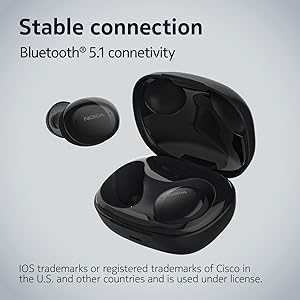
Image 2.2: The earbuds and charging case, highlighting the stable Bluetooth 5.1 connectivity.
3. Utilizarea căștilor
3.1. Purtarea căștilor
Select the ear tips that provide the most comfortable and secure fit. Gently insert the earbuds into your ears and twist slightly to ensure a snug seal. The natural ergonomic form and unique comfort ring are designed for a secure fit.
3.2. Atingeți Comenzi
The Nokia Comfort Earbuds feature touch controls for easy management of audio and calls. Refer to the quick start guide for specific tap gestures for functions such as play/pause, skip tracks, answer/end calls, and activate voice assistant.
3.3. Managementul apelurilor
The earbuds support easy automatic switching between using one or both earbuds for phone calls, providing flexibility during conversations.
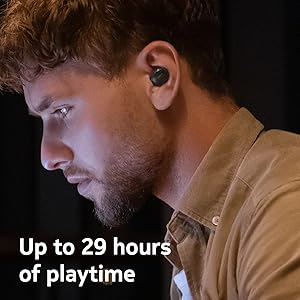
Image 3.1: A user wearing the Nokia Comfort Earbuds, demonstrating comfortable usage during daily activities.
4. Întreținere
4.1. Curatenie
Regularly clean your earbuds and charging case to ensure optimal performance and hygiene. Use a soft, dry, lint-free cloth to wipe the surfaces. For ear tips, remove them from the earbuds and clean with a mild soap solution, then rinse and dry thoroughly before reattaching.
4.2. Water and Sweat Resistance
The Nokia Comfort Earbuds are rated IPX5 for water and sweat resistance. This means they are protected against low-pressure water jets from any direction. They are suitable for workouts and light rain but should not be submerged in water. Ensure the earbuds are dry before placing them back in the charging case to prevent damage.

Image 4.1: The Nokia Comfort Earbuds demonstrating their IPX5 water and sweat resistance.
5. Depanare
5.1. Probleme comune și soluții
- Căștile nu se împerechează: Asigurați-vă că ambele căști sunt în carcasa de încărcare, apoi deschideți capacul pentru a activa modul de asociere. Verificați setările Bluetooth ale dispozitivului și încercați să le reconectați.
- Niciun sunet sau volum redus: Verificați nivelurile de volum atât pe dispozitiv, cât și pe căști. Asigurați-vă că căștile sunt așezate corect în urechi.
- Conexiune intermitentă: Move closer to your connected device. Avoid obstacles that may interfere with the Bluetooth signal.
- Căștile nu se încarcă: Ensure the charging cable is securely connected to both the case and the power source. Verify that the charging contacts on the earbuds and inside the case are clean and free of debris.
6. Specificații
| Caracteristică | Detaliu |
|---|---|
| Numele modelului | Căști True Wireless |
| Numărul de model | TWS-411 WH |
| Tehnologia de conectivitate | Fără fir (Bluetooth 5.1) |
| Tip de driver audio | Driver dinamic |
| Dimensiunea driverului | 10 mm |
| Durata de viață a bateriei (căști) | Până la 9.5 ore |
| Timp total de redare (cu carcasă) | Până la 29 ore |
| Rezistenta la apa | IPX5 (rezistent la apă, transpirație) |
| Metoda de control | Atingere |
| Microfon | Da |
| Factor de formă | In ureche |
| Material | Plastic |
| Greutatea articolului | 48.17 grame |
| Dimensiunile produsului | 10 x 10 x 4.9 cm |
| Anul modelului | 2022 |

Image 6.1: Detailed dimensions of the Nokia Comfort Earbuds and their charging case.
7. Garanție și asistență
7.1. Informații despre garanție
This product comes with a standard brand warranty. For detailed information regarding the warranty period, coverage, and terms, please refer to the warranty card included in the product packaging or visit the official Nokia support website-ul.
7.2. Asistență pentru clienți
For further assistance, technical support, or service inquiries, please contact Nokia customer support through their official channels. Contact details can typically be found on the Nokia website-ul sau în documentația produsului.
8. Produs terminatview Video
Videoclip 8.1: Un oficial terminatview of the Nokia Comfort Earbuds, showcasing their design, features, and key benefits such as ergonomic fit, sound balance, and water resistance.


