1. Introducere
Welcome to the Hover-1 Turbo Hoverboard Combo. This manual provides essential information for the safe and efficient operation, maintenance, and troubleshooting of your new Hover-1 Turbo Hoverboard and Go-Kart attachment. Please read this manual thoroughly before use and retain it for future reference.
The Hover-1 Turbo Hoverboard Combo transforms your Hover-1 hoverboard into a versatile and enjoyable Go-Kart. It features hand-operated rear wheel control, an adjustable frame, and a quick-attach connection for a new riding experience.
2. Informații de siguranță
AVERTISMENT: Nerespectarea acestor instrucțiuni de siguranță poate duce la vătămări corporale grave sau deces.
- Always wear a helmet and appropriate safety gear (knee pads, elbow pads) when operating the Hover-1 Turbo Hoverboard Combo. Safety gear is sold separately.
- This product is designed for youth and should be operated under adult supervision.
- Nu depășiți limita maximă de greutate a 220 lbs (100 kg).
- Operate on smooth, dry surfaces away from traffic, pedestrians, and obstacles.
- Avoid inclines greater than 8 de grade.
- Nu operați sub influența drogurilor sau alcoolului.
- Ensure all connections, especially the Go-Kart attachment, are securely fastened before each use.
- The Hover-1 Turbo Hoverboard is Certificat UL 2272, indicating compliance with electrical safety standards.
3. Conținutul pachetului
Verificați dacă toate articolele sunt prezente și în stare bună:
- Hover-1 Turbo Hoverboard
- Go-Kart Seat Attachment
- Încărcător
- Manual de utilizare (acest document)

Image: The Hover-1 Turbo Hoverboard Combo, showcasing both the hoverboard and the attached Go-Kart seat.
4. Configurare și asamblare
The Go-Kart attachment requires assembly. Follow these steps to prepare your Hover-1 Turbo Hoverboard Combo for use:
- Unboxing: Scoateți cu grijă toate componentele din ambalaj. Verificați dacă prezintă deteriorări.
- Hoverboard Preparation: Ensure your Hover-1 Turbo Hoverboard is fully charged before attaching the Go-Kart. Refer to the charging instructions in Section 5.1.
- Attaching the Go-Kart:
- Place the Go-Kart attachment over the Hoverboard. The footpads of the hoverboard should align with the attachment's securing points.
- Secure the Go-Kart to the hoverboard using the adjustable straps provided. Ensure the straps are tight and the attachment is stable.
- Adjust the frame length of the Go-Kart to comfortably fit the rider. Loosen the adjustment knobs, slide the frame to the desired length, and tighten the knobs securely.
- Adjust the backrest angle for rider comfort by loosening the adjustment knob behind the seat, setting the angle, and re-tightening.
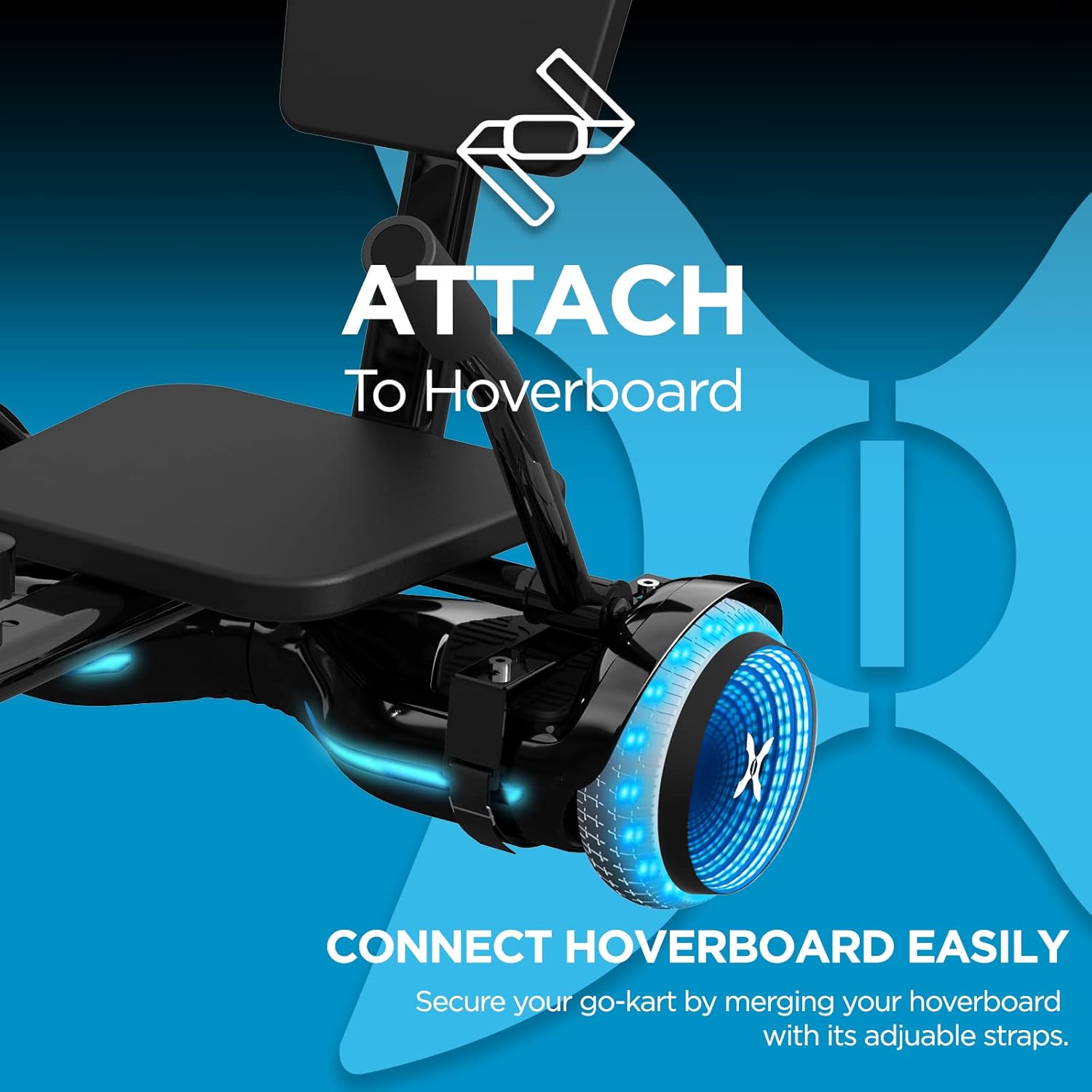
Image: Close-up of the Go-Kart attachment connecting to the Hover-1 Turbo Hoverboard.

Image: Detail of the adjustable frame mechanism on the Go-Kart attachment.
5. Instrucțiuni de utilizare
5.1. Charging the Hoverboard
Before first use, fully charge the Hover-1 Turbo Hoverboard. The 25.2V/4.0 Ah Lithium-ion battery takes approximately 4.5 de ore to fully charge. Use only the provided charger.
- Conectați încărcătorul la portul de încărcare de pe hoverboard.
- Conectați încărcătorul la o priză standard de perete.
- Indicatorul luminos de pe încărcător se va schimba (de exemplu, din roșu în verde) când încărcarea este completă.
- Disconnect the charger once fully charged to prevent overcharging.
5.2. Hoverboard Mode (Standing)
To operate the Hover-1 Turbo Hoverboard in standing mode:
- Porniți hoverboard-ul.
- Step onto one side of the hoverboard first. The self-balancing system will stabilize the board.
- Place your other foot onto the board.
- Lean slightly forward to move forward, and lean back to slow down or reverse. Turn by applying pressure to one footpad.

Image: A person demonstrating riding the Hover-1 Turbo Hoverboard in its traditional standing mode.
5.3. Go-Kart Mode (Seated)
With the Go-Kart attachment, control is intuitive and hand-operated:
- Ensure the Go-Kart attachment is securely fastened to the hoverboard.
- Așezați-vă confortabil pe scaun cu picioarele pe suporturile pentru picioare.
- Use the hand levers to control movement. Push both levers forward to accelerate, pull both back to brake or reverse.
- To turn, push one lever forward while keeping the other neutral or pulling it back slightly. For example, push the right lever forward to turn left.

Image: Close-up of the hand-operated controls on the Go-Kart attachment.
6. Întreținere
Regular maintenance ensures the longevity and safe operation of your Hover-1 Turbo Hoverboard Combo.
- curatenie: Wipe down the hoverboard and Go-Kart attachment with a damp Nu utilizați substanțe chimice dure sau produse de curățare abrazive. Evitați pătrunderea apei în componentele electronice.
- Îngrijirea bateriei:
- Încărcați complet bateria după fiecare utilizare.
- If storing for an extended period, charge the battery every 30 days to maintain its health.
- Nu expuneți bateria la temperaturi extreme.
- Inspecție anvelope: The hoverboard features 6.5" solid tires. Regularly inspect them for wear and tear.
- Verificarea elementelor de fixare: Periodically check all screws, bolts, and straps on both the hoverboard and Go-Kart attachment to ensure they are tight and secure.
7. Depanare
Dacă întâmpinați probleme, consultați următoarele probleme și soluții comune:
| Problemă | Cauza posibila | Soluţie |
|---|---|---|
| Hoverboard-ul nu pornește. | Baterie descărcată sau butonul de pornire nu este apăsat corect. | Charge the hoverboard fully. Press and hold the power button firmly. |
| Go-Kart feels unstable or loose. | Attachment straps are not tight enough or frame adjustment knobs are loose. | Re-tighten all attachment straps and frame adjustment knobs. Ensure the hoverboard is properly seated in the attachment. |
| Hoverboard not responding to controls. | Calibration issue or sensor malfunction. | Turn off the hoverboard, place it on a flat surface, and re-calibrate according to the hoverboard's specific instructions (usually involves holding the power button). If issues persist, contact customer support. |
| Viteză sau autonomie redusă. | Low battery, riding on inclines, or heavy load. | Ensure battery is fully charged. Avoid steep inclines. Check rider weight against maximum limit. |
For further assistance, please contact Hover-1 customer support.
8. Specificații
| Caracteristică | Detaliu |
|---|---|
| Numele modelului | Hover-1 Turbo Hoverboard |
| Numărul de model | DSA-TRB-CMB-BLK |
| Marca | Hover-1 |
| Puterea motorului | 400 W (2x 200 W) |
| Viteza maximă | Până la 11 km/h (7 mph) |
| Gama maximă | Up to 6 Miles (9.6 km) per charge |
| Tip baterie | 25.2V/4.0 Ah Lithium-ion (Certified) |
| Timp de încărcare | Aproximativ 4.5 ore |
| Capacitate maximă de greutate | 220 lbs (100 kg) |
| Dimensiunea roții | 6.5 inches (Solid Tires) |
| Inclinatie maxima | 8 de grade |
| Caracteristici speciale | LED Wheel Lights, Self-Balancing System, Adjustable Go-Kart Frame |
| Certificari | Certificat UL 2272 |
| Greutatea articolului | 12.3 kilograme |
| Dimensiuni (pachet) | 27.25 x 26.5 x 8.5 inci |
9. Garanție și asistență
The Hover-1 Turbo Hoverboard Combo comes with a 90 zile garanție. For warranty claims, technical support, or replacement parts, please contact DGL Group, the manufacturer.
For the most up-to-date support information, please visit the official Hover-1 website-ul web sau consultați datele de contact furnizate pe ambalajul produsului.


