1. Introducere
Mulțumesc pentru achizițieasing the Muse MT-106 BT Stereo Turntable. This manual provides essential information for the safe and efficient operation of your new device. Please read it thoroughly before use and retain it for future reference.
The Muse MT-106 BT is a versatile 3-speed (33/45/78 RPM) stereo turntable featuring a Bluetooth receiver, a USB port for playback and encoding, and two integrated speakers. It is designed to play vinyl records and can also stream music from any Bluetooth-compatible device such as a tablet, smartphone, or laptop.
2. Instrucțiuni de siguranță
- Sursa de alimentare: Asigurați-vă că sursa de alimentare voltage matches the rating indicated on the unit.
- Apă și umiditate: Do not expose the unit to rain, moisture, or dripping water. Do not place objects filled with liquids, such as vases, on the unit.
- Ventilare: Asigurați o ventilație adecvată. Nu blocați orificiile de ventilație.
- Căldură: Țineți unitatea departe de surse de căldură, cum ar fi calorifere, registre de căldură, sobe sau alte aparate producătoare de căldură.
- curatenie: Deconectați unitatea de la priza de perete înainte de curățare. Folosiți o cârpă moale și uscată. Nu utilizați produse de curățare lichide sau aerosoli.
- Service: Nu încercați să reparați singur acest produs. Consultați toate lucrările de service către personalul calificat de service.
- Plasare: Place the unit on a stable, flat surface to prevent damage from falling.
3. Conținutul pachetului
Vă rugăm să verificați dacă următoarele articole sunt incluse în pachetul dumneavoastră:
- Muse MT-106 BT Stereo Turntable
- Manual de utilizare
- Adaptor de alimentare
- Adaptor 45 RPM
4. Produs terminatview
Familiarize yourself with the components and controls of your Muse MT-106 BT Turntable.

Figura 4.1: Per total view of the Muse MT-106 BT Stereo Turntable. This image displays the turntable from an angled perspective, with its transparent dust cover lifted. The wooden base and integrated speakers are visible, along with the black platter, tonearm, and control knobs on the right side.
4.1 Front and Top Components
- Capac de praf: Protejează platanul și brațul de praf.
- platou: The rotating platform where records are placed.
- Ax: Holds the record in place on the platter.
- Adaptor 45 RPM: Used for playing 7-inch records with large center holes.
- Arme de ton: Ține stylusul și urmărește canelurile discului.
- Stylus (Ac): The part that reads the record grooves.
- Cue Lever: Lifts and lowers the tonearm.
- Selector de viteză: Comutați pentru a selecta 33, 45 sau 78 RPM.
- Difuzoare integrate: Difuzoare încorporate pentru ieșire audio.

Figura 4.2: Panou de control. Această imagine oferă o imagine detaliată view of the control panel located on the right side of the turntable. It shows three rotary knobs for volume and function selection, along with several buttons for playback control and mode switching.
4.2 Panoul de control
- Buton de alimentare/volum: Pornește/oprește unitatea și ajustează volumul.
- Buton selector de funcții: Switches between Phono, Bluetooth, USB, and Aux-in modes.
- Butoane de control al redării: Play/Pause, Skip Forward, Skip Backward (for USB mode).
- Auto Stop Switch: Enables or disables the automatic stop function for vinyl playback.
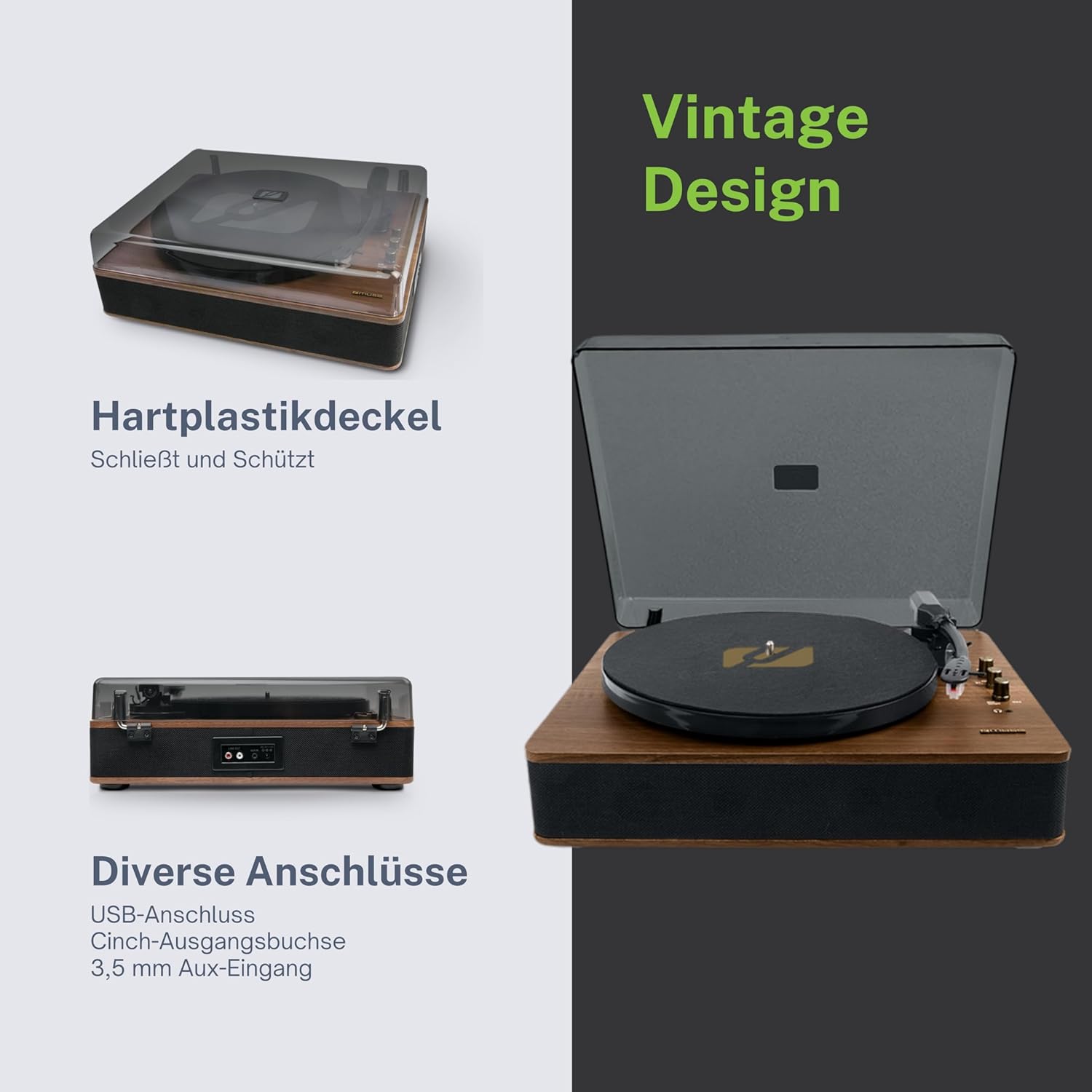
Figure 4.3: Rear Connections. The rear panel of the turntable is shown, featuring various connection ports including RCA audio outputs, a USB port, and an auxiliary input jack, allowing connection to external audio systems or devices.
4.3 Rear and Side Connections
- RCA Output Jacks (L/R): Conectați-vă la un extern ampamplificator sau difuzoare amplificate.
- Port USB: Pentru redarea MP3-urilor files from a USB drive or encoding vinyl to USB.
- AUX IN Jack (3.5mm): Conectați dispozitive audio externe.
- Mufă DC IN: Conectați adaptorul de alimentare.
- Mufă pentru căști (3.5 mm): Pentru ascultare privată.

Figura 4.4: Funcții cheie de mai susview. An illustrative graphic highlighting the key functions and connectivity options of the turntable. Icons represent features such as USB encoding, MP3 playback via USB, RCA output, auto-stop, integrated speakers, headphone jack, auxiliary input, and AC power input.
5. Configurare
5.1 Despachetarea
- Scoateți cu grijă unitatea din ambalaj.
- Îndepărtați toate materialele de ambalare și foliile de protecție.
- Keep the packaging for future transport or storage.
5.2 Plasarea
- Place the turntable on a flat, stable, and level surface.
- Avoid placing it near strong magnetic fields, direct sunlight, or heat sources.
- Asigurați-vă că există suficient spațiu în jurul unității pentru o ventilație adecvată.
5.3 Conexiune la alimentare
- Connect the supplied power adapter to the DC IN jack on the rear of the turntable.
- Conectați adaptorul de alimentare la o priză de perete adecvată.
5.4 Instalarea capacului anti-praf
- Carefully attach the dust cover to the hinges on the back of the turntable.
- The dust cover protects the unit when not in use. Remove it or lift it fully when playing records.
6. Instrucțiuni de utilizare
6.1 Redarea discurilor de vinil
- Ridicați capacul de praf.
- Rotate the Power/Volume knob clockwise to turn on the unit.
- Set the Function Selector knob to 'Phono'.
- Place a record on the platter. If playing a 45 RPM single, place the 45 RPM adapter on the spindle first.
- Select the correct speed (33, 45, or 78 RPM) using the Speed Selector switch.
- Scoateți protectorul pentru stilou din stilou.
- Lift the tonearm using the cue lever.
- Move the tonearm over the desired starting point of the record.
- Gently lower the tonearm onto the record using the cue lever. The music will begin to play.
- Adjust the volume using the Power/Volume knob.
- At the end of the record, if the Auto Stop switch is ON, the platter will stop rotating. If OFF, the platter will continue to rotate. Manually lift the tonearm and return it to its rest.
6.2 Mod Bluetooth
- Rotate the Power/Volume knob clockwise to turn on the unit.
- Set the Function Selector knob to 'BT' (Bluetooth). The Bluetooth indicator will flash, indicating pairing mode.
- Enable Bluetooth on your external device (smartphone, tablet, etc.) and search for available devices.
- Select 'MUSE MT-106 BT' from the list of devices. Once connected, the Bluetooth indicator will stop flashing and remain solid.
- You can now play music from your external device through the turntable's speakers. Adjust volume using both the turntable's knob and your external device.
6.3 Redare și codificare USB
6.3.1 Redare USB
- Rotate the Power/Volume knob clockwise to turn on the unit.
- Set the Function Selector knob to 'USB'.
- Insert a USB flash drive into the USB port. The unit will automatically detect and begin playing MP3 files.
- Use the Playback Control Buttons (Play/Pause, Skip Forward, Skip Backward) to navigate tracks.
6.3.2 Codare USB (Înregistrare vinil pe USB)
The MT-106 BT allows you to convert your vinyl records into digital MP3 files on a USB drive.
- Asigurați-vă că o unitate flash USB este introdusă în portul USB.
- Set the Function Selector knob to 'Phono'.
- Start playing your vinyl record as described in section 6.1.
- Press the 'Record' button (refer to Figure 4.2 for button location, typically indicated by a circle or 'REC' label). The recording indicator will illuminate.
- To stop recording, press the 'Record' button again. The recording indicator will turn off.
- The recorded audio will be saved as an MP3 file pe unitatea USB.
6.4 Auxiliary Input (AUX IN)
- Rotate the Power/Volume knob clockwise to turn on the unit.
- Set the Function Selector knob to 'AUX'.
- Connect an external audio device (e.g., MP3 player, CD player) to the AUX IN jack (3.5mm) on the rear of the turntable using an audio cable (not supplied).
- Play audio from your external device. The sound will be output through the turntable's speakers.
6.5 Ieșire RCA
To connect your turntable to an external ampdifuzoare amplificate sau difuzoare amplificate:
- Ensure the turntable and the external audio system are turned off.
- Connect an RCA audio cable (not supplied) from the RCA Output Jacks (L/R) on the rear of the turntable to the corresponding audio input jacks on your ampamplificator sau difuzoare amplificate.
- Turn on both the turntable and your external audio system.
- Select the appropriate input on your external audio system.
7. Întreținere
7.1 Curățarea stiloului
- Use a soft brush, specifically designed for stylus cleaning, to gently brush the stylus from back to front.
- Nu folosiți forță excesivă și nu periați dintr-o parte în alta, deoarece acest lucru poate deteriora stylus-ul.
- Replace the stylus approximately every 300-500 hours of playback, or if you notice a degradation in sound quality.
7.2 Curăţarea unităţii
- Wipe the exterior of the turntable with a soft, dry, lint-free cloth.
- Nu folosiți substanțe de curățare abrazive, ceară sau solvenți, deoarece acestea pot deteriora finisajul.
- For the dust cover, use a soft cloth and a mild, non-abrasive cleaner if necessary.
8. Depanare
If you experience issues with your turntable, please consult the following table before contacting support.
| Problemă | Cauza posibila | Soluţie |
|---|---|---|
| Fără putere | Adaptorul de alimentare nu este conectat sau priza este defectă. | Asigurați-vă că adaptorul de alimentare este conectat corect și că priza este funcțională. |
| Nici un sunet | Volume too low; incorrect function mode; external speakers not connected/powered. | Increase volume; select correct function (Phono, BT, USB, AUX); check external speaker connections and power. |
| Poor sound quality (vinyl) | Dirty or worn stylus; dirty record; incorrect speed selected. | Clean or replace stylus; clean record; select correct RPM. |
| Bluetooth nu se conectează | Turntable not in pairing mode; device too far; already connected to another device. | Ensure turntable is in BT mode and flashing; move device closer; disconnect from other devices. |
| Redarea USB nu funcționează | USB drive not inserted correctly; unsupported file formatare; unitate USB defectă. | Reinsert USB drive; ensure files are MP3 format; try a different USB drive. |
9. Specificații
| Marca | MUZĂ |
| Numele modelului | MT-106 BT |
| Culoare | Lemn |
| Material | Lemn |
| Greutatea articolului | 4.3 kilograme |
| Viteze de rotație | 33, 45, 78 RPM |
| Conectivitate | Bluetooth, USB, RCA Output, 3.5mm AUX Input, 3.5mm Headphone Jack |
| Caracteristici speciale | Integrated Speaker, Dust Protection, Adjustable Speed, USB Encoding |
| Dispozitive compatibile | Smartphone, Tabletă |
| Sursa de alimentare | AC Adapter (1 AAAA battery required for unspecified function, likely remote or internal clock) |
| Țara de origine | China |
10. Garanție și asistență
This product is covered by a manufacturer's warranty. Please refer to the warranty card included with your purchase or visit the official MUSE website-ul pentru termenii și condițiile detaliate ale garanției.
For technical support, troubleshooting assistance, or inquiries regarding spare parts, please contact MUSE customer service through their official channels. Information regarding spare parts availability is currently not available.


