1. Introducere
The Bloody M70 TWS True Wireless Gaming Earbuds are designed to provide a high-quality audio experience for gaming and music. Featuring Bluetooth 5.0 connectivity, dual ENC noise-canceling microphones, deep bass, and low latency, these earbuds are built for immersive sound. The IPX4 water-resistant rating ensures durability against splashes.

Image: Bloody M70 TWS True Wireless Gaming Earbuds in their open charging case, highlighting the design and red LED indicators.
2. Conținutul pachetului
Verify that all items are present in your Bloody M70 TWS Earbuds package:
- Bloody M70 TWS Earbuds (Left and Right)
- Carcasă de încărcare
- Cablu de încărcare USB
- Dopuri de urechi din silicon (mici, medii, mari)
- Manual de utilizare

Image: An illustration showing the Bloody M70 TWS Earbuds, charging case, various ear tip sizes, and charging cable as included in the package.
3. Noțiuni introductive
3.1 Încărcarea căștilor și a carcasei
Before first use, fully charge the earbuds and charging case. The charging case features a slide-lid design for easy access.
- Așezați căștile în carcasa de încărcare. Asigurați-vă că sunt fixate corect.
- Conectați cablul de încărcare USB la portul de încărcare de pe carcasă și la o sursă de alimentare.
- The charging time for the earbuds is approximately 1.5 hours. The case provides extended playtime up to 24 hours.

Image: The Bloody M70 TWS charging case demonstrating its slide-lid mechanism for opening.

Image: A visual representation of the Bloody M70 TWS Earbuds' battery performance, showing 6 hours of music playback, 24 hours with the charging case, and 1.5 hours for earbud charging.
3.2 Asociere Bluetooth
The Bloody M70 TWS Earbuds utilize Bluetooth 5.0 for a stable and fast connection.
- Deschideți carcasa de încărcare și scoateți căștile. Acestea vor intra automat în modul de asociere.
- Pe dispozitivul dvs. (smartphone, tabletă, computer), activați Bluetooth.
- Caută available devices and select "Bloody M70" from the list.
- După conectare, veți auzi un ton de confirmare, iar căștile vor fi gata de utilizare.
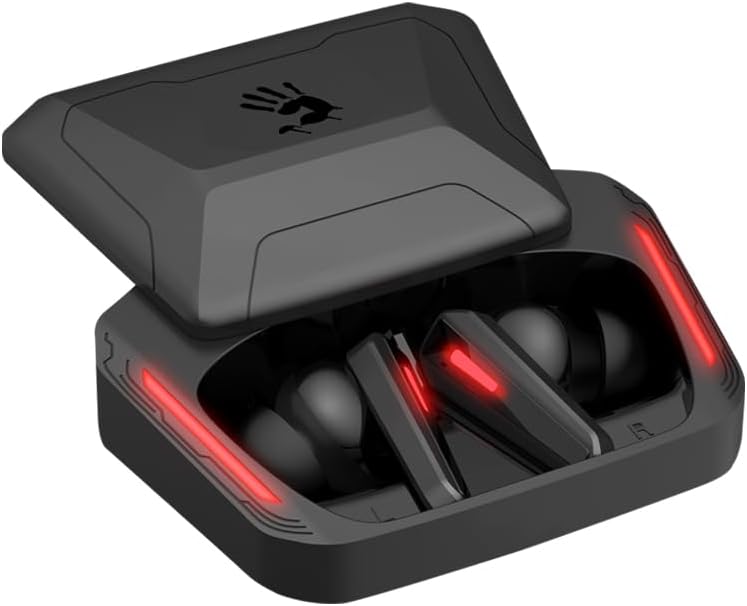
Image: A visual guide to Bluetooth pairing, showing a smartphone's Bluetooth menu with the 'Bloody M70' selected for connection.
4. Funcționare
4.1 Comenzi tactile
The Bloody M70 earbuds feature intuitive touch controls for managing audio and calls.
- Volum -: Long tap the left earbud for 2 seconds.
- Volum +: Long tap the right earbud for 2 seconds.
- Play / Call: Atingeți o singură dată oricare dintre căști.
- Pista anterioară: Atingeți de două ori căștile din stânga.
- Următoarea piesă: Atingeți de două ori casca dreaptă.
- Asistent vocal: Atingeți de trei ori casca din stânga.
- Gaming / Audio Mode Switch: Atingeți de trei ori casca dreaptă.

Image: A comprehensive diagram detailing the touch gestures and their corresponding functions on both the left and right Bloody M70 earbuds.
4.2 Dual-Mode Options (Game/Audio)
Switch between Game Mode for low-latency audio and Audio Mode for general listening by triple tapping the right earbud.

Image: A visual comparison of the Bloody M70 TWS Earbuds operating in Game Mode (highlighting low latency for gaming) and Audio Mode (for general music enjoyment).
4.3 Rezistență la apă (IPX4)
The earbuds are rated IPX4 water-resistant, protecting them from splashes and sweat. This makes them suitable for workouts and outdoor activities, but they are not designed for submersion.

Image: An earbud being splashed with water, visually representing the IPX4 water-resistant feature of the Bloody M70 TWS Earbuds.
5. Confort și potrivire
Achieving a proper fit is crucial for both sound quality and comfort. The Bloody M70 TWS Earbuds come with three sizes of silicone ear tips (Small, Medium, Large).
- Experiment with different ear tip sizes to find the best seal for your ears. A good seal enhances bass response and noise isolation.
- Gently insert the earbuds into your ear canal and twist slightly until they feel secure and comfortable.

Image: An illustration demonstrating the proper fit of an earbud in the ear, alongside the three available ear tip sizes (Small, Medium, Large) for optimal comfort and sound.
6. Îngrijire și întreținere
To ensure the longevity and optimal performance of your Bloody M70 TWS Earbuds, follow these care guidelines:
- curatenie: Curățați regulat căștile și carcasa de încărcare cu o lavetă moale, uscată și fără scame. Nu utilizați substanțe chimice dure sau materiale abrazive.
- Sfaturi pentru urechi: Remove and clean the silicone ear tips with mild soap and water, then dry thoroughly before reattaching.
- Contacte de încărcare: Asigurați-vă că contactele de încărcare atât de pe căști, cât și din interiorul carcasei sunt curate și fără reziduuri pentru a menține o încărcare corectă.
- Depozitare: Când nu le utilizați, depozitați căștile în carcasa lor de încărcare pentru a le proteja de praf și deteriorări.
- Evitați condițiile extreme: Nu expuneți căștile la temperaturi extreme, umiditate sau lumina directă a soarelui pentru perioade lungi de timp.
7. Depanare
If you encounter issues with your Bloody M70 TWS Earbuds, refer to the following common solutions:
- Căștile nu se împerechează:
- Asigurați-vă că ambele căști sunt încărcate.
- Dezactivați Bluetooth-ul pe dispozitiv, apoi activați-l din nou.
- Forget "Bloody M70" from your device's Bluetooth list and attempt to pair again.
- Place earbuds back in the case, close the lid, wait a few seconds, then reopen to reset.
- Niciun sunet de la una dintre căști:
- Asigurați-vă că ambele căști sunt încărcate.
- Try placing both earbuds back in the charging case, closing the lid, and then taking them out again.
- Curățați contactele de încărcare atât de pe cască, cât și de pe carcasă.
- Volum redus sau calitate slabă a sunetului:
- Reglați volumul atât pe dispozitiv, cât și pe căști.
- Asigurați-vă că dopurile de urechi asigură o etanșare corespunzătoare în canalul auditiv. Încercați diferite dimensiuni.
- Clean any earwax or debris from the earbud mesh.
- Carcasa de încărcare nu se încarcă:
- Asigurați-vă că cablul de încărcare este conectat în siguranță atât la carcasă, cât și la sursa de alimentare.
- Încercați un alt cablu USB sau adaptor de alimentare.
- Curățați portul de încărcare de pe carcasă.
8. Specificații
| Caracteristică | Caietul de sarcini |
|---|---|
| Numele modelului | M70 |
| Tehnologia de conectivitate | Fără fir (Bluetooth 5.0) |
| Gama Bluetooth | 10 metri |
| Controlul zgomotului | Active Noise Cancellation (ENC for Mics) |
| Durata de viață a bateriei (căști) | 6 de ore |
| Timp total de redare (cu carcasă) | Până la 24 ore |
| Timp de încărcare | 1.5 de ore |
| Nivel de rezistență la apă | IPX4 (impermeabil) |
| Tip control | Touch Control |
| Tip de driver audio | Dynamic Driver (Hybrid Diaphragm Technology) |
| Dispozitive compatibile | Gaming Consoles, Desktops, Laptops, Mobile Devices |
| Greutatea articolului | 0.24 kilograme (8.4 uncii) |
| Material | Metal, Plastic, Silicon |
9. Garanție și asistență
Bloody offers a 24 luni garantie for the M70 TWS True Wireless Gaming Earbuds. This warranty covers manufacturing defects and ensures product reliability.
For technical support, warranty claims, or any questions regarding your Bloody M70 earbuds, please refer to the contact information provided on the official Bloody website or your purchase documentation. When contacting support, please have your product model (M70) and proof of purchase readily available.


