
1. Introducere
This manual provides detailed instructions for the installation, operation, and maintenance of your DEKCO Solar Security Camera and Wireless Doorbell Camera system. Please read this manual thoroughly before using the product to ensure proper function and safety. Keep this manual for future reference.
2. Conținutul pachetului
Verificați dacă toate componentele sunt prezente și în stare bună la despachetare.
- DEKCO Solar Security Camera
- Cameră wireless pentru sonerie
- Unitate de sonerie interioară
- Solar Panel (integrated with camera)
- Suporturi și șuruburi de montare
- Cablu de încărcare USB
- Manual de utilizare (acest document)
3. Produs terminatview
The DEKCO security system combines a solar-powered outdoor camera with a wireless doorbell camera to provide comprehensive home surveillance.
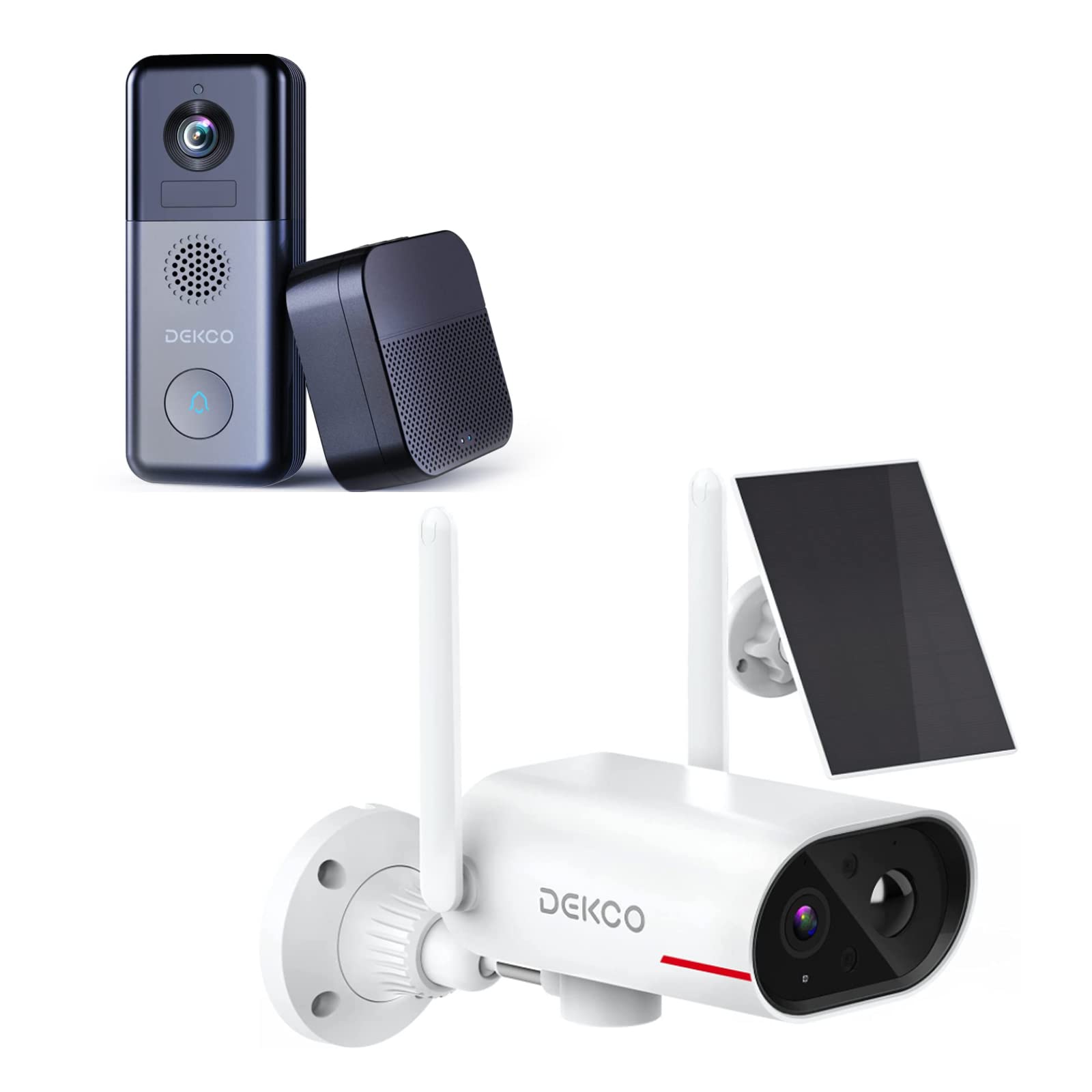
An image showing the DEKCO solar-powered security camera, the wireless doorbell camera, and its indoor chime unit. The security camera is white with two antennas and a solar panel, while the doorbell is dark grey with a camera lens and a call button. The chime is a compact black box.
3.1 Solar Security Camera Features
- 260° ViewInterval de funcționare: Achieved through a 170° rotating design.
- 100% fără fir: Flexible installation without power cables.
- Alimentat cu energie solară: Integrated solar panel for continuous power with adequate sunlight.
- Vedere de noapte: Features color night vision for clear images in low light.
- Depozitare: Supports Micro SD card and cloud storage (no monthly fees).
- Evaluare rezistentă la apă: IP65 for outdoor use.
3.2 Wireless Doorbell Camera Features
- Durata de viață a bateriei de 180 de zile: Baterie reîncărcabilă încorporată de 10000 mAh pentru utilizare extinsă.
- Audio bidirecțional: Comunicați cu vizitatorii de la distanță.
- Detectarea mișcării: Primește alerte pentru activitatea de la ușa ta.
- Sonerie fără fir: Connects to an indoor chime unit.
- Evaluare rezistentă la apă: IP65 for outdoor use.
4. Ghid de instalare
Follow these steps to set up your DEKCO security system.
4.1 Instalarea aplicației
- Download the DEKCO app from your smartphone's app store (available for Android and iOS).
- Înregistrează-te pentru un cont nou sau autentifică-te dacă ai deja unul.
4.2 Solar Security Camera Setup
- Taxă inițială: Before installation, fully charge the camera using the provided USB cable.
- Montare: Choose a location with good Wi-Fi signal and direct sunlight exposure for the solar panel. Use the mounting bracket and screws to securely attach the camera to a wall. Ensure the camera has a clear view din zona de monitorizare dorită.
- Asociere: Open the DEKCO app, select 'Add Device', and follow the on-screen instructions to connect the camera to your Wi-Fi network.
4.3 Wireless Doorbell Camera Setup
- Taxă inițială: Fully charge the doorbell camera using the provided USB cable.
- Montare: Install the doorbell camera at your desired location near your front door using the provided mounting hardware. Ensure it has a clear view și semnal Wi-Fi bun.
- Asociere: In the DEKCO app, select 'Add Device' and follow the instructions to connect the doorbell camera to your Wi-Fi network.
- Chime Setup: Plug the indoor chime unit into a power outlet. Follow the app's instructions to pair the chime with the doorbell camera. You can select different chime tones and adjust the volume through the app.
5. Instrucțiuni de utilizare
Learn how to use the features of your DEKCO security system.
5.1 Solar Security Camera Operation
- Trăi View: Open the DEKCO app and select your camera to view trăi footage. You can manually pan/tilt the camera within its 260° range.
- Detectarea mișcării: The camera is configured for motion-only alerts. Adjust sensitivity settings in the app to optimize detection and minimize false alarms.
- Înregistrare: Motion-triggered events are recorded and stored on the Micro SD card (if installed) or in the cloud. Access recordings via the app's playback feature.
- Vedere de noapte: The camera automatically switches to color night vision in low-light conditions.
5.2 Wireless Doorbell Camera Operation
- Preluarea apelurilor: When a visitor presses the doorbell button, your smartphone will receive a notification. Tap the notification to answer and engage in two-way audio communication.
- Detectarea mișcării: The doorbell camera detects motion and sends alerts to your phone. Review motion events in the app.
- Trăi View: You can initiate a live view of your front door at any time through the DEKCO app.
- Funcția de sonerie: The indoor chime will sound when the doorbell button is pressed. Adjust settings in the app.
6. Întreținere
Regular maintenance ensures optimal performance and longevity of your devices.
- Curățarea lentilelor: Periodically wipe the camera lenses and solar panel with a soft, damp o lavetă pentru a îndepărta praful și murdăria. Evitați substanțele de curățare abrazive.
- Eficiența panoului solar: Ensure the solar panel is free from obstructions (leaves, snow, etc.) to maximize charging efficiency.
- Sănătatea bateriei: While solar-powered, ensure the security camera receives sufficient sunlight. For the doorbell, monitor battery levels via the app and recharge when necessary.
- Actualizări firmware: Check the DEKCO app regularly for firmware updates. Install updates to ensure your devices have the latest features and security enhancements.
7. Depanare
Consultați această secțiune pentru soluții la problemele comune.
- Dispozitivul nu se conectează la Wi-Fi:
- Asigurați-vă că rețeaua Wi-Fi este de 2.4 GHz (5 GHz nu este acceptată).
- Verificați corectitudinea parolei Wi-Fi.
- Mută dispozitivul mai aproape de routerul Wi-Fi.
- Restart your router and the device.
- Fără alerte de detectare a mișcării:
- Verificați dacă detectarea mișcării este activată în setările aplicației.
- Reglați sensibilitatea la mișcare.
- Asigurați-vă că dispozitivul este clar view și nu este obstrucționată.
- Calitate video slabă:
- Verificați puterea semnalului Wi-Fi.
- Curățați obiectivul camerei.
- Bateria soneriei se descarcă rapid:
- Reduceți sensibilitatea sau frecvența detectării mișcării.
- Asigurați-vă că dispozitivul este încărcat complet înainte de utilizare.
- Solar Camera Not Charging:
- Ensure the solar panel receives at least 1 hour of direct sunlight daily.
- Curățați suprafața panoului solar.
8. Specificații
| Caracteristică | Caietul de sarcini |
|---|---|
| Marca | DEKCO |
| Numărul de model | B09TF8K2W8 |
| Tehnologia de conectivitate | Wireless (Wi-Fi) |
| Sursa de alimentare | Solar Powered (Camera), Battery (Doorbell) |
| Doorbell Battery Capacity | 10000 mAh |
| Viewing Angle (Camera) | 260° (170° rotating design) |
| Vedere de noapte | Color Night Vision |
| Evaluare rezistentă la apă | IP65 |
| Dispozitive compatibile | Smartphone (Android) |
| Tip de alertă | Doar mișcare |
| Tip de montare | Montare pe perete |
| Format de captură video | MPEG-4 |
9. Garanție și asistență
For warranty information, technical support, or further assistance, please refer to the DEKCO official website or contact DEKCO customer service directly. Keep your purchase receipt as proof of purchase.