1. Produs terminatview
The DIHOOM Security Camera is a wireless outdoor home battery camera designed to provide comprehensive surveillance. It features 2K full HD image quality, color night vision, advanced AI motion detection, a siren, spotlight, and two-way audio communication. Its zero-wire design and rechargeable battery ensure flexible placement and long-lasting operation.

Figure 1.1: DIHOOM Security Camera with its magnetic mounting base, highlighting its weatherproof design.
2. Ce se află în cutie
La deschiderea ambalajului, asigurați-vă că sunt prezente toate componentele:
- DIHOOM Security Camera (Model: CG1)
- Baza de montare magnetica
- Screw Mounting Kit (screws and anchors)
- Cablu de încărcare USB
- Manual de utilizare / Ghid de pornire rapidă

Figure 2.1: The DIHOOM camera supports local storage via a 128GB SD card (not included) and offers cloud service options.
3. Ghid de instalare
3.1 Încărcare inițială
Before first use, fully charge the camera for approximately 10 hours using the provided USB cable. A full charge can provide 1-6 months of standby capability depending on usage.
3.2 Instalarea și asocierea aplicației
Download the "Vicohome" app from your smartphone's app store. Follow the in-app instructions to create an account and pair your camera. The app will guide you through connecting the camera to your 2.4GHz WiFi network (5GHz WiFi is not supported).
Video 3.2.1: Official DIHOOM video demonstrating the app setup and initial camera pairing process.
Video 3.2.2: Official DIHOOM video providing a detailed guide on battery camera features and setup, including 2K resolution.
3.3 Montarea camerei
Alegeți o locație care oferă servicii optime viewing and WiFi signal strength. The camera can be mounted using the magnetic base or the screw mounting kit. Ensure the mounting location allows for sufficient sunlight if using a solar panel (sold separately) for continuous charging.

Figure 3.3.1: The camera's wide viewing angle and customizable motion detection areas allow for precise monitoring.
4. Instrucțiuni de utilizare
4.1 2K Resolution and Night Vision
The camera delivers 2K full HD video quality. It supports two night vision modes: infrared mode for clear black and white footage in low light, and color mode utilizing dual light sources for full-color night vision.

Figure 4.1.1: Visual comparison demonstrating the camera's 2K HD clarity during both day and night.

Figure 4.1.2: Illustrates the two night vision modes: color night vision activated by motion detection and standard infrared night vision.
4.2 AI Recognition & PIR Motion Detection
The camera features advanced AI technology to distinguish between humans, pets, and vehicles, reducing false alerts. When unusual motion is detected by the PIR sensor, the camera sends notifications to your phone and saves video recordings.
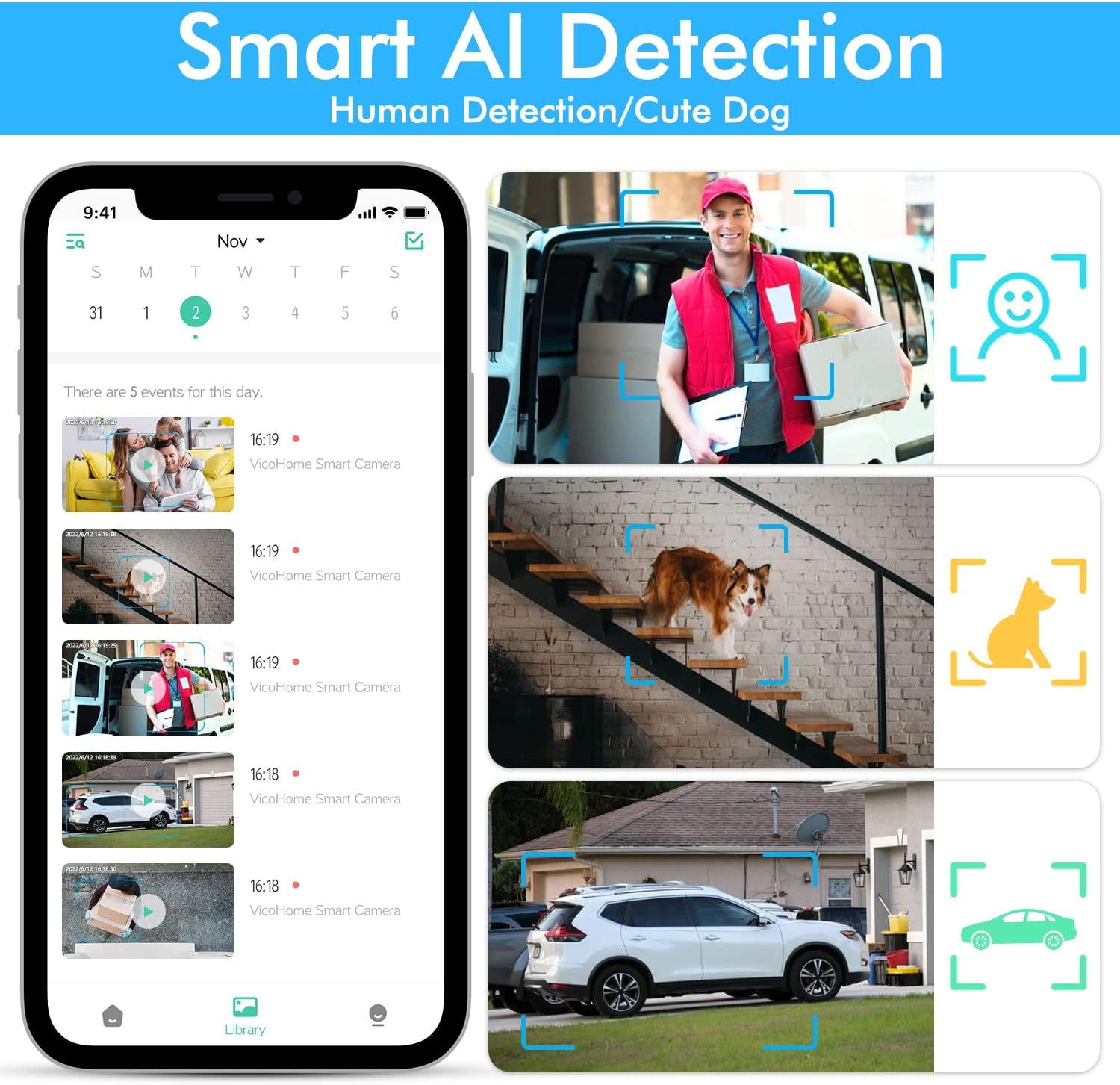
Figure 4.2.1: The smart AI detection feature categorizes detected motion, providing specific alerts for persons, pets, and vehicles.
4.3 Sunet bidirecțional
Equipped with a built-in microphone and speaker, the camera allows for two-way audio communication. You can speak to visitors or deter intruders directly through the Vicohome app on your smartphone.

Figure 4.3.1: Two-way audio enables real-time conversation with individuals at your property.
4.4 Siren & Spotlight Alarm
Upon detecting unusual motion, the camera can automatically or manually activate its spotlight and siren to deter unwanted visitors. This feature enhances security by actively responding to potential threats.

Figure 4.4.1: The integrated siren and spotlight serve as an effective deterrent against suspicious activity.
4.5 Opțiuni de stocare
The camera supports local storage via an SD card (up to 128GB, not included). Additionally, a 30-day free trial of cloud service is available, offering cloud storage and intelligent notification features.
5. Întreținere
To ensure optimal performance and longevity of your DIHOOM Security Camera, regular maintenance is recommended:
- curatenie: Ștergeți ușor obiectivul și corpul camerei cu o lavetă moale șiamp pânză. Evitați curățarea abrazivă.
- Durata de viață a bateriei: Monitor the battery level via the Vicohome app. Recharge the camera promptly when the battery is low to maintain continuous surveillance.
- Protecție împotriva intemperiilor: The camera is IP65 waterproof, designed to withstand various weather conditions. However, avoid direct high-pressure water jets.
- Actualizări firmware: Periodically check the Vicohome app for available firmware updates to ensure your camera has the latest features and security enhancements.
6. Depanare
If you encounter issues with your DIHOOM Security Camera, refer to the following common problems and solutions:
| Problemă | Cauza posibila | Soluţie |
|---|---|---|
| Camera nu se conectează la WiFi | Incorrect WiFi password; 5GHz network used; weak signal. | Asigurați-vă că parola WiFi de 2.4 GHz este corectă. Mutați camera mai aproape de router. Reporniți routerul și camera. |
| Durată slabă a bateriei | Frequent motion detection; cold weather; insufficient charging. | Reduce motion detection sensitivity. Ensure full charge. Consider solar panel for continuous charging. |
| Alerte de mișcare falsă | High sensitivity; environmental factors (e.g., swaying branches). | Adjust motion detection sensitivity in the app. Utilize activity zones to exclude irrelevant areas. |
| Fără viziune nocturnă | Night vision mode disabled; IR lights obstructed. | Check night vision settings in the app. Ensure no obstructions are blocking the IR lights. |
7. Specificatii tehnice
| Caracteristică | Caietul de sarcini |
|---|---|
| Numărul de model | CG1 |
| Rezoluție captură video | 2K |
| Tehnologia de conectivitate | Wireless (doar Wi-Fi 2.4 GHz) |
| Sursa de alimentare | Alimentat cu baterie (litiu-polimer 8000 mAh) |
| Utilizare în interior/exterior | În aer liber |
| Caracteristici speciale | Night Vision, Motion Sensor, Two-Way Audio, Spotlight, Siren |
| Viewunghiul ing | 120 de grade |
| Gama de vedere nocturnă | 32 picioare |
| Evaluarea internațională de protecție | IP65 |
| Greutatea articolului | 1.37 lire sterline |
| Dimensiunile produsului | 5.94 x 4.84 x 3.78 inci |
8. Garanție și asistență
For warranty information and customer support, please refer to the documentation included with your product or visit the official DIHOOM website. Contact details for after-sales customer service are typically provided in the manual.


