Produs terminatview
The CHUWI Hipen H7 is an active stylus designed for precise and accurate interaction with compatible devices. It features 4096 levels of pressure sensitivity, palm rejection, and an ergonomic design for comfortable use, making it ideal for writing, drawing, and navigating.

Image: The CHUWI Hipen H7 Stylus Pen, a sleek black pen with a blue and green line drawn beneath it, illustrating its writing capability.
Înființat
Instalarea bateriei
The Hipen H7 stylus is powered by a single AAAA battery.
- Unscrew the top cap of the stylus.
- Insert one AAAA battery into the battery compartment, ensuring correct polarity.
- Înșurubați capacul superior la loc în siguranță.
The stylus is designed for long battery life, offering up to 1000 hours of use.
Compatibilitate
The CHUWI Hipen H7 stylus supports the MPP (Microsoft Pen Protocol) protocol. It is compatible with:
- CHUWI UBook
- CHUWI UBook XPro
- CHUWI Hi10 X
- CHUWI FreeBook
- CHUWI 10.8in MiniBook X
Nota: This stylus is nu compatible with: Hipad Xpro, Hipad X, Hipad max, Hipad plus, UBook X, 10.51in Minibook X.

Image: The CHUWI Hipen H7 Stylus shown alongside various compatible Microsoft Surface PC series devices, illustrating its broad compatibility with MPP scheme tablets and laptops.
Instrucțiuni de operare
Utilizare de bază
The Hipen H7 stylus allows for natural writing, drawing, and navigation on your compatible device. Simply touch the pen tip to the screen to begin interaction.

Image: A hand holding the CHUWI Hipen H7 Stylus, writing on a tablet screen, demonstrating accurate writing and real-time display. The image also highlights the automatic sleep function.
Sensibilitate la presiune
The stylus features 4096 levels of pressure sensitivity, allowing for varying line thickness and opacity based on the pressure applied. This provides a natural and responsive drawing and writing experience.

Image: A diagram of the CHUWI Hipen H7 Stylus highlighting its key features: 4096 pressure levels, ergonomic design, Wacom Chip, and 180 days of battery life.
Funcționalitatea butoanelor
The Hipen H7 is equipped with two buttons on its side:
- Buton clic dreapta: Press this button to activate the right-click function, similar to a mouse.
- Eraser Button: Press this button to activate the eraser function. Note: The eraser function is only available for Intel devices.

Image: A detailed specification diagram of the CHUWI Hipen H7 Stylus, labeling its components including the AAAA Battery compartment, Clip, Right Click Button, Eraser Button, and tip. It also lists key specifications like length, pressure sensitivity, battery type, tip size, weight, and diameter.
Respingerea palmelor
The stylus features palm rejection technology, allowing you to rest your hand naturally on the screen while writing or drawing without causing unintended marks.
Funcție automată de somn
To conserve battery life, the Hipen H7 will automatically enter a sleep state within 60 seconds if there is no external stimulus. This eliminates the need for frequent manual switching.
Întreţinere
Înlocuirea bateriei
When the stylus performance degrades or it stops responding, it may be time to replace the AAAA battery. Follow the battery installation steps in the "Setup" section.
Înlocuirea vârfului
The stylus tip is designed for durability. If the tip becomes worn or damaged, it can be replaced.
- Gently pull the old tip straight out from the stylus.
- Insert a new replacement tip firmly into the stylus until it clicks into place.
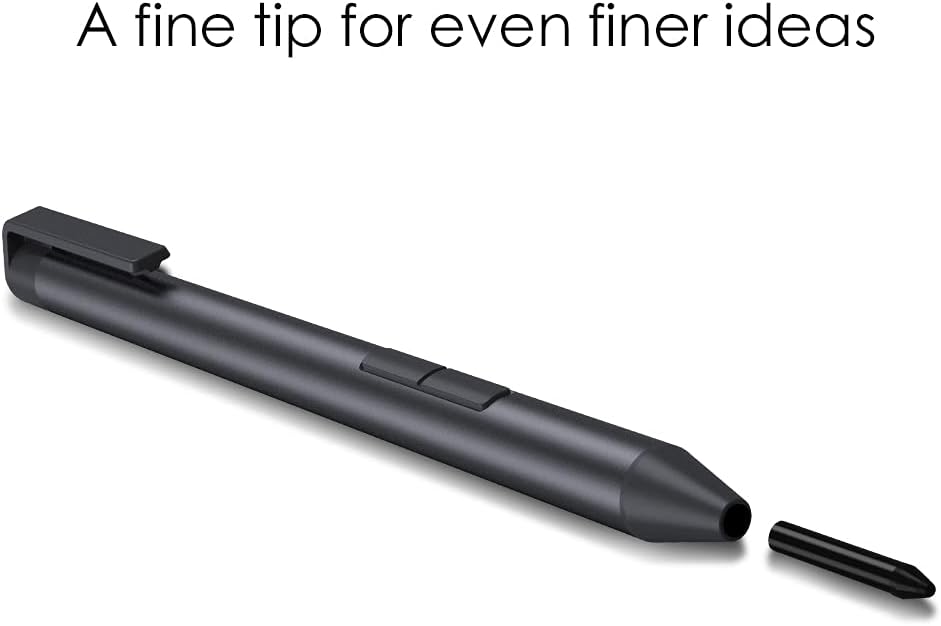
Imagine: Un prim-plan view of the CHUWI Hipen H7 Stylus tip, with a detached replacement tip shown next to it, emphasizing its fine tip design.
Curatenie
To clean the stylus, wipe it gently with a soft, dry, lint-free cloth. Do not use abrasive cleaners or immerse the stylus in water.
Depanare
Stylusul nu răspunde
- Check if the AAAA battery is correctly installed and has sufficient charge. Replace the battery if necessary.
- Ensure your device is compatible with the MPP protocol and the CHUWI Hipen H7 stylus. Refer to the compatibility list in the "Setup" section.
- Reporniți dispozitivul.
- If the issue persists, try resetting the stylus by removing and reinserting the battery.
Intrare inexactă sau întârziată
- Ensure the stylus tip is clean and free of debris.
- Check if the stylus tip is worn and needs replacement.
- Verify that your device's display is clean.
- Close any unnecessary applications on your device that might be consuming system resources.
Eraser Function Not Working
- Confirm that your device has an Intel processor, as the eraser function is specifically designed for Intel devices.
- Ensure the application you are using supports the eraser function.
Specificații
| Caracteristică | Detaliu |
|---|---|
| Model | CHUWI H7 Stylus Pen |
| Sensibilitate la presiune | 4096 niveluri |
| Dimensiunea sfaturilor | 1.0mm (fine tip) |
| Tip baterie | AAAA (1 included) |
| Durata de viață a bateriei | Până la 1000 ore |
| Material | Metal |
| Greutatea articolului | 1.76 uncii (aprox. 50 g) |
| Dimensiuni pachet | 6.38 x 2.09 x 0.75 inci |
| Protocol | MPP 2.0 |
Garanție și suport
CHUWI provides professional support for its products to ensure customer satisfaction.
Perioada de service
For CHUWI tablets, laptops, and Mini PCs, the standard service period is 1 year from the date of purchase.
Asistență pentru clienți
CHUWI offers lifetime factory professional support and 24 hours of online support to help resolve any issues as soon as possible.
For further assistance or inquiries, please visit the official CHUWI website-ul sau contactați serviciul pentru clienți.
CHUWI Official Website: https://www.chuwi.com


