1. Introducere
This manual provides detailed instructions for the safe and effective operation of your POCOCO DJ Disco Stage Party Light. This versatile lighting unit features a combination of laser and LED effects, sound activation, and multiple operating modes, suitable for various indoor and outdoor entertainment settings. It is powered by a built-in rechargeable battery or via USB.

Figure 1.1: POCOCO Disco Light highlighting its battery and USB power capabilities, along with key features such as 60 patterns, remote control, sound control, built-in battery, USB charging, and timer function.
2. Informații de siguranță
Vă rugăm să citiți cu atenție toate avertismentele și instrucțiunile de siguranță înainte de a utiliza acest produs. Nerespectarea acestor instrucțiuni poate duce la electrocutare, incendiu sau vătămări corporale grave.
- This product contains a laser. DO NOT LOOK DIRECTLY INTO THE LASER APERTURE. Direct exposure to the laser beam may cause eye damage.
- Păstrați dispozitivul departe de apă, umiditate și umiditate ridicată.
- Nu utilizați dispozitivul dacă a fost deteriorat sau a fost scăpat.
- Asigurați o ventilație corespunzătoare. Nu blocați orificiile de ventilație.
- Use only the provided USB cable and a compatible 5V power adapter for charging.
- A nu se lăsa la îndemâna copiilor. Aceasta nu este o jucărie.
- Nu încercați să dezasamblați sau să modificați dispozitivul. Apelați la personal calificat pentru orice intervenție de service.
- Evitați expunerea dispozitivului la temperaturi extreme sau la lumina directă a soarelui pentru perioade prelungite.
3. Conținutul pachetului
Verificați dacă toate articolele enumerate mai jos sunt incluse în pachetul dumneavoastră:
- POCOCO DJ Disco Stage Party Light (DQ-R50)
- Telecomanda
- Cablu de încărcare USB
- Suport de fixare
- Șuruburi de montare (2)
- Manual de utilizare (acest document)

Figure 3.1: The POCOCO Disco Light unit and its accompanying remote control.
4. Produs terminatview
Familiarize yourself with the components of your POCOCO Disco Stage Party Light and its remote control.
4.1 Componentele dispozitivului

Figure 4.1: Labeled diagram of the POCOCO Disco Light, indicating the LED light, remote sensor, play mode indicator, red laser light, green laser light, cooling fan, sound active sensor, DC 5V power input, and power switch.
- Lumina LED: Projects various patterns and colors.
- Remote Sensor (IR): Primește semnale de la telecomandă.
- Play Mode Indicator: Afișează modul de funcționare curent.
- Red Laser Light: Projects red laser patterns.
- Green Laser Light: Projects green laser patterns.
- Ventilator de racire: Disipează căldura în timpul funcționării.
- Sound Active Sensor (MIC): Detects ambient sound for sound-activated mode.
- Power Input (DC 5V): Connects to the USB charging cable.
- Comutator de alimentare (ON/OFF): Pornește sau oprește dispozitivul.
4.2 Funcții de control de la distanță
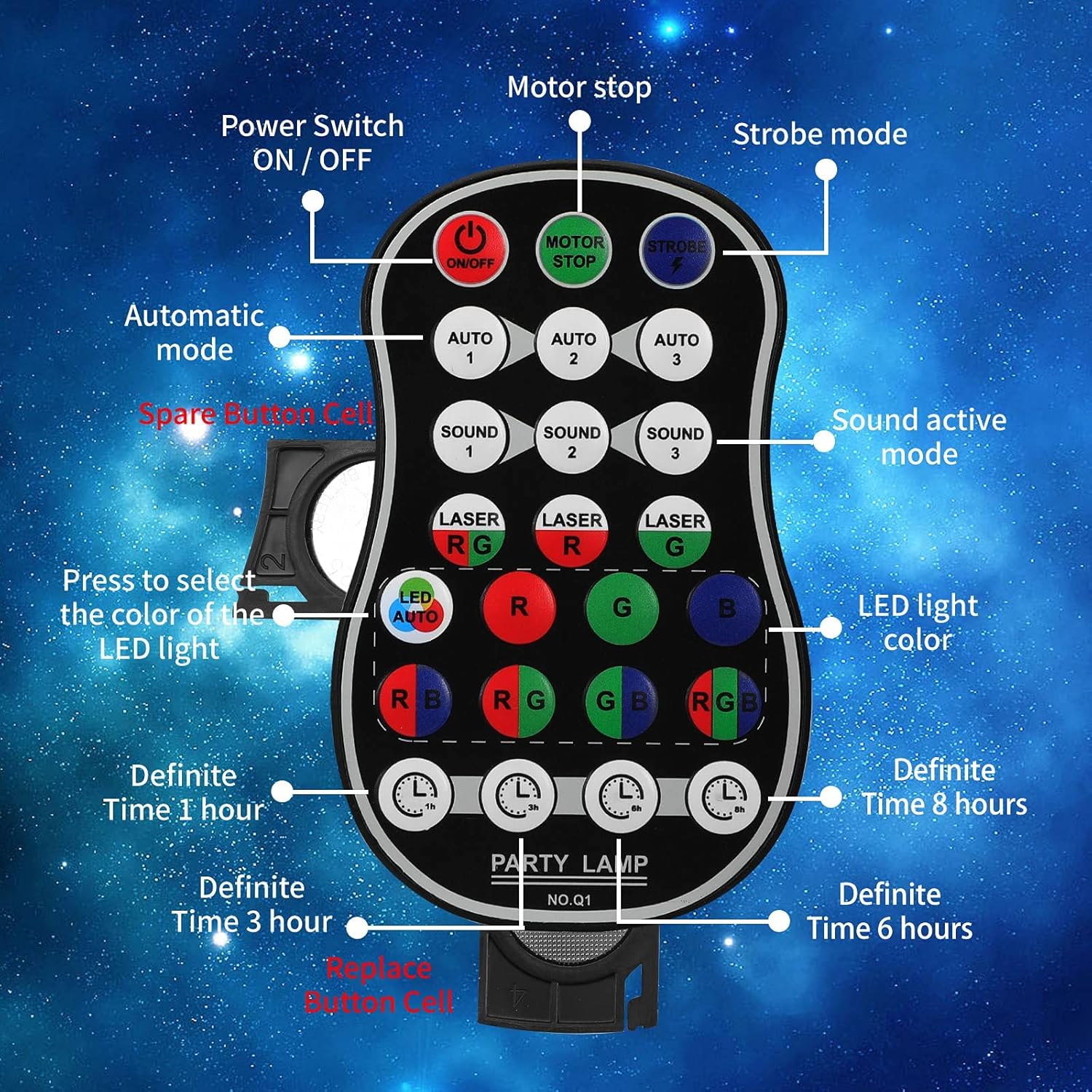
Figure 4.2: Labeled diagram of the remote control, showing buttons for Power ON/OFF, Motor Stop, Strobe Mode, Automatic Modes (Auto 1, 2, 3), Sound Active Modes (Sound 1, 2, 3), Laser Color Selection (RG, R, G), LED Light Color Selection (LED Auto, R, G, B, RB, RG, GB, RGB), and Definite Time settings (1h, 3h, 6h, 8h).
- ON/OFF: Întrerupător.
- MOTOR STOP: Stops the motor movement of patterns.
- STROBE: Activates strobe effect.
- AUTO 1/2/3: Selects different automatic light color and pattern change modes.
- SOUND 1/2/3: Activates sound-controlled modes with varying sensitivities.
- LASER RG/R/G: Selects laser color combinations (Red & Green, Red only, Green only).
- LED AUTO/R/G/B/RB/RG/GB/RGB: Selects LED light colors or automatic color cycling.
- 1h/3h/6h/8h: Sets a timer for automatic shutdown after the selected duration.
5. Configurare
5.1 Încărcarea dispozitivului
The device comes with a built-in 3000 mAh battery, providing up to 5 hours of operation on a full charge.
- Connect the small end of the provided USB charging cable to the DC 5V power input port on the back of the light.
- Connect the standard USB end of the cable to a USB power adapter (not included), a computer USB port, or a power bank.
- Indicatorul luminos de încărcare se va aprinde în timpul încărcării și se va stinge când bateria este complet încărcată.
5.2 Opțiuni de montare
The POCOCO Disco Light is designed for flexible placement, including on a table, on the ground, or mounted on a ceiling or wall.
- Table/Ground Placement: Simply place the unit on a flat, stable surface. Adjust the angle of the light using the integrated bracket.
- Montare pe tavan/perete: Use the provided mounting bracket and screws. Secure the bracket to the desired surface, then attach the light unit to the bracket. The bracket allows for 180-degree manual rotation to adjust the projection angle.
6. Instrucțiuni de utilizare
After setup, use the remote control to operate the light.
- Pornire/Oprire: Apăsați tasta ON/OFF button on the remote control or use the physical switch on the device.
- Selectați modul de operare:
- Mod auto: Presa AUTO 1, AUTO 2, sau AUTO 3 for automatic color and pattern changes, creating a relaxed atmosphere.
- Modul stroboscopic: Apăsați tasta STROBE button for rapid flashing effects.
- Mod control sunet: Presa SUNETUL 1, SUNETUL 2, sau SUNETUL 3. The lights will change colors and patterns according to the rhythm of surrounding music or sounds.
- Adjust Laser Colors: Utilizați LASER RG, LASER R, sau LASER G buttons to select desired laser colors.
- Adjust LED Colors: Utilizați LED AUTO, R, G, B, RB, RG, GB, sau RGB buttons to select specific LED colors or automatic cycling.
- Stop Motor Movement: Apăsați tasta OPRIRE MOTOR button to pause the pattern movement while keeping the lights on.
- Setați temporizatorul: Presa 1h, 3h, 6h, sau 8h to set the light to automatically turn off after the specified time.
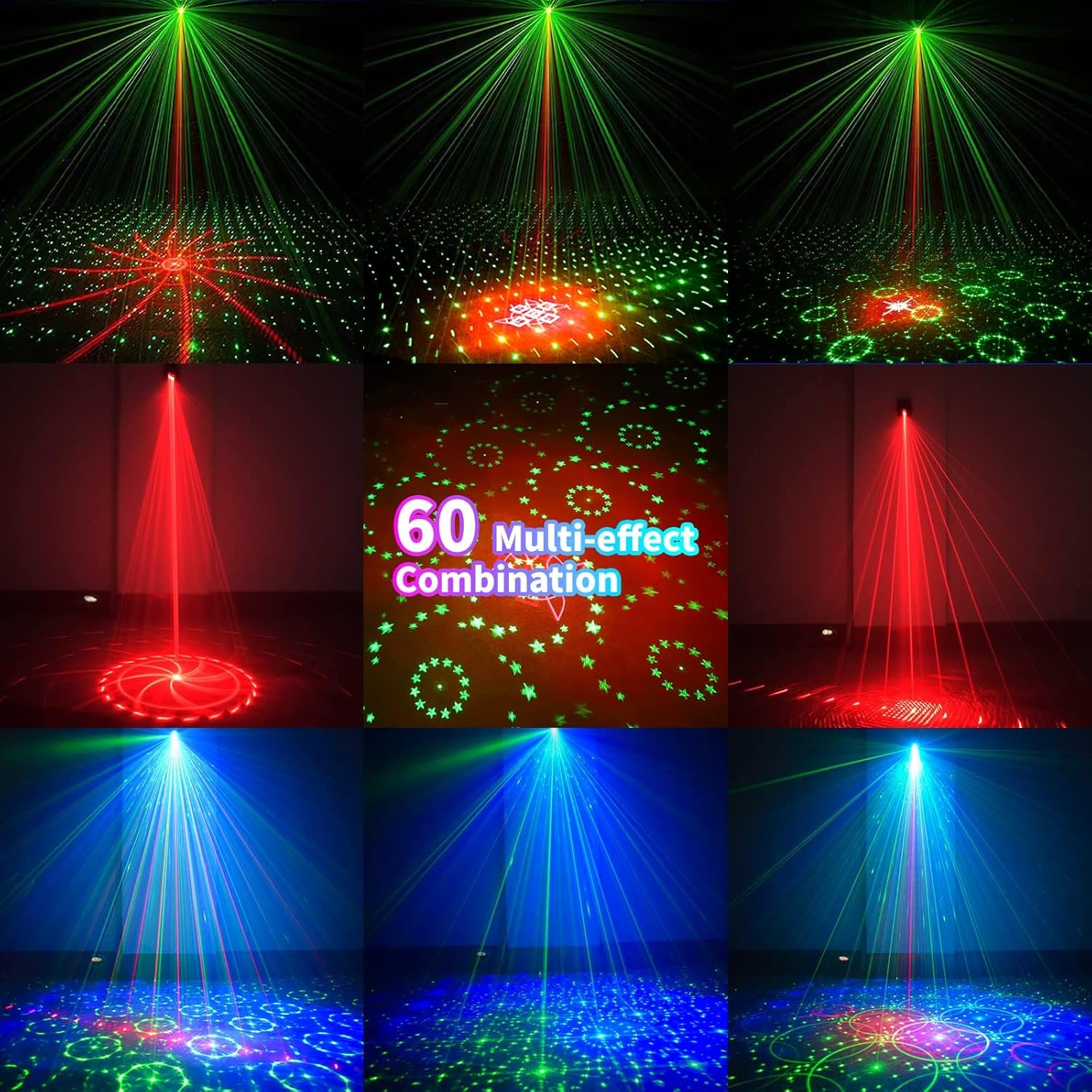
Figura 6.1: Examples of the 60 multi-effect combinations produced by the POCOCO Disco Light, showcasing various laser and LED patterns in different colors.
7. Întreținere
Întreținerea corespunzătoare asigură longevitatea și performanța optimă a dispozitivului dumneavoastră.
- curatenie: Use a soft, dry cloth to clean the exterior of the device. Do not use abrasive cleaners or solvents. Ensure the laser aperture and LED lens are free of dust and smudges for clear projection.
- Depozitare: Când nu este utilizat pentru perioade lungi de timp, depozitați dispozitivul într-un loc răcoros și uscat, ferit de lumina directă a soarelui și de temperaturi extreme.
- Îngrijirea bateriei: To maintain battery health, charge the device fully before long-term storage and recharge it every 3-6 months if not in regular use.
8. Depanare
If you encounter issues with your POCOCO Disco Light, refer to the following common problems and solutions:
| Problemă | Cauza posibila | Soluţie |
|---|---|---|
| Dispozitivul nu pornește. | Bateria este epuizată. Comutatorul de alimentare este oprit. Bateria telecomenzii este descărcată. | Încărcați dispozitivul folosind cablul USB. Ensure the physical power switch is in the ON position. Înlocuiți bateria în telecomandă. |
| No laser or LED projection. | Lens is obstructed. Modul selectat greșit. | Clean the lens and aperture. Ensure a projection mode (Auto, Sound, Strobe) is active. |
| Sound control not working. | Microfonul este obstrucționat. Ambient sound is too low. Mod de sunet selectat greșit. | Ensure the microphone opening is clear. Increase the volume of the music or sound source. Try different SOUND modes (SOUND 1, 2, 3). |
| Telecomanda nu răspunde. | Bateria telecomenzii este descărcată. Obstruction between remote and sensor. Remote is too far from the device. | Înlocuiți bateria telecomenzii. Ensure a clear line of sight to the IR sensor on the device. Apropiați-vă de dispozitiv. |
| Patterns are static (not moving). | MOTOR STOP button pressed. | Press the MOTOR STOP button again to resume movement. |
If the problem persists after trying these solutions, please contact POCOCO customer support.
9. Specificații
| Caracteristică | Caietul de sarcini |
|---|---|
| Numărul de model | DQ-R50 |
| Dimensiuni (L x l x H) | 2.91" x 2.79" x 2.83" (7.39 cm x 7.09 cm x 7.19 cm) |
| Greutatea articolului | 13.1 uncii (371 grame) |
| Sursa de alimentare | Battery Powered (Built-in Lithium Ion) / USB Powered |
| Capacitatea bateriei | 3000 mAh |
| Vol. De operaretage | 5 volți |
| Tip sursă de lumină | Light Emitting Diode (LED) / Laser |
| Material | Aliaj de aluminiu |
| Metoda de control | Remote Control / Sound Activated |
| Culoare | Negru |
| UPC | 704078007977 |
10. Garanție și asistență
For warranty information and customer support, please refer to the documentation provided at the time of purchase or contact the seller directly. You can also visit the official POCOCO store for more information:


