1. Introducere
The Verizon Wireless 4G & 5G LTE Network Extender is designed to significantly improve your cellular signal strength and LTE data speeds within your home or office environment. It connects to your existing high-speed internet connection to create a strong, reliable Verizon network signal, supporting up to 16 active devices simultaneously.
This device is particularly beneficial in areas with weak macro base station signals, helping to eliminate dropped calls and improve text message delivery. It features a large LCD screen for easy setup and operation, and offers flexible mounting options for desks, walls, or ceilings.
2. Ce se află în cutie
- Verizon Wireless 4G & 5G LTE Network Extender (ASK-SFE116)
- Adaptor de alimentare
- Cablu Ethernet
- GPS Antenna Module with adhesive backing
- Cable Management Hooks (3M stickers with hooks)
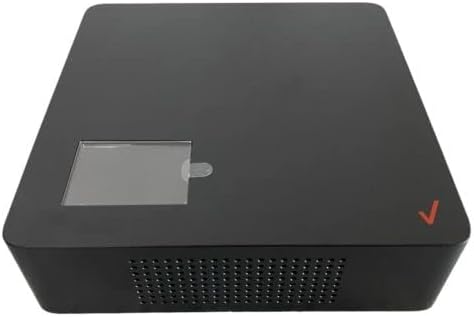
Figura 2.1: Față view of the Verizon Wireless 4G & 5G LTE Network Extender.
3. Instrucțiuni de configurare
Follow these steps to set up your Network Extender:
- Conectați cablul Ethernet: Locate the Ethernet port on the back of the Network Extender. Connect one end of the provided Ethernet cable to this port and the other end to an available LAN port on your internet router or modem.
- Conectați adaptorul de alimentare: Plug the power adapter into the power port on the back of the Network Extender. The device will automatically power on once connected to power, as there is no ON/OFF switch.
- Amplasarea antenei GPS: The GPS antenna is crucial for the device's operation. It is initially stored within a compartment on the bottom of the extender. To access it, remove the circular cover on the bottom. Unwind enough cable from the GPS antenna module to place it near a window with a clear view of the sky. This ensures optimal GPS signal reception, which is necessary for the extender to function correctly. Use the provided adhesive backing to secure the GPS antenna module to a wall or window frame.
- Conexiune inițială: Once powered on, the LCD screen on the front of the extender will display initialization messages, including "Connecting to Router" and "Searching for GPS signal." This process may take up to 10 minutes.

Figura 3.1: De jos view of the Network Extender with the cover on, showing the Ethernet and power ports.

Figura 3.2: De jos view of the Network Extender with the cover removed, revealing the GPS antenna module.
4. Instrucțiuni de utilizare
Once the setup is complete and the device displays "Service Active," your Network Extender is ready for use. The LCD screen provides vital information about its status.
- Display LCD: The front LCD screen will cycle through various status updates, including the number of connected satellites and the number of connected devices.
- Checking Connection: To confirm your phone is connected to the Network Extender, dial #48 from your Verizon phone. An automated message will confirm if you are under 4G LTE Network Extender coverage.
- Conexiune automată: In most cases, your phone will automatically connect to the LTE Network Extender after a few minutes of it being active. If your phone does not connect automatically, try power cycling your phone (turning it off and then back on).
5. Depanare
If you encounter issues with your Network Extender, refer to the following common problems and solutions:
- "Server Error 5A": This error typically indicates an issue with the GPS signal. Ensure the GPS antenna module is unwound from its compartment and placed near a window with a clear view of the sky. A strong GPS signal is essential for the extender to register and operate correctly.
- Fără îmbunătățire a semnalului: If your phone's signal bars do not improve after the extender is active, try power cycling your phone. Allow a few minutes for your phone to re-establish connection with the extender.
- Fără conexiune internet: Verify that your internet router/modem is functioning correctly and has an active internet connection. Ensure the Ethernet cable is securely connected to both the extender and your router.
6. Specificații
| Dimensiunile produsului | 6 x 6 x 4 inci |
| Greutatea articolului | 2.77 lire sterline |
| ASIN | B09L79CWZ2 |
| Data primului disponibil | 7 noiembrie 2021 |
| Producător | Verizon |
| Țara de origine | Samoa Americană |
| Comunicare wireless standard | 802.11ac |
| Rata de transfer de date | 10 de megabiți pe secundă |
| Caracteristica specială | Management de la distanţă |
| Tip conector | RJ45 |
7. Garanție și asistență
This Certified Refurbished product is tested and certified to look and work like new. The refurbishing process includes functionality testing, basic cleaning, inspection, and repackaging. The product ships with all relevant accessories and may arrive in a generic box.
Protection plans are available for purchase to extend coverage beyond the standard refurbished warranty:
- Plan de protecție pe 3 ani: 36.99 USD
- Plan de protecție pe 4 ani: 47.99 USD
- Protecție completă: 16.99 USD/lună (acoperă toate achizițiile trecute și viitoare eligibile)
For technical support, please contact Tech Proz, the third-party seller. For details on protection plans, refer to the respective product pages.


