PPLEE Extra Loud Vibrating Alarm Clock with Bed Shaker
Model: CR1018I
1. Produs terminatview
The PPLEE Extra Loud Vibrating Alarm Clock is designed to provide effective wake-up solutions for deep sleepers, individuals with hearing impairment, and the deaf. It features multiple wake-up modes, a large digital display, dual alarm settings, and convenient charging capabilities.

Image 1.1: The PPLEE Extra Loud Vibrating Alarm Clock with its bed shaker accessory.
Caracteristici cheie:
- Strong Bed Shaker & Loud Alarm Buzzer: Offers three wake-up modes: loud buzzer, strong bed shaker, or a combination of both.
- 8.7" Large Mirror LED Display: Provides clear time visibility and can also function as a makeup mirror.
- Dual Alarms with Snooze Function: Allows setting two independent alarms with a 9-minute snooze option.
- Adjustable Brightness & Volume: Features 8 levels of display brightness and 7 levels of alarm volume.
- Port de încărcare USB: Conveniently charge your mobile devices directly from the clock.
- Baterie de rezerva: Menține setările de oră și alarmă în timpul întreruperii alimentăriitages (CR2032 battery included).
- 12/24H Mode & DST Function: Supports both 12-hour and 24-hour time formats, along with Daylight Saving Time adjustment.
2. Conținutul pachetului
Vă rugăm să bifați căsuța pentru următoarele elemente:
- 1 x PPLEE Mirror Alarm Clock
- 1 x Bed Shaker
- 1 x Power Plug with USB Cable
- 1 x manual de instrucțiuni
- 1 x CR2032 Cell Coin Battery (pre-installed or separate)

Imaginea 2.1: Toate componentele incluse în pachetul produsului.
3. Ghid de instalare
3.1 Conexiune la alimentare
- Connect the USB cable to the alarm clock's power input port.
- Plug the power adapter into a standard electrical outlet. The clock display will illuminate.
- Ensure the CR2032 backup battery is installed in its compartment. This battery preserves time and alarm settings during power interruptions.

Imaginea 3.1: Spate view of the alarm clock showing the AC power input and backup battery compartment.
3.2 Amplasarea agitatorului de pat
The bed shaker provides a strong vibration to assist in waking. For optimal effectiveness, place the bed shaker in one of the following locations:
- Under your pillow.
- Under your fitted sheet.
- Between your mattress and box spring.

Image 3.2: Recommended placements for the bed shaker to maximize vibration effectiveness.
4. Instrucțiuni de utilizare
4.1 Setarea orei
- Țineți apăsat butonul SETAREA OREI apăsați butonul până când cifrele orei încep să clipească.
- Utilizați ORĂ şi MINUT butoane pentru a regla ora.
- Presa SETAREA OREI din nou pentru a confirma și a ieși din modul de setare a orei.
4.2 Setarea alarmelor (Alarma 1 și Alarma 2)
Ceasul suportă două alarme independente.
- Țineți apăsat butonul ALARMA 1 or ALARMA 2 apăsați butonul până când cifrele orei alarmei clipesc.
- Utilizați ORĂ şi MINUT butoane pentru a seta ora dorită a alarmei.
- Presa ALARMA 1 or ALARMA 2 din nou pentru a confirma ora alarmei.
- Pentru a activa sau dezactiva o alarmă, apăsați scurt butonul corespunzător ALARMA 1 or ALARMA 2 O pictogramă de alarmă va apărea/dispăre pe afișaj.

Image 4.1: The dual alarm feature allows setting two separate wake-up times.
4.3 Funcția Snooze
Când sună o alarmă, apăsați butonul PUI DE SOMN pentru a dezactiva temporar alarma timp de 9 minute. Alarma va suna din nou după perioada de amânare.
4.4 Turning Off Alarms
- Temporary Turn Off: Apăsați tasta ALARMĂ OPRITĂ button once when the alarm is sounding to stop it for the current day. It will reactivate the next day.
- Permanent Turn Off: Țineți apăsat butonul ALARMĂ OPRITĂ button to deactivate the alarm permanently. The alarm icon will disappear from the display.
4.5 Reglarea luminozității afișajului
The display has 8 levels of brightness. Short press the DIMMER button repeatedly to cycle through the brightness levels (OFF, Level 1-7). When in 'OFF' mode, the red indicator on top will remain on.
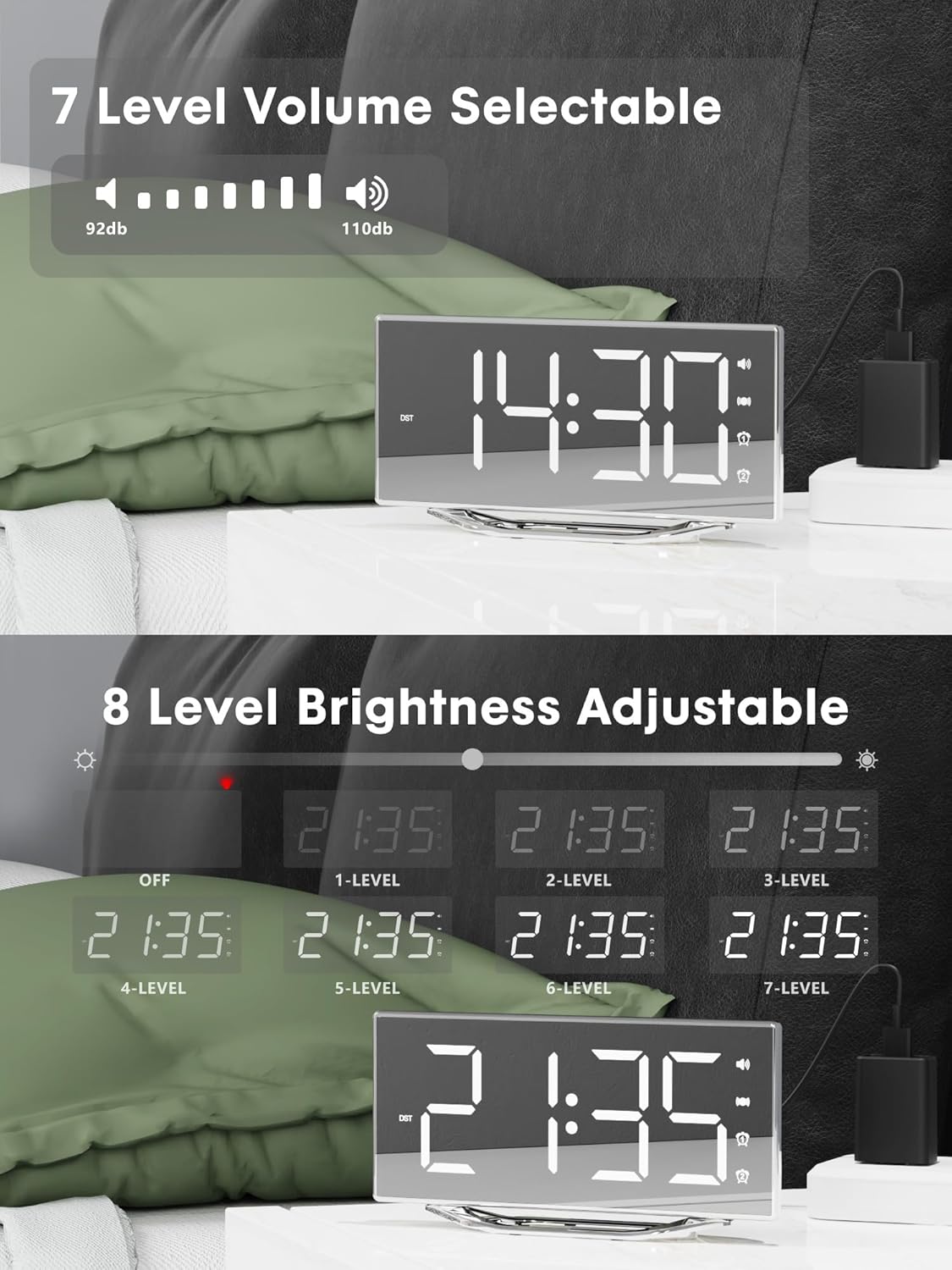
Image 4.2: Visual representation of the 8-level brightness adjustment for the LED display.
4.6 Adjusting Alarm Volume
The alarm buzzer has 7 adjustable volume levels. Short press the VOLUM button repeatedly to cycle through the volume levels.

Image 4.3: The alarm volume can be adjusted across 7 levels, from 92dB to 110dB.
4.7 Selecting Wake-Up Mode
Apăsați tasta BÂZÂIT/VIB button to select your preferred wake-up method:
- Loud Buzzer only
- Strong Bed Shaker only
- Both Buzzer and Shaker

Image 4.4: The alarm clock offers three distinct wake-up modes for personalized use.
4.8 Format 12/24 de ore și DST
- Format 12/24 de ore: Apăsați scurt pe 12/24H button to switch between 12-hour and 24-hour time display.
- Funcția DST: Apăsați scurt pe DST button to activate or deactivate Daylight Saving Time.

Image 4.5: The clock supports both 12-hour and 24-hour time formats, and features a USB charging port.
4.9 port de încărcare USB
The integrated USB charging port allows you to charge your smartphone or other USB-powered devices directly from the alarm clock. Simply connect your device's USB charging cable to the port on the clock.
5. Întreținere
- Clean the clock surface with a soft, dry cloth. Avoid using abrasive cleaners or solvents.
- Keep the clock away from water and high humidity.
- Nu expuneți ceasul la lumina directă a soarelui sau la temperaturi extreme.
- If the clock will not be used for an extended period, consider removing the backup battery to prevent leakage.
6. Depanare
| Problemă | Cauza posibila | Soluţie |
|---|---|---|
| Afișajul ceasului este oprit. | Fără alimentare; cablu de alimentare slăbit. | Ensure the power adapter is securely plugged into the clock and a working outlet. Check if the dimmer is set to 'OFF'. |
| Alarma nu sună/nu vibrează. | Alarm not activated; volume too low; bed shaker not connected or placed incorrectly. | Verify alarm is activated (icon visible). Increase alarm volume. Ensure bed shaker is securely plugged in and properly placed. |
| Resetarea orei/setărilor după întreruperea alimentăriitage. | Bateria de rezervă este descărcată sau nu este instalată. | Replace the CR2032 backup battery. Ensure it is installed correctly. |
| Încărcarea prin USB nu funcționează. | Device not compatible; cable faulty; clock not powered. | Ensure the clock is powered. Try a different USB cable. Verify your device is compatible with standard USB charging. |
7. Specificații
| Caracteristică | Detaliu |
|---|---|
| Marca | PPLEE |
| Numărul de model | CR1018I |
| Culoare | Silver Surface (with Bed Shaker) |
| Tip de afișare | LED digital |
| Dimensiunile produsului | 8.7"W x 8.7"H (Display size) |
| Sursa de alimentare | Electric cu fir |
| Baterie de rezervă | 1 x CR2032 (inclus) |
| Material | Plastic |
| Greutatea articolului | 7 uncii (0.2 kilograme) |
| Moduri de alarmă | Buzzer, Vibration, Buzzer + Vibration |
| Luminozitatea afișajului | 8 Levels (including OFF) |
| Volumul alarmei | 7 niveluri |
| Format de timp | Selectabil 12H/24H |
| Caracteristici speciale | Dual Alarms, Snooze, USB Charging Port, DST Function, Mirror Surface |
8. Garanție și asistență
PPLEE is committed to providing high-quality products and customer satisfaction.
- 1 an garanție: Produsul beneficiază de o garanție de 1 an de la data achiziției împotriva defectelor de fabricație.
- Garanție de rambursare a banilor în 90 de zile: If you are unsatisfied with the product, you may be eligible for a full refund within 90 days of purchase.
- Lifetime Free Support: PPLEE offers free lifetime user support for any questions or concerns regarding the product.
- 24-Hour Response Service: For any inquiries, please contact us via Amazon. We aim to respond within 24 hours.

Image 8.1: Summary of warranty and support offerings.


