1. Introducere
Mulțumesc pentru achizițieasing the eKids Cocomelon Karaoke Machine, Model CO-550. This portable Bluetooth party speaker is designed to provide hours of musical fun for children, featuring built-in Cocomelon songs, a real working microphone, and versatile connectivity options. This manual provides essential information for safe and optimal use of your new karaoke machine.
2. Produs terminatview
2.1 Caracteristici cheie
- Conectivitate Bluetooth: Wirelessly stream audio from any compatible Bluetooth device.
- Melodii încorporate: Includes 24 popular Cocomelon songs for immediate entertainment.
- USB Audio Player: Connect a USB drive to play your own MP3 music files.
- Real Working Microphone: Sing along with the included wired microphone.
- Design prietenos cu copiii: Lightweight and portable with a built-in handle.
- Baterie reîncărcabilă: Enjoy portable use with the integrated rechargeable battery (USB charging cable included).
- Jack pentru căști: Pentru ascultare privată.
2.2 Componente
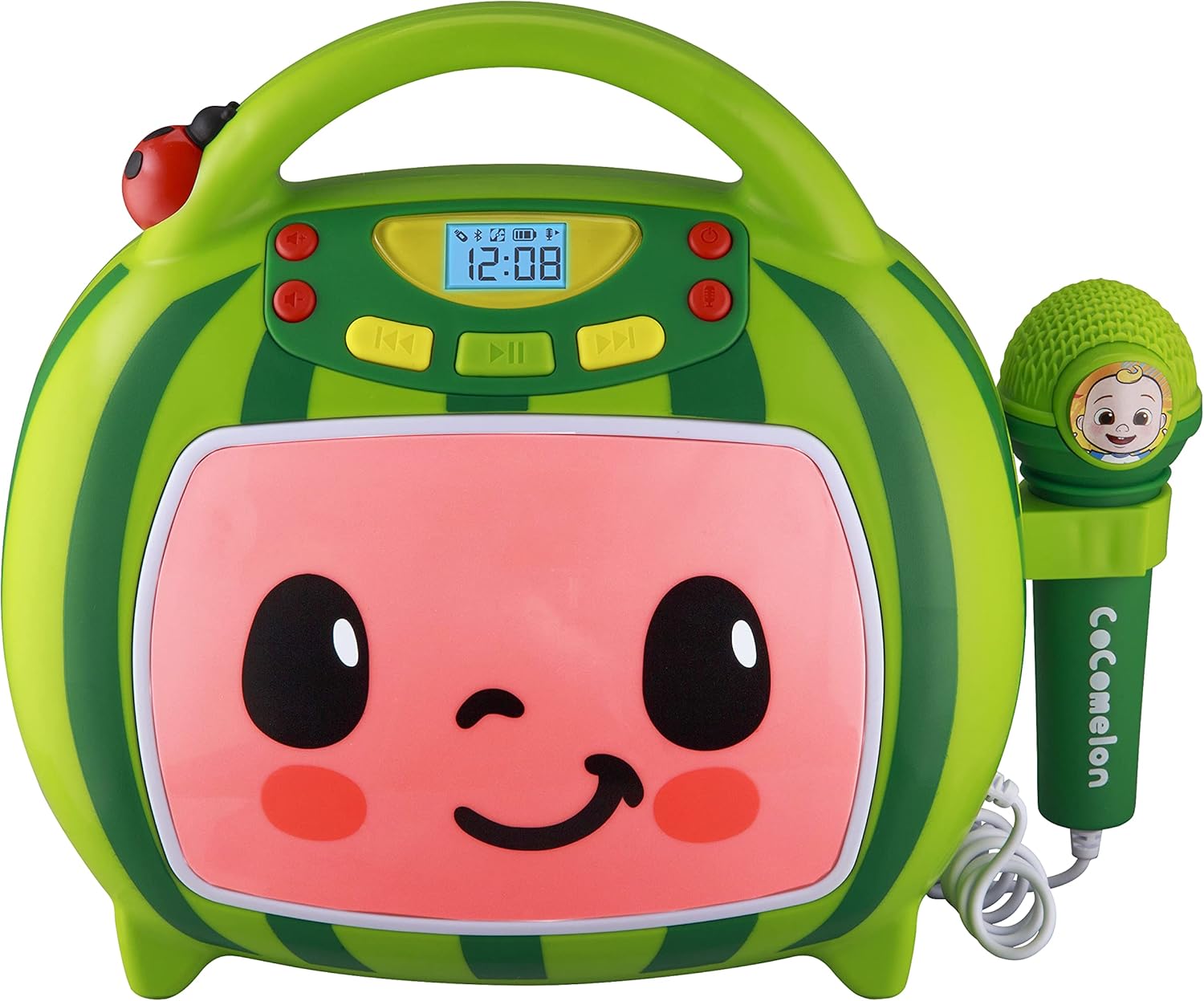
Faţă view of the eKids Cocomelon Karaoke Machine, featuring the watermelon-themed design and integrated microphone.

An annotated diagram detailing the dimensions, control buttons (volume, play/pause, power), microphone jack, USB port, and battery compartment of the karaoke machine.
Pachetul include:
- eKids Cocomelon Karaoke Machine
- Microfon cu fir
- Cablu de încărcare USB
3. Configurare
3.1 Instalarea bateriei
The karaoke machine requires 1 Lithium Ion battery. Ensure the battery is correctly installed according to the polarity markings in the battery compartment, located on the back of the unit.
3.2 Pornirea inițială
- Locate the Power ON/OFF button on the unit.
- Press and hold the Power ON/OFF button to turn on the device. The display will illuminate.
4. Instrucțiuni de utilizare
4.1 Asociere Bluetooth
- Porniți aparatul de karaoke. Acesta va intra automat în modul de conectare Bluetooth.
- On your compatible device (e.g., smartphone, tablet), enable Bluetooth and search for available devices.
- Select 'eKids Cocomelon' from the list of devices to pair.
- Once paired, you can stream audio wirelessly from your device to the karaoke machine.

The karaoke machine is shown with icons indicating its compatibility with various Bluetooth-enabled devices such as PCs, smartwatches, tablets, and mobile phones.
This video demonstrates the Bluetooth pairing process for the eKids Cocomelon Karaoke Machine, showing how to connect a mobile device to stream music wirelessly.
4.2 USB Audio Playback
- Insert a USB drive containing MP3 music files into the USB port located on the back of the unit.
- The machine will automatically detect the USB drive and begin playing music.
- Use the playback controls (Play/Pause, Forward, Reverse) to navigate your music.
4.3 melodii încorporate
The karaoke machine comes pre-loaded with 24 Cocomelon songs. To play these songs, ensure no Bluetooth device is connected and no USB drive is inserted. Use the playback controls to select and play the desired song.

A visual representation of the 24 pre-loaded Cocomelon songs, including popular titles like 'Hello Song' and 'Wheels on the Bus'.
4.4 Utilizarea microfonului
- Plug the wired microphone into the microphone jack on the side of the unit.
- Adjust the microphone volume using the dedicated controls.
- Sing along to your favorite tunes!

A young child engaging with the eKids Cocomelon Karaoke Machine, holding the microphone and singing along.
Un pesteview prezentare videoasing the eKids Cocomelon Karaoke Machine in action, highlighting its portability, microphone, and various functions for children's entertainment.
4.5 Controale
- Pornire/Oprire: Pornește sau oprește unitatea.
- Volume UP/DOWN: Reglează volumul general al sunetului.
- Redare/Pauză: Pornește sau întrerupe redarea.
- Inainte invers: Skips to the next or previous track.
- Microfon pornit/oprit: Activates or deactivates the microphone.
5. Întreținere
- curatenie: Wipe the unit with a soft, dry cloth. Do not use abrasive cleaners or immerse in water.
- Depozitare: Store the karaoke machine in a cool, dry place away from direct sunlight when not in use.
- Îngrijirea bateriei: If the unit will not be used for an extended period, remove the battery to prevent leakage.
6. Depanare
| Problemă | Soluţie |
|---|---|
| Unitatea nu pornește. | Verificați instalarea bateriei și asigurați-vă că bateria este încărcată. |
| Niciun sunet din difuzor. | Increase volume. Ensure Bluetooth device is connected and playing, or USB is inserted correctly. |
| Bluetooth nu se conectează. | Ensure the unit is in pairing mode. Turn off and on Bluetooth on your device. Move closer to the unit. |
| Microfonul nu funcționează. | Ensure the microphone is securely plugged in and the microphone ON/OFF switch is activated. |
7. Specificații
| Caracteristică | Detaliu |
|---|---|
| Numărul de model | CO-550 |
| Greutatea articolului | 2.12 lire sterline |
| Dimensiunile produsului | 12 x 4 x 1 inci |
| baterii | Este necesară 1 baterie litiu-ion |
| Conectivitate | Bluetooth, USB |
| Număr de vorbitori | 1 |
| Componente incluse | Cablu USB |
8. Garanție și asistență
For warranty information or technical support, please refer to the contact details provided on the product packaging or visit the official eKids webPăstrați bonul fiscal ca dovadă a achiziției.
9. Informații de siguranță
- This product is intended for children aged 18 months and up.
- Se recomandă supravegherea unui adult în timpul utilizării.
- Nu expuneți unitatea la apă sau umiditate excesivă.
- Nu încercați să dezasamblați sau să modificați unitatea.
- Keep the USB cable and microphone cord away from young children to prevent choking hazards.
- Aruncați bateriile în mod responsabil, conform reglementărilor locale.


