1. Introducere
Mulțumesc pentru achizițieasing the Kimwood Bluetooth Headset. This manual provides detailed instructions on how to set up, operate, and maintain your headset. Please read this manual carefully before use to ensure optimal performance and longevity of your device.

Figure 1.1: Kimwood Bluetooth Headset with its charging case.
2. Informații de siguranță
- Nu expuneți setul cu cască la temperaturi extreme, umiditate sau substanțe corozive.
- Evitați să scăpați căștile sau să le supuneți la impacturi puternice.
- Do not disassemble or modify the headset. This will void the warranty and may cause damage.
- Nu lăsați setul cu cască la îndemâna copiilor și a animalelor de companie.
- Folosiți doar cablul de încărcare furnizat și un adaptor de alimentare compatibil.
3. Conținutul pachetului
Vă rugăm să verificați pachetul pentru următoarele articole:
- Kimwood Bluetooth Headset
- Carcasă de încărcare
- Cablu de încărcare USB de tip C
- Manual de utilizare

Figura 3.1: Elemente incluse în pachet.
4. Produs terminatview
Familiarize yourself with the components of your Kimwood Bluetooth Headset:
| Nu. | Componentă | Funcţie |
|---|---|---|
| 1 | Buton de alimentare/multifuncțional | Power On/Off, Play/Pause, Answer/End Call, Voice Assistant |
| 2 | Creșterea volumului / următorul track | Increase volume, skip to next track (long press) |
| 3 | Reducere volum / piesa anterioară | Decrease volume, go to previous track (long press) |
| 4 | Microfon | Picks up your voice for calls |
| 5 | Port de încărcare (Tip-C) | Connects to charging cable |
| 6 | Indicator LED | Shows power, pairing, and charging status |
5. Configurare
5.1 Încărcarea căștilor și a carcasei
Before first use, fully charge the headset and its charging case.
- Connect the USB Type-C cable to the charging port on the case.
- Conectați celălalt capăt al cablului la o sursă de alimentare USB (de exemplu, computer, adaptor de perete).
- Afișajul digital de pe carcasa de încărcare va afișa procentul baterieitage. When fully charged, it will display "100".
- Place the headset into the charging case. The headset will automatically begin charging.
The charging case has a 500mAh battery, and the earphone has a 100mAh battery. A full charge takes approximately 1.5 hours.

Figure 5.1: Charging the headset and case.
5.2 Împerecherea cu un dispozitiv Bluetooth
The headset supports Bluetooth 5.1 for stable and automatic connections.
- Take the headset out of the charging case. It will automatically power on and enter pairing mode (LED indicator will flash blue).
- Pe dispozitivul dumneavoastră (smartphone, tabletă, PC), activați Bluetooth.
- Caută available Bluetooth devices and select "VYK-B26" from the list.
- Once connected, the LED indicator on the headset will stop flashing and remain solid blue. A voice prompt will confirm the connection.
After the initial pairing, the headset will automatically connect to the last paired device when taken out of the case.

Figure 5.2: Automatic pairing process.
5.3 Purtarea căștilor
The ear-hook design allows for comfortable wear on either the left or right ear. The microphone and ear hook can be rotated to fit your preference.
- Adjust the ear hook to fit securely around your ear.
- Rotate the microphone arm up to 180 degrees and the ear hook up to 360 degrees to find the optimal position for comfort and clear voice pickup.

Figure 5.3: Adjusting the headset for left or right ear use.
6. Instrucțiuni de utilizare
6.1 Pornire/Oprire
- Pornire: Take the headset out of the charging case, or long-press the Multi-function Button for 3 seconds.
- Oprire: Place the headset back into the charging case, or long-press the Multi-function Button for 5 seconds.
6.2 Funcții de apel
- Răspundeți/Terminați apelul: Apăsați scurt butonul multifuncțional.
- Respinge apelul: Apăsați lung butonul multifuncțional timp de 2 secunde.
- Dezactivați/activați sunetul microfonului: During a call, long press the Volume Up or Volume Down button for approximately 3 seconds.

Figure 6.1: Mute function and unidirectional microphone for clear calls.
6.3 Redarea muzicii
- Redare/Pauză: Apăsați scurt butonul multifuncțional.
- Următoarea piesă: Apăsați scurt butonul de creștere a volumului.
- Pista anterioară: Apăsați scurt butonul de reducere a volumului.
6.4 Controlul volumului
- Creșteți volumul: Apăsați scurt butonul de creștere a volumului.
- Reduceți volumul: Apăsați scurt butonul de reducere a volumului.
6.5 Asistent vocal
Activate your device's voice assistant (Siri, Google Assistant, etc.) directly from the headset.
- Activați Asistentul vocal: While the headset is connected and in standby mode, long press the Multi-function Button for 2 seconds.
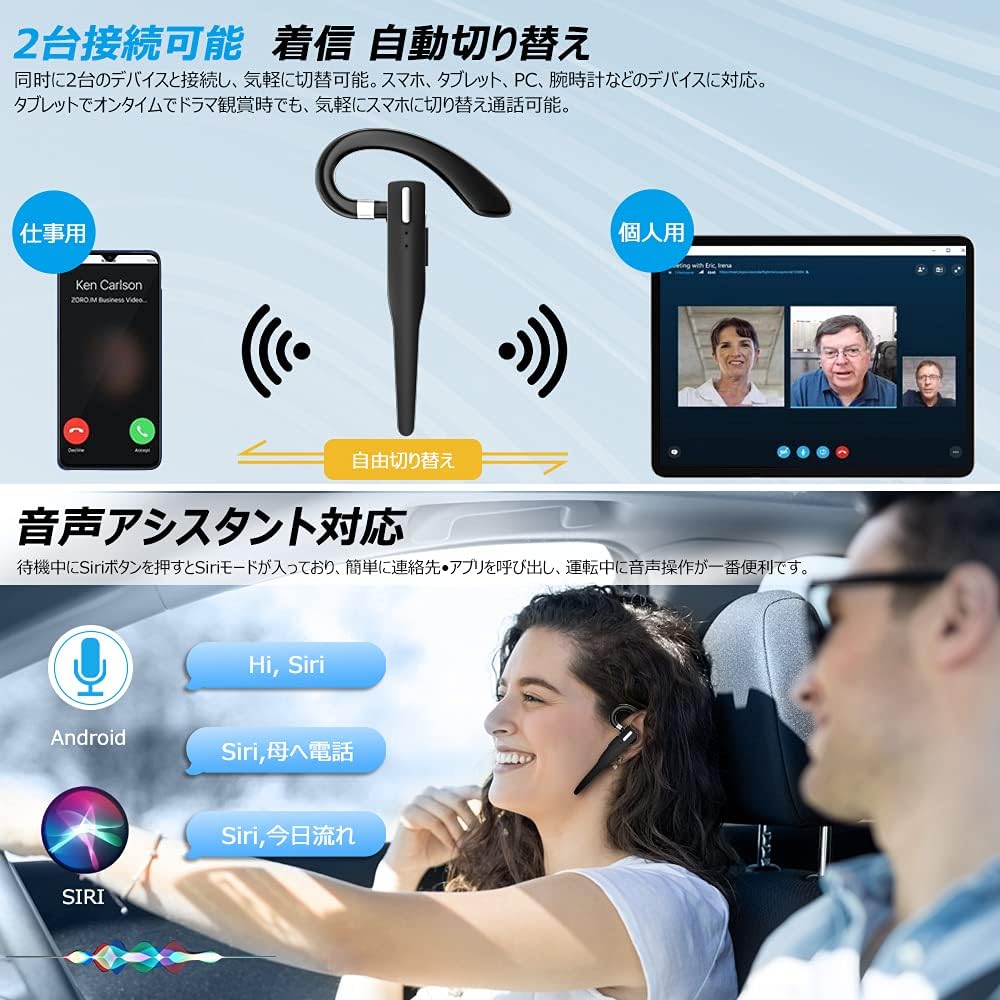
Figure 6.2: Multi-device connectivity and voice assistant features.
6.6 Conexiune multi-dispozitiv
The headset can connect to two Bluetooth devices simultaneously, allowing for seamless switching between them.
- Pair the headset with the first device as described in Section 5.2.
- Turn off Bluetooth on the first device. The headset will re-enter pairing mode.
- Asociați setul de căști cu al doilea dispozitiv.
- Turn on Bluetooth on the first device. The headset should now be connected to both devices.
- The headset will automatically switch audio output to the device that is actively playing media or receiving a call.
7. Întreținere
7.1 Curățare
- Wipe the headset and charging case with a soft, dry, lint-free cloth.
- Nu utilizați substanțe chimice dure, solvenți de curățare sau detergenți puternici.
7.2 Depozitare
- Când nu le utilizați, depozitați setul cu cască în carcasa de încărcare pentru a-l proteja de praf și deteriorări.
- Depozitați dispozitivul într-un loc răcoros și uscat, ferit de lumina directă a soarelui și de temperaturi extreme.

Figure 7.1: The compact charging case provides convenient storage.
8. Depanare
Dacă întâmpinați probleme cu setul cu cască, consultați următoarele probleme și soluții frecvente:
| Problemă | Cauza posibila | Soluţie |
|---|---|---|
| Căștile nu pornesc. | Baterie descărcată. | Charge the headset and charging case. |
| Nu se poate realiza asocierea cu dispozitivul. | Bluetooth este dezactivat pe dispozitiv; căștile nu sunt în modul de asociere; prea departe de dispozitiv. | Ensure Bluetooth is on; take headset out of case to enter pairing mode; keep within 10 meters. |
| Niciun sunet sau volum redus. | Volume too low; headset not connected; sound output set to another device. | Increase volume on headset and device; re-pair headset; check device's audio output settings. |
| Microfonul nu funcționează. | Microphone muted; incorrect audio input settings on device. | Unmute microphone (long press Volume Up/Down); check device's audio input settings. |
| Connection unstable or drops. | Interferență; prea departe de dispozitiv; baterie descărcată. | Move closer to device; avoid strong electromagnetic interference; charge headset. |
9. Specificații
| Caracteristică | Detaliu |
|---|---|
| Model | VYK-B26 |
| Versiune Bluetooth | 5.1 |
| Anularea zgomotului | CVC8.0 |
| Capacitatea bateriei căștilor | 100mAh |
| Capacitatea bateriei carcasei de încărcare | 500mAh |
| Timp de vorbire | Până la 12 ore |
| Timp de redare a muzicii | Până la 12 ore |
| Timp total de utilizare (cu carcasă) | Până la 72 ore |
| Timp de așteptare | Până la 400 ore |
| Timp de încărcare | Aproximativ. 1.5 ore |
| Port de încărcare | USB tip C |
| Evaluare rezistentă la apă | IPX7 (rezistent la transpirație) |
| Compatibilitate | iOS, Android, Windows (Bluetooth-enabled devices) |

Figure 9.1: Advanced Bluetooth 5.1 and CVC8.0 Noise Cancelling features.
10. Garanție și asistență
Kimwood products are designed for reliability and performance. For warranty information and technical support, please refer to the contact details provided on the product packaging or visit the official Kimwood website. Vă rugăm să păstrați dovada achiziției pentru reclamații în garanție.


