Introducere
This manual provides instructions for the installation and maintenance of the Fodsports Accessory Clamp Kits, designed for use with Fodsports FX6, FX6S, and FX-S Motorcycle Bluetooth Intercom Headsets. Please read this manual thoroughly before installation to ensure proper use and longevity of the product.
Produs terminatview
The Fodsports Accessory Clamp Kit offers versatile mounting solutions for your Fodsports intercom unit. It includes both a traditional clamp and an adhesive mount, along with necessary hardware, to securely attach your intercom to various helmet types.
Ce este în cutie
The Fodsports Accessory Clamp Kit includes the following components:
- Clamp Paranteză
- Adhesive Mount Base
- Șuruburi de montare
- Șurubelniță în formă de L
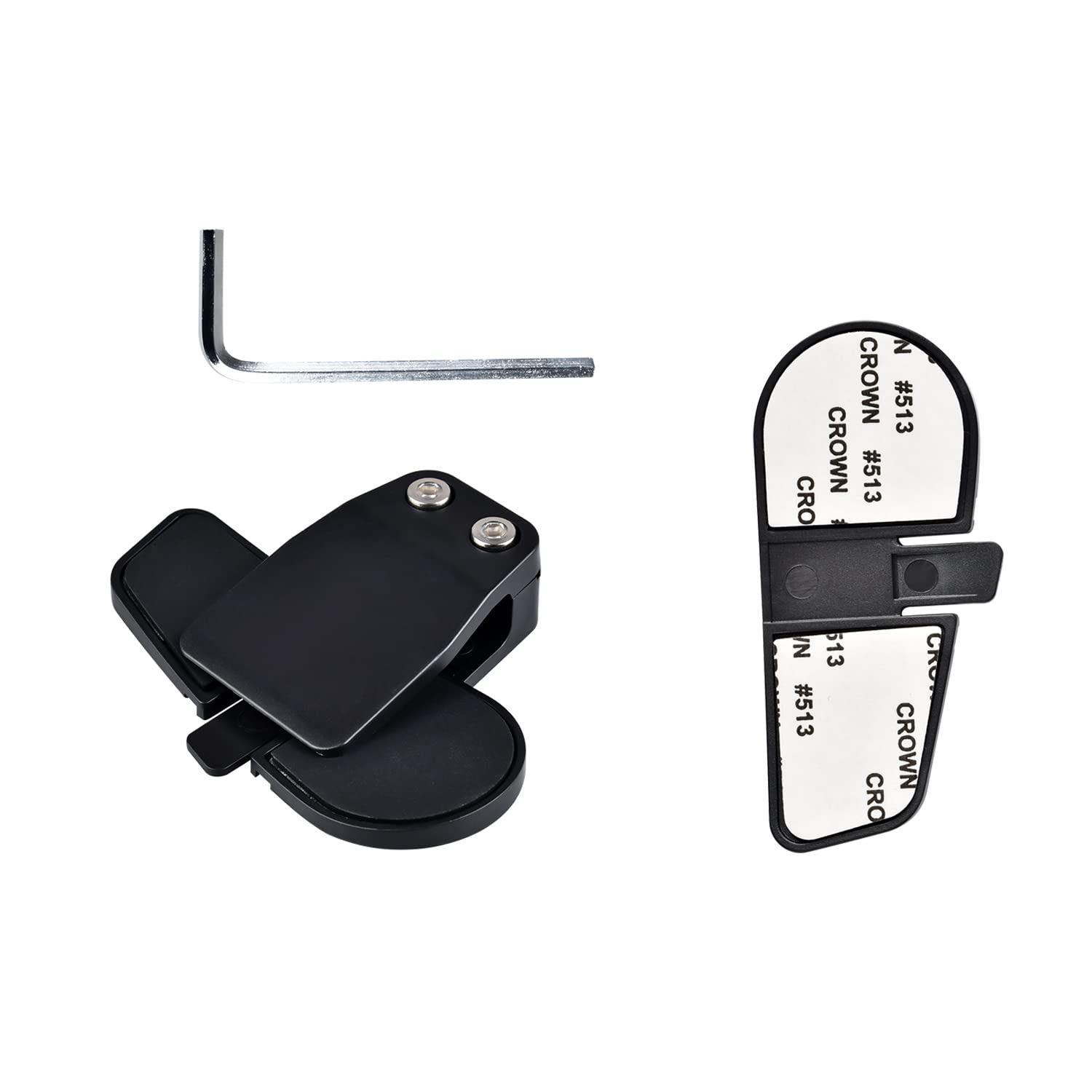
Image description: A complete view of the Fodsports Accessory Clamp Kit components, including the clamp bracket, adhesive mount base, screws, and an L-shaped screwdriver.
Configurare și instalare
Before installation, ensure your helmet surface is clean and dry.
Alegerea metodei de montare
The kit provides two primary methods for attaching your intercom unit to your helmet: the clamp bracket or the adhesive mount base.
Clamp Instalarea suportului
- Locate a suitable position on the left side of your helmet, typically between the outer and inner shells, where the clamp can securely grip.
- Slăbiți șuruburile de pe clamp bracket using the provided L-shaped screwdriver.
- Glisați clamp bracket onto the edge of your helmet, ensuring it is firmly seated.
- Strângeți șuruburile pentru a fixa clema.amp bracket in place. Do not overtighten.
- Slide your Fodsports intercom unit onto the installed clamp bracket until it clicks into place.

Descrierea imaginii: Un prim-plan view of the Fodsports clamp bracket, showing its design for gripping the helmet edge.
Adhesive Mount Base Installation
- Select a flat, clean area on the left side of your helmet for the adhesive mount. Ensure the surface is free from dirt, grease, or moisture.
- Peel off the protective backing from the adhesive mount base.
- Press the adhesive mount base firmly onto the chosen helmet surface for at least 30 seconds.
- Allow the adhesive to cure for at least 24 hours before attaching the intercom unit to ensure maximum bond strength.
- Slide your Fodsports intercom unit onto the installed adhesive mount base until it clicks into place.

Descrierea imaginii: Un prim-plan view of the Fodsports adhesive mount base, showing the adhesive backing.
Securing the Intercom Unit
Odată ce clamp or adhesive base is securely attached, slide your Fodsports FX6, FX6S, or FX-S intercom unit onto the mounting bracket. Ensure it is fully engaged and feels stable.

Image description: A Fodsports intercom unit securely mounted on the side of a motorcycle helmet using the clamp trusa.
Operating the Clamp Kit
Clamp kit itself does not have operational controls. Its function is to provide a stable and secure mounting point for your Fodsports Bluetooth intercom unit. Once the intercom is attached, refer to the specific user manual for your Fodsports FX6, FX6S, or FX-S intercom for operational instructions regarding its features (e.g., power, pairing, volume, communication).
Întreţinere
- Inspectați regulat clamp bracket or adhesive mount for any signs of wear, damage, or loosening.
- Ensure all screws on the clamp bracket remain tight. Re-tighten with the L-shaped screwdriver if necessary, but avoid overtightening.
- Curățați clamp kit components with a soft, damp cloth. Avoid using harsh chemicals or abrasive materials that could damage the plastic or adhesive.
- If using the adhesive mount, periodically check the bond strength. If the adhesive shows signs of weakening, consider replacing the mount or using the clamp paranteză.
Depanare
Intercom Unit Feels Loose on Mount
- Verificați Clamp Șuruburi: Dacă se utilizează clamp bracket, ensure the screws are sufficiently tightened.
- Verify Intercom Engagement: Make sure the intercom unit is fully slid onto the mounting bracket until it locks securely.
- Verificați pentru daune: Examine both the clamp kit and the intercom's mounting slot for any cracks or deformities that might prevent a secure fit.
Adhesive Mount Not Sticking
- Pregătirea suprafeței: Ensure the helmet surface was thoroughly cleaned and dried before application.
- Timp de întărire: Allow the adhesive to cure for the recommended 24 hours before attaching the intercom unit.
- Temperatură: Apply the adhesive in a moderate temperature environment (e.g., room temperature) for optimal bonding. Extreme cold or heat can affect adhesion.
- Tip suprafață: The adhesive works best on smooth, non-porous surfaces.
Clamp Bracket Does Not Fit Helmet Edge
- Compatibilitate cască: Some helmet designs may have edges that are too thick or shaped unusually for the standard clamp bracket. In such cases, the adhesive mount base is the recommended alternative.
Specificații
| Caracteristică | Detaliu |
|---|---|
| Numele modelului | Clamp Kits for FX6 FX6S FX-S |
| Marca | Sporturi furajere |
| Material | Plastic |
| Componente incluse | Clamp with Screw, Adhesive Mount |
| Dispozitive compatibile | Fodsports FX6, FX6S, FX-S Motorcycle Bluetooth Intercom Headsets |
| Greutatea articolului | 0.986 uncii (aprox. 0.03 kilograme) |
| Dimensiuni pachet | 6.77 x 5.04 x 0.67 inci |
Notă: Specificațiile pot fi modificate fără notificare prealabilă.
Garanție și suport
For warranty information or technical support regarding your Fodsports Accessory Clamp Kit, please refer to the documentation included with your original Fodsports intercom unit or visit the official Fodsports website. You may also contact Fodsports customer service directly for assistance.
Official Fodsports Store on Amazon: Fodsports Store


